Average score
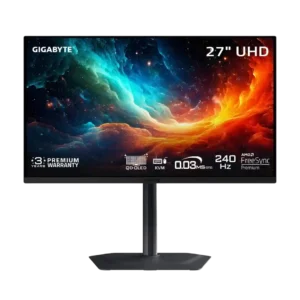
Gigabyte MO27U2 Gaming Monitor
4.1
local dimming performance
Gigabyte MO27U2 Gaming Monitor
5.0
Per-pixel lighting eliminates zone transitions and sharply limits blooming around bright objects. High-contrast scenes look cleaner than on zone-lit LCDs.
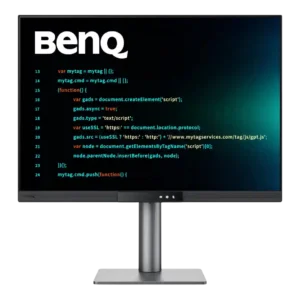
BenQ RD280UG
1.5
The static backlight cannot provide meaningful local dimming. Dark HDR scenes lose depth and highlights lack the separation available from OLED or advanced mini-LED displays.
competitive gaming suitability
Gigabyte MO27U2 Gaming Monitor
4.7
Extremely low latency, 240Hz refresh, clean motion, and tactical aspect-ratio modes make it excellent for competitive gaming. Only the most demanding esports players may want an even higher refresh rate.
BenQ RD280UG
2.6
The 120Hz panel is fine for casual gaming but too slow for serious competitive play. A 5ms response, residual blur, and unconventional aspect ratio put esports players at a disadvantage.
software support
Gigabyte MO27U2 Gaming Monitor
2.5
Software is a major weakness: Gigabyte Control Center can fail to detect or sync with the monitor, and advertised firmware features were unavailable in testing. One unit’s basic firmware behavior was otherwise stable.
BenQ RD280UG
4.5
Windows, macOS, and Linux support is unusually broad, and Linux brightness control worked immediately in testing. A few software and multi-input control quirks prevent a completely seamless experience.
backlight bleed control
Gigabyte MO27U2 Gaming Monitor
5.0
Because every OLED pixel controls its own light, conventional backlight bleed is effectively absent and dark scenes remain clean.
BenQ RD280UG
3.0
Backlight control is acceptable rather than exceptional. A visible glow can remain around dark imagery when the room is very dark.
HDR performance
Gigabyte MO27U2 Gaming Monitor
3.2
HDR is impressive in dark, high-contrast scenes but inconsistent overall. Bright-area highlights can clip, full-screen brightness is limited, and the boosted 1,000-nit mode is poorly calibrated.
BenQ RD280UG
1.3
HDR is consistently disappointing. Limited brightness, modest contrast, and a static backlight leave highlights weak and dark scenes washed out, making SDR the better choice.
response time
Gigabyte MO27U2 Gaming Monitor
4.8
Pixel response is essentially instantaneous, with no meaningful slowdown at lower refresh rates. Fast motion stays clean and responsive.
BenQ RD280UG
3.2
The 5ms response is acceptable for casual play but visibly slower than dedicated gaming displays. Fast motion can blur, so serious competitive players will notice the limitation.
eye comfort features
Gigabyte MO27U2 Gaming Monitor
3.3
Anti-flicker controls may help with VRR flicker, but availability appears firmware-dependent. A small minority may still notice eye strain from OLED refresh pulsing.
BenQ RD280UG
4.8
Eye comfort is a standout strength, combining low-blue-light modes, automatic brightness, Paper Color, reminders, and MoonHalo bias lighting. Long-session users repeatedly found the screen comfortable, especially in dim rooms.
reflection handling
Gigabyte MO27U2 Gaming Monitor
3.5
The glossy coating preserves clarity and manages mirror-like reflections reasonably well. QD-OLED blacks still lift noticeably when ambient light reaches the screen.
BenQ RD280UG
4.9
The Nano Matte coating handles windows, skylights, and room lighting extremely well. It adds only slight grain while keeping reflections from washing out the work area.
overall satisfaction
Gigabyte MO27U2 Gaming Monitor
3.5
The core 4K 240Hz QD-OLED experience is highly enjoyable, but overall enthusiasm varies. Strong picture and gaming performance are offset by software, HDR tuning, and price concerns.
BenQ RD280UG
4.8
Overall satisfaction is very high among work-focused reviewers, several of whom made it a primary display or considered buying another. Enthusiasm drops mainly when judged as a gaming, HDR, or value-first monitor.
reliability over time
Gigabyte MO27U2 Gaming Monitor
3.3
The newer multi-layer OLED design may improve durability, and burn-in warranty coverage helps. Long periods of static content still carry permanent burn-in risk.
BenQ RD280UG
4.5
One reviewer used the monitor heavily for more than four months and remained strongly satisfied. No durability failure was reported during that extended daily use.
productivity versatility
Gigabyte MO27U2 Gaming Monitor
3.8
High pixel density, clear text, low reflections, and a compact stand make everyday work comfortable. Static desktop use and imperfect color accuracy limit professional productivity roles.
BenQ RD280UG
5.0
The tall display excels at coding, trading, writing, spreadsheets, research, creative tools, and multi-window work. Its extra vertical space often replaces the need for a second screen.
color accuracy
Gigabyte MO27U2 Gaming Monitor
2.5
Factory accuracy is a consistent weakness, with red tinting, white-balance errors, and problematic HDR modes. Calibration can help, but it is not ideal for critical color work.
BenQ RD280UG
3.6
Color accuracy ranges from respectable to merely average depending on mode and measurement. It looks natural enough for everyday design and light creative work, but demanding color professionals should choose a specialist display.
DisplayPort connectivity
Gigabyte MO27U2 Gaming Monitor
4.0
DisplayPort 1.4 with DSC handles the monitor’s 4K 240Hz output without a meaningful real-world penalty. The lack of DisplayPort 2.1 is mostly academic.
BenQ RD280UG
3.0
DisplayPort connectivity supports the full panel and daisy chaining, but bandwidth becomes tight when driving multiple high-resolution screens at 120Hz. Careful cable and compression support may be needed.
brightness
Gigabyte MO27U2 Gaming Monitor
3.3
Small HDR highlights can reach roughly 1,000 nits, but sustained bright scenes and full-screen images are much dimmer. The monitor performs best in a controlled room.
BenQ RD280UG
4.3
Brightness is sufficient for normal indoor work and can be driven high when needed. More importantly, it dims very low while preserving clarity, and the ambient sensor can adjust it automatically.
PC gaming compatibility
Gigabyte MO27U2 Gaming Monitor
4.8
The 4K 240Hz panel, G-Sync support, low latency, and DisplayPort connection make it an excellent PC gaming display.
BenQ RD280UG
3.9
PC games run smoothly enough for casual use, and the 120Hz upgrade makes the monitor far more versatile than its predecessor. The unusual aspect ratio and slower response still make dedicated gaming displays a better fit for enthusiasts.
color gamut
Gigabyte MO27U2 Gaming Monitor
4.2
The QD-OLED panel covers a wide range of DCI-P3 and Adobe RGB colors. Coverage is strong, though one test measured slightly less than expected.
BenQ RD280UG
3.4
Color is vivid enough for general work, yet measured DCI-P3 coverage repeatedly fell below BenQ’s claim and below stronger rivals. Photos and videos can look less saturated than on wider-gamut monitors.
ghosting control
Gigabyte MO27U2 Gaming Monitor
5.0
Fast OLED response produces clean motion without the overshoot artifacts commonly seen on aggressive LCD overdrive modes.
BenQ RD280UG
4.3
Ghosting is controlled reasonably well once overdrive is raised. A little inverse ghosting can appear, but it is subtle and generally worth the added clarity.
overdrive tuning
Gigabyte MO27U2 Gaming Monitor
5.0
OLED response needs only one overdrive behavior across the refresh range, so there is no need to retune it for different frame rates.
BenQ RD280UG
4.3
The default overdrive setting is a sensible all-purpose choice, while the Premium mode adds useful motion clarity for games. Tuning remains conservative enough to avoid severe artifacts.
on-screen display usability
Gigabyte MO27U2 Gaming Monitor
3.8
The joystick-driven OSD is usually fast and intuitive, but certain changes can reset the monitor or force Windows reconfiguration.
BenQ RD280UG
4.5
The OSD is clear and feature-rich, with large text, a joystick, and a quick-access Function Bar. Some prefer physical controls, but rapid mode switching is widely praised.
single-player cinematic gaming suitability
Gigabyte MO27U2 Gaming Monitor
3.7
Deep blacks, vivid color, and precise highlights make darker cinematic games look excellent. Bright daytime HDR scenes lack the punch of stronger televisions and some LCD monitors.
BenQ RD280UG
4.3
Story-driven and vertically oriented games can look unusually immersive, with more scenery visible above and ahead. The presentation is vibrant and enjoyable, though not every game handles 3:2 equally well.
motion clarity
Gigabyte MO27U2 Gaming Monitor
4.8
Motion is one of the monitor’s strongest traits, combining 240Hz refresh with near-instant OLED response. Black-frame insertion can sharpen 120Hz play further when available.
BenQ RD280UG
4.3
Scrolling and everyday motion look smooth at 120Hz, especially in code, charts, and desktop apps. Games are improved too, though moving objects can still look softer than on a gaming monitor.
screen size
Gigabyte MO27U2 Gaming Monitor
4.3
The 27-inch format is a strong match for 4K, delivering dense detail without requiring a huge desk. A selectable 24-inch mode adds flexibility for esports.
BenQ RD280UG
4.8
Although it occupies roughly a 28-inch footprint, the taller panel feels closer to a 32-inch widescreen in vertical space. That added height makes dense work layouts feel less cramped.
black equalizer performance
Gigabyte MO27U2 Gaming Monitor
4.0
AI Black Equalizer successfully reveals enemies hidden in dark areas. It is useful for competitive play, though more specialized than essential.
BenQ RD280UG
4.5
The Local Contrast option lifts darker tones to keep text legible at very low brightness. It pairs especially well with the monitor’s night-focused comfort features.
setup ease
Gigabyte MO27U2 Gaming Monitor
4.5
Assembly is straightforward, with the stand clipping into the display and fastening to the base with a single thumbscrew.
BenQ RD280UG
5.0
Physical assembly is exceptionally quick, and USB-C can reduce a laptop setup to one cable for video, data, and charging. Monitor-arm installation is also straightforward.
value for money
Gigabyte MO27U2 Gaming Monitor
2.8
Value depends heavily on price. Two sources considered the $1,000 launch price uncompetitive beside cheaper rivals, while one considered it fair for the specifications and warranty.
BenQ RD280UG
3.3
The premium price makes sense mainly for buyers who will use the 3:2 workspace and comfort features every day. Cheaper 4K, gaming, and color-focused monitors offer better value for narrower needs.
port selection
Gigabyte MO27U2 Gaming Monitor
4.0
The monitor covers the major gaming and productivity connections, including dual HDMI 2.1, DisplayPort, USB-C, USB hub ports, and audio. DisplayPort 2.1 is the main omission.
BenQ RD280UG
4.4
Connectivity is a major strength, combining USB-C power delivery, HDMI, DisplayPort, USB-B, and accessible downstream ports. A few reviewers disliked specific port positions, but the overall selection is highly versatile.
premium feel
Gigabyte MO27U2 Gaming Monitor
4.2
The metal stand and refined exterior look and feel premium. Image-processing and software shortcomings keep the total experience from feeling equally polished.
BenQ RD280UG
4.5
MoonHalo lighting, thoughtful controls, and polished integration give the monitor a premium character beyond its utilitarian shell. It feels refined and purposeful rather than showy.
adaptive sync performance
Gigabyte MO27U2 Gaming Monitor
4.3
G-Sync and VRR generally prevent tearing and preserve response consistency across refresh rates. Low, unstable frame rates can still produce OLED flicker.
BenQ RD280UG
4.0
AMD FreeSync worked in testing, and another reviewer reported unofficial Nvidia G-Sync support. Adaptive sync is useful here, but the monitor is still tuned more for work than high-speed gaming.
VRR compatibility
Gigabyte MO27U2 Gaming Monitor
4.3
Variable refresh operation is generally smooth and tear-free, with stable OLED response across refresh rates. Flicker can appear when frame rates become low and inconsistent.
BenQ RD280UG
4.0
Variable refresh works with AMD FreeSync and has also been reported with unofficial Nvidia G-Sync. That broad compatibility helps casual gaming feel smoother.
aspect ratio
Gigabyte MO27U2 Gaming Monitor
4.5
Tactical Switch can quickly move from 16:9 to 4:3 or 5:4 and a 24-inch view, which is especially useful for competitive shooters.
BenQ RD280UG
4.8
The unusual 3:2 shape is the monitor’s defining strength. It may feel odd briefly, but programmers, traders, writers, and creative users repeatedly preferred its extra vertical room.
USB hub functionality
Gigabyte MO27U2 Gaming Monitor
4.0
USB-C, upstream USB-B, and downstream USB-A ports provide practical hub connectivity. USB-C power delivery is limited to 18W.
BenQ RD280UG
4.3
The built-in USB hub is practical, with easily reached USB-A and USB-C ports for peripherals and charging. Placement under the front edge is convenient for temporary devices but awkward for permanent cabling.
design and aesthetics
Gigabyte MO27U2 Gaming Monitor
4.5
The understated black-and-gray design looks clean, modern, and premium without excessive RGB. Its compact metal base is especially attractive.
BenQ RD280UG
4.3
The design is clean, minimal, and professional rather than flashy. The flush Function Bar and restrained charcoal finish work particularly well in stacked or office setups.
panel type
Gigabyte MO27U2 Gaming Monitor
4.3
The tandem QD-OLED panel delivers elite speed, contrast, color, and clarity in controlled lighting. Burn-in risk and limited bright-scene output remain familiar OLED compromises.
BenQ RD280UG
4.5
The upgraded IPS panel delivers much stronger contrast than typical IPS displays. It remains an IPS screen rather than an OLED-class entertainment panel, but its work-focused balance is impressive.
black levels
Gigabyte MO27U2 Gaming Monitor
4.3
Blacks look nearly perfect in dim rooms. Direct room light can lift them toward gray or magenta.
BenQ RD280UG
4.2
Blacks look noticeably deeper than on standard IPS panels, helping the screen feel richer and more immersive. Some greyish glow remains in very dark scenes and rooms.
build quality
Gigabyte MO27U2 Gaming Monitor
4.7
The thin screen, metal stand, and compact base feel sturdy and well made. The stand is repeatedly singled out as a major strength.
BenQ RD280UG
4.8
Construction feels solid, stable, and reassuringly well assembled. The monitor is more utilitarian than delicate, but its materials and fit suit a premium work display.
stand adjustability
Gigabyte MO27U2 Gaming Monitor
4.7
The compact stand offers height, tilt, swivel, and pivot adjustment while taking up little desk space. Its flat base also leaves room for accessories.
BenQ RD280UG
4.8
The stand offers generous height, tilt, swivel, and portrait rotation, with smooth movement and a stable base. Rotating the display requires enough cable slack to avoid stressing rear-facing connections.
refresh rate
Gigabyte MO27U2 Gaming Monitor
4.7
The 240Hz refresh rate makes movement exceptionally fluid and easy to track. Its OLED clarity can resemble much faster LCD gaming monitors.
BenQ RD280UG
4.8
Moving from 60Hz to 120Hz makes scrolling, window movement, charts, and casual gaming feel substantially smoother. It is a major upgrade for productivity, even if competitive gaming monitors run much faster.
Resolution
Gigabyte MO27U2 Gaming Monitor
4.8
The 4K resolution looks exceptionally crisp at 27 inches, with high pixel density that improves games, text, and multitasking.
BenQ RD280UG
4.9
The 3840 × 2560 panel adds 400 vertical pixels beyond standard 4K, producing a spacious, highly detailed desktop. Text and dense interfaces benefit most from the extra resolution.
overall picture quality
Gigabyte MO27U2 Gaming Monitor
4.3
The monitor delivers sharp 4K detail, vibrant color, deep blacks, and outstanding motion. Uneven calibration, bright-room behavior, and HDR processing keep it from being class-leading.
BenQ RD280UG
4.3
The panel looks crisp, rich, and pleasing in SDR, with excellent text clarity and stronger-than-average IPS contrast. Its weaker HDR, gamut, and motion performance keep it from being an all-purpose image-quality leader.
contrast
Gigabyte MO27U2 Gaming Monitor
4.7
Per-pixel OLED control produces excellent contrast and clean separation between bright highlights and dark backgrounds. Ambient light reduces that advantage.
BenQ RD280UG
4.7
The roughly 2,000:1 contrast is a clear improvement over ordinary IPS monitors and the earlier model. Text gains definition, images have more punch, and dark content looks richer.
sharpness
Gigabyte MO27U2 Gaming Monitor
4.8
The glossy 4K panel looks exceptionally sharp, with minimal text fringing and no matte-coating grain. Fine detail and desktop text are both clear.
BenQ RD280UG
4.8
Sharpness is one of the monitor’s biggest strengths. Small fonts, code, documents, and fine image details look crisp and print-like despite the matte coating.
built-in speakers
Gigabyte MO27U2 Gaming Monitor
3.0
The 5W speakers can get loud and punchy enough for casual videos, but sound quality is divisive and not a substitute for dedicated audio.
BenQ RD280UG
3.0
The speakers are adequate for podcasts and basic system audio but lack volume and depth. One reviewer found them improved over the previous model, yet they remain no substitute for external speakers.
HDMI 2.1 support
Gigabyte MO27U2 Gaming Monitor
4.5
Two full-bandwidth HDMI 2.1 ports provide strong support for high-refresh 4K sources and current consoles.
BenQ RD280UG
4.5
HDMI 2.1 can carry the full 3840 × 2560 resolution at 120Hz with compatible hardware. It is a welcome upgrade for users who do not rely solely on USB-C.
burn-in protection
Gigabyte MO27U2 Gaming Monitor
4.2
OLED Care tools, automatic maintenance, and burn-in warranty coverage provide solid safeguards. Static desktop use can still cause permanent wear over time.
BenQ RD280UGNo score yet
cable management
Gigabyte MO27U2 Gaming MonitorNo score yet
BenQ RD280UG
4.8
The adjustable cable loop is simple but unusually effective, and daisy chaining can further reduce desk clutter. Multi-monitor users especially benefit from the cleaner wiring.
console gaming compatibility
Gigabyte MO27U2 Gaming Monitor
4.3
Dual HDMI 2.1 inputs and 120Hz VRR support make the monitor well suited to modern consoles. VRR anti-flicker support may depend on firmware.
BenQ RD280UGNo score yet
gaming image presets
Gigabyte MO27U2 Gaming Monitor
2.8
The monitor offers many gaming and HDR presets, but tuning them can be frustrating. Some settings introduce artifacts, reset the display, or trade accuracy for brightness.
BenQ RD280UGNo score yet
input lag
Gigabyte MO27U2 Gaming Monitor
5.0
Processing delay is extremely low in both SDR and HDR, making controls feel immediate and competitive play highly responsive.
BenQ RD280UGNo score yet
KVM switch performance
Gigabyte MO27U2 Gaming MonitorNo score yet
BenQ RD280UG
4.2
The KVM is genuinely useful for sharing peripherals between two computers and works better than many monitor-integrated implementations. Wake behavior and control quirks keep it from feeling flawless.
screen uniformity
Gigabyte MO27U2 Gaming Monitor
5.0
The tested panel showed excellent uniformity across white and dark-gray screens, with no noticeable dirty-screen effect.
BenQ RD280UGNo score yet
sleep and wake behavior
Gigabyte MO27U2 Gaming MonitorNo score yet
BenQ RD280UG
2.0
Sleep and wake behavior can be frustrating in a two-computer KVM setup. When both connected systems sleep, the monitor may not wake on the intended input without extra effort.
VESA mount compatibility
Gigabyte MO27U2 Gaming MonitorNo score yet
BenQ RD280UG
5.0
A standard 100mm VESA pattern makes arm mounting straightforward. This was welcomed by the reviewer who preferred a monitor arm.
viewing angles
Gigabyte MO27U2 Gaming Monitor
5.0
Viewing angles are essentially perfect, with the image staying strong even from extreme off-axis positions.
BenQ RD280UGNo score yet
warranty and support service
Gigabyte MO27U2 Gaming Monitor
4.3
The three-year warranty includes burn-in coverage, providing useful protection for an OLED monitor. Software support is less reassuring than the hardware warranty.
BenQ RD280UGNo score yet