long-range speed
Netgear Nighthawk M7
1.5
At the most demanding far-range location, the Wi-Fi signal failed entirely, showing the limits of this compact hotspot.
Fritz!Box 5690 Pro
5.0
One detailed home test found the router pulling ahead of rivals in distant rooms, making sustained speed away from the router a standout strength.
dual-WAN support
Netgear Nighthawk M7
5.0
The cradle can combine fixed broadband and cellular as primary and backup internet paths, making the M7 more useful at a desk.
Fritz!Box 5690 Pro
1.8
The router cannot use its internet inputs in parallel, and one review specifically notes that this also prevents using both as a conventional fallback pair.
whole-home coverage
Netgear Nighthawk M7
2.0
The M7 is not designed to replace a conventional whole-home router; long-range household coverage is a clear limitation.
Fritz!Box 5690 Pro
5.0
Multi-room coverage is one of the strongest results, with performance holding up unusually well in bedrooms, dining rooms and other farther locations.
Ethernet port count
Netgear Nighthawk M7
2.7
There is no built-in Ethernet jack, so wired networking requires a USB-C adapter or cradle. That keeps the body compact but adds cost and accessories.
Fritz!Box 5690 Pro
5.0
The four extra gigabit LAN ports are genuinely useful for NAS boxes, adapters and other wired gear, even though their individual speeds are conservative.
security features
Netgear Nighthawk M7
4.6
A private hotspot, firewall, filtering, hidden-SSID options, WPA3, and firmware updates make the M7 a reassuring alternative to exposing devices directly to public Wi-Fi.
Fritz!Box 5690 Pro
2.5
The router offers extensive configurable security tools, but one review notes the absence of active threat-protection features beyond auditing and configuration checks.
content filtering
Netgear Nighthawk M7
4.5
URL filtering adds another layer of control when the M7 is being used as a private gateway on top of public Wi-Fi.
Fritz!Box 5690 Pro
2.5
Filtering supports specific sites, apps and usage profiles, but one reviewer criticizes the lack of category-based web filtering found on some competitors.
multi-gig Ethernet support
Netgear Nighthawk M7
4.5
Multi-gig Ethernet is possible through USB-C adapters rather than a built-in port, and tested 2.5GbE hardware worked without issue.
Fritz!Box 5690 Pro
2.5
Multi-gig capability exists, but reviewers consistently wish there were more fast Ethernet ports rather than concentrating higher speed on only the SFP/WAN side.
5 GHz performance
Netgear Nighthawk M7
3.5
5GHz can be fast enough for normal work, but its 80MHz ceiling keeps peak local throughput below what many buyers will expect from Wi-Fi 7.
Fritz!Box 5690 Pro
5.0
5GHz performance is consistently strong, with reviewers finding excellent throughput and useful signal across larger homes and through brick walls.
network monitoring
Netgear Nighthawk M7
3.5
Data and device visibility are useful, though physical-SIM usage reporting may be less accurate than Netgear eSIM reporting.
Fritz!Box 5690 Pro
5.0
Monitoring tools are a strength, offering detailed traffic visibility while making it easier to identify high-usage devices and understand the network.
range
Netgear Nighthawk M7
3.3
Range is adequate to very good for a mobile hotspot, especially in a hotel room or small office, but it is not a substitute for a full home router and can weaken quickly through distance or difficult walls.
Fritz!Box 5690 Pro
4.6
Coverage is a recurring strength: reviewers report useful signal through multiple walls, across large homes and at distances where existing setups weakened.
2.4 GHz performance
Netgear Nighthawk M7
2.8
The 2.4GHz band works, but it is slower and does not consistently add the range benefit users might expect.
Fritz!Box 5690 Pro
4.0
The 2.4GHz band is viewed as solid for IoT and older devices, but it is also the one band that does not receive full Wi-Fi 7 support.
heat management
Netgear Nighthawk M7
5.0
Even under sustained or heavy use, the M7 only became mildly warm and avoided uncomfortable heat.
Fritz!Box 5690 Pro
3.8
Thermal results are mixed across tests: one measured a very cool fanless chassis, while another noticed meaningful heat under load.
expandability
Netgear Nighthawk M7
3.8
Adapters and the optional cradle can add Ethernet, charging, and failover features, but the lack of built-in ports and external antenna connectors limits out-of-box flexibility.
Fritz!Box 5690 Pro
5.0
The router is repeatedly framed as the center of a broader ecosystem, with mesh, smart-home, telephony and storage functions that can grow beyond basic routing.
design and appearance
Netgear Nighthawk M7
4.2
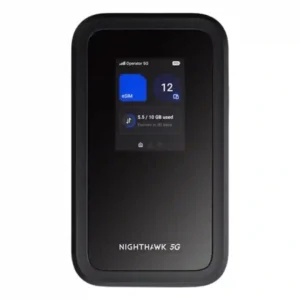
The rectangular, phone-like design is generally sleek and ergonomic, with a premium feel. One tester found the glossy front panel scratches very easily.
Fritz!Box 5690 Pro
3.0
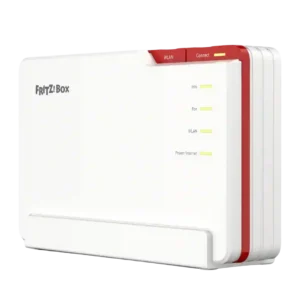
The upright chassis is practical and understated to some reviewers, while others dislike the dated styling and glossy surface that attracts fingerprints and scratches.
IoT device compatibility
Netgear Nighthawk M7
5.0
A heavy mixed-client test that included smart speakers ran cleanly alongside phones, tablets, and laptops.
Fritz!Box 5690 Pro
4.0
Popular Zigbee products such as Philips Hue and IKEA devices generally work reliably, though some advanced functions can vary versus dedicated manufacturer hubs.
wall penetration
Netgear Nighthawk M7
3.0
Typical interior walls are manageable, but a difficult external wall defeated the signal in testing.
Fritz!Box 5690 Pro
4.0
The lower bands carry well through walls, but 6GHz still struggles with thick concrete; overall wall penetration is strong rather than physics-defying.
wireless performance
Netgear Nighthawk M7
3.9
Overall wireless performance is good for travel and daily work, but it is more impressive for reliability and flexibility than for maximum local Wi-Fi throughput.
Fritz!Box 5690 Pro
4.8
Across tests, wireless performance is consistently strong, with especially good breadth of coverage and standout Wi-Fi 7 results even when peak close-range speed is not always class-leading.
size and footprint
Netgear Nighthawk M7
4.4
For a full mobile router, the phone-like M7 is impressively easy to carry in a bag or jacket pocket, though a few testers still found it chunky.
Fritz!Box 5690 Pro
3.6
The vertical orientation reduces desk footprint, but the router is still physically wide and substantial, so reactions depend on where it will be placed.
power consumption
Netgear Nighthawk M7
3.5
Moderate workloads use roughly a workday’s worth of battery, while heavier multi-device sessions increase power draw noticeably.
Fritz!Box 5690 Pro
2.8
Power use is acceptable under heavy activity but less impressive at idle, where reviewers feel efficiency could be better.
value for money
Netgear Nighthawk M7
3.5
Value depends heavily on how often you travel. Frequent travelers can justify the premium through flexibility and multi-device use, while occasional users may struggle to make the $499 price worthwhile.
Fritz!Box 5690 Pro
4.2
Value depends heavily on use case: it looks expensive as a simple router, but reviewers find the price much easier to justify when its modem, telephony, mesh and smart-home roles replace separate hardware.
wired device performance
Netgear Nighthawk M7
4.3
USB-C tethering and Ethernet adapters work well and can deliver faster, steadier connections than Wi-Fi, though wired use depends on extra hardware.
Fritz!Box 5690 Pro
5.0
Despite the LAN-speed ceiling, actual NAS transfers were described as excellent and comparable with the reviewer’s existing system.
Wi-Fi speed
Netgear Nighthawk M7
4.2
Wireless speeds are strong enough for streaming, calls, and general work in good coverage, but results fall sharply when the cellular connection is weak.
Fritz!Box 5690 Pro
4.8
Reviewers repeatedly describe very fast real-world Wi-Fi, including dramatic gains over older routers and a noticeable step up when using Wi-Fi 7-capable clients.
Wi-Fi 7 support
Netgear Nighthawk M7
3.8
Wi-Fi 7 is a real feature, but the experience is mixed: some testers praised its modern performance while others found the implementation too limited to show the standard’s full potential.
Fritz!Box 5690 Pro
4.3
Wi-Fi 7 is a central strength and delivers clear performance gains, though 2.4GHz remains on Wi-Fi 6 and some reviewers note that not every client can exploit the newest features.
hardware reliability
Netgear Nighthawk M7
4.5
Hands-on testing did not uncover hardware problems, and the ruggedized body adds confidence for travel use.
Fritz!Box 5690 Pro
5.0
One review explicitly cites the brand’s reliability as part of the reason this router is easy to recommend for serious home networking.
security update support
Netgear Nighthawk M7
4.5
Ongoing automatic firmware updates are a useful security safeguard for a device intended to travel across many networks.
Fritz!Box 5690 Pro
5.0
AVM’s long software-support history is repeatedly treated as a major ownership advantage and a reason the router should remain viable for years.
settings organization
Netgear Nighthawk M7
3.0
The app is mostly uncluttered, but some settings are buried deeply enough that their locations take time to remember.
Fritz!Box 5690 Pro
3.5
The interface exposes a huge amount of control and can feel busy, but the simpler MyFRITZ! view gives less technical users a cleaner overview.
connection reliability
Netgear Nighthawk M7
4.7
Reliability is one of the M7’s best traits in decent coverage, with repeated reports of stable sessions, few drops, and dependable travel use.
Fritz!Box 5690 Pro
4.3
Most testing found stable, reliable connectivity and smooth streaming, although one client in one test did lose its connection.
web interface quality
Netgear Nighthawk M7
4.3
The browser interface is useful for deeper settings that the app does not expose, and it is generally straightforward to navigate.
Fritz!Box 5690 Pro
4.6
FRITZ!OS earns strong marks for depth, clarity and accessibility, although one reviewer finds the main dashboard text-heavy and more verbose than necessary.
build quality
Netgear Nighthawk M7
4.4
Most testers found the chassis solid, rugged, and travel-ready, but the easily marked front panel is a notable blemish.
Fritz!Box 5690 Pro
4.7
Build quality is consistently strong, with solid plastics, protected rear ports and sturdy physical controls despite the glossy finish.
latency
Netgear Nighthawk M7
4.5
A wired gaming test ran without noticeable stutter or lag.
Fritz!Box 5690 Pro
4.8
Wi-Fi 7 and VPN testing both point to low latency, with reviewers noting modest VPN overhead and noticeable improvements when newer wireless features are used.
setup ease
Netgear Nighthawk M7
4.6
Getting online is consistently quick and uncomplicated, with QR-code onboarding and SIM activation often taking only minutes.
Fritz!Box 5690 Pro
4.5
Setup feedback is mixed by user type: basic installation can be fast and beginner-friendly, while advanced fibre, telephony and smart-home configuration demands more networking knowledge.
USB port support
Netgear Nighthawk M7
3.5
USB-C is genuinely useful for charging, tethering, and Ethernet adapters, but it cannot host USB storage.
Fritz!Box 5690 Pro
3.6
The single USB port is useful and fast enough for storage expansion, but reviewers repeatedly note that one port feels limited on a premium Pro model.
automatic configuration
Netgear Nighthawk M7
5.0
Compatible physical SIMs can configure themselves automatically, reducing the amount of manual network setup needed.
Fritz!Box 5690 Pro
5.0
Migration from another FRITZ!Box is a highlight, with settings transferring smoothly and with very little manual rework.
firewall quality
Netgear Nighthawk M7
4.5
The built-in firewall is part of a broader security stack that makes public-network use feel substantially safer.
Fritz!Box 5690 Pro
4.5
Firewall controls are considered robust enough for families and small businesses, with advanced customization available for more technical users.
WAN failover
Netgear Nighthawk M7
5.0
With the optional cradle, the M7 can automatically take over when fixed broadband fails, creating a strong backup-internet setup.
Fritz!Box 5690 Pro
5.0
Newer firmware adds automatic fallback to a mobile dongle or another FRITZ!Box, which materially improves resilience when the primary connection fails.
2.5 GbE support
Netgear Nighthawk M7
4.5
A third-party USB-C 2.5GbE adapter worked successfully, giving the M7 a practical path to faster wired networking.
Fritz!Box 5690 ProNo score yet
5 GbE support
Netgear Nighthawk M7No score yet
Fritz!Box 5690 Pro
1.5
A reviewer specifically calls out the absence of 5GbE as part of the wired-connectivity shortfall that keeps the router from being the best overall.
6 GHz performance
Netgear Nighthawk M7No score yet
Fritz!Box 5690 Pro
4.4
The 6GHz band delivers the highest throughput and excellent nearby speeds, but range drops faster with distance and barriers than on 5GHz.
10 GbE support
Netgear Nighthawk M7No score yet
Fritz!Box 5690 Pro
1.8
Multiple reviewers wanted 10GbE on a router this capable, especially because faster competitors can avoid the local-network bottleneck.
160 MHz support
Netgear Nighthawk M7
1.3
The M7 does not deliver 160MHz operation on 5GHz, a limitation that materially holds back its Wi-Fi 7 performance.
Fritz!Box 5690 ProNo score yet
320 MHz support
Netgear Nighthawk M7
1.5
The M7 falls far short of Wi-Fi 7’s 320MHz potential, with its 5GHz radio topping out at 80MHz.
Fritz!Box 5690 ProNo score yet
access controls
Netgear Nighthawk M7
4.5
MAC filtering, URL filtering, and hidden-SSID options give travelers useful control over who and what can use the hotspot.
Fritz!Box 5690 ProNo score yet
app setup quality
Netgear Nighthawk M7
4.9
The app-led onboarding is a standout strength: scanning the code, linking the hotspot, and activating a SIM or eSIM are generally fast and smooth.
Fritz!Box 5690 ProNo score yet
automatic firmware updates
Netgear Nighthawk M7
4.5
Automatic firmware updates help keep the hotspot current without manual intervention.
Fritz!Box 5690 ProNo score yet
automatic route optimization
Netgear Nighthawk M7
4.0
The M7 can intelligently favor available Wi-Fi or stronger cellular options, but one test found source changes briefly restart the Wi-Fi network.
Fritz!Box 5690 ProNo score yet
battery portability
Netgear Nighthawk M7
4.1
Battery life usually covers a workday under light or moderate use, with some tests running much longer. Heavy multi-device use shortens runtime, and the non-removable battery is a recurring compromise.
Fritz!Box 5690 ProNo score yet
cellular connectivity
Netgear Nighthawk M7
4.6
Cellular performance is a major strength: the M7 works across 4G/5G networks, can switch among SIM options, and often holds a stronger, more useful connection than phones. Weak local coverage still sets the ceiling.
Fritz!Box 5690 ProNo score yet
channel width support
Netgear Nighthawk M7
1.8
The 80MHz maximum on 5GHz is a major technical constraint and directly limits local Wi-Fi throughput.
Fritz!Box 5690 ProNo score yet
close-range speed
Netgear Nighthawk M7No score yet
Fritz!Box 5690 Pro
3.5
Near the router, results range from merely average for the class to fast and stable, so short-range speed is good but not the clearest reason to buy it.
congestion handling
Netgear Nighthawk M7
4.0
Even in a crowded network environment, everyday performance remained usable, though cleaner spectrum could produce better speeds.
Fritz!Box 5690 ProNo score yet
connected-device management
Netgear Nighthawk M7
4.5
The app makes it easy to see who is connected and react quickly if an unexpected device appears.
Fritz!Box 5690 ProNo score yet
device capacity
Netgear Nighthawk M7
4.7
The 32-device ceiling is more than marketing for typical travel use; testing with large client counts showed the hotspot can handle busy groups.
Fritz!Box 5690 ProNo score yet
device identification
Netgear Nighthawk M7
4.5
Connected-device visibility is clear enough to serve as a useful security check in public places.
Fritz!Box 5690 ProNo score yet
download performance
Netgear Nighthawk M7
4.6
Strong 5G locations regularly provide plenty of download headroom for streaming, calls, and work, with direct USB-C often going faster still.
Fritz!Box 5690 ProNo score yet
dual-band support
Netgear Nighthawk M7
2.5
Dual-band operation is available, but enabling 2.4GHz can reduce 5GHz performance enough to make the implementation feel compromised.
Fritz!Box 5690 ProNo score yet
eSIM flexibility
Netgear Nighthawk M7
4.7
The strongest differentiator is flexible eSIM use: travelers can buy plans in-app, load third-party eSIMs, keep a physical SIM, and switch networks without hunting for local cards. Netgear’s own plans can be pricey or limited.
Fritz!Box 5690 ProNo score yet
firmware stability
Netgear Nighthawk M7No score yet
Fritz!Box 5690 Pro
2.0
An early software build had several annoying bugs and inactive Zigbee functionality, showing that launch-period firmware was not fully mature.
firmware update process
Netgear Nighthawk M7No score yet
Fritz!Box 5690 Pro
4.8
FRITZ!OS updates are viewed positively for regular fixes, integrated delivery and continuous development over the product’s life.
gaming optimization
Netgear Nighthawk M7
3.5
Casual gaming works well, and wired play can be smooth, but intensive gaming is better with an Ethernet adapter than over hotspot Wi-Fi alone.
Fritz!Box 5690 ProNo score yet
guest network
Netgear Nighthawk M7No score yet
Fritz!Box 5690 Pro
4.5
Guest Wi-Fi is well regarded, including isolated guest access and controls suited to homes, visitors and small offices.
installation process
Netgear Nighthawk M7
4.5
Physical SIM installation is refreshingly simple and feels much like inserting a SIM into a smartphone.
Fritz!Box 5690 ProNo score yet
interface responsiveness
Netgear Nighthawk M7
3.3
The simple button-driven screen works well for basic status on some units, but several testers found app dependence and single-button navigation awkward.
Fritz!Box 5690 ProNo score yet
internet pause
Netgear Nighthawk M7No score yet
Fritz!Box 5690 Pro
5.0
A dedicated WLAN button makes it easy to shut wireless access off quickly without opening the administration interface, a convenience one reviewer particularly liked.
ISP compatibility
Netgear Nighthawk M7No score yet
Fritz!Box 5690 Pro
3.3
Compatibility is strongest for European AON/GPON and DSL users; UK reviewers caution that direct fibre use may be limited by ISP practices, though Ethernet WAN provides a workaround.
LAN port speed
Netgear Nighthawk M7No score yet
Fritz!Box 5690 Pro
2.2
Wired speed is the most repeated hardware complaint: four LAN ports are only gigabit and the faster port tops out at 2.5GbE, which limits high-end NAS and local transfers.
latency consistency
Netgear Nighthawk M7
4.5
Wired gaming remained steady enough to avoid stutters or lag during the test.
Fritz!Box 5690 ProNo score yet
long-term performance
Netgear Nighthawk M7No score yet
Fritz!Box 5690 Pro
4.4
Long update support, fibre readiness and modern Wi-Fi give the router strong longevity, although missing XGS-PON and limited Ethernet speeds may matter to the most demanding users.
Matter support
Netgear Nighthawk M7No score yet
Fritz!Box 5690 Pro
1.3
Matter is the clearest smart-home weakness: several reviewers note that promised support was still unavailable, and one considers that a dealbreaker for a modern controller.
mesh performance
Netgear Nighthawk M7No score yet
Fritz!Box 5690 Pro
5.0
Reviewers describe the FRITZ! mesh ecosystem as powerful and easy to expand, with centralized management helping multiple nodes behave as one network.
mid-range speed
Netgear Nighthawk M7
4.5
At roughly ten meters with multiple walls in the path, performance remained impressively close to the short-range result.
Fritz!Box 5690 ProNo score yet
MIMO support
Netgear Nighthawk M7No score yet
Fritz!Box 5690 Pro
4.5
The Pro model’s 4×4 MIMO coverage across every band is presented as an advantage over the non-Pro version, particularly for buyers chasing stronger coverage and peak performance.
mobile app quality
Netgear Nighthawk M7
4.0
The Netgear app is mostly clean, capable, and easy to use, especially for SIM management. A few menu quirks, account requirements, and app-only tasks keep it from feeling flawless.
Fritz!Box 5690 ProNo score yet
modem compatibility
Netgear Nighthawk M7No score yet
Fritz!Box 5690 Pro
5.0
The integrated DSL and fibre options are repeatedly praised for letting users move from DSL to fibre without replacing the router again.
multi-device performance
Netgear Nighthawk M7
4.6
The M7 handles several active devices comfortably, and one stress test ran 27 devices at once without falling apart.
Fritz!Box 5690 ProNo score yet
Multi-Link Operation
Netgear Nighthawk M7No score yet
Fritz!Box 5690 Pro
4.5
MLO can deliver very high throughput and lower latency, but one test notes that the current two-band Wi-Fi 7 implementation limits theoretical peak speed and that many clients still cannot exploit it fully.
network segmentation
Netgear Nighthawk M7
4.5
Wi-Fi Offload keeps clients behind the M7’s own private network rather than exposing them directly to the upstream public hotspot.
Fritz!Box 5690 ProNo score yet
network stability
Netgear Nighthawk M7
4.3
Normal sessions are very stable, though changing between internet sources can cause a temporary client disconnect.
Fritz!Box 5690 ProNo score yet
node pairing ease
Netgear Nighthawk M7No score yet
Fritz!Box 5690 Pro
5.0
Repeater integration has become easier, with streamlined onboarding and less repeated credential entry when adding mesh nodes.
parental controls
Netgear Nighthawk M7No score yet
Fritz!Box 5690 Pro
4.5
Parental controls are broad and increasingly easy to manage, with schedules, time tickets and per-device profiles; category-based filtering is the main missing piece.
performance under load
Netgear Nighthawk M7
3.8
Under strong network conditions, the M7 can stay fast with many clients, but weak-signal environments become much more vulnerable to heavier loads.
Fritz!Box 5690 ProNo score yet
setup guidance
Netgear Nighthawk M7No score yet
Fritz!Box 5690 Pro
5.0
The guided setup is clearly structured and walks users through the important connection and wireless settings step by step.
smart home compatibility
Netgear Nighthawk M7No score yet
Fritz!Box 5690 Pro
4.0
Zigbee and DECT ULE make the router a capable smart-home hub that can replace extra bridges, but compatibility is not universal and missing Matter reduces cross-platform reach.
status light usefulness
Netgear Nighthawk M7No score yet
Fritz!Box 5690 Pro
4.5
The front LEDs are clear and easy to interpret, giving at-a-glance confirmation of internet, wireless and telephony status.
subscription requirements
Netgear Nighthawk M7
4.5
Netgear’s travel data can be purchased without long contracts, which is convenient for short trips. The flexibility is better than the pricing, since short-term eSIM packages can cost a lot per gigabyte.
Fritz!Box 5690 ProNo score yet
telephony features
Netgear Nighthawk M7No score yet
Fritz!Box 5690 Pro
4.8
Integrated DECT, analogue-phone and VoIP functions are repeatedly treated as a major differentiator, especially for small businesses that want routing and telephony in one box.
tri-band support
Netgear Nighthawk M7No score yet
Fritz!Box 5690 Pro
5.0
The full 2.4GHz, 5GHz and 6GHz arrangement is praised as a genuine premium implementation that improves capacity and gives newer devices more room to operate.
upload performance
Netgear Nighthawk M7
4.4
Uploads are consistently capable enough for work files, presentations, calls, and media, especially on strong 5G or wired connections.
Fritz!Box 5690 ProNo score yet
USB storage sharing
Netgear Nighthawk M7No score yet
Fritz!Box 5690 Pro
5.0
FRITZ!NAS makes attached storage easy to share, including newer link-based uploads and multiple access methods for home or small-office files.
video conferencing optimization
Netgear Nighthawk M7
4.8
Video calls are a comfortable workload for the M7 in good coverage, even while other devices and tasks are active.
Fritz!Box 5690 ProNo score yet
VPN server support
Netgear Nighthawk M7No score yet
Fritz!Box 5690 Pro
5.0
WireGuard and IPSec support performs very well in testing, combining strong throughput with manageable latency and straightforward common setup paths.
wall-mounting support
Netgear Nighthawk M7No score yet
Fritz!Box 5690 Pro
2.0
There is no built-in wall-mounting option, a repeated disappointment for users who prefer to keep networking hardware off desks or shelves.
web interface setup
Netgear Nighthawk M7
5.0
Opening the local browser interface and getting to advanced settings is simple and self-explanatory.
Fritz!Box 5690 ProNo score yet
Wi-Fi standard support
Netgear Nighthawk M7
5.0
Packing Wi-Fi 7 into a pocket-sized hotspot is a genuine strength, even if this implementation does not exploit every high-end Wi-Fi 7 capability.
Fritz!Box 5690 ProNo score yet
WPA3 support
Netgear Nighthawk M7
4.5
WPA3 encryption strengthens the M7’s private hotspot protection when it is rebroadcasting cellular or public Wi-Fi connections.
Fritz!Box 5690 ProNo score yet
XGS-PON support
Netgear Nighthawk M7No score yet
Fritz!Box 5690 Pro
1.0
One reviewer flags the lack of XGS-PON as a genuine future-proofing gap for users expecting faster next-generation fibre service.