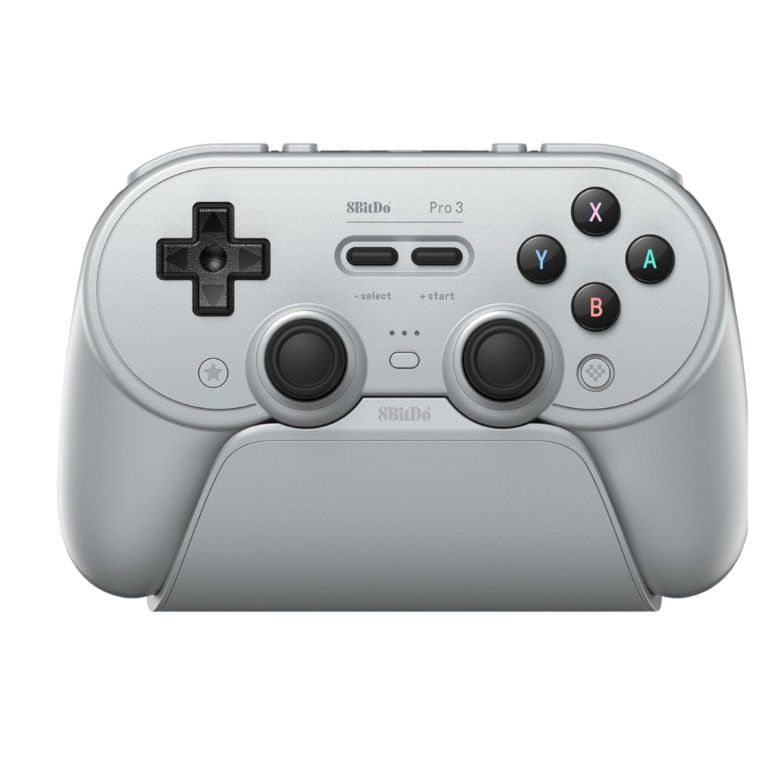
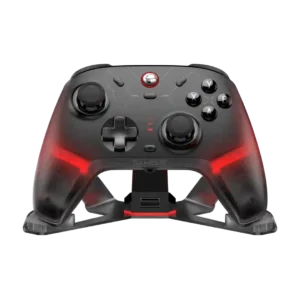
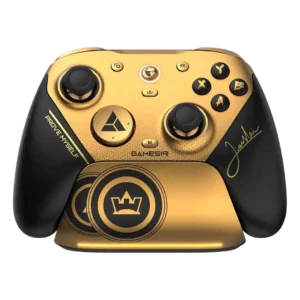
Choose it for comfortable retro-first control, a superb dock, swappable buttons, and flexible PC/Switch use. Skip it if you need quiet face buttons, foolproof software, replaceable batteries, or top-tier competitive polling and thumbstick grip.
Best for
Best for PC and Switch players who prefer symmetrical sticks, play plenty of retro or 2D games, and want a docked, deeply customizable controller without premium-brand pricing.
Not for
Skip it for Xbox or PlayStation console use, quiet shared-room gaming, serious esports play, or if a removable battery and proven long-term durability are essential.
Verdict
The 8BitDo Pro 3 succeeds by combining a genuinely good retro-first shape with modern features that are usually scattered across pricier controllers. The tactile D-pad, smooth TMR sticks, switchable triggers, four programmable inputs, magnetic face buttons, and excellent charging dock make it especially compelling for PC, Switch, emulation, and mixed-genre play. It is not flawless: the face buttons are loud, the stock stick tops can feel slippery, Ultimate Software remains rough, and the 250Hz polling rate limits its competitive credentials. More concerning are repeated customer reports of cracked buttons, broken triggers, charging failures, and inaccurate D-pad diagonals. For most casual and retro-focused players it is a feature-rich, comfortable value, but buyers who prioritize silence, esports performance, or long-term repairability should weigh those caveats carefully.
Hall effect stick performance: 5.0, based on 1 review
The magnetic stick system is praised for smooth, drift-resistant control, although the Pro 3's actual stick modules are TMR rather than Hall effect. Hall effect technology is used in the triggers.
Stick movement is one of the clearest strengths, with a smooth glide and very little friction across the range. Even critical reviews generally liked the mechanical smoothness.
The retro-inspired color schemes and matching dock are widely admired, especially the GameCube, PlayStation, and Game Boy themes. The controller looks distinctive without sacrificing modern functionality.
Rear buttons are useful for sprinting, skills, emulator shortcuts, and other actions that would otherwise require leaving the sticks. They are one of the controller's strongest modern additions.
competitive gaming suitability: 4.1, based on 5 reviews
Trigger stops, precise sticks, and extra buttons provide useful competitive tools. The 250Hz polling ceiling, slippery caps, and occasional latency concerns keep it below dedicated esports controllers.
retro gaming suitability: 4.0, based on 31 reviews
Retro games are the controller's natural strength, thanks to its D-pad-first layout, turbo support, and classic shape. It remains modern enough to handle newer games without feeling like a specialty pad.
The package is generous, with a matching dock, USB-C dongle, cable, spare magnetic buttons, removal tool, and ball-top caps. The arcade-style caps are fun but niche, and their storage is poorly solved.
The rounded grips and retro-modern shape feel natural to many users and support long sessions well. The symmetrical layout and narrower body remain preference-dependent.
The precise sticks, trigger locks, and extra buttons can work well in shooters, especially for casual play. Slippery thumbstick tops and the modest polling rate make it less convincing for highly competitive FPS use.
The rear buttons generally sit where fingers naturally rest and can be used without changing grip. Placement of the additional top L4/R4 buttons is more divisive, especially for shorter fingers.
Motion controls are accurate and responsive when the correct Switch or Steam Input mode is available. Some connection methods disable them, so platform setup matters.
Axis inversion and controller-level remapping add useful flexibility for players who need alternate control behavior. Accessibility is not a major focus, but the available adjustments are welcome.
The analog triggers provide adjustable range and useful control for games that need graduated input. The short overall travel can make fine racing adjustments feel more demanding for some players.
Charging is described as quick enough to keep the controller ready between sessions. The dock encourages frequent top-ups, so charging time rarely becomes a practical complaint.
The face buttons provide a decent amount of travel with a firm bottom-out. The action is clear and tactile rather than soft, though it contributes to the controller's audible character.
The controller is broadly liked for comfort, customization, retro control, and its excellent dock. Loud buttons, software friction, D-pad inconsistency, and scattered durability failures keep the praise from being universal.
Comfort is a major strength: the rounded grips, moderate weight, and retro shape suit long sessions for many players. Larger hands and users who dislike symmetrical sticks are more likely to feel cramped.
The raised tactile D-pad earns strong praise for its crisp, solid feedback and retro-game focus. Its clickiness, firmness, and sound are personal tastes, and some prefer the softer Pro 2 style.
Macros are especially popular for automation, turbo tasks, and Pokémon shiny hunting, and they work well once configured. Software bugs and unintuitive editing make setup harder than the feature deserves.
trigger stop effectiveness: 3.9, based on 15 reviews
The physical trigger locks create a convincing click-style action with little wasted travel. They are widely praised, though occasional looseness or partial movement keeps them from feeling perfect.
The controller has enough heft to feel substantial without becoming tiring, and the weight is generally distributed evenly. Users who prefer very light pads may still notice its density.
casual gaming suitability: 3.9, based on 9 reviews
For everyday single-player, couch, and mixed-genre gaming, the controller is easy to live with and highly versatile. Its competitive limitations matter far less in casual use.
The main bumpers are generally praised for a cushioned, quiet, satisfying press. Their membrane feel contrasts with the sharper microswitch action of the adjacent programmable buttons.
face button responsiveness: 3.9, based on 4 reviews
Face buttons respond quickly and are easy to hit during action-heavy games. Their responsiveness is stronger than their sound and material consistency.
The controller usually feels dense, sturdy, and more refined than its predecessor, with a reassuring weight in hand. A minority report rattles, cracked removable buttons, or early failures that weaken confidence.
The TMR modules are consistently praised for smoothness, precision, low power use, and drift resistance. Their benefits are partly wasted when the small stock caps feel slippery.
Both analog and microswitch modes respond quickly, and the short mode gives immediate actuation for shooters and Switch games. A few users report missed inputs or awkward initial feel.
The analog triggers generally move smoothly with even spring resistance and a clean range. Some reviewers consider the full travel too short for delicate analog control.
Gyro works accurately on supported Switch and Steam Input configurations and compares well with first-party motion controls. Access to it depends heavily on connection mode and platform setup.
The weighted dock is a standout feature, combining charging, display, accessory storage, and a pass-through home for the 2.4GHz dongle. It makes the controller consistently convenient to grab and use.
Connections are usually fast and dependable on PC and Switch, especially through the docked dongle. A smaller group reports random disconnections, driver duplication, or confusing mode behavior.
At roughly $60–$70, the controller delivers an unusually complete mix of premium hardware, dock, and customization. Buyers focused on 1000Hz polling or proven durability may find stronger value elsewhere.
Most users report roughly a full day of intermittent play, commonly around 12–25 hours depending on mode and settings. The charging dock makes the merely good runtime feel less burdensome.
The sticks are widely described as accurate and responsive, with adjustable dead zones and good centering. Their precision is sometimes undermined by slippery caps or mode-specific latency.
Basic PC and Switch setup is usually quick, especially with the physical mode switch and docked dongle. Advanced profiles, Android, Apple, Linux, and firmware workflows can become confusing.
The controller can travel across PC, handhelds, Switch, and mobile devices, reducing the need to pack multiple pads. Its full dock-and-accessory setup is less compact than a simple travel controller.
Broad platform support makes it a useful single controller for travel, particularly with handheld PCs and mobile devices. Carrying the dock, dongle, loose caps, and adapters adds bulk.
USB-C handles wired play, charging, and the dock connection cleanly, and the color-matched cable is a thoughtful touch. The USB-C dongle may require an adapter on devices limited to USB-A.
The rear paddles feel useful and unobtrusive, with a placement that many users can ignore when unneeded. They are less premium than replaceable metal paddles and cannot always be disabled or assigned freely.
hand fatigue over long sessions: 3.7, based on 6 reviews
Most users can play for hours without meaningful fatigue thanks to the rounded grips and balanced weight. Large hands, intense vibration, or awkward reach to the top buttons can reduce comfort.
The textured rear shell usually keeps the controller secure without abrasive rubber. Complaints about slipperiness mostly concern the thumbstick tops rather than the handles.
compatibility with Nintendo Switch: 3.6, based on 38 reviews
Switch and Switch 2 support is generally strong, with working gyro, flexible connection choices, and convenient dock use. Wake behavior, rumble quality, NFC, and mode-specific features vary by firmware and connection method.
Compared with the Pro 2, the dock, 2.4GHz support, TMR sticks, extra buttons, and trigger locks are meaningful upgrades. Losing the removable battery and changing the D-pad make the upgrade less automatic for every owner.
platformer control precision: 3.6, based on 15 reviews
Platformers and 2D games benefit from the prominent D-pad and crisp directional changes. Unwanted diagonal reports mean demanding players should test their unit carefully.
fighting game suitability: 3.6, based on 11 reviews
The prominent D-pad, trigger locks, and remappable controls suit many fighting games and arcade titles. Players who struggle with its firmer diagonals or clicky action may prefer another pad.
TMR sensing avoids the contact wear associated with traditional potentiometer sticks and is expected to resist drift well. This is a major long-term appeal, though it does not protect against every mechanical failure.
The weight, textured shell, precise controls, and matching dock give the controller a convincingly premium presentation. Small rattles, loud buttons, or brittle parts can break that impression.
Swappable magnetic face buttons, replaceable stick caps, four extra inputs, profiles, macros, sensitivity, trigger, and vibration controls create unusually broad customization. Platform and software restrictions prevent every option from working everywhere.
Analog triggers work for racing games and can be switched back from the short digital mode. Their relatively short travel and the controller's stick layout may limit fine throttle and steering control.
Wired play is dependable and useful when the battery is low or minimal latency is preferred. It also exposes certain modes unavailable through the dongle, though cable length can be limiting.
Wireless play is usually stable across normal room distances, particularly with the 2.4GHz receiver. Random disconnects and platform-specific driver issues appear in a minority of reports.
The included USB-C cable looks coordinated and feels adequate, but some users consider it too short for comfortable wired play. It is better suited to charging or nearby desktop setups.
Support experiences are mixed, with some users receiving limited troubleshooting or being directed toward paid replacement parts. Unanswered messages and weak help with early failures are the main complaints.
PC is one of the controller's best platforms, particularly through wired or 2.4GHz XInput. Steam Input, Linux, Bluetooth layouts, and driver behavior can require extra setup or compromise advanced features.
Standard rumble adds useful feedback and can be adjusted, but it lacks refined HD haptics. Some Switch users find it harsh or excessively strong, while others consider it perfectly adequate.
Dead zones, stick curves, trigger ranges, macros, profiles, and vibration can be adjusted in detail. The breadth is excellent, but the interface and platform limitations make it less polished than the hardware.
Stick tension feels controlled and returns cleanly to center, though preferences vary between users accustomed to softer or firmer first-party pads. A few found the small caps or tension less confidence-inspiring.
2.4GHz dongle performance: 3.3, based on 40 reviews
The dock-mounted 2.4GHz receiver makes PC and Switch use quick and convenient, with fast reconnection when the controller is lifted from the stand. Some mode and platform limitations keep it from being universally seamless.
Ultimate Software V2 offers deep control over profiles, macros, dead zones, triggers, and vibration. Its rough interface, bugs, connection problems, and confusing workflow are among the most consistent complaints.
button remapping options: 3.3, based on 10 reviews
Buttons can be reassigned through onboard shortcuts, Steam Input, or Ultimate Software profiles. The flexibility is strong, although certain modes and extra-button combinations impose frustrating limits.
Firmware updates have added or improved features such as Switch 2 wake behavior and compatibility. Updating can still be unreliable, and some users needed troubleshooting before the controller was recognized.
Wireless response is good enough for most games over 2.4GHz, but Bluetooth and DInput can add noticeable delay. Competitive players are more likely to notice the difference.
Many users find the D-pad precise, stable, and excellent for deliberate cardinal inputs. Others report frequent unwanted diagonals, making accuracy the most sharply divided aspect of the controller.
Android, iOS, iPad, Mac, and Apple TV can work, but button layouts and analog-trigger behavior vary by mode. Apple and Android users report more configuration friction than PC or Switch owners.
Bluetooth works well for straightforward Switch and mobile pairing, but it is generally less consistent and more mode-dependent than the 2.4GHz connection. Several users encountered layout, trigger, or latency compromises on non-Switch devices.
Most controls feel tactile and solid, but the face buttons are polarizing because they are loud and sometimes feel hollow or inconsistent. Mushy Start and Select buttons are another recurring weak point.
programmable button support: 3.0, based on 20 reviews
Four additional inputs provide useful shortcuts without requiring a full pro-controller price. The rear pair are well liked, while L4/R4 reach and assignment restrictions draw more criticism.
size suitability for different hand sizes: 3.0, based on 12 reviews
Medium and smaller hands often find the shape immediately comfortable, while some large-handed users feel the body is narrow or the sticks too close together. Reach to L4/R4 varies noticeably by hand size.
Multiple onboard profiles make it practical to keep separate layouts for games and platforms. Profile assignment and persistence can be confusing or unreliable in the software.
Bumper inputs register quickly and feel distinct from the extra shoulder buttons. A few users need more force than expected, but responsiveness is usually dependable.
The internal battery is a clear step backward from the Pro 2's removable pack and AA option. The dock reduces day-to-day inconvenience, but long-term replacement remains a concern.
The 250Hz ceiling is acceptable for ordinary play but disappointing for a controller carrying a Pro label. Cheaper and similarly priced rivals offer 1000Hz modes.
The face buttons are noticeably loud and clacky, a trait some users enjoy for its crisp feedback and many others find distracting. Quiet-room and shared-couch players are the most likely to object.
Wired and 2.4GHz response is generally adequate for normal play, while Bluetooth and DInput can be noticeably slower in certain modes. Measurements and experiences vary enough to discourage latency-sensitive buyers.
Switch 2 wake support improved through shake-to-wake firmware, but experiences vary by firmware and setup. Earlier reviews and some users still report unreliable or inconvenient wake behavior.
Core play is simple, but modes, profiles, button layouts, macros, and platform differences take time to understand. The physical selector helps, yet the full feature set can overwhelm new users.
Long-term feedback is the controller's biggest warning sign: some face buttons crack, triggers break, caps snap, or charging fails unusually early. Many units remain solid, but the repeated failures are difficult to dismiss.
Start and Select button design: 2.3, based on 5 reviews
Start and Select preserve the soft retro feel, but many users find them mushy, cramped together, or awkwardly centered. They stand out as less immediate than the surrounding controls.
The stock stick tops are a recurring weakness for some players because they feel small, slick, and difficult to hold during rapid aiming. Others find the rubber texture acceptable, making this strongly preference-dependent.
Linux users criticize the lack of full software support and feel the brand prioritizes Windows configuration. The hardware can still function, but advanced setup is less accessible outside supported platforms.
consistency across sessions: 2.0, based on 2 reviews
A few reviewers encountered phantom presses or inconsistent readings after otherwise normal use. These reports are uncommon but concerning because they interrupt games unpredictably.
compatibility with PlayStation: 1.8, based on 3 reviews
The PlayStation-style layout does not translate into native PlayStation console support. Buyers needing a PS4 or PS5 controller must choose another model.
The controller can mimic an Xbox button layout on PC, but it does not natively work with Xbox consoles. That distinction is easy to miss because of the swappable ABXY arrangement.
A few buyers received used, damaged, or incomplete packages despite ordering new units. These complaints concern fulfillment rather than the controller's normal performance.
The controller has no 3.5mm headset jack, a frequently noted omission for wired-headset users. This is especially inconvenient on Switch, where Bluetooth audio can add its own compromises.
cloud gaming compatibility: 1.0, based on 1 review
GeForce Now use can be problematic because saved button layouts may not be respected on some Mac setups. Cloud-gaming support is therefore less dependable than direct PC or Switch play.
Compared With Category Average
Compared with other Video Game Controller, this product is above average in gyro aiming performance, upgrade value, platformer control precision, near average in battery life, d-pad feel, below average in audio jack quality, input lag, durability.
Summary
77 compared features
Above average0.4+ pts higher
7(9%)
Same as averagewithin 0.3 pts
24(31%)
Below average0.4+ pts lower
46(60%)
Largest category differences
Attribute
This product
Category average
Difference
audio jack quality
1.5
4.1
-2.6
input lag
2.7
4.6
-1.9
durability
2.4
4.1
-1.8
consistency across sessions
2.0
3.8
-1.8
programmable button support
3.0
4.3
-1.3
bumper responsiveness
3.0
4.5
-1.5
compatibility with PlayStation
1.8
3.4
-1.5
polling rate
2.9
4.4
-1.5
Consider This Instead
If you want better durability
Choose GameSir G8 Plus MFi. It scores 4.5 vs 2.4 for durability, with a 4.2 overall score.
Better: polling rate and competitive specificationsThe Gamesir offers a 1000Hz rate and comparable hardware for only slightly more money.
8BitDo Ultimate 2
Better: modern all-purpose alternativeThe Ultimate 2 is recommended as the better modern-layout choice for most buyers.
Similar: slippery thumbstick textureThe Pro 3 repeats the Ultimate 2's disliked slick thumbstick texture.
Worse: battery lifeThe Pro 3 lasted longer than the pricier Ultimate 2 in the reviewer's testing.
Fantech EOS Pro 2
Alternative: symmetrical-layout alternativesThe Fantech EOS Pro 2 is suggested as another symmetrical-controller option.
FAQ
Does it work with Nintendo Switch 2 and PC?
Yes. Reviews generally found Switch, Switch 2, and PC support strong, especially through Bluetooth on Switch and wired or 2.4GHz XInput on PC.
Does it work on Xbox or PlayStation consoles?
No. The controller can use an Xbox-style button layout on PC, but it does not natively support Xbox or PlayStation consoles.
How good is the D-pad?
Most reviewers praise its crisp, tactile feel and retro-game precision. A meaningful minority report unwanted diagonal inputs, so demanding D-pad users should test their unit carefully.
How long does the battery last?
Reported runtime ranges from roughly 12 to 25 hours, with many experiences clustering around the advertised 20 hours. The battery is internal and not easily replaceable.
Is it good for competitive shooters?
It is usable thanks to accurate sticks, trigger locks, and extra buttons, but the 250Hz polling rate and sometimes slippery stick tops make it less ideal than dedicated esports pads.
Are the face buttons and sticks replaceable?
The magnetic ABXY caps and thumbstick tops can be swapped, and extra colored buttons plus arcade-style ball caps are included. Some owners report fragile caps, so repeated swapping should be done carefully.
How good is the configuration software?
Ultimate Software V2 offers profiles, macros, remapping, dead-zone, trigger, and vibration controls. It is powerful but frequently described as buggy, rough, or confusing.
Can it wake the Switch 2?
Some reviews say later beta firmware added shake-to-wake, while earlier tests and some users still found wake support unreliable. Firmware version and setup matter.
Sample Expert Reviews We Analyzed
These are a few of the reviews included in our analysis.
Choose the GameSir Cyclone 2 if you want a low-cost PC/Switch/mobile controller with precise sticks, deep customization, and a dock. Skip it if Xbox/PS5 support, premium buttons, or flawless dock/battery...
Pros: hand fatigue over long sessions, macro support
Cons: compatibility with Xbox, compatibility with PlayStation
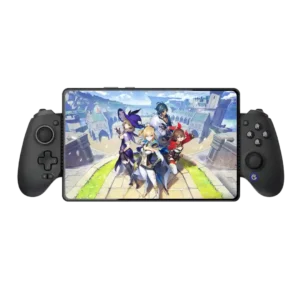
Best for console-like comfort, precise Hall controls, reliable wired play, and iPhone or iPad mini support. Skip it if you need pocketable hardware, Switch compatibility, polished software, or dependable mobile...
Pros: d-pad accuracy, analog stick precision
Cons: gyro aiming performance, brand software support
Best for competitive PC play, precise sticks, low latency, and exceptional sub-$100 value. Skip it for Xbox or PlayStation, dependable gyro, all-day battery life, or if early-unit quality-control risk is...
Pros: hand fatigue over long sessions, charging speed
Cons: compatibility with Xbox, compatibility with PlayStation
Best for an affordable, durable first sim-racing setup with broad PC and PlayStation support. Skip it if you want quiet, smooth direct-drive feedback or pedals that stay planted without mounting.
Pros: ergonomics, programmable button support
Cons: hand fatigue over long sessions, wheel noise