Access logs
P1
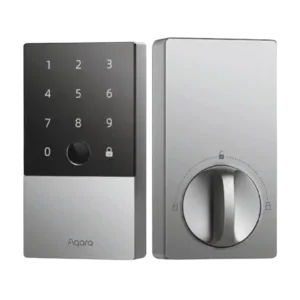
Product 1: Aqara Smart Lock U100
4.1
Activity logs are a strong feature, showing who unlocked the door and by which method in many cases. One limitation noted is that HomeKit-related unlocks can appear as a generic HomeKit event rather than the exact method used.
P2
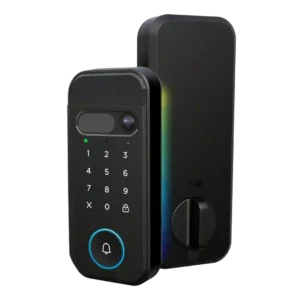
Product 2: myQ Secure View 3-in-1 Smart...
4.0
PINs can be assigned per person and activity/history views are referenced, enabling basic visibility into who accessed the door.
Alarm/siren loudness (if included)
P1
Product 1: Aqara Smart Lock U100
4.1
The lock provides audible chirps/voice prompts and a door-not-locked alarm, with adjustable volume levels and do-not-disturb options. Loudness is generally adequate for awareness rather than a full security siren.
P2Product 2: myQ Secure View 3-in-1 Smart...
No score yetApp
P1
Product 1: Aqara Smart Lock U100
3.9
The Aqara app provides deeper control than HomeKit (logs, codes, users, alerts, automations), and the UI is generally considered capable. Some reviewers dislike the firmware update flow, Bluetooth connection wait time, or needing to be near the lock for certain settings.
P2
Product 2: myQ Secure View 3-in-1 Smart...
3.8
Reviews consistently praise the myQ app for guiding setup, managing PINs/biometrics, and providing remote control; however, multiple reviewers warn that key camera/AI conveniences may be gated by a subscription or altered over time.
Auto-lock
P1
Product 1: Aqara Smart Lock U100
3.9
Auto-lock is feature-rich (door-close sensing, timers, schedules, passage mode), and many find it convenient. However, some reviews label it beta and report occasional misfires or latch problems if calibration or door alignment is off. Auto-unlock behaviors are mainly achieved through automations (for example, location-based routines or ecosystem rules) rather than a pure hands-free proximity unlock. These can work well but may depend on hubs and platform security prompts.
P2
Product 2: myQ Secure View 3-in-1 Smart...
4.0
Auto-lock can be enabled and timed in-app (example: ~90 seconds), providing set-and-forget security once the door is closed. Hands-free face access and other biometric/PIN methods make entry convenient, but at least one outlet notes face-based automations can require a paid plan, reducing the value of the feature.
Auto-relock after failed attempts
P1
Product 1: Aqara Smart Lock U100
4.5
Failed-attempt lockout is widely described as effective: after multiple incorrect entries, the lock disables certain methods for up to about 30 minutes. This helps deter brute-force attempts and is often configurable.
P2Product 2: myQ Secure View 3-in-1 Smart...
No score yetBackset compatibility
P1
Product 1: Aqara Smart Lock U100
4.5
Supports common backset sizing (2-3/8 and 2-3/4) and is generally compatible with typical North American deadbolt spacing when installed to spec.
P2
Product 2: myQ Secure View 3-in-1 Smart...
4.5
Installation guidance explicitly supports common backsets (2-3/8 and 2-3/4), with the latch adjustable to match standard door prep.
Battery
P1
Product 1: Aqara Smart Lock U100
3.9
Battery life is often rated around 8 months on four AA cells and many users report strong endurance, while a few long-term accounts cite faster drain. USB-C emergency power and a physical key mitigate low-battery scenarios.
P2
Product 2: myQ Secure View 3-in-1 Smart...
4.2
Most sources cite roughly 4–6+ months per charge and like the rechargeable pack; charging can take several hours, and a swap/spare battery option is mentioned for avoiding downtime.
Bluetooth
P1
Product 1: Aqara Smart Lock U100
3.9
Bluetooth is the default direct connection and usually works reliably within range, though initial connections can take a few seconds. Binding to an Aqara hub can shift more traffic to Zigbee and feel snappier for remote tasks.
P2
Product 2: myQ Secure View 3-in-1 Smart...
3.8
Bluetooth is mentioned as part of the internal module/antenna during installation, but Wi-Fi remains the primary path for remote control and camera features.
Build quality and durability
P1
Product 1: Aqara Smart Lock U100
4.4
The exterior housing is frequently described as heavy, sturdy, and premium-feeling (zinc-alloy/metal), while the interior side is more plastic. Overall durability impressions are strong, with some long-term cosmetic wear noted.
P2
Product 2: myQ Secure View 3-in-1 Smart...
4.4
Unboxing and install videos describe the exterior unit as dense/heavy with solid materials and good fit, suggesting strong build quality for a first-gen lock.
Door-sense
P1
Product 1: Aqara Smart Lock U100
3.9
Door-sense relies on a gyroscope/accelerometer to infer open/closed/ajar status and trigger alerts or auto-lock. Accuracy is generally good after calibration, but a few reviewers report occasional false readings or less-than-perfect precision.
P2
Product 2: myQ Secure View 3-in-1 Smart...
4.3
A door-position sensor (magnet) can report door-ajar vs closed status and is used during calibration; installation can be adhesive or a more permanent drilled mount.
Door compatibility (deadbolt fit)
P1
Product 1: Aqara Smart Lock U100
3.8
Fits many standard single-cylinder deadbolt doors, but door prep matters: small misalignment can cause friction or latch issues. Measure carefully and expect occasional hole/strike adjustments on older hardware.
P2Product 2: myQ Secure View 3-in-1 Smart...
No score yetFeature additions via updates
P1
Product 1: Aqara Smart Lock U100
3.7
Firmware updates can add features and improve stability over time, and several reviewers cite meaningful improvements after updates. The update process can be more manual than expected (download to phone, transfer over Bluetooth).
P2
Product 2: myQ Secure View 3-in-1 Smart...
3.0
At least one reviewer notes an initial firmware update during setup; other coverage raises concerns that Chamberlain has historically changed features or added paywalls post-launch.
Fingerprint
P1
Product 1: Aqara Smart Lock U100
4.4
Fingerprint unlocking is consistently a standout: fast (often cited under 0.5s) and accurate, with storage kept on-device. Wet fingers or cuts can cause retries, but overall performance is excellent.
P2
Product 2: myQ Secure View 3-in-1 Smart...
4.2
Fingerprint access is widely described as fast and reliable after setup, with support for enrolling multiple family members.
Finish durability
P1
Product 1: Aqara Smart Lock U100
3.5
Some owners report the finish can scratch or show wear over months, especially on darker colors, even though it does not affect operation. The keypad coating is often praised for resisting smudges.
P2Product 2: myQ Secure View 3-in-1 Smart...
No score yetGuest Codes and Access
P1
Product 1: Aqara Smart Lock U100
4.0
Guest access is flexible with one-time and temporary codes and shareable passes, and HomeKit can also generate guest codes. A recurring day-of-week/time window schedule is a noted limitation in several reviews.
P2
Product 2: myQ Secure View 3-in-1 Smart...
4.2
Guest access is handled via PINs and temporary passes in the app, aimed at deliveries, pet sitters, and short-term visitors without sharing a physical key.
Hub requirement
P1
Product 1: Aqara Smart Lock U100
3.3
Hubs are optional for basic local use but commonly required for the best experience: Apple Home remote access needs a Home hub, and Matter/Alexa/Google/IFTTT and many remote features need an Aqara hub. This adds cost and setup complexity.
P2Product 2: myQ Secure View 3-in-1 Smart...
No score yetInstallation and Setup
P1
Product 1: Aqara Smart Lock U100
4.3
Most reviewers found installation straightforward for standard deadbolts, with clear in-app tutorials and a required calibration step. Older doors sometimes need drilling or chiseling for a smooth bolt throw.
P2
Product 2: myQ Secure View 3-in-1 Smart...
4.1
DIY installation is considered doable with clear instructions, but some doors may require drilling or extra strike/fitment work; careful alignment and cable connections matter.
Key override reliability
P1
Product 1: Aqara Smart Lock U100
4.5
A hidden physical keyway plus included keys provide a dependable backup, and multiple reviewers recommend carrying a key in case of connectivity or power issues. Manual operation from inside remains simple via the thumbturn.
P2
Product 2: myQ Secure View 3-in-1 Smart...
4.4
A physical key is available (often hidden under a cover), and multiple videos highlight an emergency 9V contact method to power the lock long enough to get inside if the main battery is drained.
Keypad
P1
Product 1: Aqara Smart Lock U100
4.1
The touchscreen keypad is widely praised for being backlit, responsive, and easy to use for 6-10 digit codes. Minor nitpicks include needing to wake it first and, in some workflows, pressing a confirm/lock button.
P2
Product 2: myQ Secure View 3-in-1 Smart...
3.9
The touch keypad is easy to use and supports PIN entry for guests; one reviewer prefers physical buttons, so tactile feedback may not suit everyone.
Lock/unlock speed
P1
Product 1: Aqara Smart Lock U100
4.4
Lock and unlock actions are generally quick, especially via fingerprint and Home Key, with responsive bolt movement. App and auto-lock actions can show small delays depending on connectivity and settings.
P2
Product 2: myQ Secure View 3-in-1 Smart...
4.5
Multiple reviews repeat Chamberlain’s two-second unlock claim and hands-on videos describe face/fingerprint unlock as very quick in real use.
Locking reliability
P1
Product 1: Aqara Smart Lock U100
4.3
Day-to-day locking is usually reliable, but a minority of long-term reports mention occasional offline freezes or auto-lock calibration mishaps. Firmware updates and a reset often improve stability, and a physical backup is advised.
P2
Product 2: myQ Secure View 3-in-1 Smart...
4.1
Locking works reliably after calibration, but one install notes initial tightness/alignment issues that required strike/door prep adjustments—typical of deadbolt installs.
Notifications
P1
Product 1: Aqara Smart Lock U100
3.8
Notifications cover unlock events, door-not-locked warnings, and various alerts, with do-not-disturb controls available. Some long-term feedback mentions missed alerts or occasional incorrect status reporting in the app, often improving after updates.
P2
Product 2: myQ Secure View 3-in-1 Smart...
3.7
You will get basic lock and motion notifications, but richer, context-aware alerts (what triggered motion) and video-related conveniences may require a subscription.
Physical attack resistance
P1
Product 1: Aqara Smart Lock U100
3.5
Some reviews cite BHMA/ANSI compliance and sturdy construction for basic physical resilience, but it is not positioned as the highest-grade security hardware. The practical security story is the combination of durability, alerts, and logs.
P2Product 2: myQ Secure View 3-in-1 Smart...
No score yetPick/drill resistance (if rated)
P1
Product 1: Aqara Smart Lock U100
3.5
Pick/drill resistance is not emphasized with a top-tier rating in these reviews, and several discussions imply it is similar to typical consumer smart lock cylinders. If high-security cylinder performance is a priority, this may not be the best match.
P2Product 2: myQ Secure View 3-in-1 Smart...
No score yetRemote access
P1
Product 1: Aqara Smart Lock U100
3.9
Remote access is achievable through a HomeKit hub and/or an Aqara hub, enabling remote lock control, status checks, and code management. Without a hub, control is typically limited to Bluetooth range.
P2
Product 2: myQ Secure View 3-in-1 Smart...
4.1
Remote lock/unlock from the myQ app is described as straightforward and responsive, making it practical for letting in guests or service providers when you are away.
Security features (encryption)
P1
Product 1: Aqara Smart Lock U100
4.4
Security is reinforced with AES-128 style encryption claims and on-device fingerprint storage, which reviewers view positively for privacy. The feature set focuses on secure access methods and auditability rather than ultra-high-security cylinders.
P2
Product 2: myQ Secure View 3-in-1 Smart...
4.2
One walkthrough emphasizes that facial data stays on-device and references network protection settings, pointing to a privacy/security-first approach for biometrics.
Smart-home integration (Alexa, Google, Siri, HomeKit, Matter, Thread)
P1
Product 1: Aqara Smart Lock U100
4.3
Integration is a major strength: Apple Home/Home Key and Siri work well, and with an Aqara hub the lock can expand to Matter, Alexa, Google Home, and IFTTT. A few ecosystem-specific quirks and hub dependencies are the main downsides.
P2
Product 2: myQ Secure View 3-in-1 Smart...
2.3
Coverage repeatedly notes limited integration with major platforms (Apple Home/HomeKit, Alexa, Google) and stronger ties to the myQ ecosystem and select security partners.
Tamper detection sensitivity
P1
Product 1: Aqara Smart Lock U100
4.0
Brute-force mitigation is solid, with alarms, visual warnings, and a lockout after repeated failed attempts that disables keypad/fingerprint temporarily. Sensitivity and lockout timing are typically adjustable.
P2Product 2: myQ Secure View 3-in-1 Smart...
No score yetTouchscreen
P1
Product 1: Aqara Smart Lock U100
4.1
The touch interface is generally sensitive and satisfying, with a matte finish that helps readability and reduces fingerprint marks. Night visibility is typically strong thanks to the backlight.
P2
Product 2: myQ Secure View 3-in-1 Smart...
3.8
The touchscreen/touch surface looks modern and responsive, but some users may still prefer traditional button keypads for feel and certainty.
User access management
P1
Product 1: Aqara Smart Lock U100
3.9
User management supports multiple users, fingerprints, passcodes, and (Aqara) NFC credentials with per-user limits. Apple Home's access management is simpler and may not expose the same scheduling and log detail.
P2
Product 2: myQ Secure View 3-in-1 Smart...
4.1
User and credential management (adding users, quick/temporary passes, PINs, faces, fingerprints) is a core strength highlighted in setup walkthroughs.
Value and Price
P1
Product 1: Aqara Smart Lock U100
4.1
Value is frequently rated high, especially when discounted and compared with other Home Key locks. The main price caveat is that adding hubs can push the total closer to premium competitors.
P2
Product 2: myQ Secure View 3-in-1 Smart...
3.2
At roughly $279.99 plus potential monthly fees for premium camera/AI features, reviewers frame it as a premium-priced option where total cost depends on whether you subscribe.
Voice control
P1
Product 1: Aqara Smart Lock U100
4.0
Voice control is strong via Siri/HomeKit, while Alexa and Google typically require an Aqara hub and may need extra setup steps. Voice unlocking commonly uses a PIN or platform security gating.
P2
Product 2: myQ Secure View 3-in-1 Smart...
1.3
Voice control via mainstream assistants is called out as missing/limited, so hands-free voice unlocking routines are not a focus here.
Weather resistance
P1
Product 1: Aqara Smart Lock U100
4.5
The exterior portion is IP65-rated and reviewers report it tolerates heat, cold, and rain well. The interior unit is not weather-rated but is protected indoors.
P2
Product 2: myQ Secure View 3-in-1 Smart...
4.4
Hardware is presented as built for outdoor use with wide operating temperatures and good sealing/gasketing to help keep moisture out.
Wi-Fi
P1
Product 1: Aqara Smart Lock U100
1.0
There is no built-in Wi-Fi radio, so the lock itself cannot connect directly to a router. Remote control and broader integrations rely on an Apple Home hub and/or an Aqara Zigbee hub acting as the bridge.
P2
Product 2: myQ Secure View 3-in-1 Smart...
4.0
Wi-Fi setup is app-driven and generally smooth, but one install walkthrough highlights 2.4GHz-only pairing and a firmware update step during onboarding.