If you want better Guest Codes and Access
Choose ULTRALOQ Bolt Fingerprint Smart Lock. It scores 4.8 vs 3.8 for Guest Codes and Access, with a 4.2 overall score.
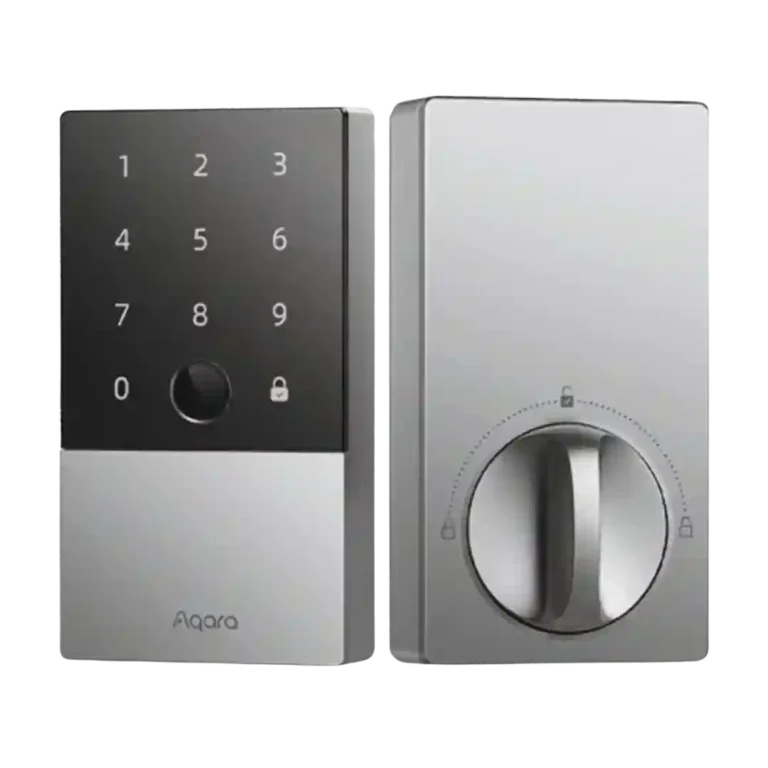
Choose the Aqara U100 for fast fingerprint access, HomeKit/Home Key, and strong feature value. Skip it if you need built-in Wi-Fi, simple re-keying, or rock-solid long-term app reliability.
Best for Apple Home users who want Home Key, fingerprint access, a keypad, guest codes, and strong smart-home flexibility in one lock. It also suits buyers who value features per dollar more than the cleanest hardware design.
Not for people who need built-in Wi-Fi, effortless re-keying to match existing locks, or the simplest possible app and hub setup. It is also risky for users who cannot tolerate occasional offline or auto-lock quirks.
The Aqara U100 stands out because reviewers repeatedly praised its fast fingerprint reader, rich unlock options, HomeKit/Home Key support, and strong value for the feature set. Build quality also earned broad confidence, and installation was usually described as manageable on standard deadbolt doors. The tradeoff is ecosystem complexity: many remote, Matter, Alexa, Google, and advanced Aqara features depend on a hub, and the lack of built-in Wi-Fi came up often. Long-term reliability was not unanimous either, with some reviewers reporting offline behavior, slow app status, battery drain, or beta-like auto-lock issues. It is strongest as a feature-packed Apple-friendly smart lock, but not the simplest or most mechanically flexible option.
Compared with other Smart Locks, this product is above average in Door-sense, Fingerprint, Alarm/siren loudness (if included), near average in Keypad, Battery, below average in Wi-Fi, Pick/drill resistance (if rated), Remote access.
| Attribute | This product | Category average | Difference |
|---|---|---|---|
| Wi-Fi | 2.3 | 3.8 | -1.5 |
| Pick/drill resistance (if rated) | 2.5 | 3.9 | -1.4 |
| Door-sense | 4.1 | 2.9 | +1.2 |
| Remote access | 2.9 | 4.1 | -1.2 |
| Fingerprint | 4.8 | 3.8 | +0.9 |
| Keyway quality | 2.2 | 3.3 | -1.2 |
| Alarm/siren loudness (if included) | 4.0 | 2.9 | +1.1 |
| Smart-home integration (Alexa, Google, Siri, HomeKit, Matter, Thread) | 4.4 | 3.6 | +0.8 |
Choose ULTRALOQ Bolt Fingerprint Smart Lock. It scores 4.8 vs 3.8 for Guest Codes and Access, with a 4.2 overall score.
Choose Schlage Encode Smart Lock. It scores 4.4 vs 2.3 for Wi-Fi, with a 4.3 overall score.
Choose Aqara UWB Smart Lock U400. It scores 4.3 vs 2.2 for Keyway quality, with a 4.4 overall score.
Choose Yale August Smart Lock. It scores 4.7 vs 2.9 for Remote access, with a 3.8 overall score.
Products reviewers directly compared with this model, grouped into quick takeaways.
Yes. Reviewers repeatedly praised HomeKit and Home Key support, especially unlocking with an iPhone or Apple Watch, though some advanced features still depend on hubs or ecosystem setup.
Fingerprint unlocking was the clearest strength across the reviews. Most reviewers described it as fast, accurate, and reliable, with only minor caveats such as wet fingers or sensor placement.
Basic local use can work without an Aqara hub, but reviewers repeatedly noted that remote control, Matter, Alexa, Google, and deeper Aqara automations require additional hub hardware.
Reviewer evidence was mixed. Some found auto-lock accurate or flawless, while others reported delays, beta-feature behavior, or lockout problems connected to latch or offline issues.
No, not based on the reviews. Multiple reviewers treated re-keying as difficult or a meaningful downside, with one calling it a deal killer.
Most reviewers thought it was a strong value because it combines Home Key, fingerprint access, keypad access, physical keys, and broad integrations at a lower price than several named Home Key alternatives.
These are a few of the reviews included in our analysis.
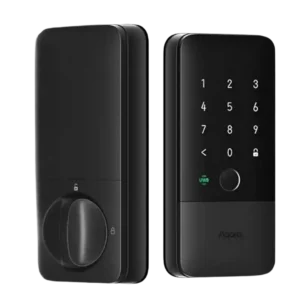
Choose the Aqara U400 if you want hands-free UWB unlocking, strong Apple Home integration, and many backup entry methods. Skip it if you dislike bulky smart-lock hardware or need a...
Pros: Locking reliability, Lock/unlock speed
Cons: Bluetooth, Physical attack resistance
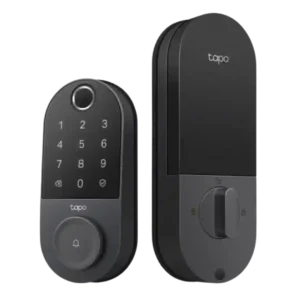
Choose the Tapo DL110 if you want fast fingerprint entry, strong app control, long battery life, and premium features under a lower price. Skip it if your door/strike alignment is...
Pros: Value and Price, Lock/unlock speed
Cons: Existing hardware reuse, Door compatibility (deadbolt fit)
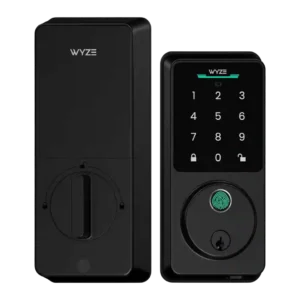
Choose the Wyze Lock Bolt v2 for low-cost Wi-Fi, fast fingerprint entry, and flexible codes. Skip it if you need Matter/HomeKit support, rechargeable batteries, or stronger door-sense behavior.
Pros: Lock/unlock speed, Keypad
Cons: Door-sense, Battery
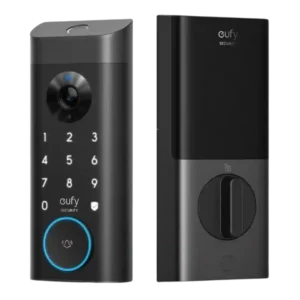
Good if you want one polished lock, camera, and doorbell with excellent fingerprint access. Skip it if short battery life, screen/storm doors, or a narrow camera view would frustrate you.
Pros: Lock/unlock speed, Security features (encryption)
Cons: Door-sense, Keyway quality