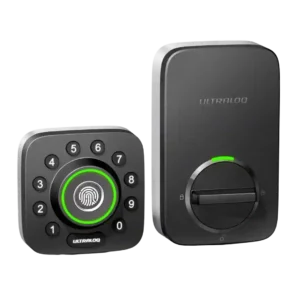
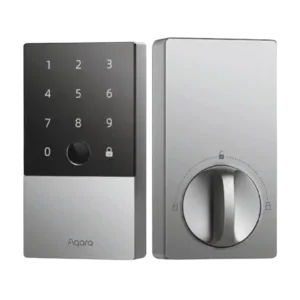
Access logs are consistently highlighted as useful and fairly detailed, showing who unlocked the door and by what method (PIN, fingerprint, app/remote, manual). A few experiences note the log view can be limited initially but loads more history as you scroll, making it practical for monitoring kids, guests, or service providers.
Activity logs are a strong feature, showing who unlocked the door and by which method in many cases. One limitation noted is that HomeKit-related unlocks can appear as a generic HomeKit event rather than the exact method used.
The lock provides audible chirps/voice prompts and a door-not-locked alarm, with adjustable volume levels and do-not-disturb options. Loudness is generally adequate for awareness rather than a full security siren.
The app is generally described as easy to set up and feature-rich (users, logs, settings, firmware), but polish varies. Several reviews mention occasional sluggishness or connection hiccups, and Wi-Fi setup can be frustrating on certain networks; standalone/manual programming is also reported as unreliable by at least one reviewer.
The Aqara app provides deeper control than HomeKit (logs, codes, users, alerts, automations), and the UI is generally considered capable. Some reviewers dislike the firmware update flow, Bluetooth connection wait time, or needing to be near the lock for certain settings.
Auto-lock is a major strength: it is configurable (seconds to minutes), and in Wi-Fi/door-sensor setups it can avoid locking when the door is open/ajar. A recurring minor complaint is that auto-lock being enabled by default can surprise new users, though it is easy to adjust or disable.
Auto-lock is feature-rich (door-close sensing, timers, schedules, passage mode), and many find it convenient. However, some reviews label it beta and report occasional misfires or latch problems if calibration or door alignment is off. Auto-unlock behaviors are mainly achieved through automations (for example, location-based routines or ecosystem rules) rather than a pure hands-free proximity unlock. These can work well but may depend on hubs and platform security prompts.
Failed-attempt lockout is widely described as effective: after multiple incorrect entries, the lock disables certain methods for up to about 30 minutes. This helps deter brute-force attempts and is often configurable.
Backset compatibility is repeatedly described as standard (commonly 2-3/8 or 2-3/4). A couple of hands-on installs mention minor confusion/quirks during adjustment, but overall fit is framed as typical for U.S. doors.
Supports common backset sizing (2-3/8 and 2-3/4) and is generally compatible with typical North American deadbolt spacing when installed to spec.
Battery life varies by usage and connectivity: manufacturer claims range from months to longer, but reviewers report anything from about a month during heavy testing to multiple months in normal use. Strong low-battery warnings are commonly noted, and emergency USB power plus a hidden key reduce lockout risk.
Battery life is often rated around 8 months on four AA cells and many users report strong endurance, while a few long-term accounts cite faster drain. USB-C emergency power and a physical key mitigate low-battery scenarios.
Bluetooth pairing is generally described as straightforward and reliable for local control. Bridge-based setups rely on Bluetooth to link the lock to the bridge, and most reviewers report good day-to-day operation once paired.
Bluetooth is the default direct connection and usually works reliably within range, though initial connections can take a few seconds. Binding to an Aqara hub can shift more traffic to Zigbee and feel snappier for remote tasks.
Build quality is frequently praised as solid, heavy, and secure-feeling. Several reviews reference commercial-grade claims (especially on the Wi-Fi model), while a few note the industrial look or plastic feel on some exterior elements; overall durability impressions skew strongly positive.
The exterior housing is frequently described as heavy, sturdy, and premium-feeling (zinc-alloy/metal), while the interior side is more plastic. Overall durability impressions are strong, with some long-term cosmetic wear noted.
The door sensor is widely viewed as a meaningful upgrade, enabling open/closed status, open-door alerts, and smarter auto-lock behavior that helps prevent locking when the door is ajar. Reviewers consistently frame it as useful for peace of mind and better automation.
Door-sense relies on a gyroscope/accelerometer to infer open/closed/ajar status and trigger alerts or auto-lock. Accuracy is generally good after calibration, but a few reviewers report occasional false readings or less-than-perfect precision.
Door compatibility is generally presented as standard deadbolt fit for typical U.S. doors, with common door thickness and bore/backset ranges. Most installs are described as straightforward when replacing an existing deadbolt, with extra work mainly if drilling new holes or correcting alignment.
Fits many standard single-cylinder deadbolt doors, but door prep matters: small misalignment can cause friction or latch issues. Measure carefully and expect occasional hole/strike adjustments on older hardware.
Firmware updates and software-driven features are commonly mentioned (adding or refining behaviors like Magic Shake, sensor-based auto-lock, and general stability). A caution appears in some user-feedback sections that updates or configuration changes can occasionally introduce issues, so keeping alignment and settings correct matters.
Firmware updates can add features and improve stability over time, and several reviewers cite meaningful improvements after updates. The update process can be more manual than expected (download to phone, transfer over Bluetooth).
Fingerprint performance is a standout: most reviewers describe it as fast and accurate with quick setup. A few note that finger positioning/angle can matter and some users (especially older users in anecdotal feedback) may see inconsistent scans, but overall sentiment is strongly positive.
Fingerprint unlocking is consistently a standout: fast (often cited under 0.5s) and accurate, with storage kept on-device. Wet fingers or cuts can cause retries, but overall performance is excellent.
Some owners report the finish can scratch or show wear over months, especially on darker colors, even though it does not affect operation. The keypad coating is often praised for resisting smudges.
Geofencing behavior is mixed: some reviewers report a better experience than prior generations, while others call it unreliable or dependent on leaving a set radius before it will trigger properly. It can be helpful when tuned, but it is not the most universally dependable feature.
Geofencing and location-based automation options are available primarily through app automations and platform routines. They can be powerful but may be labeled beta and require always-on location permissions.
Guest access is repeatedly described as strong: temporary PINs, scheduled access windows, one-time codes, and shareable eKeys are highlighted as ideal for cleaners, dog walkers, and rentals. Logs tied to user identity improve accountability for shared access.
Guest access is flexible with one-time and temporary codes and shareable passes, and HomeKit can also generate guest codes. A recurring day-of-week/time window schedule is a noted limitation in several reviews.
Hub/bridge needs depend on the version: built-in Wi-Fi models remove the bridge requirement, while older bundles require a bridge placed close to the door (often described as within about 10 feet). Bridge requirement is a common source of complexity for voice assistants and remote features on non-Wi-Fi versions.
Hubs are optional for basic local use but commonly required for the best experience: Apple Home remote access needs a Home hub, and Matter/Alexa/Google/IFTTT and many remote features need an Aqara hub. This adds cost and setup complexity.
Installation varies sharply by generation: Wi-Fi revisions are often described as much easier and faster than early versions, with some installs completing in under 10–30 minutes. Older versions are described as finicky, sometimes requiring tailpiece trimming and very careful screw tightness and alignment to avoid binding.
Most reviewers found installation straightforward for standard deadbolts, with clear in-app tutorials and a required calibration step. Older doors sometimes need drilling or chiseling for a smooth bolt throw.
There is no clear mention of an automatic jam-detection feature, but jamming/binding scenarios come up: misalignment, overtightened screws, and door fit can cause resistance. Newer hardware revisions are described as reducing prior jamming issues, but proper alignment remains important.
The hidden physical key is broadly viewed as a reliable backup, and emergency external power via a USB port adds another recovery option when batteries die. This layered fallback approach is frequently cited as a major practical advantage versus app-only smart locks.
A hidden physical keyway plus included keys provide a dependable backup, and multiple reviewers recommend carrying a key in case of connectivity or power issues. Manual operation from inside remains simple via the thumbturn.
The keypad earns praise for tactile buttons, backlighting, and the anti-peep feature that allows extra digits around the real code. A recurring usability nit is the circular layout, which some find slower than a traditional keypad, but most still consider it dependable and secure.
The touchscreen keypad is widely praised for being backlit, responsive, and easy to use for 6-10 digit codes. Minor nitpicks include needing to wake it first and, in some workflows, pressing a confirm/lock button.
Keyway quality is not heavily evaluated, but one review explicitly notes a standard-style keyway (Schlage mentioned) and most emphasize that the keyhole is hidden behind a flip-down faceplate. As a backup entry method, it is generally framed as dependable and well-integrated.
Re-keying is a common pain point: several reviewers say the cylinder and pins are nonstandard or hard to swap, making matching existing house keys difficult without a locksmith-level workaround.
Lock/unlock speed is commonly described as quick, especially via fingerprint and keypad, with near-instant responses frequently noted in tests. Geofence-based behaviors can be slower or more conditional, but direct methods are consistently fast.
Lock and unlock actions are generally quick, especially via fingerprint and Home Key, with responsive bolt movement. App and auto-lock actions can show small delays depending on connectivity and settings.
The motor is often described as smooth and fast, but a couple of reviewers note it can be louder than some competing locks. Most still consider the sound level acceptable, and the faster action is often seen as a worthwhile tradeoff.
The motor is often described as powerful with high torque and fast actuation, helping the deadbolt throw confidently. Proper alignment is still important to avoid binding on the strike.
Once installed correctly and aligned, locking reliability is usually described as excellent with consistent fingerprint/PIN/app operation. Reported reliability issues tend to cluster around connectivity (Wi-Fi pairing or app connection loss) and installation-related binding rather than everyday mechanical failures.
Day-to-day locking is usually reliable, but a minority of long-term reports mention occasional offline freezes or auto-lock calibration mishaps. Firmware updates and a reset often improve stability, and a physical backup is advised.
Notifications are generally appreciated for remote awareness (lock/unlock events and battery alerts). Some app workflows are criticized for requiring per-user notification rules rather than a simple global option, but overall alerting is seen as helpful for security and household monitoring.
Notifications cover unlock events, door-not-locked warnings, and various alerts, with do-not-disturb controls available. Some long-term feedback mentions missed alerts or occasional incorrect status reporting in the app, often improving after updates.
Physical attack resistance is framed as strong on Wi-Fi/door-sensor variants that reference commercial-grade/Grade 1 claims, while at least one older evaluation notes the model was not officially certified and was described as closer to Grade 2 in spirit. Overall, reviewers still describe it as robust for typical residential use.
Some reviews cite BHMA/ANSI compliance and sturdy construction for basic physical resilience, but it is not positioned as the highest-grade security hardware. The practical security story is the combination of durability, alerts, and logs.
Pick/drill resistance is not emphasized with a top-tier rating in these reviews, and several discussions imply it is similar to typical consumer smart lock cylinders. If high-security cylinder performance is a priority, this may not be the best match.
Remote access is a key benefit when Wi-Fi is built in or when a bridge is used: reviewers frequently highlight being able to lock/unlock from anywhere and manage users remotely. Some note remote actions can be slower over Wi-Fi than Bluetooth and that Wi-Fi stability depends on signal quality and network constraints.
Remote access is achievable through a HomeKit hub and/or an Aqara hub, enabling remote lock control, status checks, and code management. Without a hub, control is typically limited to Bluetooth range.
Security features commonly mentioned include dual-layer encryption claims, the anti-peep keypad, activity logs, and a lockout mode that disables electronic access. These are generally seen as meaningful safeguards, though account-level protections are not universally praised.
Security is reinforced with AES-128 style encryption claims and on-device fingerprint storage, which reviewers view positively for privacy. The feature set focuses on secure access methods and auditability rather than ultra-high-security cylinders.
Smart-home integrations are broad (Alexa, Google, IFTTT, and sometimes SmartThings), enabling routines and automations. The most consistent limitation is the lack of Apple HomeKit support; setup can also be a bit quirky depending on how platforms label the integration and which connectivity version you own.
Integration is a major strength: Apple Home/Home Key and Siri work well, and with an Aqara hub the lock can expand to Matter, Alexa, Google Home, and IFTTT. A few ecosystem-specific quirks and hub dependencies are the main downsides.
Brute-force mitigation is solid, with alarms, visual warnings, and a lockout after repeated failed attempts that disables keypad/fingerprint temporarily. Sensitivity and lockout timing are typically adjustable.
The touch interface is generally sensitive and satisfying, with a matte finish that helps readability and reduces fingerprint marks. Night visibility is typically strong thanks to the backlight.
At least one review explicitly criticizes the companion app for lacking two-factor authentication, even while other reviews mention phone-number verification during account creation. If account security is a top priority, this is a notable weakness compared with platforms that offer robust 2FA.
User access management is repeatedly praised: multiple roles (admin/normal/temporary), schedules, usage limits, and support for many users with PINs and fingerprints. This flexibility is a primary reason reviewers recommend it for families, offices, and rental properties.
User management supports multiple users, fingerprints, passcodes, and (Aqara) NFC credentials with per-user limits. Apple Home's access management is simpler and may not expose the same scheduling and log detail.
Value is generally rated positively relative to competitors because it bundles many entry methods (fingerprint + keypad + app + key) and strong guest-management features. Some reviewers still call MSRP expensive, but discounts and the feature set often shift the judgment toward good value.
Value is frequently rated high, especially when discounted and compared with other Home Key locks. The main price caveat is that adding hubs can push the total closer to premium competitors.
Voice control (Alexa/Google) is commonly supported, typically requiring a voice PIN for unlocking. Experience depends on version: Wi-Fi models simplify setup, while bridge-based versions add placement constraints but still work well once configured.
Voice control is strong via Siri/HomeKit, while Alexa and Google typically require an Aqara hub and may need extra setup steps. Voice unlocking commonly uses a PIN or platform security gating.
Warranty and support are not deeply reviewed across sources, but one review’s user-feedback roundup notes generally responsive customer support and replacement parts when needed. Most other coverage focuses more on features and setup than long-term service outcomes.
Weather resistance is frequently cited through IP65 and wide operating temperature claims, with reviewers expecting it to hold up in typical outdoor conditions. Real-world endurance commentary is limited, but the overall framing is that it is designed for exterior exposure.
The exterior portion is IP65-rated and reviewers report it tolerates heat, cold, and rain well. The interior unit is not weather-rated but is protected indoors.
Wi-Fi is a major convenience upgrade on built-in models, enabling remote access without extra hardware, but 2.4GHz-only requirements are a recurring pain point—especially for certain mesh setups. Strong signal and correct band selection are repeatedly emphasized for stable operation.
There is no built-in Wi-Fi radio, so the lock itself cannot connect directly to a router. Remote control and broader integrations rely on an Apple Home hub and/or an Aqara Zigbee hub acting as the bridge.