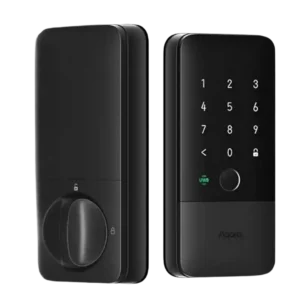
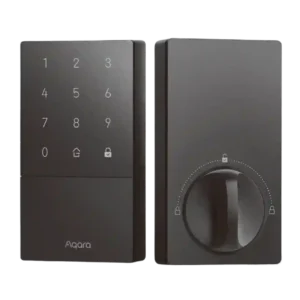
Access logs are highlighted most clearly in app walkthroughs that show event histories for lock/unlock actions and alerts, supporting practical oversight for families and guest access.
Access logs are a meaningful benefit in several reviews, showing event history and helping track who unlocked when, with retention commonly described in the weeks-to-month range.
The lock includes audible feedback and alarm-related settings (including volume/muting and Do Not Disturb in some ecosystems), but reviews do not deeply quantify siren loudness. The emphasis is on configurable audio cues rather than raw volume.
The lock provides audible prompts and alarms, and some reviews like the adjustable volume options; others find default voice volume loud or note that certain door-open alarms can be inconsistent.
The Aqara app is generally described as clean and functional for setup, settings, and firmware updates, and it can unlock extra features. Some reviewers still prefer living in Apple Home day-to-day, and a few mention minor friction (learning curve or occasional platform-specific bugs like code generation).
The Aqara app is described as feature-rich for user management, logs, automations, and settings; a recurring complaint is that some controls (like sounds/volume) may require pairing to an Aqara hub.
Auto-lock is widely supported and commonly used, with options ranging from immediate lock-on-close styles to time-based delays. Some reviewers note occasional timing quirks (door-close detection can take a few seconds or mis-time), so many recommend keeping a time-based auto-lock as a safety net.
Auto-lock features are frequently praised, including timed auto-lock and door-closed-based locking; reviewers also like modes that temporarily bypass auto-lock for high-traffic situations.
Beyond basic lockout behavior after repeated failed entries, some reviewers highlight safety behaviors like re-locking after remote/unattended unlock events. Where described, these features are positioned as thoughtful safeguards rather than headline features.
Failed-attempt protections are discussed as a plus, with temporary keypad lockouts after repeated wrong codes and continued access via key or app for admins.
Backset adjustability is explicitly demonstrated in at least one install-focused review, where the deadbolt length can be adjusted to center properly in the door prep.
Reviewed setups commonly mention support for the two typical US backset depths, which helps it work with most standard doors.
Battery life is typically characterized as around six months per charge, with strong praise for USB-C charging and emergency external power options. A recurring concern is the practicality of spare/replaceable rechargeable packs compared with swapping AA batteries.
Battery life is commonly positioned as months on four AA cells, with USB-C emergency power as a safety net; several reviewers report better battery behavior than early U100 units.
Bluetooth is present and often used for certain local interactions or setup flows, but reviewers generally position Thread/UWB as the main performance story. Some call out Bluetooth-based auto-unlock on other locks as unreliable compared with UWB.
Bluetooth is central for HomeKey/HomeKit-style setups and works well up close, but it is also the main source of perceived latency or flakiness in remote-style control when a hub is not handling communication.
Build quality impressions are generally positive, with several reviewers describing the lock as solid and well made. Some note that aesthetics are subjective (larger, clearly a smart lock), and at least one review references the enclosure/material feel as less premium than a truly metal-bodied alternative.
Build quality is widely seen as solid (heavy feel, good materials), with the main complaints being a bulky footprint and a few plastic parts or covers that may feel less premium over time.
Door-sense behavior is frequently mentioned: the lock can infer door closed/open states for automation and lock-on-close style behavior, though at least one review notes that door state may not always be exposed to every smart-home platform as a simple contact sensor would be.
Door status sensing is a standout feature thanks to the built-in gyroscope approach, though at least one review finds it less reliable than a dedicated door sensor in tricky installs.
Most reviews indicate compatibility with standard deadbolt doors, and several note included adapters/rings to handle different bore sizes. Because it replaces the full lock assembly, it may be less suitable for situations where you must keep existing exterior hardware (some apartments/condos).
Multiple strike/bolt plate options help the lock fit many common deadbolt cutouts, but proper alignment matters to avoid binding or abnormal bolt behavior.
Because the U400 replaces the full deadbolt hardware, it is not a retrofit-only upgrade. Some installers highlight included plates/adapters that can reduce the need for extra drilling in certain scenarios, but overall it is less about reusing existing deadbolt hardware and more about replacing it cleanly.
Several reviewers highlight rekeyability to match existing keys as a major convenience, though installation still replaces the deadbolt hardware and some users reuse or swap strike components depending on fit.
Firmware updates and future-facing standards are frequently referenced, including ongoing updates, Aliro readiness, and platform-driven improvements. A few reviewers mention update friction in some apps, suggesting the manufacturer app may be the smoother path at times.
At least one review notes that Aqara has expanded passcode controls over time (more granular periodic schedules), suggesting ongoing firmware and app improvements.
Fingerprint performance is repeatedly described as quick and accurate, often serving as the preferred backup method even for users who primarily rely on UWB. Several reviews note that fingerprint enrollment can be handled via the app or directly on-lock in certain workflows.
Multiple sources emphasize the lack of a fingerprint reader as the main feature loss versus the U100, which is a dealbreaker for users who rely on biometric entry.
Finish observations focus more on appearance and fingerprint/smudge resistance than on long-term wear. Where mentioned, reviewers appreciate a finish that resists fingerprints and looks clean day-to-day.
The matte black finish is praised for hiding fingerprints and looking modern, but limited color options and bulky styling are recurring nitpicks.
Geofencing is mostly discussed as a negative point for older smart locks, with reviewers favoring UWB because it avoids the unreliable behavior they experienced from Bluetooth/geofence auto-unlock systems.
Guest access is a strong area: reviewers mention multiple PINs, temporary/one-time codes, time-limited schedules, and in Apple Home the ability to share Home Key-style access. Some NFC accessories may be optional purchases depending on the setup.
Passcode features are repeatedly highlighted, including multiple household codes, guest sharing, one-time use codes, and scheduled codes for regular visitors; some setups enforce longer minimum PIN lengths.
A Thread border router is commonly described as effectively required to get meaningful Matter/Thread functionality and remote control in third-party platforms. Aqara hubs are optional but can add Aqara-app remote access and certain integrations.
A hub is frequently recommended to unlock full functionality (broader integrations, Matter bridging, richer automations), but adds cost and can introduce placement or connectivity considerations.
Installation is typically described as straightforward for a full deadbolt replacement, often quoted in the 15–45 minute range depending on door fit and experience. Minor pain points include tight wiring routes, small screws, and occasional door-prep quirks (latch recess/backset adjustments).
Installation is generally described as quick and straightforward for standard single-cylinder deadbolts, with app-led calibration; a few reviews note instructions can be picture-heavy or require minor door/strike adjustments.
Some reviews describe abnormal bolt or door-not-closed situations triggering alerts, helping users catch a misaligned door or failed latch/bolt extension.
Physical key access is treated as an important fallback, with the keyway often hidden behind a sliding cover. Reviewers generally expect it to be dependable even if they rarely use it.
Mechanical key backup is consistently included and the hidden keyhole cover is appreciated for aesthetics and casual security, with reviewers generally treating it as a dependable fallback.
The keypad is commonly praised for a stealth look (numbers hidden until activated) and reliable entry, though multiple reviewers mention occasional wake sensitivity where it may take an extra tap before accepting input.
The keypad is widely liked for large, backlit digits and reliable code entry, but it typically needs a wake touch first and some users want the first press to register immediately.
Keyway design is typically described as discreet (hidden behind a panel) and practical as a backup. Rekeyability is explicitly called out in at least one review as a convenience for matching house keys.
Keyway and cylinder design are often framed positively because the lock can be rekeyed; one reviewer cautions that cylinder swaps can be non-standard and may have constraints.
Speed is a recurring compliment: Thread-based control is often described as instant or very responsive, and UWB unlock triggers early enough that users can keep walking without pausing at the door.
HomeKey taps and keypad entry are usually described as fast, and the motor action feels smooth once the door is aligned; app-based commands can be slower when Bluetooth is involved.
Lock operation is repeatedly described as smooth and quiet when aligned correctly, with less risk of grinding compared with poorly fitted smart locks.
Locking reliability is strongly rated across reviews, especially for UWB unlocking and routine locking/unlocking in Apple Home. Minor inconsistencies appear more around door-close auto-lock timing rather than core lock actuation failures.
Overall locking reliability is viewed as strong in daily use, including remembering codes and auto-lock behavior even when hub connectivity is imperfect, provided the door and strike are properly aligned.
Notifications and alerts are frequently mentioned, including lock/unlock confirmations, door left open/unlocked warnings, and watch-based prompts that can even enable quick relocking. Some audio/alert behavior can be tuned with modes like Do Not Disturb in certain ecosystems.
Notifications and alerts are commonly used for status awareness (locked/unlocked, abnormal events, and user activity), with some reviews highlighting customizable alert behavior.
Several reviews cite the U400 as BHMA Grade 3, which is a basic certification tier. Reviewers generally accept it for typical residential use but note it is not the top choice if you are prioritizing maximum forced-entry resistance.
Physical security is generally treated as appropriate for typical homes, with the hidden keyhole design adding a small deterrent and overall construction seen as sturdy.
Rather than detailed pick/drill testing, reviewers lean on the BHMA Grade 3 reference as the primary proxy for physical resistance. It is acknowledged as better than nothing but not the highest tier available.
One review references residential-grade security positioning and acknowledges that higher pick/drill resistance usually requires spending more, framing U50 as adequate rather than high-security.
Remote access is generally reliable when the lock is paired through a Thread-enabled smart-home platform (like Apple Home) or when used with an Aqara hub for Aqara-app remote control. Without that infrastructure, functionality is described as more local and limited.
Remote control is generally available through smart-home ecosystems or hubs, and checking lock status is valued for peace of mind; performance varies, with Bluetooth-based paths sometimes feeling slower than hub-based control.
Security discussions center on UWB precision and anti-relay style benefits compared with Bluetooth-based proximity unlocking. Reviewers frame UWB as more intent-aware and harder to spoof in typical use than older Bluetooth/geofence approaches.
Security is framed around modern app and platform controls, with some reviews explicitly calling out AES-style encryption and secure ecosystem integrations.
Smart-home integration is a major strength: Matter over Thread is repeatedly cited for broad compatibility (Apple Home, Google Home, Alexa, SmartThings, Home Assistant) and responsive local control. Apple Home Key is central to the best experience for Apple users.
Integration is repeatedly cited as a strength, especially Apple HomeKey and Apple Home support; broader platform support (Google, Alexa, Matter/SmartThings) is often possible but typically depends on using an Aqara hub or compatible controller.
Tamper-related behavior is referenced through lockout timers, alerts for unusual conditions (like too many failed attempts or door left unlocked), and forced-entry style notifications in some setups. Detailed sensitivity tuning is not consistently covered, but protective behaviors are present.
As a touch interface, the hidden keypad generally works well, but wake-up responsiveness is a recurring minor quirk across reviews. Once active, entering codes is typically smooth and reliable.
The touch interface is generally responsive and easy to use, with minor learning curve around waking the panel before entering a code.
User access management is repeatedly described as flexible, with role-based controls in Aqara and a more constrained but still practical set of limits in Matter-based ecosystems. For most households, the practical user and credential limits are viewed as sufficient.
User access management is a strong point, with support for multiple users, one-time codes, scheduled or periodic access, and code-specific automations in the Aqara ecosystem.
Pricing is often framed around a roughly $270 tier: some call it reasonable for first-to-market UWB convenience, while others label it pricey compared with strong fingerprint-first alternatives. The perceived value rises sharply for Apple Home users who will actually use UWB daily.
Value is a major theme: most reviews call U50 one of the most affordable HomeKey-capable options, though the need for an additional hub to unlock full functionality can reduce the perceived bargain.
Voice control is commonly described as available through connected ecosystems (notably Siri in Apple Home, and also Alexa/Google in Matter setups), making lock status checks and basic locking actions convenient hands-free.
Voice control is supported through major platforms, but often requires a hub integration and may be gated by platform security steps such as PIN requirements for unlocking.
Support and warranty considerations come up mainly around modifications: at least one review warns that swapping the lock cylinder can void warranty and puts the user on their own.
Weather resistance is repeatedly supported by references to an IP65 rating for the exterior keypad panel, and at least one long-use review reports stable performance across rain, snow, ice, and temperature swings.
Weather protection is generally presented as suitable for outdoor exposure, but the exact IP rating varies across reviews (often IPX5; one source claims higher) and one review notes reduced dustproofing versus pricier models.
Wi-Fi is commonly referenced in comparisons: Thread is described as faster and more battery-friendly than typical Wi-Fi smart locks. The U400 is generally not treated as a Wi-Fi-first lock, so remote features are expected to come via Thread border routers or hubs instead of direct Wi-Fi.
Most U50-focused reviews say there is no built-in Wi-Fi and that Wi-Fi-style remote/integration features depend on hubs; one included video appears to cover a different Aqara lock with built-in Wi-Fi, which can confuse expectations.