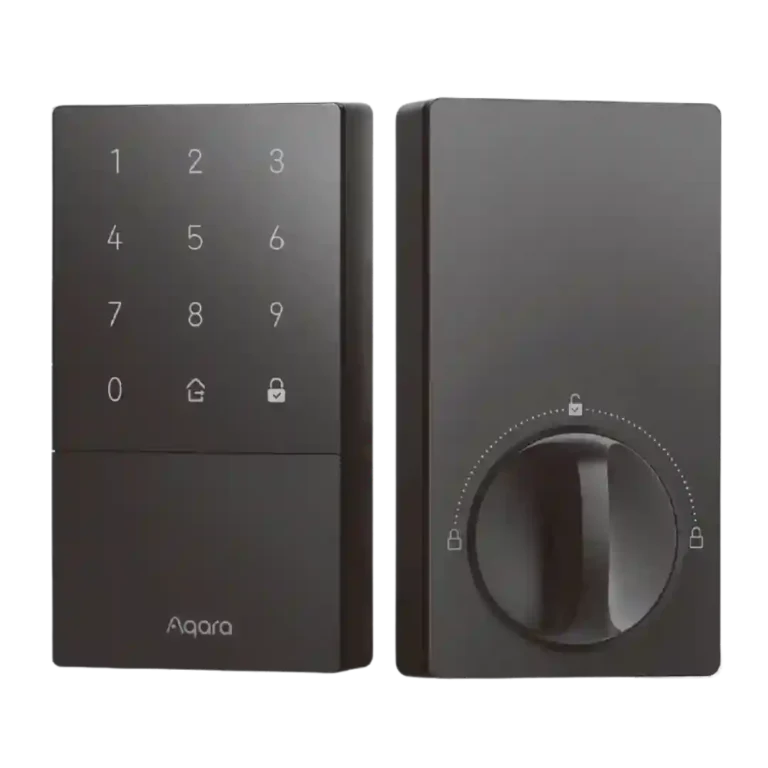
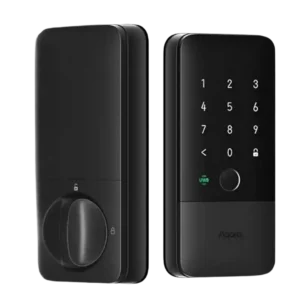
Aqara U50 Smart Lock

Aqara U50 Smart Lock Review

Brand: Aqara
Released: May 23, 2024
Updated: 2 weeks ago
4.0
Consolidated expert score
119
Review insights
33
Scored features
12
Expert reviews

Bottom Line

Choose the Aqara U50 for affordable HomeKey access, easy setup, strong keypad controls, and auto-lock. Skip it if you need built-in Wi-Fi, fingerprint unlocking, or hub-free advanced settings.

Best for

Best for Apple Home users or budget-focused smart-home buyers who want HomeKey, keypad entry, temporary codes, auto-lock, and broad ecosystem support without paying flagship-lock prices.

Not for

Not for buyers who want fingerprint unlocking, built-in Wi-Fi, a very slim or premium-looking lock, or full advanced controls without adding a hub.

Verdict

Reviewers frame the Aqara U50 as a value-first HomeKey smart lock that keeps the essentials strong: easy installation, responsive keypad or HomeKey unlocking, flexible guest codes, and useful auto-lock behavior. The main tradeoff is that its low price depends on omissions and ecosystem compromises. There is no fingerprint reader, no built-in Wi-Fi, and the fullest remote, automation, sound, and integration controls often push users toward an Aqara hub or an Apple Home hub. Design reactions are also mixed because the lock is modern and sturdy but bulky and limited in color. Overall, the evidence points to a capable budget lock with excellent Apple-home convenience, as long as buyers accept the hub and Bluetooth limitations.

Compared in Reviews

Products reviewers directly compared with this model, grouped into quick takeaways.

U100

  • Worse: overall value impression The reviewer ended up more impressed with the U50 than the U100 despite the budget positioning.
  • Better: overall preference and fingerprint tradeoff The reviewer still preferred the U100, mainly because the U50 loses the fingerprint scanner and included hub.

Schlage Encode Plus

  • Better: response speed The U50 is said to respond slower than the Schlage Encode Plus because it lacks Thread.

Feature Scorecards

Summary

33 reviewed features
  • Very positive 4.5-5.0 42% 14 features
  • Positive 3.5-4.4 33% 11 features
  • Neutral 2.5-3.4 21% 7 features
  • Negative 1.5-2.4 3% 1 feature
  • Very negative below 1.5 0% 0 features

Pros

  • 5.0
    based on 1 review
    Access logs: 5.0, based on 1 review
    The log feature earned praise because it lets reviewers see when people lock and unlock the door and helps track comings and goings.
  • 4.8
    based on 10 reviews
    Value and Price: 4.8, based on 10 reviews
    Reviewers strongly agreed that the U50 is excellent value, repeatedly calling it affordable, a great deal, and one of the best budget HomeKey smart locks.
  • 4.8
    based on 5 reviews
    Auto-lock: 4.8, based on 5 reviews
    Auto-lock is one of the U50's clearest strengths, with reviewers praising improved behavior, passage-style controls, and dependable nighttime locking.
  • 4.7
    based on 3 reviews
    Locking reliability: 4.7, based on 3 reviews
    Reliability feedback was strong: the lock kept working without the hub, worked smoothly with Apple devices, and automatically locked as expected.
  • 4.7
    based on 8 reviews
    Guest Codes and Access: 4.7, based on 8 reviews
    Guest access is a major strength, with praise for multiple codes, temporary or periodic access, NFC access, and practical use for family, visitors, dog walkers, and Airbnb hosts.
  • 4.7
    based on 8 reviews
    Installation and Setup: 4.7, based on 8 reviews
    Installation and setup were consistently praised as easy, fast, and approachable, though there were isolated caveats about door fit and instructions.
  • 4.6
    based on 7 reviews
    Lock/unlock speed: 4.6, based on 7 reviews
    Unlocking was consistently described as quick, especially with HomeKey, keypad, and improved hub/Matter response paths.
  • App
    4.5
    based on 5 reviews
    App: 4.5, based on 5 reviews
    The Aqara app is viewed as powerful, especially for automations, status checks, and advanced settings, with repeated praise for its breadth of options.
  • 4.5
    based on 5 reviews
    Keypad: 4.5, based on 5 reviews
    The keypad earned strong marks for lighting, large numbers, easy code entry, and fast response, despite a few wake-up quirks.
  • 4.5
    based on 3 reviews
    Notifications: 4.5, based on 3 reviews
    Notifications were useful to reviewers for lock activity, people coming home, low battery, and related automation triggers.
  • 4.5
    based on 1 review
    Feature additions via updates: 4.5, based on 1 review
    Aqara's updated periodic passcode controls were praised as a meaningful improvement that brought the lock in line with other manufacturers.
  • 4.5
    based on 1 review
    Jam detection: 4.5, based on 1 review
    Jam or abnormal-deadbolt feedback was positive in limited testing, with the lock alerting the reviewer when the door did not latch properly.
  • 4.5
    based on 4 reviews
    Key override reliability: 4.5, based on 4 reviews
    Physical key backup and rekeying were praised, especially the hidden keyhole and the convenience of matching existing keys.
  • 4.5
    based on 3 reviews
    Build quality and durability: 4.5, based on 3 reviews
    Build quality generally impressed reviewers through sturdy materials and solid feel, though one noted some cheaper-feeling plastic elements.
  • 4.4
    based on 2 reviews
    Locking motor: 4.4, based on 2 reviews
    The locking mechanism was praised in limited evidence for moving smoothly once installation was aligned correctly.
  • 4.3
    based on 4 reviews
    Battery: 4.3, based on 4 reviews
    Battery feedback was positive overall, with reviewers calling the life a thumbs up, appreciating ordinary AA batteries, and noting useful low-battery warnings.
  • 4.2
    based on 8 reviews
    Smart-home integration (Alexa, Google, Siri, HomeKit, Matter, Thread): 4.2, based on 8 reviews
    Smart-home support is a major selling point, with praise for HomeKey, HomeKit, Matter, Alexa, Google, and broad ecosystem flexibility, tempered by hub/Bluetooth tradeoffs.
  • 4.2
    based on 4 reviews
    User access management: 4.2, based on 4 reviews
    User management is useful for household and guest codes, though Apple Home controls were described as bare-bones compared with Aqara's app.
  • 4.2
    based on 2 reviews
    Weather resistance: 4.2, based on 2 reviews
    Weather resistance was viewed as sufficient for outdoor use, though one review noted the lower dust rating as a cost-cutting compromise.
  • 4.0
    based on 1 review
    Door compatibility (deadbolt fit): 4.0, based on 1 review
    Door fit received positive but limited evidence: one reviewer said it worked in many doors and was not hard to install.
  • 4.0
    based on 1 review
    Physical attack resistance: 4.0, based on 1 review
    Residential security was treated as adequate rather than premium, with one reviewer saying the lock was good enough for most homes.
  • 4.0
    based on 1 review
    Pick/drill resistance (if rated): 4.0, based on 1 review
    The hidden keyhole cover was praised as an extra security measure against casual lock-picking visibility.
  • 4.0
    based on 1 review
    Voice control: 4.0, based on 1 review
    Voice control had limited but positive outcome evidence, with a reviewer showing a voice-assisted unlock working after PIN confirmation.
  • 3.7
    based on 3 reviews
    Touchscreen: 3.7, based on 3 reviews
    Touch input is mostly good, especially swipe-to-lock, but reviewers noted that waking the panel before entry can be mildly confusing.
  • 3.6
    based on 2 reviews
    Door-sense: 3.6, based on 2 reviews
    Door-sense split reviewers: one was impressed by the built-in sensor, while another liked the idea but found it not reliable enough for exact door position.

Cons

  • 3.4
    based on 7 reviews
    Industrial design: 3.4, based on 7 reviews
    Design opinions were mixed: reviewers liked the modern black look and sleek layout, but several called it bulky, plain, hard to read from a distance, or limited in color options.
  • 3.3
    based on 3 reviews
    Remote access: 3.3, based on 3 reviews
    Remote access was mixed: it gave peace of mind when working, but some reviewers disliked Bluetooth limitations or slower Home app control.
  • 3.1
    based on 3 reviews
    Bluetooth: 3.1, based on 3 reviews
    Bluetooth is a backup and low-power option, but reviewers consistently preferred Zigbee or hub-based connections for faster, steadier response.
  • 3.0
    based on 2 reviews
    Alarm/siren loudness (if included): 3.0, based on 2 reviews
    Alarm and sound controls are useful and adjustable, but one reviewer found the default voice volume very loud and hub-dependent to change.
  • 2.8
    based on 6 reviews
    Hub requirement: 2.8, based on 6 reviews
    Hub feedback was mixed: some Apple Home users can avoid an Aqara hub, but several reviewers disliked needing one for full features, volume controls, or broader integrations.
  • 2.6
    based on 2 reviews
    Fingerprint: 2.6, based on 2 reviews
    The missing fingerprint reader was the biggest tradeoff versus the U100; some reviewers missed it, while others accepted it as part of the lower price.
  • 2.5
    based on 2 reviews
    Wi-Fi: 2.5, based on 2 reviews
    Wi-Fi was a recurring limitation because the U50 lacks built-in Wi-Fi and needs a hub for remote access and fuller smart-home features.
  • 2.0
    based on 1 review
    Warranty and support: 2.0, based on 1 review
    Warranty evidence was limited and negative: one reviewer warned that replacing the cylinder could leave the user on their own with warranty coverage.

Compared With Category Average

Compared with other Smart Locks, this product is above average in Jam detection, Value and Price, Smart-home integration (Alexa, Google, Siri, HomeKit, Matter, Thread), below average in Warranty and support, Fingerprint, Wi-Fi.

Summary

8 compared features
  • Above average 0.4+ pts higher 38% 3 features
  • Same as average within 0.3 pts 0% 0 features
  • Below average 0.4+ pts lower 63% 5 features
Attribute This product Category average Difference
Warranty and support 2.0 3.6 -1.6
Fingerprint 2.6 4.0 -1.4
Jam detection 4.5 3.2 +1.3
Wi-Fi 2.5 3.7 -1.2
Hub requirement 2.8 3.8 -1.0
Value and Price 4.8 3.9 +0.9
Industrial design 3.4 4.1 -0.7
Smart-home integration (Alexa, Google, Siri, HomeKit, Matter, Thread) 4.2 3.6 +0.6

FAQ

Does the Aqara U50 need a hub?

Not always. Reviewers said Apple Home users can use HomeKey and remote control through an Apple Home hub, but Aqara, Matter, Google, Alexa, volume controls, and fuller automations often require an Aqara hub.

Is the Aqara U50 easy to install?

Yes. Multiple reviewers called installation easy, fast, or straightforward, with one finishing in about 10 minutes and another replacing the lock in about 15 minutes. A few still warned that door alignment or instructions can create small hiccups.

What are the main ways to unlock it?

Reviewers used passcodes, Apple HomeKey with iPhone or Apple Watch, the Aqara app, NFC cards, voice assistants, and the physical key. The missing method is fingerprint unlocking.

How good is the keypad?

The keypad was widely praised for large numbers, backlighting, and fast response. The main caveat is that some reviewers found the wake-before-entry behavior mildly confusing.

How does it compare with the Aqara U100?

Reviewers generally described it as a cheaper, similar alternative to the U100. The big downgrade is no fingerprint reader, while the big advantages are lower price and easier rekeying.

Are auto-lock and door-sense reliable?

Auto-lock received strong praise and was called improved or a favorite feature. Door-sense was more mixed: one reviewer was impressed by the built-in sensor, while another preferred a separate door sensor for more reliable position updates.

Consider This Instead

Overall Top Smart Locks Alternatives

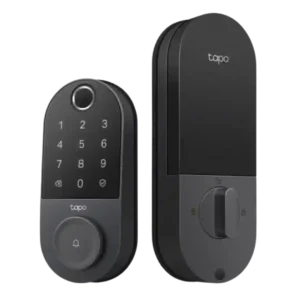
#1 Tapo Smart Door Lock DL110
4.4
12 reviews

Choose the Tapo DL110 if you want fast fingerprint entry, strong app control, long battery life, and premium features under a lower price. Skip it if your door/strike alignment is...

Pros: Value and Price, Lock/unlock speed

Cons: Existing hardware reuse, Door compatibility (deadbolt fit)
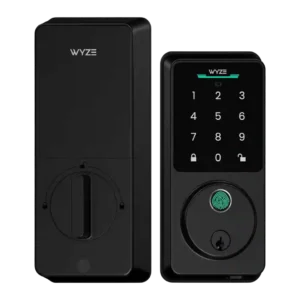
#2 Lockin Veno Pro Smart Deadbolt Lock
4.3
12 reviews

Choose the Lockin Veno Pro if you want touchless palm unlocking, local video storage, and one device for lock plus doorbell. Skip it if you need polished Matter features, discreet...

Pros: Lock/unlock speed, Wi-Fi

Cons: Feature additions via updates, Warranty and support

#3 Wyze Auto-Lock Bolt v2 Smart Lock
4.3
8 reviews

Choose the Wyze Lock Bolt v2 for low-cost Wi-Fi, fast fingerprint entry, and flexible codes. Skip it if you need Matter/HomeKit support, rechargeable batteries, or stronger door-sense behavior.

Pros: Lock/unlock speed, Keypad

Cons: Door-sense, Battery
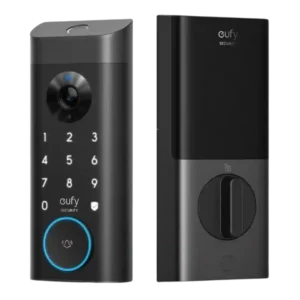
#4 myQ Secure View 3-in-1 Smart Lock
4.3
7 reviews

Choose it if you want a fast, camera-equipped smart lock with strong biometric options and myQ ecosystem control. Skip it if open smart-home integrations, subscription-free advanced alerts, or a basic...

Pros: Lock/unlock speed, Locking motor

Cons: Smart-home integration (Alexa, Google