Access logs
P1
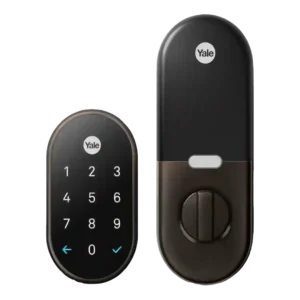
Product 1: Google Nest x Yale Smart...
4.4
Reviewers consistently liked the event history and activity timeline, which showed lock use, code use, and who came or went.
P2
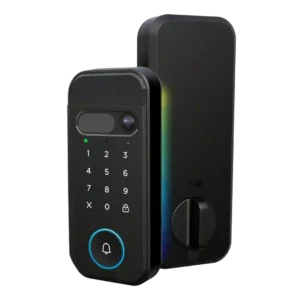
Product 2: myQ Secure View 3-in-1 Smart...
4.1
The app can associate access with individual PINs or users, giving at least basic visibility into who opened the door.
App
P1
Product 1: Google Nest x Yale Smart...
4.3
The Nest app was usually praised as simple and capable, though one review reported early crashes and hangs during setup and control.
P2
Product 2: myQ Secure View 3-in-1 Smart...
4.4
Reviewers consistently describe the myQ app as central to setup, settings, unlocking, device management, and camera/lock control.
Auto-lock
P1
Product 1: Google Nest x Yale Smart...
4.3
Auto-lock was a reliable strength, especially with Home/Away Assist or configurable delay options, but it does not auto-unlock.
P2
Product 2: myQ Secure View 3-in-1 Smart...
4.6
Auto-lock evidence is strong, including unknown-person locking, face-based lock/unlock automation, and a configurable 90-second autolock delay.
Backset compatibility
P1
Product 1: Google Nest x Yale Smart...
4.0
Door backset and latch fit matter: the lock can fit standard setups, but reviewers stress checking measurements and alignment first.
P2
Product 2: myQ Secure View 3-in-1 Smart...
4.5
The hands-on install shows adjustable backset handling, including the common 2-3/8 and 2-3/4 inch style positions.
Battery
P1
Product 1: Google Nest x Yale Smart...
4.2
Battery coverage was strong, with AA batteries lasting around a year or longer and 9V emergency power available when depleted.
P2
Product 2: myQ Secure View 3-in-1 Smart...
4.2
Battery feedback is mostly positive around six-month claims and rechargeable design, with one caveat that the initial charge took several hours.
Bluetooth
P1
Product 1: Google Nest x Yale Smart...
1.9
Bluetooth-style proximity unlocking was a weakness because reviewers noted the lock lacks approach-based or Bluetooth auto-unlock behavior.
P2
Product 2: myQ Secure View 3-in-1 Smart...
3.8
Bluetooth appears during setup or internal hardware discussion, but the review evidence is limited and not performance-focused.
Build quality and durability
P1
Product 1: Google Nest x Yale Smart...
4.3
Build quality was generally strong, with reviewers calling the hardware sturdy, sleek, solid, stylish, and high quality.
P2
Product 2: myQ Secure View 3-in-1 Smart...
4.5
Hands-on reviewers describe the exterior as dense, secure, and well built, with general quality impressions that are strongly positive.
Camera and doorbell performance
P1
Product 1: Google Nest x Yale Smart...
3.0
Nest camera and doorbell ties were useful inside the Nest app, but reviewers wanted tighter Hello/video-feed integration.
P2
Product 2: myQ Secure View 3-in-1 Smart...
4.4
Camera and doorbell evidence is broad: reviewers cite 2K HDR video, wide-angle viewing, color night vision, two-way audio, and doorbell/camera consolidation.
Door-sense
P1
Product 1: Google Nest x Yale Smart...
1.8
Door-sense evidence was negative: reviewers wanted a door sensor and noted auto-lock could throw the bolt while the door was open.
P2
Product 2: myQ Secure View 3-in-1 Smart...
4.5
Door-sense is supported by the included magnetic open/closed sensor and app feedback that distinguishes a door being ajar from closed.
Door compatibility (deadbolt fit)
P1
Product 1: Google Nest x Yale Smart...
3.7
Deadbolt fit was mostly standard-door friendly, but several reviewers had to adjust frames, holes, or strike plates for smooth operation.
P2
Product 2: myQ Secure View 3-in-1 Smart...
3.8
Door fit is workable for deadbolt-style installs, though one reviewer needed to drill and prep a door that did not already have a deadbolt.
Existing hardware reuse
P1
Product 1: Google Nest x Yale Smart...
3.7
The lock reuses the door conceptually as a deadbolt replacement and can preserve the doorknob, but it replaces the existing deadbolt hardware.
P2
Product 2: myQ Secure View 3-in-1 Smart...
2.5
Existing hardware reuse is limited because the lock replaces the deadbolt and may require new drilling if the door is not already prepared.
Feature additions via updates
P1
Product 1: Google Nest x Yale Smart...
3.4
Feature-update evidence was mixed but promising, with Google Assistant and Nest integrations described as arriving or promised through software.
P2Product 2: myQ Secure View 3-in-1 Smart...
No score yetGuest Codes and Access
P1
Product 1: Google Nest x Yale Smart...
4.2
Guest codes were a major strength, with expiring, scheduled, or temporary codes praised, though one test saw frequent keycode-generation errors.
P2
Product 2: myQ Secure View 3-in-1 Smart...
4.4
Guest and temporary access are supported through PIN codes, user-specific pins, and quick passes for short-term access.
Hub requirement
P1
Product 1: Google Nest x Yale Smart...
3.9
A Nest Connect or Nest Guard is central to the experience; reviewers accepted it but consistently flagged it as a required extra hub.
P2
Product 2: myQ Secure View 3-in-1 Smart...
4.2
Review evidence points to direct Wi-Fi setup and optional accessories rather than a clearly required hub, though no review gives a formal no-hub statement.
Installation and Setup
P1
Product 1: Google Nest x Yale Smart...
4.0
Installation was usually straightforward with app or voice guidance, but several reviewers needed alignment, frame, or setup troubleshooting.
P2
Product 2: myQ Secure View 3-in-1 Smart...
4.4
Setup is usually described as clear or easy, but the most detailed install shows extra work for drilling, strike prep, calibration, and alignment.
Key override reliability
P1
Product 1: Google Nest x Yale Smart...
1.7
Key override reliability was weak because the lock has no physical key; reviewers relied instead on keypad access or 9V emergency power.
P2
Product 2: myQ Secure View 3-in-1 Smart...
4.2
A physical key remains available as a backup, with reviewers noting included keys and a concealed keyhole under the doorbell cover.
Keypad
P1
Product 1: Google Nest x Yale Smart...
3.9
The keypad was convenient and glove-friendly, but some reviewers disliked the required checkmark step or found touch feedback inconsistent.
P2
Product 2: myQ Secure View 3-in-1 Smart...
4.2
The keypad supports PIN entry and is described as visible during setup, with one reviewer noting the touch-sensitive design instead of physical buttons.
Locking motor
P1
Product 1: Google Nest x Yale Smart...
4.1
The locking motor was smooth and quiet, with chimes or audible confirmation and one review calling it among the quietest locks tested.
P2
Product 2: myQ Secure View 3-in-1 Smart...
4.3
Motor operation is described positively overall, with smooth inside locking and working app lock/unlock, though one install needed strike cleanup.
Locking reliability
P1
Product 1: Google Nest x Yale Smart...
4.3
Locking reliability was one of the strongest themes, with multiple reviewers reporting dependable locking and unlocking once installed correctly.
P2
Product 2: myQ Secure View 3-in-1 Smart...
4.4
Hands-on testing found the unlock methods working after setup, with reliability depending partly on correct strike alignment.
Notifications
P1
Product 1: Google Nest x Yale Smart...
4.4
Notifications were strong, with reviewers receiving alerts for lock events, battery status, offline status, and failed lock behavior.
P2
Product 2: myQ Secure View 3-in-1 Smart...
3.9
Notifications include context-aware alerts, motion alerts, access alerts, and paid detection labels that identify what triggered an alert.
Physical attack resistance
P1
Product 1: Google Nest x Yale Smart...
4.2
Physical resistance evidence was positive, from ANSI Grade 2 mentions, sturdy construction, and stronger strike-plate screw installation.
P2
Product 2: myQ Secure View 3-in-1 Smart...
3.0
Physical resistance evidence is limited: one review says no BHMA/ANSI grade is disclosed, while another notes a stronger strike component.
Pick/drill resistance (if rated)
P1
Product 1: Google Nest x Yale Smart...
4.0
Pick resistance was supported by the keyless design and fingerprint-resistant touchscreen, but drill resistance was not directly evaluated.
P2
Product 2: myQ Secure View 3-in-1 Smart...
2.3
Pick or drill resistance is not independently tested; the only related evidence is the lack of a disclosed BHMA/ANSI grade.
Remote access
P1
Product 1: Google Nest x Yale Smart...
4.4
Remote access was a core advantage through the app once Nest Connect or Nest Guard enabled internet connectivity.
P2
Product 2: myQ Secure View 3-in-1 Smart...
4.5
Remote access is well supported, with app-based lock/unlock control described for letting someone in when the owner is away.
Security features (encryption)
P1
Product 1: Google Nest x Yale Smart...
4.1
Security features centered on privacy mode, keypad disabling, passcode limits, tamper or wrong-code alerts, and Grade 2 hardware rather than encryption details.
P2
Product 2: myQ Secure View 3-in-1 Smart...
4.5
Security evidence is strongest for biometric privacy because one reviewer says face scans stay on the device rather than the cloud.
Smart-home integration (Alexa, Google, Siri, HomeKit, Matter, Thread)
P1
Product 1: Google Nest x Yale Smart...
3.1
Smart-home integration was the main tradeoff: it works best in Nest, but Alexa, HomeKit, SmartThings, IFTTT, and Z-Wave support were limited or absent.
P2
Product 2: myQ Secure View 3-in-1 Smart...
2.7
Integration is mixed: myQ ecosystem integration is presented as a strength, but popular third-party platforms are described as unsupported or previously restricted.
Tamper detection sensitivity
P1
Product 1: Google Nest x Yale Smart...
4.0
Tamper detection had direct evidence from CNET, which noted alerts for tampering and repeated incorrect password attempts.
P2Product 2: myQ Secure View 3-in-1 Smart...
No score yetTouchscreen
P1
Product 1: Google Nest x Yale Smart...
4.1
The touchscreen looked premium and lit up clearly, but some reviewers found it resistive, fiddly, or lacking button feedback.
P2
Product 2: myQ Secure View 3-in-1 Smart...
3.7
The front keypad is touch-sensitive, though one reviewer notes physical buttons may be a personal preference for some users.
User access management
P1
Product 1: Google Nest x Yale Smart...
4.2
User access management was generally strong with scheduled, expiring, and revocable codes, though one review hit app errors during sharing.
P2
Product 2: myQ Secure View 3-in-1 Smart...
4.5
User management is strong, with evidence for managing users, assigning PINs, adding fingerprints, adding another user, and short-term access.
Value and Price
P1
Product 1: Google Nest x Yale Smart...
3.4
Value depended heavily on the Nest ecosystem: reviewers saw the lock as pricey but worthwhile for Nest users who prize reliability.
P2
Product 2: myQ Secure View 3-in-1 Smart...
3.3
Value is mixed: reviewers like the all-in-one design, but price, overkill for simple needs, and subscription-gated features create clear caveats.
Voice control
P1
Product 1: Google Nest x Yale Smart...
2.6
Voice control was mixed across review timing: some reviews found no assistant support, while later evidence described Google Assistant lock-only support.
P2
Product 2: myQ Secure View 3-in-1 Smart...
1.5
Voice-control evidence is negative because reviewers cite removed Google Assistant support and lack of Amazon Alexa or Google Home integration.
Warranty and support
P1
Product 1: Google Nest x Yale Smart...
4.2
Warranty and support evidence was positive but sparse, with warranty coverage and Nest Pro installation support mentioned.
P2
Product 2: myQ Secure View 3-in-1 Smart...
2.0
Support evidence is a concern because one review highlights disabled third-party support and broader consumer skepticism about Chamberlain’s practices.
Weather resistance
P1
Product 1: Google Nest x Yale Smart...
4.7
Weather resistance was supported by wide temperature ratings, glove use, and reviewers contrasting it with conventional locks freezing.
P2
Product 2: myQ Secure View 3-in-1 Smart...
4.5
Weather evidence is positive, including the stated -4°F to 140°F range and hands-on praise for a moisture-sealing rubber gasket.
Wi-Fi
P1
Product 1: Google Nest x Yale Smart...
3.5
Wi-Fi was indirect through Nest Connect or Nest Guard, and reviewers sometimes reported distance or connection caveats.
P2
Product 2: myQ Secure View 3-in-1 Smart...
4.2
Wi-Fi support is directly shown in review evidence, including connection to a 2.4 GHz Wi-Fi network during setup.