Access logs
P1
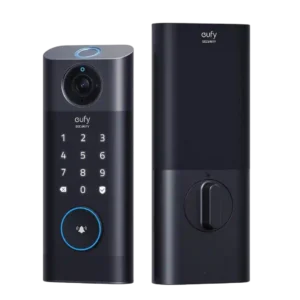
Product 1: eufy Video Smart Lock S330
4.8
Access logs were useful for seeing who came and went and which credential unlocked the door.
P2
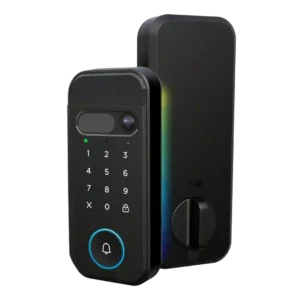
Product 2: myQ Secure View 3-in-1 Smart...
4.0
Access-log evidence was limited but positive, with one reviewer noting individual pins can show who opened the door.
App
P1
Product 1: eufy Video Smart Lock S330
4.6
The app was usually described as smooth, easy, useful, or user-friendly across reviews.
P2
Product 2: myQ Secure View 3-in-1 Smart...
4.5
The app setup experience was praised as simple, with phone control presented as easy to use.
Auto-lock
P1
Product 1: eufy Video Smart Lock S330
4.3
Auto-lock was valued for peace of mind, though one reviewer cautioned against using timed auto-lock without reliable door-position awareness.
P2
Product 2: myQ Secure View 3-in-1 Smart...
4.0
Auto-lock support was viewed as useful and configurable, though the evidence centers on one reviewer’s setup experience.
Battery
P1
Product 1: eufy Video Smart Lock S330
4.4
Battery life was generally praised as long-lasting, though full charging can take several hours.
P2
Product 2: myQ Secure View 3-in-1 Smart...
4.0
Battery impressions were mixed: reviewers liked the rechargeable pack, but one noted a long initial charge time.
Build quality and durability
P1
Product 1: eufy Video Smart Lock S330
4.8
Reviewers consistently praised the heavy, metal-feeling construction and durable build.
P2
Product 2: myQ Secure View 3-in-1 Smart...
4.8
Reviewers praised the physical construction, describing the lock as a great quality product and super well built.
Camera and doorbell performance
P1
Product 1: eufy Video Smart Lock S330
4.3
Camera and doorbell performance was generally strong, especially video clarity, but motion timing, distance, and visitor button clarity were recurring caveats.
P2
Product 2: myQ Secure View 3-in-1 Smart...
4.7
Camera and doorbell evidence was positive, with praise for clear visitor video, a wide-angle view, and the integrated 2K camera-doorbell design.
Door-sense
P1
Product 1: eufy Video Smart Lock S330
3.0
Door-sense evidence was mixed: departure detection was useful, but one reviewer criticized the lock for not knowing whether the door was open.
P2
Product 2: myQ Secure View 3-in-1 Smart...
4.0
Door-sense worked in the reviewer’s test, with the app state updating once the door closed.
Door compatibility (deadbolt fit)
P1
Product 1: eufy Video Smart Lock S330
2.7
Door fit was context-dependent: some installations worked smoothly, while shallow strike plates, alignment, and size constraints caused problems.
P2
Product 2: myQ Secure View 3-in-1 Smart...
4.0
Door-fit evidence was limited but positive: one reviewer’s older steel door prep worked with the included jig and deadbolt drilling guidance.
Facial recognition
P1Product 1: eufy Video Smart Lock S330
No score yet
P2
Product 2: myQ Secure View 3-in-1 Smart...
5.0
Facial recognition drew some of the strongest praise, with reviewers calling it cool, incredible, and very fast.
Feature additions via updates
P1
Product 1: eufy Video Smart Lock S330
4.5
A post-review feature addition impressed one long-term reviewer by making live-view unlocking more convenient.
P2Product 2: myQ Secure View 3-in-1 Smart...
No score yetFingerprint
P1
Product 1: eufy Video Smart Lock S330
4.4
Fingerprint performance was strongly positive in most reviews, but one reviewer had repeated failed reads.
P2
Product 2: myQ Secure View 3-in-1 Smart...
5.0
Fingerprint access performed well in hands-on testing, with the reviewer saying the biometrics worked completely.
Guest Codes and Access
P1
Product 1: eufy Video Smart Lock S330
5.0
Guest access was a standout use case, with reviewers liking temporary access, contractor use, and removable access.
P2
Product 2: myQ Secure View 3-in-1 Smart...
4.5
Guest access was praised for service or pet-care scenarios where the owner could let someone in without sharing a key.
Industrial design
P1
Product 1: eufy Video Smart Lock S330
4.0
Design was generally liked for its sleek or elegant look, though its large size stood out as a drawback.
P2
Product 2: myQ Secure View 3-in-1 Smart...
4.5
The lock’s integrated design was praised for reducing separate-device clutter and for looking slick and well designed.
Installation and Setup
P1
Product 1: eufy Video Smart Lock S330
4.2
Installation was often described as easy or manageable, but door fit and alignment created trouble for some reviewers.
P2
Product 2: myQ Secure View 3-in-1 Smart...
4.5
Hands-on reviewers generally found installation approachable, praising complete hardware, easy installation, clear directions, and a smooth process, with one longer install still going fairly smoothly.
Keypad
P1
Product 1: eufy Video Smart Lock S330
4.3
Keypad and touchpad feedback was mostly positive, though one reviewer had wake-up/tap responsiveness issues.
P2
Product 2: myQ Secure View 3-in-1 Smart...
4.3
Keypad evidence was mixed: one reviewer preferred physical buttons, while another confirmed the pin code worked.
Lock/unlock speed
P1
Product 1: eufy Video Smart Lock S330
5.0
When working well, unlocking was described as instant or very fast, especially through fingerprint recognition.
P2
Product 2: myQ Secure View 3-in-1 Smart...
5.0
Speed was a standout: one article cited two-second unlock latency, while a hands-on reviewer found face recognition extremely fast.
Locking motor
P1
Product 1: eufy Video Smart Lock S330
3.5
Motor feedback was split: one long-term reviewer found it solid, while another warned that small alignment resistance could stop locking.
P2
Product 2: myQ Secure View 3-in-1 Smart...
5.0
The interior locking action received strong praise from a reviewer who described it as super smooth.
Locking reliability
P1
Product 1: eufy Video Smart Lock S330
4.2
Reliability was mixed, ranging from flawless and better-than-prior locks to failures when alignment or one-touch locking was imperfect.
P2
Product 2: myQ Secure View 3-in-1 Smart...
4.5
A hands-on reviewer tested multiple unlock methods and found them working successfully.
Notifications
P1
Product 1: eufy Video Smart Lock S330
4.0
Notifications were mostly praised as quick and useful, but some reviewers reported missed or delayed motion events.
P2
Product 2: myQ Secure View 3-in-1 Smart...
3.8
Notification evidence was mixed: one review praised context-aware alerts, while another noted unsubscribed alerts lacked detection details.
Physical attack resistance
P1
Product 1: eufy Video Smart Lock S330
4.5
Physical security impressions were positive, centered on wanting a sturdier alternative to flimsy plastic doorbells.
P2Product 2: myQ Secure View 3-in-1 Smart...
No score yetRemote access
P1
Product 1: eufy Video Smart Lock S330
5.0
Remote access was a clear strength, with reviewers valuing lock control from the app while away.
P2
Product 2: myQ Secure View 3-in-1 Smart...
4.5
Remote access was praised for letting someone enter without needing a physical key handoff.
Security features (encryption)
P1
Product 1: eufy Video Smart Lock S330
3.5
Security/encryption evidence was limited but noted an encryption message before streaming, alongside privacy caution.
P2
Product 2: myQ Secure View 3-in-1 Smart...
5.0
Security handling for face scans was praised because the reviewer said scans stay on the device rather than going to the cloud.
Smart-home integration (Alexa, Google, Siri, HomeKit, Matter, Thread)
P1
Product 1: eufy Video Smart Lock S330
3.0
Smart-home integration was mixed because Alexa/Google support was useful, but reviewers noted the lack of Apple HomeKit, IFTTT, or Matter.
P2
Product 2: myQ Secure View 3-in-1 Smart...
2.7
Integration evidence was split: myQ ecosystem control was praised, but multiple reviews criticized or warned about limited popular smart-home platform support.
Touchscreen
P1
Product 1: eufy Video Smart Lock S330
3.8
Touchscreen feedback was split between responsive operation and needing repeated taps to wake it.
P2
Product 2: myQ Secure View 3-in-1 Smart...
3.5
The touch-sensitive keypad divided preference, with one reviewer noting some people may prefer physical buttons instead.
User access management
P1
Product 1: eufy Video Smart Lock S330
5.0
User management evidence was positive, especially around quickly adding additional users.
P2
Product 2: myQ Secure View 3-in-1 Smart...
4.0
User access management was described as easy for users, PIN codes, and alerts.
Value and Price
P1
Product 1: eufy Video Smart Lock S330
4.2
Most reviewers considered the price fair for the combined lock, camera, doorbell, fingerprint, and no-extra-fee package.
P2
Product 2: myQ Secure View 3-in-1 Smart...
3.3
Value depends heavily on use case: reviewers praised the feature bundle and recommendations, but flagged overkill, subscriptions, and fee concerns.