Access logs
P1
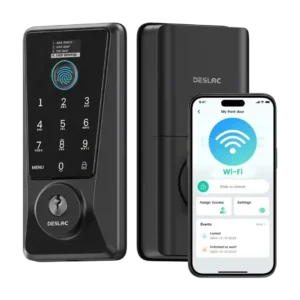
Product 1: Desloc D110 Plus Smart Lock
4.4
Access logs were useful for seeing lock history, entry timing, and who entered.
P2
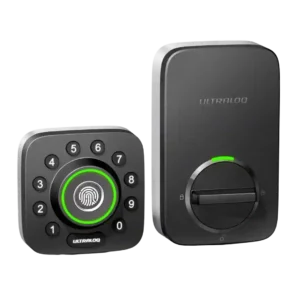
Product 2: ULTRALOQ U-Bolt Pro Smart Lock
4.2
Reviewers who discussed logs found them useful for seeing who entered, when access happened, and how the lock was used; notification-style detail was praised more often than criticized.
App
P1
Product 1: Desloc D110 Plus Smart Lock
4.4
The app was generally described as simple, easy, and user-friendly, with good access controls and setup flow.
P2
Product 2: ULTRALOQ U-Bolt Pro Smart Lock
3.7
The app drew mixed reactions: several reviewers found it intuitive or easy, while others reported connection hiccups, slow loading, or an unpolished interface.
Auto-lock
P1
Product 1: Desloc D110 Plus Smart Lock
3.9
Auto-lock was praised for peace of mind and convenience, but multiple reviewers flagged limits around timing and open-door behavior.
P2
Product 2: ULTRALOQ U-Bolt Pro Smart Lock
3.8
Auto-lock was valued for peace of mind, especially with door sensing, but multiple reviewers disliked that it could lock too quickly or surprise them by being enabled by default.
Auto-relock after failed attempts
P1
Product 1: Desloc D110 Plus Smart Lock
2.5
Failed-attempt lockout drew criticism from one reviewer because the settings and behavior were not clearly adjustable or explained.
P2Product 2: ULTRALOQ U-Bolt Pro Smart Lock
No score yetBattery
P1
Product 1: Desloc D110 Plus Smart Lock
4.1
Battery impressions were good overall but not exceptional, ranging from solid and efficient to fine but not incredible.
P2
Product 2: ULTRALOQ U-Bolt Pro Smart Lock
3.7
Battery impressions were mixed: some reviewers expected months of use and liked low-battery warnings, while others worried about fast drain and vague battery reporting.
Bluetooth
P1Product 1: Desloc D110 Plus Smart Lock
No score yet
P2
Product 2: ULTRALOQ U-Bolt Pro Smart Lock
4.0
Bluetooth pairing was generally smooth, with reviewers appreciating quick pairing and local control, though it was less central than Wi-Fi in the overall experience.
Build quality and durability
P1
Product 1: Desloc D110 Plus Smart Lock
4.1
Most reviewers described the lock as solid, sturdy, or durable for the price, while one found the construction quality questionable.
P2
Product 2: ULTRALOQ U-Bolt Pro Smart Lock
4.7
Build quality was a clear strength, with reviewers repeatedly describing the lock as solid, durable, heavy-duty, or tank-like.
Door-sense
P1
Product 1: Desloc D110 Plus Smart Lock
2.2
Door-sense was a clear weakness because reviewers noted there is no door sensor and the bolt can extend while the door is open.
P2
Product 2: ULTRALOQ U-Bolt Pro Smart Lock
4.4
Door-sense feedback was positive where tested; reviewers liked the added sensor and remote reporting of open/closed and lock/unlock state.
Door compatibility (deadbolt fit)
P1
Product 1: Desloc D110 Plus Smart Lock
2.8
One reviewer cautioned that very thick doors may require modification even though standard doors worked well.
P2Product 2: ULTRALOQ U-Bolt Pro Smart Lock
No score yetFeature additions via updates
P1
Product 1: Desloc D110 Plus Smart Lock
5.0
The 90-day follow-up praised Desloc for frequent firmware updates and meaningful improvements.
P2
Product 2: ULTRALOQ U-Bolt Pro Smart Lock
4.5
Reviewers viewed the Wi-Fi model’s added capabilities as meaningful improvements over earlier versions, especially built-in Wi-Fi, door sensing, and Smart Auto Lock.
Fingerprint
P1
Product 1: Desloc D110 Plus Smart Lock
4.4
Fingerprint access was one of the most praised areas, with many fast and accurate reports, though PCWorld found it hit-and-miss.
P2
Product 2: ULTRALOQ U-Bolt Pro Smart Lock
4.6
Fingerprint access was one of the strongest areas, with most reviewers calling it fast, reliable, accurate, or flawless; the main caveat was angle sensitivity in one review.
Guest Codes and Access
P1
Product 1: Desloc D110 Plus Smart Lock
4.6
Guest access was praised for one-pass, scheduled, IC-card, and Airbnb-style temporary access options.
P2
Product 2: ULTRALOQ U-Bolt Pro Smart Lock
4.7
Guest and temporary access were repeatedly praised, especially scheduled codes for cleaners, dog walkers, renters, family, and one-time visitors.
Hub requirement
P1
Product 1: Desloc D110 Plus Smart Lock
4.7
Reviewers consistently liked that no separate hub or gateway is required.
P2
Product 2: ULTRALOQ U-Bolt Pro Smart Lock
3.3
Hub feedback depended on version and setup: built-in Wi-Fi was praised for removing a bridge, while bridge-based versions drew complaints about range and pairing friction.
Industrial design
P1
Product 1: Desloc D110 Plus Smart Lock
4.3
Industrial design was praised as sleek, ergonomic, modern, and premium-looking rather than overly bulky.
P2
Product 2: ULTRALOQ U-Bolt Pro Smart Lock
3.8
Design opinions varied sharply: some liked the compact or satin finish, while others found the look industrial, unattractive, or lacking curb appeal.
Installation and Setup
P1
Product 1: Desloc D110 Plus Smart Lock
4.3
Installation was usually described as quick and simple, but one reviewer had jammed bolts and another noted a short cord and over-tightening sensitivity.
P2
Product 2: ULTRALOQ U-Bolt Pro Smart Lock
4.3
Installation was usually described as easy, quick, or straightforward on the newer Wi-Fi version, but older and bridge-based experiences included serious setup frustrations.
Key override reliability
P1
Product 1: Desloc D110 Plus Smart Lock
4.4
Backup mechanical keys were valued as a practical fallback, especially for power loss.
P2
Product 2: ULTRALOQ U-Bolt Pro Smart Lock
4.3
Physical key backup was treated as a reassuring safety feature, especially for dead batteries, forgotten phones, or other electronic access failures.
Keypad
P1
Product 1: Desloc D110 Plus Smart Lock
3.7
Keypad impressions were mixed: PCMag found it responsive and well-lit, PCWorld found it slow to wake, and another liked the soft glow.
P2
Product 2: ULTRALOQ U-Bolt Pro Smart Lock
4.3
The physical keypad was mostly praised for tactile, accurate buttons and anti-peep use, though one reviewer said the circular layout slowed code entry.
Lock/unlock speed
P1
Product 1: Desloc D110 Plus Smart Lock
4.4
Speed was mostly positive for voice and remote response, though one reviewer found it fast but slower than pricier locks.
P2
Product 2: ULTRALOQ U-Bolt Pro Smart Lock
4.5
Locking and unlocking were typically fast, with several reviewers praising instant response; Magic Shake was the notable speed-related exception.
Locking motor
P1
Product 1: Desloc D110 Plus Smart Lock
3.5
Motor feel was mixed: one reviewer found it smooth and quiet, while another warned that over-tightening could make the bolt struggle.
P2
Product 2: ULTRALOQ U-Bolt Pro Smart Lock
4.3
The motor generally felt smooth and quick, but some reviewers found the locking action louder or shakier than competing locks.
Locking reliability
P1
Product 1: Desloc D110 Plus Smart Lock
4.7
Reliability was a strength across several reviews, with reports of perfect testing, stable 90-day use, and natural daily fit.
P2
Product 2: ULTRALOQ U-Bolt Pro Smart Lock
4.7
Core locking reliability was very strong overall, with most reviewers reporting no failures, smooth operation, or dependable keyless entry.
Notifications
P1
Product 1: Desloc D110 Plus Smart Lock
3.6
Notifications were useful for awareness and security, but one reviewer wanted push notifications instead of emergency emails that went to spam.
P2
Product 2: ULTRALOQ U-Bolt Pro Smart Lock
3.8
Notifications were useful for low battery, remote status, and entry alerts, but one reviewer criticized the lack of blanket notifications across users.
On-device display
P1
Product 1: Desloc D110 Plus Smart Lock
4.3
Reviewers repeatedly liked the small on-lock display, describing it as helpful for setup, status, battery, alerts, and local control, though one saw it as basic rather than groundbreaking.
P2Product 2: ULTRALOQ U-Bolt Pro Smart Lock
No score yetPhysical attack resistance
P1
Product 1: Desloc D110 Plus Smart Lock
3.8
Physical resistance evidence was moderate: reviewers cited BHMA certification and durability, but one emphasized it is the lowest acceptable commercial level.
P2
Product 2: ULTRALOQ U-Bolt Pro Smart Lock
4.2
Physical security impressions were positive where discussed, with reviewers valuing stronger screws, reinforced security, and ANSI-related strength claims.
Remote access
P1
Product 1: Desloc D110 Plus Smart Lock
4.6
Remote access was a major convenience, especially for managing the lock away from home or unlocking for guests.
P2
Product 2: ULTRALOQ U-Bolt Pro Smart Lock
4.5
Remote access was a major strength when Wi-Fi or a bridge was working, letting reviewers lock, unlock, and check status away from home; Wi-Fi/cloud latency was the main caveat.
Security features (encryption)
P1
Product 1: Desloc D110 Plus Smart Lock
4.3
Security features such as anti-peeping and anti-hijacking were viewed as useful or reassuring, with PCMag also noting enhanced security options.
P2
Product 2: ULTRALOQ U-Bolt Pro Smart Lock
4.6
Encryption and account/security features were generally reassuring, but security confidence came mostly from reviewer judgments rather than deep technical testing.
Smart-home integration (Alexa, Google, Siri, HomeKit, Matter, Thread)
P1
Product 1: Desloc D110 Plus Smart Lock
2.8
Smart-home integration was the main limitation: Alexa and Google were supported, but reviewers missed HomeKit, Matter, IFTTT, or broader security-system support.
P2
Product 2: ULTRALOQ U-Bolt Pro Smart Lock
4.2
Smart-home integration was broad and useful across Alexa, Google, IFTTT, SmartThings, and routines, but HomeKit, Amazon Key, and 2.4 GHz setup limits created tradeoffs.
Two-factor authentication availability
P1Product 1: Desloc D110 Plus Smart Lock
No score yet
P2
Product 2: ULTRALOQ U-Bolt Pro Smart Lock
2.0
Two-factor authentication was a clear weakness in the Reviewed review, which criticized the app for lacking this extra account-protection layer.
User access management
P1
Product 1: Desloc D110 Plus Smart Lock
4.5
User access management was a strong point, with praise for simple schedules, temporary codes, and control over different users.
P2
Product 2: ULTRALOQ U-Bolt Pro Smart Lock
4.7
User access management was a standout for families and rentals, with reviewers praising individual profiles, schedules, temporary users, and revocable access.
Value and Price
P1
Product 1: Desloc D110 Plus Smart Lock
4.4
Value was the broadest strength because most reviewers saw a lot of features for the price, although PCWorld rejected the value claim after testing.
P2
Product 2: ULTRALOQ U-Bolt Pro Smart Lock
4.4
Value was viewed favorably overall: even when called expensive, reviewers often concluded the lock was worth it because of its feature set and access flexibility.
Voice control
P1
Product 1: Desloc D110 Plus Smart Lock
4.6
Voice control worked well in the reviews that tested it, especially with Alexa and Google Assistant.
P2
Product 2: ULTRALOQ U-Bolt Pro Smart Lock
4.3
Voice control worked well in the reviews that tested it, especially Alexa setup and commands, though some reviewers saw it as useful only in limited scenarios.
Weather resistance
P1
Product 1: Desloc D110 Plus Smart Lock
4.2
Weather resistance was generally viewed positively, including rain/outdoor use, though one reviewer called the IP54 rating tame.
P2
Product 2: ULTRALOQ U-Bolt Pro Smart Lock
4.0
Weather resistance was supported by limited real-world evidence and positive expectations, with reviewers noting temperature performance and IP65 confidence.
Wi-Fi
P1
Product 1: Desloc D110 Plus Smart Lock
4.6
Built-in Wi-Fi was praised for direct connectivity and remote use, and one follow-up noted updates that improved Wi-Fi stability and power use.
P2
Product 2: ULTRALOQ U-Bolt Pro Smart Lock
3.7
Wi-Fi was the biggest technical split: built-in Wi-Fi and remote access were praised, but 2.4 GHz requirements, pairing trouble, and slower cloud response drew criticism.