App
P1
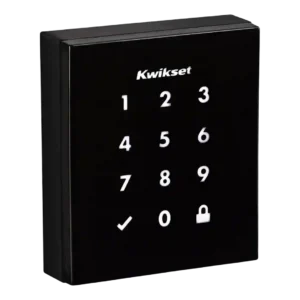
Product 1: Kwikset Obsidian Smart Lock
3.5
Reviewers liked app-based control when a compatible platform supported it, but the lock lost points because it lacks its own app and some hub apps could not manage codes.
P2
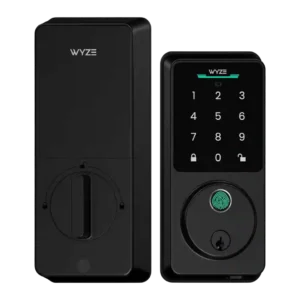
Product 2: Wyze Auto-Lock Bolt v2 Smart...
3.8
The app is useful but uneven: one review calls it overloaded during onboarding, while another praises its automation area as the coolest part of the app.
Auto-lock
P1
Product 1: Kwikset Obsidian Smart Lock
4.3
Auto-lock was reliable and easy to set up in stronger reviews, though one transcript noted that changing related customization switches required a screwdriver.
P2
Product 2: Wyze Auto-Lock Bolt v2 Smart...
4.3
Auto-lock is viewed positively for end-of-day or accidental-unlocked protection, with praise for configurable lock behavior.
Battery
P1
Product 1: Kwikset Obsidian Smart Lock
2.8
Battery feedback was mixed: one preview praised warning before batteries died, while later user-oriented evidence reported six-month or five-month battery life concerns.
P2
Product 2: Wyze Auto-Lock Bolt v2 Smart...
2.5
Battery feedback is mixed: one review notes an eight-month target is a slight hit, while another dislikes the non-rechargeable AA approach as a step back.
Build quality and durability
P1
Product 1: Kwikset Obsidian Smart Lock
4.5
Build quality was praised in the clearest durability evidence, with the lock described as sturdy and jam-free during testing.
P2
Product 2: Wyze Auto-Lock Bolt v2 Smart...
4.8
Build quality is praised, with reviews describing the upgraded body as closer to premium brands and the build as awesome.
Door compatibility (deadbolt fit)
P1
Product 1: Kwikset Obsidian Smart Lock
4.0
Door fit looked favorable for standard replacements, with the reviewer saying it should be almost as easy to install in most standard lock enclosures.
P2Product 2: Wyze Auto-Lock Bolt v2 Smart...
No score yetFingerprint
P1
Product 1: Kwikset Obsidian Smart Lock
4.4
Fingerprint-related security earned consistent praise because SecureScreen and coating features reduced the risk of visible touch patterns revealing codes.
P2
Product 2: Wyze Auto-Lock Bolt v2 Smart...
4.7
Fingerprint access is one of the strongest themes, with reviewers repeatedly praising speed, accuracy, convenience, and the learning scanner, though one notes it is not perfect.
Guest Codes and Access
P1
Product 1: Kwikset Obsidian Smart Lock
3.8
Guest access was one of the most mixed areas: reviewers liked multiple codes and temporary scheduling in some versions, but criticized limited code counts and remote-code gaps in others.
P2
Product 2: Wyze Auto-Lock Bolt v2 Smart...
4.8
Guest and code access is praised for flawless one-time codes and flexible household access options.
Hub requirement
P1
Product 1: Kwikset Obsidian Smart Lock
3.0
Hub requirements split reviewers: Z-Wave was welcomed by smart-home users, while others treated the required hub as an added burden.
P2
Product 2: Wyze Auto-Lock Bolt v2 Smart...
5.0
Reviewers praise the lack of a hub requirement because Wi-Fi removes the need for helper devices and puts the lock closer to pricier competitors.
Industrial design
P1
Product 1: Kwikset Obsidian Smart Lock
4.5
Design was the strongest consensus attribute, with repeated praise for the sleek, minimalist, modern, key-free look.
P2
Product 2: Wyze Auto-Lock Bolt v2 Smart...
3.8
Design reactions are generally positive but not unqualified: one review calls it clean but uninspired, while others praise the tempered-glass update and lower profile.
Installation and Setup
P1
Product 1: Kwikset Obsidian Smart Lock
3.5
Installation ranged from simple and thoughtfully guided to frustrating, with one reviewer blaming unclear instructions and bolt machining while others completed setup easily.
P2
Product 2: Wyze Auto-Lock Bolt v2 Smart...
4.0
Setup is mostly viewed as DIY-friendly, but one review reports failed first onboarding/calibration attempts, keeping the overall impression mixed.
Keypad
P1
Product 1: Kwikset Obsidian Smart Lock
4.5
The keypad was praised for intuitive everyday locking and unlocking.
P2
Product 2: Wyze Auto-Lock Bolt v2 Smart...
5.0
The keypad earns praise in one hands-on review for fast, seamless unlocking.
Lock/unlock speed
P1
Product 1: Kwikset Obsidian Smart Lock
3.8
Locking speed was mixed, with one review praising prompt Alexa locking while another noticed the lock ran a bit slower than normal.
P2
Product 2: Wyze Auto-Lock Bolt v2 Smart...
5.0
Unlocking speed is strongly positive, with reviewers calling keypad/fingerprint unlocking speedy, seamless, and quick.
Locking motor
P1
Product 1: Kwikset Obsidian Smart Lock
2.5
The locking motor drew a clear complaint for being quite loud, even though the same review did not report jams.
P2
Product 2: Wyze Auto-Lock Bolt v2 Smart...
4.0
The motor is praised for quiet operation, though one review says the lock chimes enough that the reviewer turned operation volume off.
Locking reliability
P1
Product 1: Kwikset Obsidian Smart Lock
4.5
Locking reliability was positive overall, with reviewers reporting that auto-relock worked every time, the bolt worked fine after setup, and the mechanism did not jam.
P2
Product 2: Wyze Auto-Lock Bolt v2 Smart...
4.8
Locking reliability is praised, with one review saying the lock works great and another describing it as built for everyday reliability.
Physical attack resistance
P1
Product 1: Kwikset Obsidian Smart Lock
4.5
Physical attack resistance was praised because the keywayless design removes common keyed-entry attack paths.
P2
Product 2: Wyze Auto-Lock Bolt v2 Smart...
4.0
Physical durability/security is treated as good enough for typical homes, with one review citing suburban suitability and another praising durability.
Pick/drill resistance (if rated)
P1
Product 1: Kwikset Obsidian Smart Lock
4.5
Pick and bump-key resistance was praised because ditching the keyway removed the risk of picking or forced entry with a bump key.
P2Product 2: Wyze Auto-Lock Bolt v2 Smart...
No score yetRemote access
P1
Product 1: Kwikset Obsidian Smart Lock
3.3
Remote access depended heavily on the platform: it worked well through Wink in one review, but other evidence tied remote control to a more expensive hub-enabled setup.
P2
Product 2: Wyze Auto-Lock Bolt v2 Smart...
5.0
Remote access is a major strength: reviewers praise true remote control, app operation from far away, and full control from anywhere.
Security features (encryption)
P1
Product 1: Kwikset Obsidian Smart Lock
4.3
Security features were praised across reviews, especially SecureScreen, which reviewers said worked well and helped prevent code guessing from fingerprints.
P2
Product 2: Wyze Auto-Lock Bolt v2 Smart...
4.5
Security features are praised around anti-peep PIN protection and local biometric storage, which reviewers frame as reassuring.
Smart-home integration (Alexa, Google, Siri, HomeKit, Matter, Thread)
P1
Product 1: Kwikset Obsidian Smart Lock
3.7
Smart-home integration was useful but ecosystem-dependent: Z-Wave, SmartThings, Wink, Alexa, and other platforms worked well in some cases, while HomeKit and Google limitations hurt compatibility.
P2
Product 2: Wyze Auto-Lock Bolt v2 Smart...
3.2
Smart-home integration is mixed: the lock fits Wyze well and supports common assistants, but limited third-party support and missing Matter/HomeKit remain caveats.
Tamper detection sensitivity
P1Product 1: Kwikset Obsidian Smart Lock
No score yet
P2
Product 2: Wyze Auto-Lock Bolt v2 Smart...
4.5
Tamper detection is viewed positively as an added security layer, with one demo showing the lock reacting to repeated failed attempts.
Touchscreen
P1
Product 1: Kwikset Obsidian Smart Lock
3.9
Touchscreen feedback was mostly positive for responsiveness and security, but reviewers also noted wake-up misses and glossy smudging.
P2
Product 2: Wyze Auto-Lock Bolt v2 Smart...
4.3
The touchscreen/touchpad is praised for a sleeker tempered-glass upgrade plus better smudge resistance and visibility.
User access management
P1
Product 1: Kwikset Obsidian Smart Lock
3.4
User access management varied sharply by version and platform, from strong scheduled and one-time code support to complaints about no expiring codes or no app-based code changes.
P2
Product 2: Wyze Auto-Lock Bolt v2 Smart...
5.0
User access management receives strong praise for being intuitive and fast.
Value and Price
P1
Product 1: Kwikset Obsidian Smart Lock
3.0
Value was divided: some reviewers considered it expensive once hubs or non-connected limitations were included, while one YouTube reviewer called the price good for a keyless Z-Wave lock.
P2
Product 2: Wyze Auto-Lock Bolt v2 Smart...
5.0
Value is the clearest strength, with reviewers repeatedly emphasizing sub-$100 pricing, feature density, and premium-like capabilities for the cost.
Voice control
P1
Product 1: Kwikset Obsidian Smart Lock
3.7
Voice control worked well when supported, especially Alexa locking and status checks, but other reviews emphasized that Alexa or Google control required a Z-Wave hub.
P2
Product 2: Wyze Auto-Lock Bolt v2 Smart...
4.5
Voice control is praised in the context of Alexa and Google Assistant hands-free control, though broader ecosystem limits remain separate caveats.
Weather resistance
P1
Product 1: Kwikset Obsidian Smart Lock
2.5
Sun and heat exposure was a concern in one user review because the black exterior became uncomfortable for children to touch.
P2
Product 2: Wyze Auto-Lock Bolt v2 Smart...
4.0
Weather resistance is adequate to positive: one review calls IP53 less impressive than typical, while others say it suits residential use and rain exposure.