Access history is available in some setups (and was highlighted in early coverage), but in practice it can depend on the hub and platform, and not every controller app exposes detailed logs.
Activity history is commonly available via an events or logs view showing locks and unlocks, though at least one review noted failed attempts may not always be logged unless a lockout triggers.
Reviews note no built-in alarm/siren, so there is no siren loudness benefit to rely on.
App support is inconsistent: some versions rely on a smart-home hub app rather than a dedicated Kwikset app, which can limit advanced controls like remote code creation on certain platforms.
The app generally earns good marks for straightforward control, logs, user setup, and modes, but some reviewers wanted clearer or more adjustable advanced settings (notably around lockout behavior and alerts).
Auto-relock/auto-lock features are commonly praised for convenience and worked consistently in testing, but toggling settings may require opening the interior panel and using small switches.
Auto-lock is available with a short delay range (often cited as 5 to 120 seconds) and works as intended for many users, but its time-based nature and limited delay range drew criticism in a few reviews.
Failed-attempt protection can trigger a temporary lockout after repeated wrong codes, and at least one review described adjustable thresholds, though another noted limited transparency or controls.
Supports common backsets (2-3/8 and 2-3/4), matching typical residential door prep.
Powered by four AA batteries with low-battery warnings and external 9V jump terminals for emergencies; battery life reports vary (some cite roughly 5 to 6 months), and battery access can require partial disassembly.
Battery life is commonly quoted around six months on four AA cells (often not included), with Wi-Fi potentially increasing drain; multiple reviews highlighted USB-C emergency power, and one follow-up credited firmware updates and a Wi-Fi toggle with improving battery impact.
Multiple reviews explicitly note there is no Bluetooth, so there is no phone-proximity unlock or key fob option.
Bluetooth appears mainly in setup and onboarding flows for pairing and Wi-Fi bridging, rather than as the primary day-to-day control method.
The exterior build is described as sturdy and the mechanism proved reliable in use, but at least one reviewer reported sloppy bolt machining that made installation harder.
Build is generally described as solid for the price, with BHMA Grade 3 positioning and a mix of metal and plastic; one review questioned overall construction quality and budget compromises.
Reviews note no full door-open/closed alerting, but some describe auto-lock behavior that only triggers when the door is closed and may beep when it is not fully shut.
Reviews repeatedly note the lack of a true door sensor, meaning auto-lock can extend the bolt even if the door is open, which can be inconvenient and potentially hard on door trim.
Fits standard US deadbolt prep in most cases, including common door thickness ranges, but one reviewer noted it is less ideal for very thick doors without modification.
If you are replacing another Kwikset deadbolt, the footprint and standard door prep can make swaps easier, with minimal changes to the door.
This is a full deadbolt replacement, so you generally swap existing hardware; one reviewer chose to reuse a preferred deadbolt piece, but reuse options are limited versus retrofit-style locks.
Z-Wave Plus versions cite over-the-air firmware update capability, but overall functionality remains intentionally minimalist and still depends on the hub ecosystem.
Firmware updates are a recurring theme in longer-term coverage, including improvements like a Wi-Fi toggle, better Wi-Fi stability, reduced power usage, and privacy tweaks like masking passcode entry.
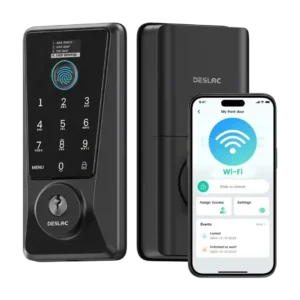
Fingerprint access is a headline feature and is often described as quick and accurate for the price, with support for up to about 50 fingerprints; one review found it hit-or-miss and requiring multiple scans.
A 90-day outdoor follow-up and several user impressions suggest the exterior holds up reasonably well, but long-term finish wear is still lightly documented.
Obsidian stores up to 16 codes on the standalone model and up to 30 codes on connected versions, with 4 to 8 digits per code; code limits and scheduling features vary by model and ecosystem.
Guest access options commonly include always-on users, scheduled access windows, and one-time or one-pass codes, making it suitable for cleaners, visitors, and rentals.
Most smart features require a compatible Z-Wave hub; without it, Obsidian behaves like a standalone keypad deadbolt.
No hub or separate gateway is required for remote features because Wi-Fi is integrated.
Many reviewers found setup straightforward with good hardware options, but others ran into alignment issues, confusing instructions, or a tricky handing/calibration step that required rework.
Most reviewers found installation straightforward and comparable to swapping a standard deadbolt, but one hands-on test reported overly tight/stiff hardware that made mounting difficult and another noted a short internal cable that can complicate assembly.
Obsidian is keywayless, so there is no physical key override if electronics fail; the emergency fallback is the external 9V jump terminals plus your PIN.
Backup entry is well covered via a traditional keyway, and several reviews also liked the USB-C emergency power option as an extra failsafe when batteries die.
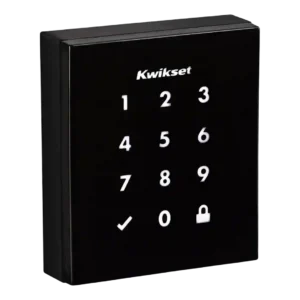
The illuminated touchscreen keypad is central to the design and is generally responsive and easy to use, though a few reviewers note it can take multiple touches to wake.
The backlit touchscreen keypad is usually described as clear and usable, and privacy features like anti-peeping or masked digits are appreciated; one review reported slow wake-up behavior requiring extra taps.
Unlocking is generally quick once the keypad wakes, but some reviewers reported slower wake behavior and slightly slower operation in hot, sunny conditions.
Speed is often praised, especially for fingerprint unlock and remote commands, but one critical review found the keypad slow to wake and fingerprint reads inconsistent, and another noted it is not the fastest compared with pricier locks.
Motor noise is noticeable to some reviewers, who describe the mechanism as loud during operation.
The motor is generally described as smooth and reasonably quiet, but over-tightening during install can cause the bolt to struggle to slide smoothly.
Across reviews, the lock generally operated consistently without jamming, and the auto-relock feature performed reliably when enabled.
Day-to-day locking/unlocking is generally reliable across reviews, including schedules and routines, though one reviewer characterized overall operation as only just OK despite not seeing jamming in testing.
The lock provides audio/LED indicators (including low-battery alerts) and hub apps can show lock state, but native, lock-specific push notifications are limited and platform-dependent.
Notifications are available for lock activity and some alarm states, but experiences vary: some reviewers wanted push alerts over email or found certain emergency emails unreliable.
Removing the keyway reduces exposure to key-based attacks, but otherwise Obsidian is a standard deadbolt without advanced intrusion sensing or active defense features.
Physical robustness is most often framed around BHMA Grade 3, which is a baseline residential-grade rating; it is not positioned as a high-security, hardened deadbolt.
Keywayless entry reduces the risk of traditional picking and bump-key attacks; reviews do not provide an explicit drill-resistance rating.
When paired to a Z-Wave hub, reviewers were able to lock/unlock and check status remotely, but code management and other functions can be restricted by the chosen platform.
Remote locking/unlocking, status checks, and managing users from anywhere are consistently highlighted as strong points when the lock has a stable Wi-Fi connection.
SecureScreen (decoy/random digits) helps prevent fingerprint-based code guessing, and Z-Wave versions mention encryption; the keywayless design also removes common key-based attack vectors like bump keys.
Security features mentioned include anti-peeping PIN entry, vacation-style restriction modes, failed-attempt lockouts, and anti-hijacking or SOS-style alerts; some sources also mention encrypted fingerprint storage, but overall physical security is positioned as budget-grade.
Integration centers on Z-Wave hubs (such as SmartThings, Wink, and Control4) with Alexa/Google voice control typically routed through that hub; multiple reviews call out missing native HomeKit support.
Smart-home support is consistently limited to Alexa and Google ecosystems, with repeated callouts that Apple HomeKit and Matter support are not available.
Anti-hijacking or alarm-style features are described as a way to signal distress or tampering, but detailed sensitivity or false-alarm behavior is not well documented in the reviews.
The glossy, minimalist touch surface looks premium on modern doors but can smudge; SecureScreen and anti-fingerprint coatings help reduce obvious fingerprint trails.
Touch controls and illumination are generally well liked, but responsiveness can vary, with one hands-on review calling the interface sluggish to wake.
You can add/remove PINs and use an optional master code, but advanced guest access controls (expiring or scheduled codes) are limited or unavailable on some models and hubs.
User management is a strength, with support for multiple users, role-based sharing, and assigning different credentials per person.
Pricing is mid-to-premium for a touchscreen deadbolt; value is better if you already own a Z-Wave hub, but paying extra for a hub and living with limited code controls can reduce perceived value.
Many reviews frame the lock as strong value, especially when discounted under $100, due to built-in Wi-Fi and multiple entry methods, but one outlet argued the compromises (install quirks and scanner quality) reduce the perceived bargain.
Voice control generally works for locking and status checks through Alexa/Google when paired with a hub, but unlocking by voice is often restricted for security.
Voice control via Alexa and Google is generally reliable for locking and, with a voice code, unlocking, but it does not provide the broader cross-platform benefits of Matter ecosystems.
The black exterior can absorb heat in direct sun; at least one reviewer noted it can get hot to the touch and may slow slightly under high heat.
Multiple reviews cite an IP54-style dust/splash rating and reported normal rain exposure without issue, though a few creator claims vary; overall it is best treated as weather resistant rather than fully waterproof.
There is no built-in Wi-Fi; remote access typically depends on Z-Wave plus a hub rather than direct Wi-Fi connectivity.
Built-in 2.4GHz Wi-Fi is a major advantage for remote access without extra hardware, but connection quality can affect responsiveness and battery use; updates and a Wi-Fi on/off toggle were noted as improvements in longer-term use.