Compare Corsair K65 RGB MINI vs be quiet! Dark Mount

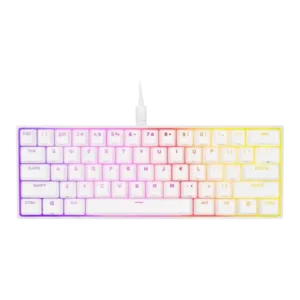
P1 Corsair K65 RGB MINI
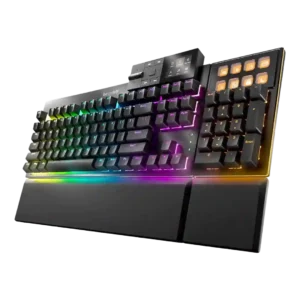
P2 be quiet! Dark Mount

Comparison Takeaways

Corsair K65 RGB MINI

Where It Has the Edge

  • portability is 4.5 vs 2.0. Portability was strong because of the small footprint, light body, and detachable cable, making the board easy to...
  • extra gaming features is 4.4 vs 2.3. Extra gaming features included NKRO, anti-ghosting, Windows lock, mouse controls, and shortcut layers, adding useful gaming-oriented functionality.
  • connectivity is 4.2 vs 2.7. Connectivity centered on wired detachable USB-C, which reviewers generally liked for travel and customization; wireless was not part...
  • polling rate is 4.6 vs 3.4. The 8,000Hz polling rate and AXON processing were widely noted as headline specs, but reviewers repeatedly questioned whether...

be quiet! Dark Mount

Where It Has the Edge

  • hot-swappable switches is 4.8 vs 1.5. Hot-swappable switches are clearly supported and praised as a major customization and maintenance benefit.
  • ease of switch replacement is 4.7 vs 1.8. Switch replacement is considered easy because the board is hot-swappable and supports standard MX-style switches with included pullers.
  • acoustics is 5.0 vs 2.2. Reviewers consistently praise the Dark Mount’s acoustic tuning, calling it exceptionally quiet and smooth, with the main caveat...
  • sound dampening is 4.8 vs 2.1. Sound dampening is a core strength, with repeated praise for multiple foam and silicone layers that reduce vibration,...
Average score
Product 1: Corsair K65 RGB MINI
3.7
Product 2: be quiet! Dark Mount
3.9
acoustics
Product 1: Corsair K65 RGB MINI
2.2

Acoustics were a major weakness, with repeated mentions of ping, hollowness, reverberation, scratchiness, and tonal issues across multiple reviews.

Product 2: be quiet! Dark Mount
5.0

Reviewers consistently praise the Dark Mount’s acoustic tuning, calling it exceptionally quiet and smooth, with the main caveat that a few non-main-key modules are noisier.

actuation consistency
Product 1: Corsair K65 RGB MINI
3.8

Evidence on consistency was mostly positive in gaming and chatter testing, though the short actuation travel also made mispresses possible for some reviewers.

Product 2: be quiet! Dark Mount
4.5

The limited actuation evidence is positive: reviewers describe the switch action as consistent, precise, and light, especially on the silent linear version.

analog input support
Product 1: Corsair K65 RGB MINI
No score yet
Product 2: be quiet! Dark Mount
0.5

Analog input support is effectively absent; the keyboard uses conventional mechanical switches rather than analog, optical, or hall-effect technology.

backlight brightness
Product 1: Corsair K65 RGB MINI
4.6

Backlight brightness was praised wherever discussed, with reviewers calling the lighting vibrant, bright, and easy to show off through the keycaps.

Product 2: be quiet! Dark Mount
4.0

Backlight brightness is generally strong and uniform, though one reviewer wanted more intensity from the under-desk lighting on the related Light Mount comparison.

build quality
Product 1: Corsair K65 RGB MINI
4.1

Build quality was generally solid or sturdy despite the all-plastic construction, with most criticism aimed at materials and design choices rather than flex.

Product 2: be quiet! Dark Mount
4.6

Build quality is widely praised, especially the sturdy base, premium feel, and rigid construction, though some module play and plastic parts remain caveats.

cable quality
Product 1: Corsair K65 RGB MINI
3.9

Cable quality was mixed: reviewers liked that it was detachable USB-C and travel-friendly, but several criticized the braid as stiff or prone to kinking.

Product 2: be quiet! Dark Mount
3.7

The detachable braided USB cable is viewed as practical and reasonably robust, but cable routing and extra extension features are not as strong as some predecessor designs.

compatibility
Product 1: Corsair K65 RGB MINI
4.4

Compatibility was good in the limited evidence, with Windows, macOS, and Xbox mentioned, though console use lacks iCUE support.

Product 2: be quiet! Dark Mount
4.6

Compatibility is a strength because IO Center Web works across Mac, Linux, and browser-based situations where software installation is restricted.

connectivity
Product 1: Corsair K65 RGB MINI
4.2

Connectivity centered on wired detachable USB-C, which reviewers generally liked for travel and customization; wireless was not part of the design.

Product 2: be quiet! Dark Mount
2.7

Connectivity is reliable but limited: reviewers repeatedly note that the Dark Mount is wired-only and lacks wireless options.

customization options
Product 1: Corsair K65 RGB MINI
4.3

Customization options were robust overall, including remaps, RGB layers, macros, profiles, hardware controls, and software-driven assignments.

Product 2: be quiet! Dark Mount
4.7

Customization is one of the strongest themes, with modular placement, programmable keys, lighting, macros, and workflow tailoring repeatedly praised.

desk space efficiency
Product 1: Corsair K65 RGB MINI
4.7

Desk space efficiency was one of the most consistent positives, with reviewers repeatedly saying the compact layout freed room for mouse movement and other desk items.

Product 2: be quiet! Dark Mount
4.8

Desk space efficiency is a major benefit of the detachable numpad, which can be removed or moved left to free mouse space while preserving number-pad access.

durability
Product 1: Corsair K65 RGB MINI
4.2

Durability was helped by PBT keycaps, thick caps, and rated Cherry switches, though some reviewers questioned the long-term feel of the plastic exterior.

Product 2: be quiet! Dark Mount
4.5

Durability evidence centers on PBT double-shot keycaps and shine resistance, with reviewers expecting the caps and construction to hold up well.

ease of switch replacement
Product 1: Corsair K65 RGB MINI
1.8

Ease of switch replacement was poor because reviewers described the switches as soldered or not hot-swappable, making aftermarket changes difficult.

Product 2: be quiet! Dark Mount
4.7

Switch replacement is considered easy because the board is hot-swappable and supports standard MX-style switches with included pullers.

ergonomics
Product 1: Corsair K65 RGB MINI
2.8

Ergonomics were mixed to negative because of no adjustable feet, fixed typing angle, awkward shortcut reach, and some uncomfortable casing edges.

Product 2: be quiet! Dark Mount
4.4

Ergonomics benefit from modular placement, wrist rests, angle adjustment, and the ability to position the numpad for comfort and mouse space.

extra gaming features
Product 1: Corsair K65 RGB MINI
4.4

Extra gaming features included NKRO, anti-ghosting, Windows lock, mouse controls, and shortcut layers, adding useful gaming-oriented functionality.

Product 2: be quiet! Dark Mount
2.3

Extra gaming features are a weakness for the price because reviewers repeatedly mention no rapid trigger, adjustable actuation, SOCD, or hall-effect features.

frame rigidity
Product 1: Corsair K65 RGB MINI
4.2

Frame rigidity was positive in the few reviews that tested it, with reviewers finding no flex or describing the board as solidly built.

Product 2: be quiet! Dark Mount
4.4

Frame rigidity is strong, with reviewers noting the aluminum top plate, stiff base, and little to no flex.

gaming performance
Product 1: Corsair K65 RGB MINI
4.2

Gaming performance was generally good, especially for FPS play and mouse space, though reviewers often said it felt like a normal responsive keyboard rather than a transformative one.

Product 2: be quiet! Dark Mount
3.9

Gaming performance is solid for normal play thanks to reliable input and NKRO, but reviewers split on whether it feels special without modern esports features.

hot-swappable switches
Product 1: Corsair K65 RGB MINI
1.5

Hot-swappable switches were consistently absent where discussed, limiting enthusiast appeal and switch experimentation.

Product 2: be quiet! Dark Mount
4.8

Hot-swappable switches are clearly supported and praised as a major customization and maintenance benefit.

keycap quality
Product 1: Corsair K65 RGB MINI
4.4

The double-shot PBT keycaps were one of the strongest physical positives, with reviewers praising texture, shine-through quality, thickness, and durability, while noting some ABS extras.

Product 2: be quiet! Dark Mount
4.5

Keycap quality is strong thanks to double-shot PBT, textured feel, shine-through legends, and durable materials.

key responsiveness
Product 1: Corsair K65 RGB MINI
4.2

Responsiveness was generally strong for gaming, with fast actuation, precise inputs, and quick registration, although the sensitive switches could also cause accidental keypresses.

Product 2: be quiet! Dark Mount
4.5

Key responsiveness is strong, with reviewers describing sharp response, accurate actuation, and reliable input registration.

key spacing
Product 1: Corsair K65 RGB MINI
4.4

Key spacing was positive in the limited evidence, with reviewers saying the layout did not feel compressed and the distance between keys felt right.

Product 2: be quiet! Dark Mount
No score yet
key stability
Product 1: Corsair K65 RGB MINI
No score yet
Product 2: be quiet! Dark Mount
4.6

Key stability is strong, with reviewers noting minimal wobble and consistent, wobble-free keystrokes.

latency
Product 1: Corsair K65 RGB MINI
3.3

The 8,000Hz mode offers a theoretical latency advantage, but most reviewers said the difference was hard or impossible to notice and sometimes brought performance caveats.

Product 2: be quiet! Dark Mount
4.1

Latency-like response is viewed positively in practical use, with reviewers reporting sharp, quick, and consistent response rather than measured low-latency results.

layout options
Product 1: Corsair K65 RGB MINI
3.7

The 60% layout retained many secondary functions, but opinions were split because the shortcuts were powerful yet could be awkward, cluttered, or steep to learn.

Product 2: be quiet! Dark Mount
4.8

Layout options are a major strength because the keyboard can shift between TKL and full-size use with left/right module placement.

legend visibility
Product 1: Corsair K65 RGB MINI
3.8

Legend visibility was mixed: several reviewers liked the shine-through and clean legends, while others criticized cluttered sublegends or unclear/messy keycap markings.

Product 2: be quiet! Dark Mount
3.6

Legend visibility is mixed: shine-through legends are praised, but stealthy status icons can be hard to see on the dark background.

macro customization
Product 1: Corsair K65 RGB MINI
4.4

Macro customization was a major strength, appearing in both iCUE and hardware controls with onboard macro recording, remapping, and profile-based assignments.

Product 2: be quiet! Dark Mount
4.7

Macro customization is broad, covering keyboard macros, display keys, shortcuts, app launches, and numpad functions.

materials quality
Product 1: Corsair K65 RGB MINI
2.8

Materials quality was mixed: reviewers liked some sturdy construction, but the plastic body, sharp edges, and scratch-prone casing repeatedly lowered impressions.

Product 2: be quiet! Dark Mount
4.0

Materials quality is good overall, led by the aluminum top plate and PBT caps, but reviewers note plastic bottom sections that feel less premium.

media controls
Product 1: Corsair K65 RGB MINI
4.3

Media controls were available as secondary functions and generally appreciated, especially because they helped replace full-size keyboard functionality.

Product 2: be quiet! Dark Mount
3.3

Media controls are useful and flexible, but reviewer opinions are mixed because some dock buttons and the scroll wheel feel shallow or imprecise.

noise level
Product 1: Corsair K65 RGB MINI
2.3

Noise level was a repeated concern, especially with louder-than-expected switches, pinging, hollow resonance, scratchiness, and intrusive typing sounds.

Product 2: be quiet! Dark Mount
4.9

Noise level is one of the strongest attributes, with multiple reviewers calling it among the quietest mechanical keyboards they have used.

onboard memory
Product 1: Corsair K65 RGB MINI
4.5

Onboard memory was a clear strength, with repeated mentions of 8MB storage, saved lighting, remaps, macros, and travel-friendly profile storage.

Product 2: be quiet! Dark Mount
4.5

Onboard memory and profiles are a strength, allowing many settings and customization profiles to remain on the keyboard.

passthrough features
Product 1: Corsair K65 RGB MINI
No score yet
Product 2: be quiet! Dark Mount
1.8

Passthrough features are weak because the accessory USB-C headers are not general passthrough ports and some older cabling conveniences are missing.

per-key lighting control
Product 1: Corsair K65 RGB MINI
4.5

Per-key lighting and layered effects were well supported, including hardware effects, up to 20 lighting layers, and individually customizable keys in iCUE.

Product 2: be quiet! Dark Mount
4.5

Per-key lighting control is well supported through IO Center, including per-key RGB and control over individual areas or segments.

polling rate
Product 1: Corsair K65 RGB MINI
4.6

The 8,000Hz polling rate and AXON processing were widely noted as headline specs, but reviewers repeatedly questioned whether the spec mattered in real play.

Product 2: be quiet! Dark Mount
3.4

Polling rate is standard rather than cutting-edge, with reviews repeatedly citing 1000Hz or 1,000Hz plus NKRO.

portability
Product 1: Corsair K65 RGB MINI
4.5

Portability was strong because of the small footprint, light body, and detachable cable, making the board easy to travel with.

Product 2: be quiet! Dark Mount
2.0

Portability is limited by size and weight, though one reviewer found it lighter and more portable than a daily-driver premium board.

profile management
Product 1: Corsair K65 RGB MINI
4.3

Profile management was strong thanks to onboard profiles and hardware profile switching, though the number and process could feel complex.

Product 2: be quiet! Dark Mount
4.0

Profile management is useful, with evidence for saved profiles, game/task switching, and executable-linked profile switching.

rapid trigger support
Product 1: Corsair K65 RGB MINI
No score yet
Product 2: be quiet! Dark Mount
0.5

Rapid trigger support is absent, and this is one of the most repeated gaming-feature omissions.

reliability
Product 1: Corsair K65 RGB MINI
2.5

Reliability evidence was limited and mixed: one TechPowerUp sample had a failed Q key, but the replacement units reportedly worked out of the box.

Product 2: be quiet! Dark Mount
2.8

Reliability is mixed because the hardware is generally solid but reviewers report media desync, wake issues, and macro or lighting software bugs.

RGB customization
Product 1: Corsair K65 RGB MINI
4.4

RGB customization was strong through iCUE and onboard shortcuts, with lighting presets, layers, profile control, and hardware playback appearing repeatedly in the reviews.

Product 2: be quiet! Dark Mount
4.6

RGB customization is extensive, with layers, custom designs, per-area effects, and rich lighting options repeatedly praised.

RGB lighting quality
Product 1: Corsair K65 RGB MINI
4.4

RGB lighting quality was a clear strength, with reviewers praising brightness, vibrancy, clean animations, the white plate effect, and the decorative spacebar illumination.

Product 2: be quiet! Dark Mount
4.4

RGB lighting quality is positive overall, with bright, uniform, vivid, and showy lighting, though a few reviewers note specific unevenness or preferences.

size and form factor
Product 1: Corsair K65 RGB MINI
4.5

The small 60% form factor was widely recognized as compact and useful for minimal setups, travel, and gaming desks.

Product 2: be quiet! Dark Mount
4.0

Size and form factor are flexible but bulky: reviewers like TKL/full-size modularity, while some note the assembled board is large.

software quality
Product 1: Corsair K65 RGB MINI
4.3

Software quality was generally strong, with iCUE praised for profiles, remapping, lighting, polling controls, and a more modern interface, despite some complexity.

Product 2: be quiet! Dark Mount
4.0

Software quality is mostly strong for a debut and includes a web app, but some reviewers report rough edges, missing options, or stability bugs.

sound dampening
Product 1: Corsair K65 RGB MINI
2.1

Sound dampening was limited; reviewers pointed to hollow case space, missing dampening material, and possible foam or O-ring fixes as ways to improve the sound.

Product 2: be quiet! Dark Mount
4.8

Sound dampening is a core strength, with repeated praise for multiple foam and silicone layers that reduce vibration, echo, and harsh key noise.

stabilizer quality
Product 1: Corsair K65 RGB MINI
3.9

Stabilizer quality was better than prior Corsair efforts and often described as decent or good, but some reviewers still noticed spacebar or acoustic issues.

Product 2: be quiet! Dark Mount
4.7

Stabilizer quality is strong, with factory lubrication and tuning reducing rattle on larger keys.

switch feel
Product 1: Corsair K65 RGB MINI
3.6

Cherry linear switches were often described as smooth, fast, or comfortable, but several reviewers found the MX Speed or Red feel scratchy, loud, or less smooth than expected.

Product 2: be quiet! Dark Mount
4.5

Switch feel is highly praised for smoothness, softness, quietness, and comfortable tactile or linear options.

switch options
Product 1: Corsair K65 RGB MINI
4.0

Reviewers consistently identified Cherry MX Red, Speed/Silver, and Silent linear options; the choice is useful, but tactile, clicky, optical, and Corsair OPX-style options were missed.

Product 2: be quiet! Dark Mount
4.3

Switch options are straightforward but limited to Be Quiet’s silent linear orange and silent tactile black choices.

typing comfort
Product 1: Corsair K65 RGB MINI
3.6

Typing comfort was polarized: some reviewers typed quickly and comfortably, while others reported typos, fatigue, or discomfort from short travel and the 60% layout.

Product 2: be quiet! Dark Mount
4.7

Typing comfort is strong, with reviewers describing comfortable long sessions, cushioned feel, and satisfying typing.

typing feel
Product 1: Corsair K65 RGB MINI
4.4

Typing feel drew some high praise for smooth, precise, and satisfying travel, but it depended heavily on reviewer preference and tolerance for the compact layout.

Product 2: be quiet! Dark Mount
4.6

Typing feel is one of the top positives, with reviews calling it great, excellent, and sound-dampened.

value for money
Product 1: Corsair K65 RGB MINI
2.9

Value for money was split, with some reviewers liking the price against Ducky or Razer and others calling it overpriced versus budget or fuller-featured alternatives.

Product 2: be quiet! Dark Mount
3.4

Value for money is mixed: some reviewers see the modular package as reasonable, while others view it as expensive and less compelling than cheaper alternatives.

volume control
Product 1: Corsair K65 RGB MINI
4.4

Volume control appeared as a useful secondary function, with reviewers calling audio adjustment accessible or part of the onboard control set.

Product 2: be quiet! Dark Mount
3.6

Volume control is useful thanks to a dedicated wheel/roller, but precision and tactile feel are criticized by some reviewers.

wireless performance
Product 1: Corsair K65 RGB MINI
1.5

Wireless performance was only discussed as an absent feature, with one reviewer saying wireless capability would have improved the board.

Product 2: be quiet! Dark Mount
0.5

Wireless performance is essentially nonexistent because the keyboard lacks wireless capability and is wired only.

wrist rest quality
Product 1: Corsair K65 RGB MINI
1.0

The only direct wrist-rest evidence was negative, with one reviewer noting that the keyboard includes no wrist rest.

Product 2: be quiet! Dark Mount
3.7

Wrist rest quality is mostly positive for comfort and softness, though some reviewers criticize modular security or level alignment.