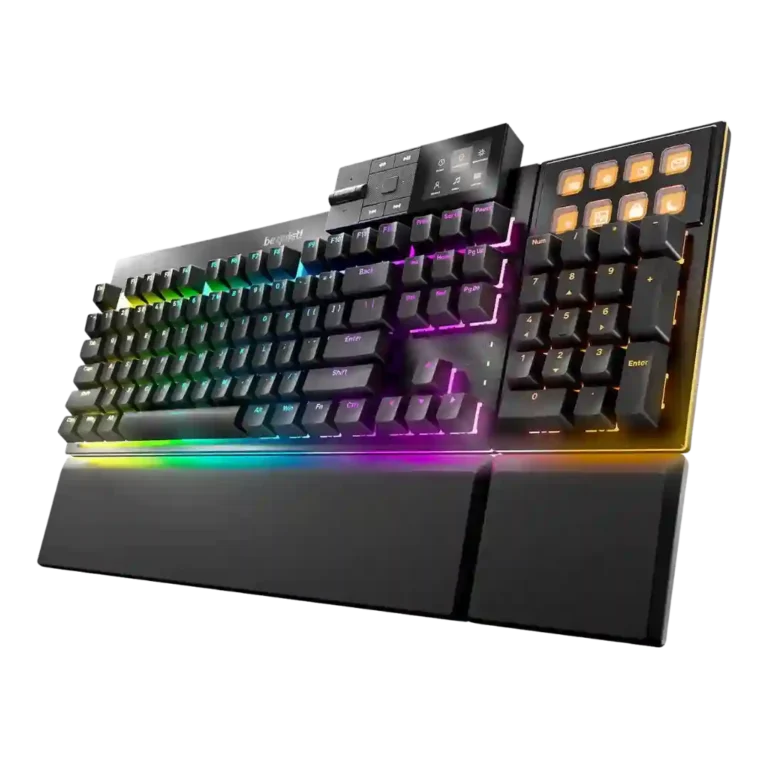
Choose the Dark Mount if you want a quiet, premium modular keyboard with strong typing feel and deep customization. Skip it if you need wireless, elite esports features, lower pricing, or fully polished add-ons.
Best for
Best for users who want a very quiet mechanical keyboard with a modular numpad, display shortcuts, strong typing feel, and deep customization for work and gaming.
Not for
Not ideal for buyers who want wireless performance, the lowest price, a compact fixed layout, or competitive gaming features such as Rapid Trigger, analog input, or adjustable actuation.
Verdict
Reviewers consistently frame the Dark Mount as a strong debut built around silence, modularity, and a premium typing feel. The best evidence clusters around its damped acoustics, smooth switches, sturdy core board, programmable numpad, flexible layout, and customizable RGB/software stack. The tradeoff is that the modules and software do not always feel as polished as the main keyboard: several reviewers criticized shallow media controls, wobbly or noisy add-ons, profile or media bugs, no wireless option, and missing advanced gaming features such as rapid trigger, analog input, or adjustable actuation. Its value depends heavily on whether the detachable numpad, display keys, and quiet operation matter more than esports-focused specs or a lower price.
Sound dampening was one of the clearest strengths, with reviewers praising the multi-layer foam/silicone system for reducing echo, vibration, and typing noise.
Noise level was the strongest consensus point: reviewers repeatedly called the board extremely quiet, whisper-like, or among the quietest mechanical keyboards they had used.
Reviewers consistently praised the Dark Mount switches as smooth, quiet, and pleasing to type on, with only minor caveats about personal preference or lack of a thocky feel.
Customization options were a defining strength, with reviewers highlighting modular layouts, remapping, display keys, RGB, macros, and flexible setup choices.
Compatibility was a strength because reviewers praised the web-based software for Mac, Linux, browser use, and situations where installing software is not allowed.
Ergonomics were generally positive thanks to angle adjustment, wrist rests, modular positioning, and reduced reach, though magnetic feet had some robustness caveats.
Macro customization was broadly praised for display keys, programmable functions, and Windows macro features, though some reviewers found the scope less advanced or less useful than expected.
RGB lighting quality was generally strong, with praise for vivid, uniform, attractive light bars and ambiance; minor complaints included distracting edge lighting or weak purple tones.
Wrist rest quality was mixed but mostly positive: many reviewers found the rests comfortable and secure, while a few criticized alignment, height, or security.
Software quality was good overall but inconsistent: reviewers praised the interface and web option, while others reported bugs, missing refinements, or basic functionality.
Cable quality received limited but positive-to-mixed feedback, with reviewers noting useful length and toughness but missing older routing or extension conveniences.
Portability was limited but not wholly negative: one reviewer found it more portable than a daily driver, though the broader design remains a modular desk keyboard.
Switch choice was seen as adequate but somewhat limited: reviewers liked the silent linear and tactile options, while one wanted a wider default selection.
Connectivity was mixed: wired and modular connections could be sturdy and easy, but reviewers also criticized play, no wireless, or wired-only limitations.
media controls: 3.5, 13 reviews, moderate consensus
Media controls were mixed: reviewers liked the dock concept and utility, but many criticized shallow buttons, mushy feel, confusing navigation, or limited flexibility.
Rapid trigger support was a repeated weakness: several reviewers explicitly missed Rapid Trigger, adjustable actuation, SOCD, or similar modern gaming functions.
extra gaming features: 2.3, 5 reviews, strong consensus
Extra gaming features were a repeated weakness, with reviewers missing hall effect switches, higher polling, SOCD, analog features, and adjustable actuation.
size and form factor: 2.8, 2 reviews, limited evidence
Size and form factor drew mixed reactions: one reviewer found the look dated, while another called it big with all modules attached.
Compared With Category Average
Compared with other Gaming Keyboards, this product is above average in hot-swappable switches, noise level, ease of switch replacement, near average in macro customization, media controls, below average in wireless performance, rapid trigger support, extra gaming features.
Summary
50 compared features
Above average0.4+ pts higher
21(42%)
Same as averagewithin 0.3 pts
18(36%)
Below average0.4+ pts lower
11(22%)
Largest category differences
Attribute
This product
Category average
Difference
wireless performance
1.5
4.1
-2.6
rapid trigger support
1.6
3.6
-2.0
extra gaming features
2.3
4.0
-1.7
hot-swappable switches
5.0
3.4
+1.6
analog input support
1.5
3.2
-1.7
size and form factor
2.8
4.1
-1.4
noise level
4.9
3.8
+1.1
ease of switch replacement
5.0
3.7
+1.3
Consider This Instead
If you want better analog input support
Choose NZXT Function Elite MiniTKL. It scores 4.7 vs 1.5 for analog input support, with a 3.9 overall score.
Worse: modular designThe reviewer notes Razer Huntsman V3 Pro lacks Dark Mount's modular design, though it offers analog-key functionality.
FAQ
Is the be quiet! Dark Mount actually quiet?
Yes. Reviewers repeatedly described it as one of the quietest mechanical keyboards they had used, crediting the silent switches, lubricated stabilizers, and layered dampening.
Is the modular numpad useful?
For many reviewers, yes. The detachable numpad was praised for moving to either side, freeing mouse space, and adding display keys for shortcuts or macros.
Is it good for competitive gaming?
It performs well for general gaming with responsive keys and N-key rollover, but reviewers repeatedly noted the lack of Rapid Trigger, analog input, adjustable actuation, and high polling options.
How good is the software?
The IO Center software and web interface were often praised as clean and useful, especially for Mac/Linux or no-install setups. Some reviewers still reported bugs, missing refinements, or basic macro/display limitations.
Does the Dark Mount support wireless use?
No. Reviewers noted it is wired-only, which was a drawback for users who want Bluetooth, 2.4GHz, or a cable-free setup.
Is the Dark Mount worth the price?
Reviewers split on value. It looks stronger if you will use the modular numpad, display keys, quiet switches, and customization; it looks expensive if you only need a basic quiet mechanical keyboard.
Sample Expert Reviews We Analyzed
These are a few of the reviews included in our analysis.
Good if you want a premium 96% Hall Effect keyboard for work and gaming with excellent build, sound, and customization. Skip it if you need cheaper esports-first speed, 8,000Hz polling,...
Good if you want a premium, quiet TKL Hall Effect keyboard for typing and gaming. Skip it if price, portability, 8,000Hz polling, or broad switch choice matters most.
Good if you want a premium full-size Hall Effect keyboard with smooth switches, quiet sound, and deep customization. Skip it if you need a portable, budget-friendly board or broad switch...