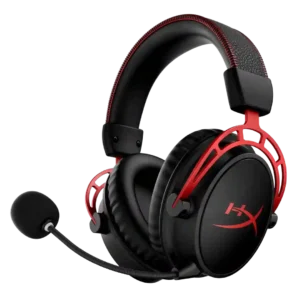
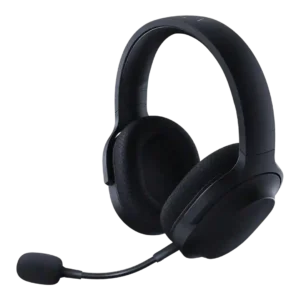
Average score
P1
Product 1: HyperX Cloud Alpha
3.9
P2
Product 2: Razer Barracuda X
3.8
Active noise cancellation
P1
Product 1: HyperX Cloud Alpha
1.0
Reviewers explicitly note the lack of active noise cancellation; isolation comes from passive earcup sealing instead.
P2
Product 2: Razer Barracuda X
1.7
The reviews do not describe built-in ANC on the Barracuda X itself; references frame ANC as absent or reserved for pricier alternatives.
Android compatibility
P1Product 1: HyperX Cloud Alpha
No score yet
P2
Product 2: Razer Barracuda X
4.5
Android compatibility is repeatedly supported through USB-C dongle use and mobile testing on Android phones.
App
P1
Product 1: HyperX Cloud Alpha
3.2
NGenuity adds battery, EQ, DTS, and control options, but reviewers call it PC-only, sparse, or glitchy in places.
P2
Product 2: Razer Barracuda X
3.7
App support enables EQ, RGB, gaming mode, or surround features, but reviewers often found the split across Razer Audio, Synapse, Chroma, and 7.1 apps inconvenient.
aptX
P1Product 1: HyperX Cloud Alpha
No score yet
P2
Product 2: Razer Barracuda X
1.5
aptX support is specifically called out as missing, reducing the Bluetooth codec score.
Audio-video sync accuracy
P1Product 1: HyperX Cloud Alpha
No score yet
P2
Product 2: Razer Barracuda X
3.7
Latency is mostly positive for gaming, especially with dongle and gaming mode, but one cloud-gaming test reported added latency, popping, and dropout.
Bass performance
P1
Product 1: HyperX Cloud Alpha
4.3
Bass is generally full, deep, and impactful, but reviewers vary on whether it is boosted, restrained, or slightly lacking thump.
P2
Product 2: Razer Barracuda X
4.1
Bass is usually described as punchy, full, or satisfying, but some reviewers found the low end either lacking in rumble or a little compromised by preset tuning.
Battery
P1
Product 1: HyperX Cloud Alpha
4.9
Battery life is the standout Wireless feature, repeatedly cited around 300 hours and in one test exceeding 327 hours.
P2
Product 2: Razer Barracuda X
4.1
Battery life is a strength overall, ranging from roughly 20-24 hours on earlier models to about 50-70 hours on later 2022 and Chroma versions.
Bluetooth
P1
Product 1: HyperX Cloud Alpha
1.0
Bluetooth is a consistent missing feature on Wireless, repeatedly framed as a limitation or lack of backup connectivity.
P2
Product 2: Razer Barracuda X
3.7
Bluetooth support depends on model year and variant, with 2022 and Chroma reviews praising it while older Barracuda X reviews note its absence.
Build quality
P1
Product 1: HyperX Cloud Alpha
4.5
Reviewers usually describe the headset as sturdy, premium, or durable, with metal/aluminum reinforcement; a few wireless-video reviews call the build merely okay rather than luxurious.
P2
Product 2: Razer Barracuda X
4.4
Build quality is generally solid for the price, with plastic construction offset by metal reinforcement, no creaking, and a sturdy feel.
Button control usability
P1
Product 1: HyperX Cloud Alpha
4.4
Controls are usually easy to find and use, with accessible volume, mute, and power controls, though some controls are minimal.
P2
Product 2: Razer Barracuda X
4.2
Physical controls are generally easy to find and use, though the Chroma volume wheel can be too easy to move unintentionally.
Cable quality
P1
Product 1: HyperX Cloud Alpha
4.1
Wired reviews praise the braided or protected cable, though one notes the bundled cable is short and another calls it only okay.
P2
Product 2: Razer Barracuda X
4.2
Cable feedback is positive where discussed, with reviewers appreciating decent length, useful included analog cables, and practical charging cables.
Carry case quality
P1
Product 1: HyperX Cloud Alpha
3.0
Wired reviews mention a basic velour pouch, while Wireless reviews criticize the lack of a travel bag or case at the price.
P2
Product 2: Razer Barracuda X
2.7
Carry protection is inconsistent: Chroma reviews mention a pouch or bag, while several Barracuda X reviews complain that no case or pouch is included.
Charging
P1
Product 1: HyperX Cloud Alpha
4.5
Charging feedback is positive overall, with USB-C charging, quick top-ups, overnight recharge, or only a few hours needed.
P2
Product 2: Razer Barracuda X
4.2
Charging evidence is positive for quick charge and use while charging, though one Chroma review found a half-to-full charge only middling.
Clamping force comfort
P1
Product 1: HyperX Cloud Alpha
4.3
Clamp is generally comfortable or minimal, with isolated notes of snugness or stronger grip depending on head shape.
P2
Product 2: Razer Barracuda X
4.2
Clamping comfort is mostly good, balancing grip and pressure, but one review found the clamping force weak enough to affect stability.
Codec support
P1Product 1: HyperX Cloud Alpha
No score yet
P2
Product 2: Razer Barracuda X
2.0
Codec support is limited in the reviews, with Bluetooth described as SBC-only and therefore weaker than headsets offering AAC or aptX.
Comfort during long use
P1
Product 1: HyperX Cloud Alpha
4.6
Comfort is one of the strongest consensus points, with many reviewers wearing it for long gaming sessions, though a few note heat or pad limitations.
P2
Product 2: Razer Barracuda X
4.5
Comfort over long sessions is a major strength, with repeated praise for light weight, breathable materials, and low fatigue across multi-hour gaming.
Connectivity versatility
P1
Product 1: HyperX Cloud Alpha
2.5
Connectivity is a split story: wired 3.5mm is very versatile, while Wireless is limited by dongle-only operation and no wired fallback.
P2
Product 2: Razer Barracuda X
4.7
Connectivity versatility is one of the main strengths, with reviewers highlighting USB-C wireless, Bluetooth on newer models, 3.5mm on older models, and broad device support.
Console compatibility limitations
P1
Product 1: HyperX Cloud Alpha
2.1
Wireless reviews repeatedly mention platform limitations, especially missing analog fallback, limited console feature support, or restricted compatibility.
P2
Product 2: Razer Barracuda X
2.7
The dominant console limitation is Xbox: reviewers repeatedly note the headset cannot connect wirelessly to Xbox and needs a cable or alternative.
Design and Aesthetics
P1
Product 1: HyperX Cloud Alpha
3.9
The HyperX red-and-black gaming look is seen as stylish or familiar by some, but one wireless review calls it dated.
P2
Product 2: Razer Barracuda X
4.5
The design is consistently praised as subtle, understated, and less gamer-looking, with Chroma adding tasteful RGB for users who want lighting.
Detachable cable convenience
P1
Product 1: HyperX Cloud Alpha
4.8
Several wired reviews like that the cable can be detached or replaced, making the headset easier to maintain and use across setups.
P2
Product 2: Razer Barracuda X
3.8
Wired fallback is helpful on older Barracuda X models and for Xbox, but one Chroma review notes wired use is not possible on that variant.
Detachable microphone convenience
P1
Product 1: HyperX Cloud Alpha
4.6
The removable boom mic is repeatedly treated as convenient for travel, casual listening, replacement, or removing the gaming look.
P2
Product 2: Razer Barracuda X
4.5
The detachable microphone is widely appreciated because it fits securely, improves everyday headphone use, and can be removed for travel.
Dongle
P1
Product 1: HyperX Cloud Alpha
4.4
The wireless USB dongle is simple and useful, but also central to the headset’s compatibility limits because it is the main or only connection path.
P2
Product 2: Razer Barracuda X
3.2
The USB-C dongle is central to the headset's versatility, but many reviewers warn it is wide, easy to lose, or able to block adjacent ports.
Ear cup padding quality
P1
Product 1: HyperX Cloud Alpha
4.2
Memory-foam/leatherette pads are widely praised for softness, but some reviewers note warmth, shallow pads, or heat buildup.
P2
Product 2: Razer Barracuda X
4.5
Ear cup padding is generally well-liked for memory foam and breathable fabric, though one review found the Chroma pads not especially plush.
Ear cup swivel/rotation range
P1
Product 1: HyperX Cloud Alpha
2.0
Reviewers repeatedly flag limited swivel or no 90-degree lay-flat rotation, making this a consistent portability and fit limitation.
P2
Product 2: Razer Barracuda X
3.1
Ear cup rotation is useful for storage, but several reviewers disliked the unusual direction in which the cups fold or swivel.
Earpad noise
P1Product 1: HyperX Cloud Alpha
No score yet
P2
Product 2: Razer Barracuda X
2.0
Earpad noise is a small weakness in one review, where fabric movement caused skin-contact noise.
Earpad replacement ease
P1
Product 1: HyperX Cloud Alpha
4.7
One hands-on review shows the pads popping off easily for cushion replacement.
P2Product 2: Razer Barracuda X
No score yetEqualizer customization
P1
Product 1: HyperX Cloud Alpha
4.0
EQ is mostly a Wireless/software feature, offering presets and custom profiles; wired reviews instead emphasize no required software.
P2
Product 2: Razer Barracuda X
3.5
EQ customization is strong on models with Razer Audio or Synapse support, but older or non-Synapse experiences can leave users without EQ control.
Fit/seal reliability
P1
Product 1: HyperX Cloud Alpha
4.6
Reviewers highlight a reliable seal and secure hold that helps stability, bass response, and passive isolation.
P2
Product 2: Razer Barracuda X
4.4
Fit and seal are generally good when clamping is right, but related stability evidence shows fit can vary by head shape.
Frequency response accuracy
P1
Product 1: HyperX Cloud Alpha
4.7
Frequency response is described as relatively faithful or clear, with dual-chamber separation helping avoid muddiness.
P2
Product 2: Razer Barracuda X
3.7
Measured frequency response was described as close to the consumer target in the mids, with more variation in lows and highs.
Game/Chat balance control
P1
Product 1: HyperX Cloud Alpha
3.5
One transcript mentions a chat/game mix rocker, but the broader review set mostly discusses volume and mic mute rather than detailed balance controls.
P2Product 2: Razer Barracuda X
No score yetHeadband adjustability
P1
Product 1: HyperX Cloud Alpha
4.4
Headband adjustment is described as straightforward, with sliders/notches and enough size range for fit.
P2
Product 2: Razer Barracuda X
4.5
Headband adjustment is supported by secure sizing and hard stops, with no major complaints in the reviews that mention it.
Hinge durability
P1
Product 1: HyperX Cloud Alpha
4.8
One review specifically praises durability features around joints and replacement parts, supporting confidence in hinge and moving-part longevity.
P2
Product 2: Razer Barracuda X
4.3
Durability around flexing and rotation is described positively, with reviewers noting no creaking and confidence when stretching the headset.
Included accessories
P1
Product 1: HyperX Cloud Alpha
4.4
Wired-package reviews report the expected essentials, including the headset, detachable mic, main cable, splitter or extender cable.
P2
Product 2: Razer Barracuda X
4.6
Included accessories are usually generous, especially dongles, adapters, detachable mics, and cables, with stronger bundles on Chroma or later versions.
Instrument separation
P1
Product 1: HyperX Cloud Alpha
4.7
Layering and separation are a recurring strength, with reviewers crediting dual-chamber design or the ability to distinguish audio layers.
P2
Product 2: Razer Barracuda X
4.4
Layered audio and separation were a strength in several reviews, with reviewers noting balanced mixes, fine details, and reduced muddiness.
Integrated microphone
P1Product 1: HyperX Cloud Alpha
No score yet
P2
Product 2: Razer Barracuda X
4.0
Integrated microphone evidence applies to the non-X Barracuda review, which praised the cleaner look but criticized mic quality.
Maximum volume clarity
P1
Product 1: HyperX Cloud Alpha
4.7
At high volumes, reviewers usually report loud output with minimal or no distortion.
P2
Product 2: Razer Barracuda X
4.3
Several reviewers pushed volume high without major distortion, making maximum-volume clarity one of the more consistently positive sound traits.
Microphone
P1
Product 1: HyperX Cloud Alpha
4.0
Microphone feedback is mixed-positive: many call it clear or usable, while others say it is wonky, thin, or not ideal for serious recording.
P2
Product 2: Razer Barracuda X
3.9
Microphone impressions range from excellent and natural to passable or weak, making it useful for chat but not consistently creator-grade.
Microphone noise reduction
P1
Product 1: HyperX Cloud Alpha
4.4
Mic noise reduction is generally effective for fans or background noise, though one review says mechanical keyboards remain a challenge.
P2
Product 2: Razer Barracuda X
4.0
Microphone noise handling is mixed: some reviewers praised background rejection, while one noted the mic lacks active noise cancellation and can pick up room noise.
Microphone quality for calls
P1
Product 1: HyperX Cloud Alpha
3.8
For calls and chat, reviewers generally find the mic understandable and usable, but not a replacement for a dedicated recording microphone.
P2
Product 2: Razer Barracuda X
4.1
Call and chat performance is mostly usable to very good, with reviewers praising clarity for Discord, Zoom, phone calls, and casual communication while noting position sensitivity.
Midrange clarity
P1
Product 1: HyperX Cloud Alpha
4.3
Midrange is usually described as clear or well-tuned, with one reviewer emphasizing the absence of murky low-mid congestion.
P2
Product 2: Razer Barracuda X
4.0
Midrange feedback is mostly positive for dialogue, vocals, and game cues, though one reviewer found the mids recessed in a more bass-heavy presentation.
Multi-platform compatibility
P1
Product 1: HyperX Cloud Alpha
4.2
Wired models are broadly cross-platform through 3.5mm; Wireless reviews limit stronger compatibility mainly to PC and PlayStation.
P2
Product 2: Razer Barracuda X
4.7
Multi-platform compatibility is a major strength across PC, PlayStation, Switch, Android, Mac, iOS, and wired fallback depending on model.
Multipoint connectivity reliability
P1Product 1: HyperX Cloud Alpha
No score yet
P2
Product 2: Razer Barracuda X
3.9
SmartSwitch and dual wireless are praised when they work, but one long-term 2022 review reported Bluetooth interfering with 2.4GHz reconnection.
Noise isolation (passive)
P1
Product 1: HyperX Cloud Alpha
4.3
Passive isolation is repeatedly praised, with reviewers saying outside sound is blocked or muffled despite no active noise cancellation.
P2
Product 2: Razer Barracuda X
3.6
Passive isolation ranges from excellent in some user tests to only decent or weak against speech and low-frequency noise.
Packaging quality
P1Product 1: HyperX Cloud Alpha
No score yet
P2
Product 2: Razer Barracuda X
2.5
Packaging is only directly discussed in one review, which compared the box to Amazon Basics rather than premium Razer packaging.
Portability/foldability
P1
Product 1: HyperX Cloud Alpha
1.9
The headset is not built around folding or compact travel; reviewers mention the lack of portability or contractable design.
P2
Product 2: Razer Barracuda X
3.3
Portability is helped by low weight, but limited folding behavior and unusual cup rotation reduce convenience versus some travel headphones.
Positional audio accuracy
P1
Product 1: HyperX Cloud Alpha
4.5
Positional cues are often strong for footsteps, gunfire, and environmental sounds, though one review prefers realism over tactical emphasis.
P2
Product 2: Razer Barracuda X
4.3
Positional audio is often good for footsteps, shots, racing cues, and 360-degree movement, though one reviewer found surround harder to pinpoint.
Preset EQ profile quality
P1
Product 1: HyperX Cloud Alpha
4.2
EQ presets can improve mids, gaming cues, or overall tuning, though at least one reviewer prefers the default sound.
P2
Product 2: Razer Barracuda X
3.1
Preset EQ feedback is mixed, with profiles described as hit-or-miss and sometimes too bass-heavy depending on the mode.
Replaceable earpads
P1
Product 1: HyperX Cloud Alpha
3.0
Earpad replaceability is mixed in the evidence: one review says stock pads are not detachable, while another demonstrates replacing cushions.
P2Product 2: Razer Barracuda X
No score yetRGB lighting customization
P1Product 1: HyperX Cloud Alpha
No score yet
P2
Product 2: Razer Barracuda X
3.7
RGB customization is strong on Chroma models, with six-zone lighting and app control, while non-Chroma Barracuda models have no RGB.
Sidetone adjustment quality
P1
Product 1: HyperX Cloud Alpha
2.4
Sidetone and mic monitoring are limited: wired lacks it, and wireless implementations exist but with little or no adjustment.
P2
Product 2: Razer Barracuda X
2.8
Sidetone is available in some software, but feedback is mixed because one reviewer disliked monitoring delay and older models lack sidetone control.
Smudge resistance
P1Product 1: HyperX Cloud Alpha
No score yet
P2
Product 2: Razer Barracuda X
3.8
Smudge resistance has limited but positive evidence, with one Chroma review noting fingerprint resistance while warning about scratches.
Software/setup simplicity
P1
Product 1: HyperX Cloud Alpha
4.3
Setup is usually simple and plug-and-play, but the wireless software/driver experience receives some reliability criticism.
P2
Product 2: Razer Barracuda X
4.6
Setup is usually plug-and-play and simple, especially with the dongle, although app requirements for some features add friction.
Sound leakage
P1
Product 1: HyperX Cloud Alpha
4.1
Leakage is mostly controlled at normal volumes, though at higher volumes one reviewer says it becomes noticeable.
P2
Product 2: Razer Barracuda X
4.5
Sound leakage is addressed positively in one review, where nearby listeners barely heard loud gameplay in a quiet room.
Sound quality
P1
Product 1: HyperX Cloud Alpha
4.6
The overall sound receives broad praise across gaming and music, with only a few reviewers describing it as merely good rather than exceptional.
P2
Product 2: Razer Barracuda X
4.3
Reviewers generally found the headset good to very good for gaming audio, with clear, balanced sound in most tests, though a few called it merely fine or not class-leading.
Soundstage width
P1
Product 1: HyperX Cloud Alpha
4.2
Soundstage is described as wide or decent, especially for a closed-back gaming headset.
P2
Product 2: Razer Barracuda X
3.4
Soundstage impressions are mixed: some reviewers heard impressive or full staging, while others found the presentation closed or narrower than rivals.
Spatial audio
P1
Product 1: HyperX Cloud Alpha
3.7
Spatial audio depends on model and platform: wired lacks built-in surround, while Wireless DTS/spatial processing can work well on PC.
P2
Product 2: Razer Barracuda X
4.0
Spatial audio is useful for directionality on supported platforms, but reviews also note it is app-dependent and less precise than higher-end THX implementations.
Stability
P1
Product 1: HyperX Cloud Alpha
4.3
Stability is strong on-head and, in some wireless reviews, connection stability is good, though one reviewer reports range degradation.
P2
Product 2: Razer Barracuda X
3.4
Stability is mixed: many reviewers report solid wireless range and no drops, but others report head fit movement, wireless drops, or 2022 reconnection problems.
Treble clarity
P1
Product 1: HyperX Cloud Alpha
4.5
Treble is mostly praised as crisp, clean, and detailed without harshness, though one wireless review says highs can be overshadowed by bass.
P2
Product 2: Razer Barracuda X
4.2
Treble is often described as crisp, clean, or non-harsh, but one Chroma review noted treble detail can suffer in the movie preset.
USB-C
P1
Product 1: HyperX Cloud Alpha
4.5
USB-C appears mainly on the Wireless model for charging or adapter support, and reviewers treat it as useful.
P2
Product 2: Razer Barracuda X
4.4
USB-C is a core advantage, appearing in charging, dongle, adapters, and cross-device support, though some ports are charging-only.
Value for money
P1
Product 1: HyperX Cloud Alpha
4.2
Value is strongest for the wired model under $100; wireless value is more mixed because the high price buys battery life but limited features.
P2
Product 2: Razer Barracuda X
4.5
Value for money is one of the strongest themes, with many reviewers calling the headset a deal, bargain, winner, or excellent for the price.
Volume output
P1
Product 1: HyperX Cloud Alpha
4.4
Volume output is generally strong and easy to adjust, though one wireless review says the maximum is not class-leading.
P2
Product 2: Razer Barracuda X
3.9
Volume output is generally strong, but one review found USB-C wireless quieter and another wanted a tighter volume dial.
Water/sweat resistance rating
P1Product 1: HyperX Cloud Alpha
No score yet
P2
Product 2: Razer Barracuda X
1.0
The available spec evidence says the headset is not waterproof, so water or sweat resistance should not be expected.
Weight comfort
P1
Product 1: HyperX Cloud Alpha
4.2
Most reviewers find the weight manageable or well distributed, though one notes the materials add noticeable weight.
P2
Product 2: Razer Barracuda X
4.6
Low weight is one of the strongest points across the reviews, with 250g and 285g variants repeatedly described as light and easy to wear.
Wireless latency
P1
Product 1: HyperX Cloud Alpha
4.5
Wireless responsiveness is positive in limited evidence, with one reviewer reporting low latency and another hearing no static or digital noise.
P2
Product 2: Razer Barracuda X
4.5
Wireless latency is usually praised as low or imperceptible over dongle and improved Bluetooth modes, with the main caveat coming from cloud-gaming latency.
Xbox compatibility
P1
Product 1: HyperX Cloud Alpha
1.8
Xbox support is mixed by model: wired evidence includes Xbox use through a headphone jack, while Wireless reviews say Xbox is unsupported or problematic.
P2
Product 2: Razer Barracuda X
2.4
Xbox compatibility is limited to wired use in the evidence, with reviewers consistently saying native wireless Xbox support is absent.