Compare Keychron K2 HE vs Ducky One X Wireless

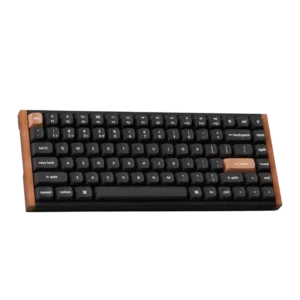
P1 Keychron K2 HE
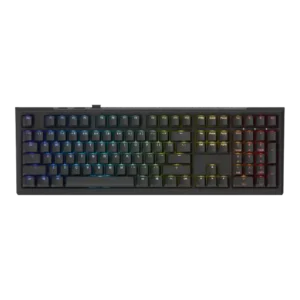
P2 Ducky One X Wireless

Comparison Takeaways

Keychron K2 HE

Where It Has the Edge

  • wrist rest quality is 5.0 vs 2.0. Wrist rest quality was praised when reviewers tried Keychron's optional palm rest, though the need for one also...
  • profile management is 4.6 vs 1.9. Profile management was positive, with reviewers valuing locally stored profiles and separate typing/gaming setups.
  • extra gaming features is 4.8 vs 2.1. Advanced gaming features were praised as serious tools for competitive players, especially actuation tuning and rapid-trigger behaviors.
  • compatibility is 4.8 vs 2.5. Compatibility was praised for Mac/Windows switching, Linux mentions, and cross-device use, with no major platform problem in scored...

Ducky One X Wireless

Where It Has the Edge

  • layout options is 4.3 vs 3.2. Layout options received positive evidence from reviewers who appreciated the full-size and 60% choices and broader layout availability.
  • per-key lighting control is 3.0 vs 2.0. Per-key lighting control was present, yet one review found it limited to a single mode while another treated...
  • volume control is 3.5 vs 2.7. Volume control was present and sometimes appreciated as part of the simple control layout, though some reviews treated...
  • cable quality is 4.0 vs 3.3. Cable quality was praised where reviewed, especially the braided USB-C cable, though one reviewer wanted an additional USB-A...
Average score
Product 1: Keychron K2 HE
4.2
Product 2: Ducky One X Wireless
3.5
acoustics
Product 1: Keychron K2 HE
4.7

Reviewers frequently liked the K2 HE's deeper, thocky, or satisfying sound, though one called it unadventurous rather than exciting.

Product 2: Ducky One X Wireless
4.7

Acoustics were one of the clearest strengths, with reviewers praising the controlled, deep, soft, and fantastic sound profile.

actuation consistency
Product 1: Keychron K2 HE
4.7

The Hall effect switches were repeatedly described as smooth and consistent, with only mild stiffness noted in one review.

Product 2: Ducky One X Wireless
3.0

Reviewers saw the consistency claim as plausible but not clearly transformative, with multiple reviewers saying they did not feel a practical advantage over Hall-effect alternatives.

analog input support
Product 1: Keychron K2 HE
4.2

Analog-style depth input was viewed as a useful advanced feature, especially for gamepad-like controls, though one reviewer saw it as more novel than essential.

Product 2: Ducky One X Wireless
3.3

Analog-style functionality was a mixed strength: multi-point and adjustable actuation impressed some reviewers, while others said induction did not add enough beyond existing Hall-effect boards.

backlight brightness
Product 1: Keychron K2 HE
2.7

Backlight brightness split reviewers: some found it dim or redundant on opaque caps, while others praised brighter implementations.

Product 2: Ducky One X Wireless
2.8

Backlight brightness was a modest weakness in the reviews that judged it, with reviewers calling it lower-end or not the brightest.

battery life
Product 1: Keychron K2 HE
4.4

Battery life was generally positive, ranging from several days to multiple weeks depending on RGB and wireless settings, with a few average assessments.

Product 2: Ducky One X Wireless
2.3

Battery life was repeatedly criticized, with reviewers reporting around 10 to 15 hours with RGB and saying it was not a buying reason.

build quality
Product 1: Keychron K2 HE
4.9

Build quality was a consistent strength, with reviewers calling it solid, premium, rigid, and well made across editions.

Product 2: Ducky One X Wireless
4.6

Build quality was widely praised, with reviewers repeatedly describing the keyboard as solid, sturdy, tank-like, durable, and well built.

cable quality
Product 1: Keychron K2 HE
3.3

Cable impressions were mixed: the braided cable was praised, but several reviewers disliked the short length or side-port constraints.

Product 2: Ducky One X Wireless
4.0

Cable quality was praised where reviewed, especially the braided USB-C cable, though one reviewer wanted an additional USB-A adapter.

compatibility
Product 1: Keychron K2 HE
4.8

Compatibility was praised for Mac/Windows switching, Linux mentions, and cross-device use, with no major platform problem in scored evidence.

Product 2: Ducky One X Wireless
2.5

Compatibility evidence centered on software and key-binding limitations, with Chromium-only support and missing special keys reducing flexibility.

connectivity
Product 1: Keychron K2 HE
4.5

Connectivity was generally strong across Bluetooth, 2.4GHz, and wired use, though side-port design and occasional wake behavior created caveats.

Product 2: Ducky One X Wireless
4.4

Connectivity was consistently useful, with reviewers appreciating wired, Bluetooth, 2.4 GHz, dongle storage, and stable connection options.

customization options
Product 1: Keychron K2 HE
4.8

Customization was one of the strongest themes, with reviewers praising per-key actuation, remapping, lighting, macros, and Hall effect controls.

Product 2: Ducky One X Wireless
2.8

Customization options were broad in concept but uneven in execution, with praised actuation/RGB controls offset by limited guidance, profiles, and advanced settings.

design aesthetics
Product 1: Keychron K2 HE
4.8

Design aesthetics earned broad praise for wood accents, a premium office-friendly look, and a less-gamer visual identity.

Product 2: Ducky One X Wireless
4.3

Design aesthetics were widely liked, with reviewers praising the clean, minimalist, sleek, cozy, and premium-looking design.

desk space efficiency
Product 1: Keychron K2 HE
4.6

The 75% layout was praised for saving desk space while retaining essentials, though some users missed larger layouts.

Product 2: Ducky One X Wireless
3.5

Desk space efficiency depended on layout: the Mini/compact version freed mouse room, while full-size reviewers noted less space for wide mouse sweeps.

durability
Product 1: Keychron K2 HE
4.8

Durability was inferred positively from sturdy construction, Hall effect longevity, and even an accidental drop test, with no major durability complaint.

Product 2: Ducky One X Wireless
2.9

Durability evidence was mixed: PBT wear resistance impressed one reviewer, but fragile clips, teardown damage, and switch housing concerns lowered confidence elsewhere.

ease of switch replacement
Product 1: Keychron K2 HE
3.8

Switch replacement was possible, but the practical experience was constrained by limited compatible magnetic switch choices.

Product 2: Ducky One X Wireless
3.3

Switch replacement was mixed: one reviewer found replacement easy, while others disliked reliance on Ducky-only switches and scarce spares.

ergonomics
Product 1: Keychron K2 HE
3.3

Ergonomics were mixed: adjustable angles helped some reviewers, but keyboard height caused wrist strain for others.

Product 2: Ducky One X Wireless
2.5

Ergonomics were a concern on taller or full-size versions, with reviewers noting finger strain, missing wrist-rest support, or the need to supply their own rest.

extra gaming features
Product 1: Keychron K2 HE
4.8

Advanced gaming features were praised as serious tools for competitive players, especially actuation tuning and rapid-trigger behaviors.

Product 2: Ducky One X Wireless
2.1

Extra gaming features lagged rivals in many reviews, especially due to sparse controls, missing SOCD/Snap Tap, and limited advanced analog options.

frame rigidity
Product 1: Keychron K2 HE
4.8

Frame rigidity was praised in the reviews that discussed it, including no deck flex, rigid construction, and ultra-stable typing.

Product 2: Ducky One X Wireless
4.8

Frame rigidity earned strong marks where tested, with minimal flex and little meaningful twisting or bending reported.

gaming performance
Product 1: Keychron K2 HE
4.7

Gaming performance was broadly positive, especially for responsiveness, rapid trigger, strafing, and clean repeated inputs, though pure esports comparisons were more guarded.

Product 2: Ducky One X Wireless
3.8

Gaming performance split reviewers: several found it fast and excellent, while competitive-oriented reviewers said limited software and features keep it behind top rivals.

hot-swappable switches
Product 1: Keychron K2 HE
2.6

Hot-swap support was consistently treated as limited because the board only accepts compatible Hall effect double-rail switches.

Product 2: Ducky One X Wireless
3.1

Hot-swap support was useful in principle, but proprietary switch limits, switches popping out with keycaps, and no spares reduced confidence.

keycap quality
Product 1: Keychron K2 HE
4.3

Keycap quality was mostly praised for PBT, OSA shape, and comfort, though a few reviews noted plain styling or material-saving concerns.

Product 2: Ducky One X Wireless
4.2

Keycap quality was mostly praised for PBT feel, texture, and durability, though one reviewer complained about chemical smell and another noted lighting legibility issues on alternate caps.

key responsiveness
Product 1: Keychron K2 HE
4.7

Key responsiveness was a major strength, with reviewers repeatedly calling the board fast, highly responsive, or effortless to trigger.

Product 2: Ducky One X Wireless
4.8

Hands-on reviewers praised responsiveness, saying response times felt great, keystrokes registered instantly, and actuation behaved as expected in tests.

key spacing
Product 1: Keychron K2 HE
3.4

Key spacing was mixed, with smaller or tightly packed keys bothering some reviewers before they adjusted.

Product 2: Ducky One X Wireless
3.0

Key spacing was only directly judged in one review, which found the wider full-size spacing noticeable and mildly straining.

key stability
Product 1: Keychron K2 HE
4.9

Key stability was repeatedly praised, with reviewers noting little or no wobble from double-rail switches and stabilized larger keys.

Product 2: Ducky One X Wireless
4.8

Key stability drew strong praise where discussed, especially for reduced wobble, stable switches, and well-controlled larger keys.

latency
Product 1: Keychron K2 HE
4.0

Latency evidence was mixed: several reviewers saw no noticeable lag, while one measured/characterized performance as not top-tier gaming latency.

Product 2: Ducky One X Wireless
3.9

Latency impressions were mostly positive in wired and wireless use, but one reviewer questioned the latency tradeoff of going wireless for a performance keyboard.

layout options
Product 1: Keychron K2 HE
3.2

Layout options were mixed: the 75% layout kept useful keys, but missing numpad, print screen, or full-size spacing bothered some users.

Product 2: Ducky One X Wireless
4.3

Layout options received positive evidence from reviewers who appreciated the full-size and 60% choices and broader layout availability.

legend visibility
Product 1: Keychron K2 HE
3.5

Legend visibility depended on version: opaque Special Edition caps drew criticism, while font clarity and shine-through options were praised elsewhere.

Product 2: Ducky One X Wireless
3.0

Legend visibility was mixed: standard legends were praised as sharp, while peach or orange alternate caps were criticized for poor shine-through or low-light readability.

macro customization
Product 1: Keychron K2 HE
4.7

Macro customization was praised where discussed, especially because macros could be created in Launcher and retained across devices.

Product 2: Ducky One X Wireless
3.7

Macro customization was praised in a few reviews for macro support and assigning keys, but one reviewer found multi-point or macro setup confusing.

materials quality
Product 1: Keychron K2 HE
4.7

Materials quality came through in praise for aluminum, wood, concrete, PBT, and overall premium-feeling construction.

Product 2: Ducky One X Wireless
4.1

Materials quality was mostly positive despite the plastic case, which reviewers often found premium-feeling or not cheap, though one wished for a more premium material.

media controls
Product 1: Keychron K2 HE
2.9

Media controls were a recurring weakness because reviewers wanted a knob or dedicated controls, despite remapping and function-row workarounds.

Product 2: Ducky One X Wireless
3.0

Media controls were mixed: some liked Ducky’s simple media-key approach, while others missed playback controls or broader dedicated buttons.

noise level
Product 1: Keychron K2 HE
4.2

Noise level was generally acceptable to good, with reviewers describing it as quiet enough or not overly clicky, though not silent.

Product 2: Ducky One X Wireless
4.3

Noise level was mostly favorable due to quieter, softer, low-rattle typing, but coil whine with RGB created a notable caveat.

onboard memory
Product 1: Keychron K2 HE
5.0

Onboard memory was praised because mappings or settings stayed on the keyboard and transferred across devices.

Product 2: Ducky One X Wireless
2.8

Onboard memory evidence was split: one reviewer praised saved macros/settings, while another criticized the absence of onboard profiles.

per-key lighting control
Product 1: Keychron K2 HE
2.0

Per-key lighting control was specifically criticized in one review for not supporting individual key color selection.

Product 2: Ducky One X Wireless
3.0

Per-key lighting control was present, yet one review found it limited to a single mode while another treated per-key adjustment as useful.

polling rate
Product 1: Keychron K2 HE
4.3

Polling rate was considered adequate to good for most users at 1,000Hz, but not class-leading for top competitive gaming.

Product 2: Ducky One X Wireless
3.4

Most reviewers treated the 1,000 Hz polling rate as adequate for normal play, while competitive-focused reviewers noted it trails higher-polling rivals.

portability
Product 1: Keychron K2 HE
3.0

Portability was a weak-to-mixed area because weight and size made the board less travel-friendly despite compact dimensions.

Product 2: Ducky One X Wireless
2.0

Portability was weak for the full-size board because reviewers found it heavy and poorly suited to frequent travel.

profile management
Product 1: Keychron K2 HE
4.6

Profile management was positive, with reviewers valuing locally stored profiles and separate typing/gaming setups.

Product 2: Ducky One X Wireless
1.9

Profile management was one of the biggest pain points in earlier reviews, with later updates improving the Mini through dual-profile support.

rapid trigger support
Product 1: Keychron K2 HE
4.9

Rapid trigger support was one of the clearest strengths, repeatedly praised for instant reset, gaming movement, and fast repeat inputs.

Product 2: Ducky One X Wireless
3.3

Rapid trigger was valued as useful and easy to toggle, but several reviewers criticized the limited high/medium/low sensitivity controls and lack of deeper tuning.

reliability
Product 1: Keychron K2 HE
3.3

Reliability was mixed: some reviewers reported no issues or a reliable experience, while others noted wake or 2.4GHz input issues.

Product 2: Ducky One X Wireless
2.4

Reliability confidence was mixed: stable wireless and bug fixes helped, but first-gen risk, no spare switches, and breakage concerns persisted.

RGB customization
Product 1: Keychron K2 HE
4.6

RGB customization was praised for plentiful modes and settings, even when lighting visibility itself was not always ideal.

Product 2: Ducky One X Wireless
3.8

RGB customization was generally available and sometimes praised, but reviewers also flagged unfinished configurator behavior and setup patience.

RGB lighting quality
Product 1: Keychron K2 HE
3.9

RGB lighting quality ranged from bright and attractive to partially blocked by opaque caps, making it version-dependent.

Product 2: Ducky One X Wireless
3.8

RGB lighting quality ranged from bright and attractive to limited or not especially bright, with some concern about unclear shine-through on alternate caps.

size and form factor
Product 1: Keychron K2 HE
4.7

The size and form factor were generally viewed as a good 75% balance, but the compact layout and weight were not ideal for every user.

Product 2: Ducky One X Wireless
3.7

The product’s size choices were useful, with reviewers noting both full-size and 60% versions, though full-size ergonomics and mouse-room tradeoffs remained.

software quality
Product 1: Keychron K2 HE
4.4

Software quality was mostly praised for a web-based Launcher that avoids bulky apps, though some reviewers found it less polished than competitors or dependent on USB/web access.

Product 2: Ducky One X Wireless
2.8

Software quality was the most repeated weakness: web-based setup was appreciated by some, but many called it buggy, limited, slow, confusing, or unfinished.

sound dampening
Product 1: Keychron K2 HE
4.8

Sound dampening was praised for muted, premium, thocky sound from internal foam, silicone, and dampening layers.

Product 2: Ducky One X Wireless
4.6

Sound dampening was strongly praised for its layers of foam, dampening materials, and controlled sound, though modders disliked how hard it was to alter.

stabilizer quality
Product 1: Keychron K2 HE
4.2

Stabilizer quality was mostly good, with several reviewers noting limited rattle or firm larger keys, but some still heard inconsistency.

Product 2: Ducky One X Wireless
4.8

Stabilizer quality was a major strength, with reviewers praising lubed, solid, vastly improved stabilizers and reduced wobble or rattle.

switch feel
Product 1: Keychron K2 HE
4.9

Switch feel was the standout attribute: reviewers repeatedly described the magnetic switches as smooth, stable, satisfying, and highly responsive.

Product 2: Ducky One X Wireless
4.6

Reviewers generally liked the inductive switch feel, repeatedly calling it smooth, pleasant, and better for typing than many Hall-effect boards, though one noted it was only fine or somewhat heavy for gaming.

switch options
Product 1: Keychron K2 HE
2.5

Switch options were the most consistent limitation because compatibility is restricted to a small set of linear Gateron double-rail magnetic switches.

Product 2: Ducky One X Wireless
2.4

Switch options were a recurring limitation: the board uses proprietary Ducky inductive switches, with few or no alternatives, although one reviewer described multiple switch options positively.

typing comfort
Product 1: Keychron K2 HE
4.3

Typing comfort was usually positive thanks to smooth switches and low fatigue, but height caused discomfort for some reviewers.

Product 2: Ducky One X Wireless
4.0

Typing comfort was generally strong, especially for long sessions, though one full-size reviewer felt strain during typing-heavy workdays.

typing feel
Product 1: Keychron K2 HE
4.8

Typing feel was overwhelmingly praised, often described as cloud-like, fluid, smooth, or among the best experiences reviewers had used.

Product 2: Ducky One X Wireless
4.9

Typing feel was one of the strongest areas, with reviewers repeatedly calling the experience smooth, satisfying, fantastic, or among the best in analog keyboards.

value for money
Product 1: Keychron K2 HE
4.6

Value for money was broadly positive because reviewers saw premium Hall effect features and design at a reasonable price, even if not cheap.

Product 2: Ducky One X Wireless
3.6

Value for money was sharply split, with positive reviewers calling it a great price or strong stock experience while critical reviewers said better-featured rivals make it hard to justify.

volume control
Product 1: Keychron K2 HE
2.7

Volume control was criticized mainly through the missing knob and reliance on remapping or function-row controls.

Product 2: Ducky One X Wireless
3.5

Volume control was present and sometimes appreciated as part of the simple control layout, though some reviews treated it as one of few dedicated controls.

wireless performance
Product 1: Keychron K2 HE
3.9

Wireless performance was mixed: many reviewers had flawless Bluetooth/2.4GHz use, while others saw wake delay or 2.4GHz bugginess.

Product 2: Ducky One X Wireless
4.2

Wireless performance was mostly responsive in positive reviews, but battery life and the usefulness of wireless for a latency-focused keyboard were questioned.

wrist rest quality
Product 1: Keychron K2 HE
5.0

Wrist rest quality was praised when reviewers tried Keychron's optional palm rest, though the need for one also reflected keyboard height.

Product 2: Ducky One X Wireless
2.0

Wrist rest evidence was negative because reviewers complained the board did not include one, especially given the keyboard height or ergonomics.