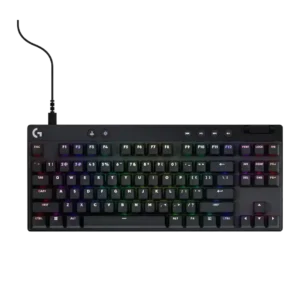
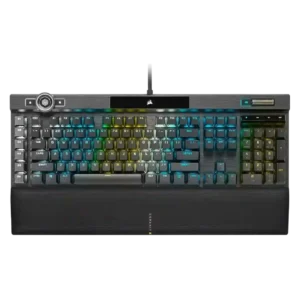
Compare Logitech G PRO X Keyboard vs Corsair K100 RGB

P1 Logitech G PRO X Keyboard
P2 Corsair K100 RGB

Comparison Takeaways

Logitech G PRO X Keyboard

Where It Has the Edge

  • portability is 4.5 vs 2.1. Portability is consistently strong thanks to compact form factors, detachable/portable designs, dongle storage, and hard carry cases.
  • desk space efficiency is 4.4 vs 2.5. Compact TKL and 60% layouts are repeatedly praised for freeing mouse space and maximizing smaller desks.
  • hot-swappable switches is 2.9 vs 1.0. Hot-swappability is a major plus on older Pro X boards but a major complaint on later TKL, 60%,...
  • size and form factor is 4.1 vs 2.3. Size and form factor are a strength for competitive desk space, though 60% sacrifices make the layout more...

Corsair K100 RGB

Where It Has the Edge

  • sound dampening is 4.9 vs 2.0. Sound dampening is praised most strongly by KitGuru, which finds the K100 noticeably more muted and less resonant...
  • materials quality is 4.7 vs 2.4. Materials quality is praised for aluminum, premium feel, strong construction, and top-quality components.
  • backlight brightness is 5.0 vs 3.1. Backlight brightness is strongly praised where mentioned, especially by reviewers who call the lighting impressively bright.
  • key stability is 5.0 vs 3.1. Key stability receives strong praise from reviewers who note almost no tilt, no rattle, and no flex or...
Average score
Product 1: Logitech G PRO X Keyboard
3.6
Product 2: Corsair K100 RGB
4.0
acoustics
Product 1: Logitech G PRO X Keyboard
3.0

Acoustics range from deep and pleasant on some TKL units to hollow, loud, or clanky on the 60% models, making sound a mixed attribute.

Product 2: Corsair K100 RGB
4.1

Acoustics are mixed: several reviewers like the smoother or more satisfying sound, while ProSettings complains about hollow, resonating, loud keys.

actuation consistency
Product 1: Logitech G PRO X Keyboard
4.2

Reviewers liked smooth or adjustable actuation when it was well tuned, but several noted that actuation advantages depend heavily on setup and switch type.

Product 2: Corsair K100 RGB
5.0

Actuation consistency is supported by IGN's report that there were no response or press issues during fast gaming use.

backlight brightness
Product 1: Logitech G PRO X Keyboard
3.1

Backlight brightness is usually usable, but multiple reviewers wanted brighter or more even output, especially on larger keys.

Product 2: Corsair K100 RGB
5.0

Backlight brightness is strongly praised where mentioned, especially by reviewers who call the lighting impressively bright.

battery life
Product 1: Logitech G PRO X Keyboard
3.5

Battery life is usable for wireless play, yet reviewers split between excellent endurance on the 60% and merely average weekly charging on the TKL.

Product 2: Corsair K100 RGB
No score yet
build quality
Product 1: Logitech G PRO X Keyboard
4.2

Build quality is often praised as sturdy, rigid, and premium-feeling, though the Pro X 60 drew sharp criticism for feeling cheap to some reviewers.

Product 2: Corsair K100 RGB
4.4

Build quality is usually described as premium, sturdy, solid, or excellent, but one Tom's Hardware sample left concerns because of magnet and key issues.

cable quality
Product 1: Logitech G PRO X Keyboard
2.9

Cable quality varies by model: older braided or thick cables pleased reviewers, while micro-USB, silicone, and minimal cables drew complaints.

Product 2: Corsair K100 RGB
3.0

Cable quality is mixed: reviewers call the cable sturdy, thick, and braided, but fixed and non-detachable design hurts convenience.

compatibility
Product 1: Logitech G PRO X Keyboard
2.5

Compatibility evidence centers on software support; one reviewer specifically criticized lack of G Hub support on Mac.

Product 2: Corsair K100 RGB
4.4

Compatibility receives positive evidence from iCue recognizing another Corsair device, suggesting useful ecosystem integration.

connectivity
Product 1: Logitech G PRO X Keyboard
4.2

Connectivity is usually praised for easy Bluetooth/Lightspeed switching and stable use, but one reviewer disliked that a TKL unit could only be used wirelessly.

Product 2: Corsair K100 RGB
3.8

Connectivity gets positive marks for USB passthrough as a handy extra, though the wired-only setup and thick cable remain contextual limitations.

customization options
Product 1: Logitech G PRO X Keyboard
4.4

Customization is one of the line’s clearest strengths, from hot-swap layouts to Keycontrol, though cost and closed ecosystems limit it on some versions.

Product 2: Corsair K100 RGB
4.3

Customization options are extremely broad across lighting, keys, macros, and wheel functions, but reviewers often warn that configuring them takes effort.

design aesthetics
Product 1: Logitech G PRO X Keyboard
3.9

Design impressions are mixed: reviewers liked the simple, functional, and colorful looks, while some criticized stale or cheap-feeling styling.

Product 2: Corsair K100 RGB
4.6

Design aesthetics are widely praised as premium, sleek, gorgeous, luxurious, or visually impressive, with the RGB-heavy look occasionally framed as busy.

desk space efficiency
Product 1: Logitech G PRO X Keyboard
4.4

Compact TKL and 60% layouts are repeatedly praised for freeing mouse space and maximizing smaller desks.

Product 2: Corsair K100 RGB
2.5

Desk space efficiency is weak because multiple reviewers mention a massive footprint or the need to sacrifice room for the keyboard and wrist rest.

durability
Product 1: Logitech G PRO X Keyboard
4.6

Durability is supported by sturdy builds, durable PBT keycaps, and reviewers expecting the boards to last, with a few variant-specific caveats.

Product 2: Corsair K100 RGB
4.7

Durability evidence focuses mainly on PBT keycaps and materials that reviewers say resist wear or hold up better over time.

ease of switch replacement
Product 1: Logitech G PRO X Keyboard
4.2

Switch replacement is praised as simple on hot-swappable G Pro X models, but full-board swapping can still be time-consuming.

Product 2: Corsair K100 RGB
No score yet
ergonomics
Product 1: Logitech G PRO X Keyboard
4.1

Ergonomics are generally helped by compact layouts and typing-angle feet, though comfort depends on posture and layout familiarity.

Product 2: Corsair K100 RGB
4.2

Ergonomics are generally good due to comfort and wrist support, though some reviewers want a better wrist angle or note the large full-size layout.

extra gaming features
Product 1: Logitech G PRO X Keyboard
4.0

Gaming extras such as Game Mode, Key Priority, and physical toggles are useful, but several reviewers question whether they justify the price.

Product 2: Corsair K100 RGB
3.5

Extra gaming features are polarizing: reviewers praise the G keys and control wheel potential, but several call the wheel limited, janky, or not very useful in games.

frame rigidity
Product 1: Logitech G PRO X Keyboard
4.5

Frame rigidity is a major positive in many reviews, with repeated praise for no flex, sturdy frames, and inflexible plates.

Product 2: Corsair K100 RGB
5.0

Frame rigidity receives excellent marks from reviewers who report no frame flex or only minimal flex.

gaming performance
Product 1: Logitech G PRO X Keyboard
4.2

Gaming performance is generally strong, with fast, responsive, reliable play; criticism focuses more on value and missing cutting-edge features.

Product 2: Corsair K100 RGB
4.5

Gaming performance is widely praised as fast, smooth, and confidence-inspiring, with some reviewers reporting better responsiveness or a noticeable improvement in games.

hot-swappable switches
Product 1: Logitech G PRO X Keyboard
2.9

Hot-swappability is a major plus on older Pro X boards but a major complaint on later TKL, 60%, and Rapid versions when absent or proprietary.

Product 2: Corsair K100 RGB
1.0

Hot-swappable switches score poorly because the one opinionated mention treats the lack of hot-swap support as a drawback.

keycap quality
Product 1: Logitech G PRO X Keyboard
3.4

Keycap quality is mixed: PBT and grip draw praise, while ABS caps, oil pickup, thin caps, and cheap feel draw complaints.

Product 2: Corsair K100 RGB
4.4

The double-shot PBT keycaps are praised for feel, texture, clean looks, durability, and bright/crisp legends, though one review criticizes the included replacement caps as less durable.

key responsiveness
Product 1: Logitech G PRO X Keyboard
4.4

Key responsiveness is mostly praised as quick, snappy, instant, or highly responsive, especially for gaming and rapid-trigger use.

Product 2: Corsair K100 RGB
4.7

The keyboard is repeatedly praised for very fast, sensitive, and responsive inputs, with several reviewers describing immediate or lightning-fast key response.

key spacing
Product 1: Logitech G PRO X Keyboard
No score yet
Product 2: Corsair K100 RGB
3.7

Key spacing is mixed, with praise for standard bottom-row spacing but complaints that the left G keys can cause reaches or accidental presses.

key stability
Product 1: Logitech G PRO X Keyboard
3.1

Key stability is inconsistent, ranging from firm, low-wobble keys to severe wobble complaints on the Pro X 60.

Product 2: Corsair K100 RGB
5.0

Key stability receives strong praise from reviewers who note almost no tilt, no rattle, and no flex or wobble in the keys.

latency
Product 1: Logitech G PRO X Keyboard
4.5

Latency is a strength in wireless models, where reviewers repeatedly describe Lightspeed as low-latency or effectively wired-like.

Product 2: Corsair K100 RGB
4.4

Latency impressions are mostly positive in real use, including reports of no lag or instant action, but some reviewers question whether the sub-millisecond gains are perceptible.

layout options
Product 1: Logitech G PRO X Keyboard
2.8

Layout options are divisive: TKL is often a sweet spot, while 60% layouts require adjustment and sacrifice dedicated keys.

Product 2: Corsair K100 RGB
4.7

Layout options improve because reviewers appreciate the standard bottom row and easier compatibility with aftermarket keycap sets.

legend visibility
Product 1: Logitech G PRO X Keyboard
2.7

Legend visibility is a repeated weak point, with complaints about secondary legends, dark spots, and uneven lighting on larger keys.

Product 2: Corsair K100 RGB
4.6

Legends are praised as sharp, clean, bright, and well illuminated, with reviewers appreciating the less gamer-heavy font and full legend visibility.

macro customization
Product 1: Logitech G PRO X Keyboard
4.2

Macro customization is powerful in G Hub and Keycontrol, though some reviewers found setup time-consuming or limited by software design.

Product 2: Corsair K100 RGB
4.6

Macro customization is a major strength, with reviewers praising G keys, Stream Deck integration, on-the-fly macro recording, and broad remapping possibilities.

materials quality
Product 1: Logitech G PRO X Keyboard
2.4

Materials quality ranges from premium-feeling PBT and metal plates to complaints about basic plastic and unremarkable stock parts.

Product 2: Corsair K100 RGB
4.7

Materials quality is praised for aluminum, premium feel, strong construction, and top-quality components.

media controls
Product 1: Logitech G PRO X Keyboard
3.5

Media controls are useful when dedicated, but placement and limited customization create mixed opinions across models.

Product 2: Corsair K100 RGB
4.0

Media controls are mostly praised for dedicated keys, a metal scroll wheel, and usable feedback, although some buttons feel odd or less satisfying.

noise level
Product 1: Logitech G PRO X Keyboard
1.8

Noise level is one of the weakest areas on several units, with complaints about distracting clack, rattling, and loud sound.

Product 2: Corsair K100 RGB
3.0

Noise level is divided: some reviewers call the board loud or drastically louder than quieter keyboards, while others find the sound pleasant or less distracting.

onboard memory
Product 1: Logitech G PRO X Keyboard
4.2

Onboard memory is useful when present, letting reviewers save settings or profiles and avoid keeping software open.

Product 2: Corsair K100 RGB
4.5

Onboard memory is praised as unusually large or impressive, especially the ability to store many profiles and lighting layers on the keyboard.

passthrough features
Product 1: Logitech G PRO X Keyboard
No score yet
Product 2: Corsair K100 RGB
4.0

Passthrough features are generally appreciated as a useful luxury or handy extra, though cable routing is not universally ideal.

per-key lighting control
Product 1: Logitech G PRO X Keyboard
4.6

Per-key lighting control is a strength where reviewers praise easy per-key RGB, custom lighting, and G Hub control.

Product 2: Corsair K100 RGB
4.5

Per-key lighting control is positively noted in reviews that appreciate the individual key lighting and access to the keyboard's 44 lighting zones.

polling rate
Product 1: Logitech G PRO X Keyboard
2.6

Polling rate is adequate at 1000Hz for some reviewers but criticized as behind competing high-polling keyboards.

Product 2: Corsair K100 RGB
3.5

The 4,000Hz polling rate is seen as technically impressive and future-facing, yet many reviewers say the practical difference from 1,000Hz is subtle or hard to notice.

portability
Product 1: Logitech G PRO X Keyboard
4.5

Portability is consistently strong thanks to compact form factors, detachable/portable designs, dongle storage, and hard carry cases.

Product 2: Corsair K100 RGB
2.1

Portability is poor because reviewers emphasize the K100's size, weight, full-size layout, and non-detachable cable as desk-bound traits.

profile management
Product 1: Logitech G PRO X Keyboard
4.2

Profile management is useful through saved onboard profiles, game profiles, and quick profile switching, though onboard limits appear on some models.

Product 2: Corsair K100 RGB
4.0

Profile management is capable but can be overwhelming; reviewers praise large onboard profile capacity while noting the profile system can become complex.

rapid trigger support
Product 1: Logitech G PRO X Keyboard
2.7

Rapid Trigger support is sharply variant-dependent: the Rapid model earns praise, while other 60% models are criticized for lacking it.

Product 2: Corsair K100 RGB
No score yet
reliability
Product 1: Logitech G PRO X Keyboard
3.2

Reliability is generally good in stable wireless and rugged models, but bugs and accidental drop behavior created concerns in a few reviews.

Product 2: Corsair K100 RGB
3.8

Reliability is mixed: optical switches are praised for avoiding chatter and missed inputs, but one reviewer experienced keyboard freezing and shutoff.

RGB customization
Product 1: Logitech G PRO X Keyboard
3.8

RGB customization is broadly praised for presets and per-key control, though G Hub difficulty hurts the experience for some reviewers.

Product 2: Corsair K100 RGB
4.8

RGB customization is considered extensive, with praise for per-key control, many lighting zones, and deep reworking options, though software complexity can slow the process.

RGB lighting quality
Product 1: Logitech G PRO X Keyboard
3.8

RGB lighting quality is often vibrant and attractive, but uneven shine-through and color limitations weaken some models.

Product 2: Corsair K100 RGB
4.6

RGB lighting quality is one of the most consistently praised areas, with reviewers calling it vibrant, bright, clear, excellent, and visually premium.

size and form factor
Product 1: Logitech G PRO X Keyboard
4.1

Size and form factor are a strength for competitive desk space, though 60% sacrifices make the layout more polarizing than TKL.

Product 2: Corsair K100 RGB
2.3

Size and form factor are a limitation for reviewers who describe the K100 as large, full-size, and demanding of desk space.

software quality
Product 1: Logitech G PRO X Keyboard
3.5

Software quality is polarizing: G Hub can be powerful and polished, but also mediocre, tedious, buggy, or unintuitive depending on reviewer and version.

Product 2: Corsair K100 RGB
3.1

Software quality is the most divisive area, combining deep iCue functionality with repeated complaints about clunkiness, confusing workflows, and tedious setup.

sound dampening
Product 1: Logitech G PRO X Keyboard
2.0

Sound dampening is weak overall; reviewers often found hollow sound or insufficient damping despite some included layers.

Product 2: Corsair K100 RGB
4.9

Sound dampening is praised most strongly by KitGuru, which finds the K100 noticeably more muted and less resonant than its predecessor.

stabilizer quality
Product 1: Logitech G PRO X Keyboard
2.5

Stabilizer quality is mixed to poor, with rattly or mushy stabilized keys recurring despite occasional praise for limited rattle.

Product 2: Corsair K100 RGB
4.3

Stabilizer quality is viewed as improved, with praise for better sound and less rattle, though one reviewer still found some wobble and rattling.

switch feel
Product 1: Logitech G PRO X Keyboard
3.5

Switch feel varies widely by variant, from smooth and snappy to hollow, overly light, wobbly, or disappointing tactile feel.

Product 2: Corsair K100 RGB
4.6

Reviewers consistently describe the OPX or Speed linear switches as fast, smooth, and satisfying, though a few note the sensitivity takes adjustment and the feel is not for everyone.

switch options
Product 1: Logitech G PRO X Keyboard
2.9

Switch options are broad on some GX models but criticized on proprietary or closed switch ecosystems.

Product 2: Corsair K100 RGB
2.0

Switch choice is viewed as limited because reviewers mention OPX and Cherry MX Speed variants, while one reviewer explicitly disliked the lack of a tactile option.

typing comfort
Product 1: Logitech G PRO X Keyboard
3.6

Typing comfort is generally good after adjustment, helped by PBT texture and familiar switch feel, but compact layouts can hurt comfort.

Product 2: Corsair K100 RGB
3.3

Typing comfort is mixed: some find the K100 comfortable after adjustment, while others call the sensitive switches unforgiving or not for all typists.

typing feel
Product 1: Logitech G PRO X Keyboard
3.9

Typing feel is usually pleasant or good on stronger models, but larger keys and some switch choices create mixed impressions.

Product 2: Corsair K100 RGB
4.4

Typing feel is generally strong once acclimated, with praise for fewer typos and satisfying keys, though PCMag initially found the keys uncomfortable.

value for money
Product 1: Logitech G PRO X Keyboard
2.5

Value for money is the most common concern, with many reviewers saying the boards are expensive for missing or niche features.

Product 2: Corsair K100 RGB
3.3

Value for money is highly conditional: reviewers like the premium feature set but repeatedly warn that the high price only makes sense if the extras are used.

volume control
Product 1: Logitech G PRO X Keyboard
3.9

Volume control is usually appreciated as convenient, especially side rollers, though a few reviewers disliked placement or cheap feel.

Product 2: Corsair K100 RGB
4.5

The volume wheel is a highlight, repeatedly praised for smoothness, premium feel, strong resistance, and better feel than some competitors.

wireless performance
Product 1: Logitech G PRO X Keyboard
4.5

Wireless performance is a major strength when Lightspeed is present, with reviewers citing stable, fast, low-latency performance.

Product 2: Corsair K100 RGB
No score yet
wrist rest quality
Product 1: Logitech G PRO X Keyboard
2.8

The lack of a wrist rest is a minor drawback for users who expect one with a premium compact keyboard.

Product 2: Corsair K100 RGB
4.6

The wrist rest is broadly praised as comfortable, cushioned, magnetic, and much improved over earlier Corsair rests, with only minor firmness or branding complaints.