- Better: battery life and overall experience The Asus ROG Azoth is described as a better all-around option with dramatically stronger battery life.
Logitech G PRO X Keyboard Review
Bottom Line
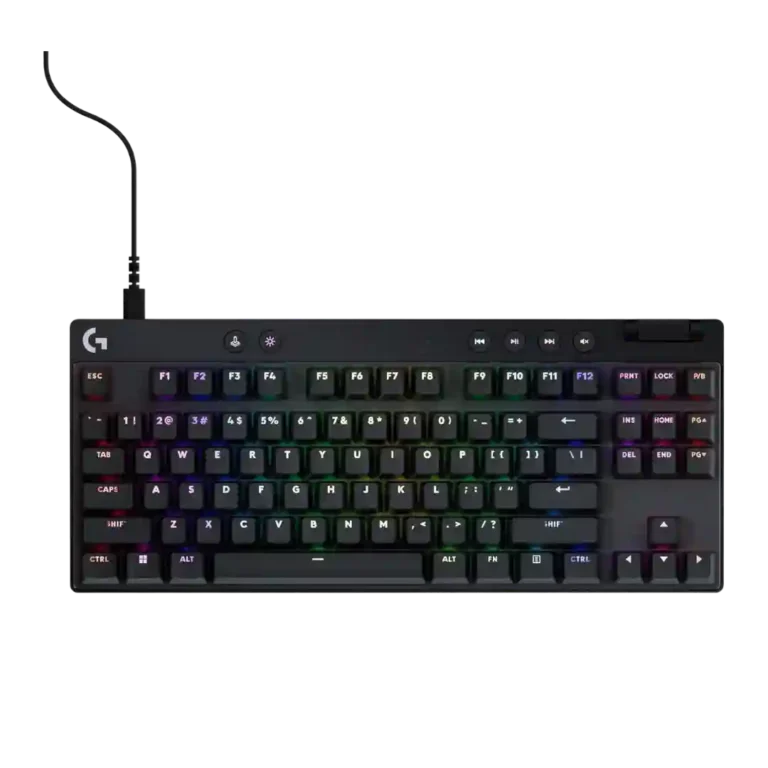
Choose the Logitech G Pro X Keyboard if you want a compact, sturdy gaming board with strong wireless options, RGB, and deep key customization. Skip it if value, quieter acoustics, standard hot-swap support, or simpler software matters more.
Best for competitive or desk-space-conscious gamers who value compact layouts, sturdy construction, fast wireless on supported models, and deep customization through G Hub or hot-swappable switches. It especially fits users already comfortable with Logitech’s software ecosystem.
Not for buyers who want the best value, quiet refined acoustics, consistent hot-swappable switch support across models, or simple plug-and-play customization. It is also less ideal for productivity users who depend on full-size layouts, visible secondary legends, or a wrist rest.
Across the review set, the Logitech G Pro X Keyboard line comes across as a sturdy, competition-focused family that gets the core gaming basics right: compact layouts, responsive keys, strong Lightspeed wireless on supported models, and unusually deep customization through switch swapping or G Hub layers. The tradeoff is that Logitech’s best ideas are not evenly distributed. Older hot-swappable versions win praise for switch experimentation but lose points for non-standard keycaps and micro-USB, while newer wireless and 60% models gain portability, media controls, and software depth but often drop hot-swap support. Reviewers repeatedly like the build and performance, yet price, uneven acoustics, stabilizers, and software friction keep the product from feeling universally easy to recommend.
Compared in Reviews
Products reviewers directly compared with this model, grouped into quick takeaways.
- Alternative: programmability, polling rate, and speed switches Corsair is framed as similarly programmable with higher polling and faster-feeling switches, while Logitech is easier to understand.
- Worse: switch stability and feel progress The reviewer says the Rapid version steps up compared with the Apex Pro and Logitech’s prior mechanical TKL.
Feature Scorecards
Pros
-
Frame rigidity is widely praised, with reviewers repeatedly mentioning little to no flex and sturdy construction across TKL, 60%, and older G Pro designs.
-
Analog-style input support appears in the magnetic Rapid model, where the reviewer explains that the switches can recognize inputs at varying travel distances.
-
Customization options are a headline strength, from switch mixing on older hot-swap models to deep key remapping and G-Shift layers on newer models.
-
Wireless performance is consistently strong where reviewed, with Lightspeed described as steady, reliable, fast, and free of hiccups.
-
Durability is supported by reviewers praising PBT resistance, long-lasting construction, and boards that feel built for travel or extended competitive use.
-
Desk space efficiency is a strong reason to consider the compact models, with reviewers repeatedly noting extra mouse space and narrower footprints.
-
Portability is a strong theme, helped by detachable cables, compact sizes, dongle storage, and especially the hard carrying cases bundled with several wireless models.
-
Per-key lighting control is well supported in the evidence, with several reviews describing individually backlit keys or per-key RGB customization.
-
Actuation control is strongest on the magnetic Rapid model, where reviewers describe adjustable per-key actuation, while another reviewer credits the Pro X 60 with improved input accuracy after adjustment.
-
Responsiveness is usually a strength, with reviewers calling keys quick, snappy, and instant-feeling in games, though this does not always overcome broader feature or value concerns.
-
Connectivity is a major positive on wireless variants, with Bluetooth and Lightspeed options widely mentioned, though one reviewer had concerns about wireless-only operation.
-
Profile management is well supported through game/app profiles, preset switching, and onboard profile storage, especially on G Hub-enabled models.
-
Latency is praised on Lightspeed wireless models, with reviewers describing low-latency behavior and instant-feeling responses compared with Bluetooth or wired expectations.
-
Reviewers consistently note multiple switch choices, especially GX Red, Brown, and Blue options on the mechanical versions, though newer optical models narrow the practical choice set.
-
Typing feel is generally positive on the better-reviewed models, with comfortable speed and daily-driver usability, but some optical and tactile variants are described as hollow or merely adequate.
-
Gaming performance is usually solid, especially for esports-focused use and compact layouts, though some reviewers say the gains are not meaningful enough for most gamers.
-
Ease of switch replacement is strong on the hot-swappable G Pro X, though reviewers warn that pins can bend and full-board swaps are time-consuming.
-
Extra gaming features are useful, including Game Mode switches, Key Priority, and disabled-key controls, though some reviewers question how valuable they are for non-pro gamers.
-
RGB customization is a consistent strength, with G Hub enabling custom colors, effects, zones, and per-key-style lighting behavior across many reviewed models.
-
Typing comfort is positive in the few direct mentions, with reviewers calling the TKL comfortable and one 60% model low enough to use without a palm rest.
-
Build quality is one of the strongest repeated positives, with many reviewers calling the boards solid, premium-feeling, durable, or tank-like, despite a few negative takes on plastic-heavy models.
-
Compatibility is mixed: reviewers praise third-party keycaps, app integrations, Logitech peripheral pairing, and third-party switches on some models, but also flag 3-pin limits and Windows-only software.
-
Macro customization is a major strength on newer models, especially Keycontrol and G-Shift layers, though older models are limited mostly to function keys.
-
Volume control is generally appreciated, especially rollers or side wheels, but a few reviewers find the placement, feel, or usefulness questionable.
-
Size and form factor are central strengths for gaming, with TKL and 60% layouts praised for compactness and esports-oriented footprints.
-
Ergonomics are generally acceptable thanks to compact layouts and adjustable feet, though taller or awkward models require adjustment and one reviewer found long sessions uncomfortable.
-
Onboard memory is useful but uneven, ranging from simple saved lighting and settings to three onboard profiles, with one review noting only a single profile.
-
RGB lighting quality is often vibrant and attractive, but not universal; some reviews praise Logitech brightness and color, while others criticize poor shine-through and uneven larger-key lighting.
-
Materials quality depends on model: metal plates, aluminum frames, and PBT caps earn praise, while plastic frames and recycled ABS materials feel less premium to some reviewers.
-
Battery life is adequate but not exceptional: 50-65 hour ratings are common, but reviewers often wanted longer endurance on premium wireless boards.
-
Software quality is powerful but divisive: reviewers praise G Hub depth and accessibility, while others call it mediocre, tedious, buggy, or less intuitive.
-
Switch feel lands from excellent to disappointing depending on model and switch type: older GX and some optical variants are described as smooth or responsive, while tactile and newer proprietary switches drew complaints about hollowness or weak tactility.
-
Backlight brightness is mixed: several reviewers call it bright or sufficient, while others wish it were brighter or complain about uneven shine-through.
-
Acoustics receive mixed comments: some reviewers like the improved typing sound and less switch ping, while others note the sound is not deep or refined.
-
Media controls vary by model: TKL boards earn praise for dedicated controls, while older and compact boards rely on function layers or place controls where visibility is poor.
-
Reliability is mixed: wireless steadiness and lack of false presses are praised, while one negative review reports random presses after drops.
Cons
-
Keycap quality is inconsistent: TKL and 60 models with PBT caps receive praise, while older ABS caps and some newer thin-feeling PBT caps draw criticism.
-
Polling rate evidence is mixed: 1000Hz is treated as adequate for most play, but several reviewers criticize it because competitors offer higher 8000Hz-style rates.
-
Layout options focus on compact gaming forms, especially TKL and 60%, but customization is constrained by non-standard bottom rows and missing dedicated keys on smaller models.
-
Key stability varies sharply by model: some reviewers report little wobble or stable box-stem keys, while others complain about severe wobble on the Pro X 60.
-
Cable quality is mixed: older braided or thick detachable cables earn praise, while micro-USB, rubber, and poor included cables draw criticism.
-
Hot-swappable switch support is the most split attribute: the older G Pro X is praised for it, while newer TKL and 60 models are repeatedly criticized for removing or limiting it.
-
Noise level ranges from quiet to distracting: some older switches are described as quieter, while several newer compact models are called clacky, rattly, or loud.
-
Sound dampening is inconsistent, with some internal dampening or reduced ping noted, but multiple reviewers criticize missing foam, weak implementation, or poor sound treatment.
-
Rapid Trigger support is uneven across the lineup: the Rapid model earns strong praise, while optical and older models are criticized for lacking the feature or needing future firmware support.
-
Legend visibility is a recurring weakness, especially for secondary legends, larger keys, indicator lights, and uneven shine-through on some layouts.
-
Value for money is the dominant concern, with many reviewers calling the boards expensive, overpriced, or worth buying only for specific needs or on sale.
-
Stabilizer quality is a common weak point, with several reviews calling larger keys rattly or mushy, though one Pro X 60 review reports very little rattle.
-
Wrist rest evidence is limited and negative only by omission: one reviewer notes the keyboard includes a carrying case rather than a wrist rest.
Compared With Category Average
Compared with other Gaming Keyboard, this product is above average in analog input support, wireless performance, portability, below average in stabilizer quality, sound dampening, value for money.
| Attribute | This product | Category average | Difference |
|---|---|---|---|
| analog input support | 4.7 | 3.1 | +1.6 |
| stabilizer quality | 2.5 | 3.9 | -1.5 |
| sound dampening | 2.6 | 4.1 | -1.5 |
| value for money | 2.5 | 3.6 | -1.2 |
| wireless performance | 4.6 | 3.2 | +1.4 |
| legend visibility | 2.6 | 3.7 | -1.1 |
| portability | 4.5 | 3.4 | +1.1 |
| key stability | 3.0 | 4.2 | -1.2 |
FAQ
Is the Logitech G Pro X Keyboard good for gaming?
Yes, most reviewers describe the keys as responsive and the compact layouts as well suited to competitive gaming. The benefit is strongest on Lightspeed and Rapid models, though some reviewers question whether the performance gains justify the price.
Is it hot-swappable?
It depends on the model. The older G Pro X mechanical keyboard is praised for hot-swappable switches, while several newer TKL, 60%, and optical variants are criticized for removing or limiting switch replacement.
How good is the wireless performance?
Wireless performance is one of the more consistent positives. Reviews describe Lightspeed as fast, reliable, steady, and close to wired use, while Bluetooth is treated as better for productivity than high-intensity gaming.
How is the Logitech G Hub software?
G Hub is powerful and supports lighting, macros, profiles, G-Shift, and deeper Keycontrol customization. Reviewers are split because some find it polished and accessible, while others call it mediocre, tedious, buggy, or less intuitive.
Are the keycaps and RGB good?
Newer PBT keycaps are often praised for feel and durability, while older ABS caps and some newer thin-feeling caps draw criticism. RGB is usually vibrant and customizable, but legend visibility and larger-key shine-through are recurring issues.
Is it worth the price?
Value is the most repeated concern. Reviewers tend to support it for buyers who specifically need Logitech’s compact gaming design, wireless performance, or customization, but many recommend waiting for a sale or considering alternatives.
Consider This Instead
If you want better value for money
Choose McHose GX87 Keyboard. It scores 4.9 vs 2.5 for value for money, with a 4.2 overall score.
If you want better wrist rest quality
Choose Razer BlackWidow V4 Pro. It scores 4.6 vs 1.5 for wrist rest quality, with a 4.0 overall score.
If you want better legend visibility
Choose HyperX Alloy Rise. It scores 4.8 vs 2.6 for legend visibility, with a 4.1 overall score.
If you want better stabilizer quality
Choose Logitech G915 X Lightspeed. It scores 4.8 vs 2.5 for stabilizer quality, with a 3.9 overall score.
Overall Top Gaming Keyboard Alternatives
Best for 8K polling, magnetic-switch gaming control, premium build, and deep web customization. Skip it if you need broad switch compatibility, USB passthrough, a wrist rest, or a portable keyboard.
Pros: latency, polling rate
Cons: portability, switch options
Good if you want a premium full-size Hall Effect keyboard with smooth switches, strong gaming controls, and quiet acoustics. Skip it if you need a portable, budget, or broadly switch-compatible...
Pros: key stability, frame rigidity
Cons: portability, switch options

Best for a premium, quiet Hall Effect TKL with strong wireless, software, and gaming features. Skip it if price, switch flexibility, USB passthrough, or an included wrist rest matter most.
Pros: rapid trigger support, typing feel
Cons: switch options, portability
Best for a premium 96% metal keyboard with Hall Effect tuning, strong wireless, and excellent typing feel. Skip it for travel, bargain pricing, or maximum esports specs.
Pros: build quality, frame rigidity
Cons: portability, switch options