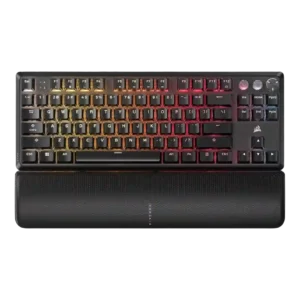
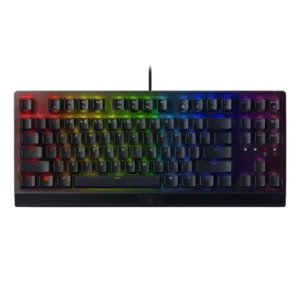
Compare Corsair K70 PRO vs Razer BlackWidow V3

P1 Corsair K70 PRO
P2 Razer BlackWidow V3

Comparison Takeaways

Corsair K70 PRO

Where It Has the Edge

  • hot-swappable switches is 2.6 vs 1.0. Hot-swappable switch support was mostly a weakness on RGB Pro and TKL variants, though the Mini Wireless review...
  • wireless performance is 2.5 vs 1.0. Wireless performance was mostly a limitation for wired variants, while the Mini Wireless review reported no wireless signal...
  • sound dampening is 3.0 vs 1.8. Sound dampening was uneven: newer TKL designs used silicone layers, but other K70 versions lacked foam or still...
  • reliability is 4.5 vs 3.6. Reliability was strong overall, with no chatter, no dropped keystrokes, anti-ghosting, n-key rollover, and consistent registration reported.

Razer BlackWidow V3

Where It Has the Edge

  • legend visibility is 4.4 vs 3.5. Legend visibility has specific positive evidence from the TKL review, where Razer's lighting treatment improved readability for non-English...
  • key stability is 4.0 vs 3.3. Key stability is generally good thanks to switch and cap design, but one review reported some wobble on...
  • ergonomics is 4.0 vs 3.4. Ergonomics are generally good thanks to angle feet and wrist-rest support, though comfort depends on desk space and...
  • latency is 4.7 vs 4.2. The available latency evidence is strongly positive, describing the BlackWidow V3 as remarkably low-latency for fast gaming input.
Average score
Product 1: Corsair K70 PRO
3.8
Product 2: Razer BlackWidow V3
3.7
acoustics
Product 1: Corsair K70 PRO
2.6

Acoustics were the most common weakness, with repeated reports of ping, harsh clacking, hollow sound, or stabilizer-related noise.

Product 2: Razer BlackWidow V3
2.2

Acoustic impressions are weak overall because multiple reviews mention pinging, especially with forceful typing or particular setups.

actuation consistency
Product 1: Corsair K70 PRO
3.9

Actuation evidence was mixed: some tests found forces within spec or highly adjustable, while others found sensitive switches or inconsistent switch mixes.

Product 2: Razer BlackWidow V3
4.1

Actuation evidence is mostly positive, with reviewers pointing to short pre-travel, 1.9 mm actuation behavior and quick activation, especially for gaming.

analog input support
Product 1: Corsair K70 PRO
3.5

Analog-style input support appears limited to Hall effect depth/actuation features such as adjustable travel and multi-action keypress mapping rather than broad analog control.

Product 2: Razer BlackWidow V3
No score yet
backlight brightness
Product 1: Corsair K70 PRO
3.8

Backlight brightness was serviceable to bright, with hotkeys and direct controls, though not every reviewer found it exceptionally bright.

Product 2: Razer BlackWidow V3
4.0

Brightness impressions vary: some found the lights toned down, others praised brightness on the TKL or noted practical brightness controls.

battery life
Product 1: Corsair K70 PRO
2.5

Battery life evidence only appeared for the wireless Mini variant, where RGB-on runtime was rated modestly compared with lights-off use.

Product 2: Razer BlackWidow V3
No score yet
build quality
Product 1: Corsair K70 PRO
4.0

Build quality was mostly praised for solid aluminum construction and a premium feel, with a few newer TKL critiques around cost-cutting.

Product 2: Razer BlackWidow V3
4.3

Build quality is a consistent positive, with reviewers praising sturdy construction, a rugged feel and premium-feeling materials across full-size and TKL versions.

cable quality
Product 1: Corsair K70 PRO
4.0

Cable quality was positive, with detachable USB-C, braided or removable cables, and easier transport or replacement repeatedly noted.

Product 2: Razer BlackWidow V3
3.9

Cable quality is mostly good on the full-size model thanks to braided, manageable or routed cables, but TKL evidence notes a weaker rubber cable.

compatibility
Product 1: Corsair K70 PRO
3.9

Compatibility was broad across Windows, macOS, Xbox, Linux, and devices in some reviews, but console support was not universal.

Product 2: Razer BlackWidow V3
3.9

Compatibility is adequate but not universal: plug-and-play setup, Windows software support and Linux/macOS keyboard use appear, but customization is Windows-limited.

connectivity
Product 1: Corsair K70 PRO
3.4

Connectivity centered on wired USB-C for performance, with reviewers praising detachable routing but also noting the lack of wireless on several models.

Product 2: Razer BlackWidow V3
2.9

Connectivity is wired-focused, using USB-A or USB cabling; reviews do not treat this as a wireless-capable board.

customization options
Product 1: Corsair K70 PRO
4.1

Customization options were extensive, spanning actuation, lighting, macros, profiles, key assignments, and dial or game-mode behavior.

Product 2: Razer BlackWidow V3
4.5

Customization options are broad, covering key programming, secondary functions, lighting, macros and Synapse-based personalization.

desk space efficiency
Product 1: Corsair K70 PRO
3.5

Desk space efficiency was mixed: full-size boards used more space, while removable wrist rests or smaller wireless layouts improved desk flexibility.

Product 2: Razer BlackWidow V3
2.9

Desk-space efficiency is mixed, with the full-size board often called large or difficult to position, while TKL evidence shows more mouse room.

durability
Product 1: Corsair K70 PRO
4.3

Durability was supported by PBT keycaps, strong legends, high keystroke ratings, and extended hands-on use without visible degradation.

Product 2: Razer BlackWidow V3
4.5

Durability is a standout, supported by doubleshot keycaps, an aluminum/metal top plate, braided cable mentions and 80-million-keystroke switch ratings.

ease of switch replacement
Product 1: Corsair K70 PRO
2.8

Ease of switch replacement was limited overall because several models were not hot-swappable or only partially interchangeable.

Product 2: Razer BlackWidow V3
No score yet
ergonomics
Product 1: Corsair K70 PRO
3.4

Ergonomics were mostly acceptable with feet, wrist rests, and comfort options, but a palm rest angle issue was reported in one review.

Product 2: Razer BlackWidow V3
4.0

Ergonomics are generally good thanks to angle feet and wrist-rest support, though comfort depends on desk space and the quality of the included rest.

extra gaming features
Product 1: Corsair K70 PRO
4.2

Extra gaming features were strong, including Tournament Mode, Game Mode, FlashTap/SOCD, anti-ghosting, and rapid-trigger-related controls.

Product 2: Razer BlackWidow V3
4.1

Extra gaming features include Gaming Mode, Hypershift, game-integrated lighting and related controls, making the board more than a basic mechanical keyboard.

frame rigidity
Product 1: Corsair K70 PRO
3.8

Frame rigidity was generally good, with multiple reviews noting low flex or rigid construction, though some feet or chassis details drew criticism.

Product 2: Razer BlackWidow V3
4.2

Frame rigidity is mostly strong, especially where reviewers cite aluminum top frames and low flex, though one comparison noted less heft than Filco and Ducky boards.

gaming performance
Product 1: Corsair K70 PRO
4.3

Gaming performance was consistently strong, with reviewers describing responsive, accurate, and pressure-ready play across genres.

Product 2: Razer BlackWidow V3
4.5

Gaming performance is a major strength, with reviewers saying inputs felt responsive and reliable across games and heavy key-press situations.

hot-swappable switches
Product 1: Corsair K70 PRO
2.6

Hot-swappable switch support was mostly a weakness on RGB Pro and TKL variants, though the Mini Wireless review noted hot-swap capability.

Product 2: Razer BlackWidow V3
1.0

Hot-swap support is not present; the only direct evidence states that the keyboard does not support hot swapping.

keycap quality
Product 1: Corsair K70 PRO
4.2

Keycap quality was a major positive, especially the double-shot PBT caps, durable legends, texture, and shine resistance.

Product 2: Razer BlackWidow V3
3.8

Doubleshot ABS keycaps earned praise for texture and durability, but several reviewers noted ABS limitations, shine over time, or a cheaper feel on the TKL.

key responsiveness
Product 1: Corsair K70 PRO
4.4

Key responsiveness was one of the strongest themes, with reviewers reporting fast, precise, and reliably registered inputs during gaming and typing.

Product 2: Razer BlackWidow V3
4.3

Key response was a recurring strength: reviewers called the board responsive in games and typing, though one review noted the switches do not suit a very light touch.

key spacing
Product 1: Corsair K70 PRO
4.0

Key spacing was adequate, with reviewers calling the keys a good size or well spaced, despite some wobble concerns.

Product 2: Razer BlackWidow V3
4.1

Key spacing receives positive evidence from reviewers who said the shape, spacing and layout were easy to adapt to.

key stability
Product 1: Corsair K70 PRO
3.3

Key stability was mixed, with some reviewers noting wobble or different switch feel across key groups.

Product 2: Razer BlackWidow V3
4.0

Key stability is generally good thanks to switch and cap design, but one review reported some wobble on larger keys such as the spacebar and Shift.

latency
Product 1: Corsair K70 PRO
4.2

Latency was rated highly on paper and in several reviews, although some reviewers considered the real-world gains from ultra-low latency hard to perceive.

Product 2: Razer BlackWidow V3
4.7

The available latency evidence is strongly positive, describing the BlackWidow V3 as remarkably low-latency for fast gaming input.

layout options
Product 1: Corsair K70 PRO
4.0

Layout options covered full-size, TKL, and compatible standard layouts, with reviewers often valuing the numpad, common key sizes, or function rows.

Product 2: Razer BlackWidow V3
4.1

Layout support is broad across full-size and TKL variants, giving users a traditional full-size option and compact tenkeyless alternatives.

legend visibility
Product 1: Corsair K70 PRO
3.5

Legend visibility was mostly good, with readable fonts noted, but some reviewers found indicator symbols or RGB shine-through imperfect.

Product 2: Razer BlackWidow V3
4.4

Legend visibility has specific positive evidence from the TKL review, where Razer's lighting treatment improved readability for non-English key legends.

macro customization
Product 1: Corsair K70 PRO
4.2

Macro customization was strong, with onboard recording, programmable keys, remapping, and easy assignment mentioned across reviews.

Product 2: Razer BlackWidow V3
4.4

Macro customization is a strong point, with Synapse, Hypershift and on-the-fly recording repeatedly supporting key remapping and macros.

materials quality
Product 1: Corsair K70 PRO
4.3

Materials quality was strong where aluminum, PBT, and solid plastic were used, giving the boards a premium or battle-ready feel.

Product 2: Razer BlackWidow V3
4.1

Materials are generally strong, combining aluminum or metal top plates with plastic bases; reviewers liked the premium feel despite not being fully metal.

media controls
Product 1: Corsair K70 PRO
4.4

Media controls were a clear strength, with dedicated buttons, media rows, and easy-to-find controls appearing across reviews.

Product 2: Razer BlackWidow V3
3.9

Media controls are generally useful, especially the roller wheel and media key, though some reviewers wanted dedicated controls or backlighting.

noise level
Product 1: Corsair K70 PRO
2.8

Noise level depended heavily on switch choice, but multiple reviewers warned about ping, clickiness, or overwhelming sound in normal use.

Product 2: Razer BlackWidow V3
2.5

Noise level is a common drawback: clicky Green switches were enjoyed by some but repeatedly described as loud, cacophonous or annoying in shared spaces.

onboard memory
Product 1: Corsair K70 PRO
4.9

Onboard memory was consistently praised for storing up to 50 profiles or lighting layers without needing software running constantly.

Product 2: Razer BlackWidow V3
4.5

Onboard memory is positively supported by several reviews citing storage for up to five keyboard profiles.

passthrough features
Product 1: Corsair K70 PRO
1.8

Passthrough features were a drawback because reviewers noted USB passthrough was removed or absent compared with older K70 models.

Product 2: Razer BlackWidow V3
1.0

Passthrough features are a consistent absence, with reviews explicitly noting no USB passthrough and, on TKL, no audio passthrough.

per-key lighting control
Product 1: Corsair K70 PRO
4.5

Per-key lighting control was directly supported and repeatedly highlighted as useful for custom effects and individual key programming.

Product 2: Razer BlackWidow V3
4.7

Per-key lighting is well supported by Synapse and Chroma Studio, giving users individual key control across the RGB spectrum.

polling rate
Product 1: Corsair K70 PRO
4.2

The 8,000Hz polling rate was widely mentioned as a flagship gaming feature, but several reviewers treated it as niche or not clearly noticeable.

Product 2: Razer BlackWidow V3
4.4

The board is credited with a 1000 Hz polling rate, supporting responsive gaming and typing performance.

portability
Product 1: Corsair K70 PRO
4.0

Portability was helped by detachable cables and onboard profiles, but full-size boards were not positioned as highly portable.

Product 2: Razer BlackWidow V3
3.5

Portability depends on version: the full-size wired model is not mobile-friendly, while reviewers described the TKL and lighter full-size handling more favorably.

profile management
Product 1: Corsair K70 PRO
4.4

Profile management was a strength, with hardware profile switching and many profiles saved to onboard memory.

Product 2: Razer BlackWidow V3
4.3

Profile management is strong, with up to five profiles and profile switching or syncing mentioned across multiple reviews.

rapid trigger support
Product 1: Corsair K70 PRO
4.5

Rapid Trigger support was praised on Hall effect TKL coverage as a real competitive feature for fast repeated inputs.

Product 2: Razer BlackWidow V3
No score yet
reliability
Product 1: Corsair K70 PRO
4.5

Reliability was strong overall, with no chatter, no dropped keystrokes, anti-ghosting, n-key rollover, and consistent registration reported.

Product 2: Razer BlackWidow V3
3.6

Reliability is mixed: one reviewer had no performance issues and another called it solid, while the TKL review reported missing profiles and Synapse problems.

RGB customization
Product 1: Corsair K70 PRO
4.3

RGB customization was a clear strength, with per-profile lighting, many effects, layers, zones, and software or onboard control.

Product 2: Razer BlackWidow V3
4.4

RGB customization is a clear strength, with Chroma and Synapse allowing broad effects, color control and game-linked lighting.

RGB lighting quality
Product 1: Corsair K70 PRO
4.1

RGB lighting quality was generally attractive, bright, and colorful, though a few reviews found brightness or LED uniformity less impressive.

Product 2: Razer BlackWidow V3
3.9

RGB quality is widely discussed and mixed: reviewers liked the vibrant Chroma look, but Quartz and ABS keycap lighting could appear uneven, washed out, or bleed through.

size and form factor
Product 1: Corsair K70 PRO
3.5

Size and form factor varied by version, from large full-size boards to TKL and 60 percent wireless designs.

Product 2: Razer BlackWidow V3
3.6

Form factor is context-dependent: the full-size model can feel huge, while TKL coverage highlights a more compact option.

software quality
Product 1: Corsair K70 PRO
3.9

Software quality was powerful and broad, especially iCUE, but reviewers varied between calling it intuitive, complex, heavy, or needing setup.

Product 2: Razer BlackWidow V3
3.3

Software quality is split: Synapse enables deep control and worked well for some, but others disliked multiple apps, Windows-only limits or serious bugs.

sound dampening
Product 1: Corsair K70 PRO
3.0

Sound dampening was uneven: newer TKL designs used silicone layers, but other K70 versions lacked foam or still sounded loud.

Product 2: Razer BlackWidow V3
1.8

Sound dampening appears poor in the available evidence, with a hollow spacebar thud called out during typing tests.

stabilizer quality
Product 1: Corsair K70 PRO
3.2

Stabilizer quality was one of the more mixed areas, ranging from minimal rattle to noticeable ping, rattly spacebars, or inconsistent tuning.

Product 2: Razer BlackWidow V3
2.4

Stabilizer evidence is limited and negative, centered on the spacebar producing a hollow thud during typing.

switch feel
Product 1: Corsair K70 PRO
4.1

Switch feel was generally positive, with reviewers praising smooth Cherry, Hall effect, or linear/tactile options, though some noted scratchiness or preference differences.

Product 2: Razer BlackWidow V3
4.3

Green switches were consistently described as tactile, clicky and satisfying, though that same clickiness can become intrusive in shared spaces.

switch options
Product 1: Corsair K70 PRO
4.3

Reviewers repeatedly noted a broad Cherry MX switch selection, including Red, Brown, Blue, Silent, and Speed variants depending on model.

Product 2: Razer BlackWidow V3
3.9

Reviews confirm two main switch choices, Green clicky and Yellow linear, with praise for having options but some disappointment over the narrow selection and missing preferred variants.

typing comfort
Product 1: Corsair K70 PRO
3.6

Typing comfort was generally good for users who liked the switches and wrist rest, but ping or underwhelming feel reduced comfort for some.

Product 2: Razer BlackWidow V3
4.1

Typing comfort is mostly positive, with reviewers praising gentle keys, enjoyable use and longer-session comfort despite some positioning concerns.

typing feel
Product 1: Corsair K70 PRO
3.6

Typing feel ranged from outstanding or smooth to underwhelming, mainly depending on switch choice and tolerance for ping or hollow sound.

Product 2: Razer BlackWidow V3
4.1

Typing feel is broadly favorable, ranging from pleasant and easy to very nice, though one review only called the switches decent.

value for money
Product 1: Corsair K70 PRO
3.5

Value for money was mixed: reviewers often liked the feature set and quality, but price concerns appeared repeatedly.

Product 2: Razer BlackWidow V3
3.7

Value is mixed-to-positive for the full-size model, with reviewers citing sensible pricing and long-term durability, but the TKL review criticized value at $100.

volume control
Product 1: Corsair K70 PRO
4.5

Volume control was consistently praised, especially the roller or knob for texture, precision, and convenient adjustment.

Product 2: Razer BlackWidow V3
4.3

Volume control is one of the best-liked convenience features, with several reviewers praising the roller wheel for quick audio adjustment.

wireless performance
Product 1: Corsair K70 PRO
2.5

Wireless performance was mostly a limitation for wired variants, while the Mini Wireless review reported no wireless signal issues.

Product 2: Razer BlackWidow V3
1.0

Wireless performance is effectively absent on the standard V3, with evidence that it lacks the Pro model's wireless and Bluetooth capabilities.

wrist rest quality
Product 1: Corsair K70 PRO
3.8

Wrist rest quality was highly divisive, praised for magnetic convenience and comfort by many but criticized for texture, material, or looseness by others.

Product 2: Razer BlackWidow V3
3.1

Wrist rest quality is mixed: some reviewers found it helpful or comfortable, while others criticized the hard plastic feel, lack of attachment or absence on TKL.