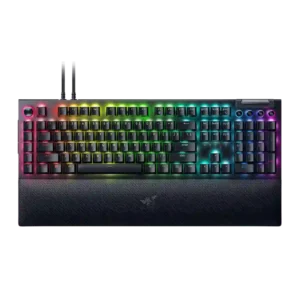
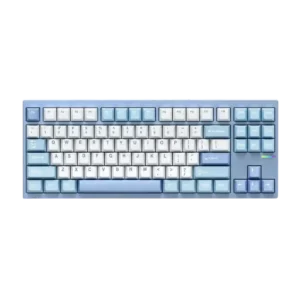
Acoustics are solid but switch-dependent. Yellow builds are described as pleasing and controlled, while Green builds can sound louder and more plasticky.
Reviewers praise the GX87’s stock sound as a standout, describing it as refined, lively, and unusually satisfying for a prebuilt board.
For the tested Yellow switches, reviewers describe consistent fast reset behavior that keeps repeated presses from dropping inputs.
One review specifically says the switches deliver a consistent key press.
Brightness is strong and flexible enough to stand out in normal use, with reviewers specifically praising how bright and focused the lighting looks.
Battery life is a clear strength, with multiple reviews calling out the large 8,000mAh capacity and very long runtime.
Build quality is widely praised. Reviewers consistently describe the board as premium, sturdy, and well assembled despite some plastic in the chassis.
Multiple reviewers describe the GX87 as very well built, with strong assembly, solid casework, and no obvious quality-control issues.
Cable quality is good, with braided detachable cables repeatedly noted, though the dual-cable setup adds clutter if passthrough is enabled.
One video calls the included cable cheap and unimpressive.
Compatibility is limited by platform support; one review specifically calls out weak Mac support and points users toward Windows for the full experience.
Key mappings are described as persisting across multiple devices, which supports multi-device use.
Connectivity is functional but not especially flexible: the board is wired, supports passthrough, and benefits from that for low latency, but several reviews note the loss of wireless.
The board offers Bluetooth and 2.4GHz wireless modes, but one review also reports minor connectivity issues.
Overall customization is exceptional, especially around key remapping, dial modes, lighting, and workflow tuning.
Reviewers consistently say the GX87 is easy to customize, thanks to straightforward disassembly and mod-friendly design, with one video also mentioning swappable top colors.
Desk-space efficiency is poor. Reviewers repeatedly note that the macro column and large wrist rest make the board hard to justify on tighter setups.
The TKL layout is described as saving desk space versus full-size boards while keeping a familiar key set.
Durability evidence centers on the rated 100 million keystroke lifespan and the generally robust construction.
One review explicitly says the GX87 feels built to last.
Switch replacement is not especially easy because the board is not hot-swappable, so changing switches is more restrictive than on enthusiast-oriented alternatives.
Switch replacement is described as very easy because switches can be removed and replaced without soldering.
Ergonomics are good in some respects thanks to the wrist rest and comfortable key shapes, but the added side and left macro controls can interfere with hand placement until you adapt.
The fixed typing angle is presented as standard enough that it should not bother most users.
Extra gaming features are plentiful, including macro keys, command-dial functions, polling-rate options, and other gaming-focused controls.
A dedicated ultra low latency mode is explicitly mentioned in the software.
Frame rigidity is excellent, with the board repeatedly described as heavy, planted, and difficult to shift once it is on the desk.
The chassis is praised for having no flex or rattles, though one video notes the quick-release design may feel less rigid than a screwed-in case.
Gaming performance is consistently strong, with reviewers praising smooth inputs, macro advantages, and dependable action across shooters, MMOs, and general gaming.
Reviewers say the GX87 handles gaming well, especially for hybrid work-and-play use, even if it is not framed as a specialist Hall Effect board.
Hot-swappable switches are a clear weakness. Multiple reviewers explicitly note that the full-size V4 Pro does not support hot-swap.
Hot-swap support is clearly confirmed across reviews, making switch swaps part of the board’s appeal.
Keycap quality is decent rather than class-leading: reviewers like the shine-through look and texture, but several note the premium price makes the ABS choice harder to forgive.
One review specifically praises the included PBT keycaps as high quality.
Where responsiveness is discussed directly, presses are described as immediate and dependable, with fast recovery under repeated inputs.
One review says the switches feel fairly responsive in play.
Key spacing is generally favorable, with reviewers noting enough separation and room to reduce accidental presses once they adjust to the macro-heavy layout.
Stability is strong where reviewers examined wobble directly, with switches and keycaps described as very tight and controlled.
Latency is a clear strength in the full-size model, with reviewers repeatedly describing inputs as instantaneous, lag-free, and especially strong for wired competitive play.
Latency is framed positively for normal gaming use, with reviewers noting reduced latency concerns and immediate-feeling keypresses.
Legend visibility is mixed. Main legends are praised for shine-through readability, but several reviewers say the media-button legends are too dark or hard to see.
Macro customization is a major strength. Across many reviews, the board’s macro keys and remapping options are described as flexible, powerful, and useful for both games and productivity.
Macro support is explicitly mentioned as part of the board’s deeper customization toolkit.
Material quality is strong overall thanks to the aluminum top case and premium-feeling finishes, though the plastic lower shell keeps it from feeling fully top-tier throughout.
The materials are consistently praised, especially the aluminum chassis and PBT keycaps, with one reviewer also highlighting the smooth finish.
Media controls are widely praised for convenience and feel, making everyday playback adjustments easier.
Noise level depends heavily on switch choice, but the Green version is explicitly described as very loud.
The sound profile is described as muted rather than sharply loud, keeping the board’s thock controlled.
Onboard memory exists and stores profiles, but some custom behavior still depends on Synapse, so the onboard implementation is useful without being fully self-sufficient.
Customizations are explicitly described as being stored on the keyboard itself.
USB passthrough is useful for low-power accessories and convenient desk routing, but reviewers note bandwidth or power limitations and the need for a second cable.
Per-key lighting control is supported and called out directly, alongside underglow zones for a more elaborate lighting setup.
The board’s adjustable polling rate and 8,000Hz ceiling are repeatedly highlighted as premium gaming features, even if some reviewers note many players may not fully notice the difference.
The keyboard is repeatedly described as running at 1,000Hz, with one video also discussing a low-latency mode.
Portability is poor. The full-size body, added macro column, and overall heft make this a desk board rather than a travel-friendly one.
Its heavy all-metal build makes it less convenient to carry around or reposition frequently.
Profile management is solid, with multiple reviews confirming onboard profiles and quick switching for different tasks.
Reliability is mixed. Reviews mention lighting glitches, occasional wrist-rest connection issues, accidental side-button presses, and some software inconsistency.
One review reports rare duplicate key registrations and a fringe long-hold input issue, so reliability is good but not flawless.
RGB customization is robust through Synapse and Chroma, including synchronized effects and game-aware lighting options.
Lighting customization exists and can be adjusted, but the experience is not unanimously polished, with one review calling it clunky.
RGB lighting quality is one of the board’s standout features, with reviewers repeatedly praising the brightness, underglow, wrist-rest lighting, and overall presentation.
The full-size form factor gives buyers every control they could want, but several reviewers stress that it is undeniably big and best suited to larger desks.
The GX87 is explicitly described as an 80% TKL, giving it a compact-but-not-tiny footprint.
Software quality is mixed. Synapse is often called easy enough to use, but many reviews criticize its background dependency, resource use, or occasional inconsistency.
Software support is generally seen as good for the category, with QMK/VIA support and dedicated software, though one reviewer still found VIA basic.
Sound dampening is a genuine plus, with multiple reviewers noticing that the internal foam cuts down ping, reverb, and harsher case noise.
Internal foam and damping layers are specifically credited with reducing ping and cleaning up the typing sound.
Stabilizers are better than expected for a mainstream gaming board, with reviewers noting improved stability, low rattle, and effective factory lubrication.
Stabilizers are mixed but acceptable overall: one review says they are nearly silent, while another wanted a bit more lube.
Across multiple switch variants, reviewers describe the switch feel as smooth, fast, and satisfying, with Yellow switches especially easy to game on and Green switches still enjoyable for clicky fans.
The stock linear switches are described as satisfying, bouncy, crisp, and snappy in everyday use.
Reviews confirm two stock switch choices, Green clicky and Yellow linear, which gives buyers a basic choice but not a broad menu of switch options.
Switch choice at purchase is limited, with one review explicitly noting only two similar linear options and no tactile choice.
Typing comfort is generally good for long sessions, though not every switch variant feels equally cushioned for extended writing.
Typing comfort is positively described, with reviewers calling out a soft, bouncy, comfort-focused feel.
Typing feel is generally praised for being fast and satisfying, though it depends somewhat on switch choice and the board’s larger layout.
Typing feel is strongly positive, with reviewers describing the GX87 as joyful, smooth, and satisfying to type on.
Value depends on whether you will use the extra features. Many reviewers think the feature set helps justify the price, but several still call the board expensive.
Reviews repeatedly frame the GX87 as unusually strong value, pairing premium-feeling features with a budget-friendly price.
Volume control is a strong point, with the roller or dial repeatedly described as smooth, satisfying, and easy to use.
Wireless behavior is praised for reconnecting quickly after idle and feeling responsive in use.
Wrist rest quality is one of the most praised parts of the package, with reviewers repeatedly calling it soft, comfortable, and premium, even if a few mention connection or height quirks.