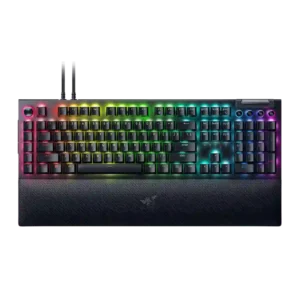
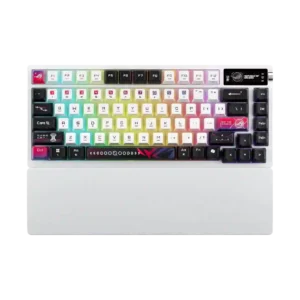
Compare Razer BlackWidow V4 Pro vs ASUS ROG Azoth X

P1 Razer BlackWidow V4 Pro
P2 ASUS ROG Azoth X

Comparison Takeaways

Razer BlackWidow V4 Pro

Where It Has the Edge

  • materials quality is 4.8 vs 3.2. Materials quality was praised through aluminum, premium finishes, and strong material choices across several full-size reviews.
  • value for money is 3.5 vs 2.7. Value was divided: many full-size reviewers felt the $230 price was justified by features, while 75% Pro reviewers...
  • key spacing is 4.3 vs 3.5. Key spacing evidence was positive, with reviewers saying the spacing reduced errors and let them play without looking...
  • gaming performance is 4.8 vs 4.2. Gaming performance was consistently strong, with reviewers reporting smooth play, no stutter or delay, top-tier responsiveness, and macro...

ASUS ROG Azoth X

Where It Has the Edge

  • compatibility is 4.6 vs 2.0. Compatibility was strong thanks to Mac support, PC/Mac switching, MX-style switch compatibility, and south-facing PCB keycap compatibility.
  • battery life is 4.9 vs 2.3. Battery life drew near-universal praise, with many reviewers calling it impressive even when RGB or OLED reduced rated...
  • size and form factor is 4.8 vs 2.5. The 75% size was praised as practical, with reviewers calling it a useful and near-perfect form factor for...
  • connectivity is 4.8 vs 2.9. Connectivity was highly praised: reviewers liked tri-mode support, dongle convenience, and smooth switching between wireless modes or devices.
Average score
Product 1: Razer BlackWidow V4 Pro
3.8
Product 2: ASUS ROG Azoth X
4.2
acoustics
Product 1: Razer BlackWidow V4 Pro
3.6

Reviewers varied by switch and model: some praised muted, clacky or lower-pitched sound, while others heard plasticky clicks, dinging, or a weaker stock sound.

Product 2: ASUS ROG Azoth X
4.2

Acoustics were usually praised as crisp, deep, creamy, or fantastic, although the spacebar inconsistency kept this from being universally excellent.

actuation consistency
Product 1: Razer BlackWidow V4 Pro
4.3

Actuation balance was described positively where reviewers noted accidental strokes were avoided and productivity work was not littered with misinputs.

Product 2: ASUS ROG Azoth X
4.5

Actuation consistency was praised where discussed, with reviewers noting consistent switch feel and minimal friction across keypresses.

analog input support
Product 1: Razer BlackWidow V4 Pro
No score yet
Product 2: ASUS ROG Azoth X
2.1

Analog input support was consistently marked down because reviewers repeatedly called out the absence of Hall-effect or analog switch features.

backlight brightness
Product 1: Razer BlackWidow V4 Pro
4.0

Backlighting was generally viewed as focused and granular, with reviewers noticing improved brightness control and stronger LED presentation.

Product 2: ASUS ROG Azoth X
4.3

Backlight brightness split reviewers: several found it exceptional or very bright, while one reviewer felt the lighting was underwhelming.

battery life
Product 1: Razer BlackWidow V4 Pro
2.3

Battery evidence was split by model and settings, ranging from good light-use results to severe drain when RGB, OLED or wireless polling were active.

Product 2: ASUS ROG Azoth X
4.9

Battery life drew near-universal praise, with many reviewers calling it impressive even when RGB or OLED reduced rated endurance.

build quality
Product 1: Razer BlackWidow V4 Pro
4.4

Build quality was broadly praised on the full-size model for solidity and premium feel, though one 75% Pro reviewer criticized the case quality for the price.

Product 2: ASUS ROG Azoth X
4.3

Build quality was generally sturdy and solid, but the plastic base, premium-price expectations, and scratch-prone finish produced mixed marks.

cable quality
Product 1: Razer BlackWidow V4 Pro
2.8

Cabling drew mixed reactions: braided or detachable hardware felt solid, but two cables, non-coiled cabling, and a chunky dongle hurt desk neatness.

Product 2: ASUS ROG Azoth X
4.0

Cable quality had limited positive evidence: reviewers liked the sleeved/braided cable, though one noted its gray color did not match the white board.

compatibility
Product 1: Razer BlackWidow V4 Pro
2.0

Compatibility evidence was limited but negative where Mac support was described as lacking for the keyboard.

Product 2: ASUS ROG Azoth X
4.6

Compatibility was strong thanks to Mac support, PC/Mac switching, MX-style switch compatibility, and south-facing PCB keycap compatibility.

connectivity
Product 1: Razer BlackWidow V4 Pro
2.9

Connectivity was a recurring tradeoff: wired operation helped latency and passthrough, but reviewers missed wireless or noted cable-dependent clutter.

Product 2: ASUS ROG Azoth X
4.8

Connectivity was highly praised: reviewers liked tri-mode support, dongle convenience, and smooth switching between wireless modes or devices.

customization options
Product 1: Razer BlackWidow V4 Pro
4.5

Customization was one of the strongest themes, especially around remapping, the Command Dial, Chroma, and multi-layer programmability, with some Synapse limits.

Product 2: ASUS ROG Azoth X
4.6

Customization options were a major strength, covering disassembly, OLED settings, RGB, macros, web tools, and component tinkering.

design aesthetics
Product 1: Razer BlackWidow V4 Pro
4.3

Design reactions were mostly positive for premium, high-end styling and RGB-heavy looks, though one reviewer found the shine-through gamer look tacky.

Product 2: ASUS ROG Azoth X
4.3

Design aesthetics were divisive but mostly positive: reviewers often liked the bold sci-fi white theme, while acknowledging it will not suit every desk setup.

desk space efficiency
Product 1: Razer BlackWidow V4 Pro
2.6

Desk-space efficiency was weak on the full-size board because its macro column and wrist rest make it huge, while the 75% variants earned better space praise.

Product 2: ASUS ROG Azoth X
4.5

Desk space efficiency was praised because the keyboard stayed compact without feeling cramped and saved space versus larger layouts.

durability
Product 1: Razer BlackWidow V4 Pro
3.3

Durability evidence centered on a sturdy frame and repair/mod potential, offset by one reviewer’s concern about keycap wear from a prior BlackWidow generation.

Product 2: ASUS ROG Azoth X
4.1

Durability evidence was positive but limited, mainly tied to durable dye-sub legends and premium construction.

ease of switch replacement
Product 1: Razer BlackWidow V4 Pro
5.0

Switch replacement was excellent on hot-swap 75% variants, where reviewers found swapping solid or easy, but it was not a strength of the full-size board.

Product 2: ASUS ROG Azoth X
4.7

Switch replacement was praised as straightforward, with reviewers describing access or removal as quick and easy.

ergonomics
Product 1: Razer BlackWidow V4 Pro
2.9

Ergonomics were mixed: wrist comfort and long-use ergonomics could be excellent, but side buttons and the extra left column caused accidental presses or reach issues.

Product 2: ASUS ROG Azoth X
4.8

Ergonomics were positive where covered, mainly due to the wrist rest and FR4/typing changes that improved comfort.

extra gaming features
Product 1: Razer BlackWidow V4 Pro
4.3

Extra gaming features were praised most by macro-heavy and Snap Tap users, with reviewers highlighting benefits for tinkerers, strafing, and command-heavy games.

Product 2: ASUS ROG Azoth X
3.7

Extra gaming features were mixed: Speed Tap and the OLED were useful or fun, but reviewers questioned the OLED’s value and noted missing Hall-effect features.

frame rigidity
Product 1: Razer BlackWidow V4 Pro
4.5

Frame rigidity was praised where reviewers described the chassis and top plate as robust, solid, and free of noticeable creaking.

Product 2: ASUS ROG Azoth X
4.6

Frame rigidity was a strength, with reviewers repeatedly noting no deck flex, no rattle, and a stable body.

gaming performance
Product 1: Razer BlackWidow V4 Pro
4.8

Gaming performance was consistently strong, with reviewers reporting smooth play, no stutter or delay, top-tier responsiveness, and macro advantages in games.

Product 2: ASUS ROG Azoth X
4.2

Gaming performance was positive for casual and mainstream play, but reviewers noted it is less compelling for players seeking Hall-effect or esports-focused features.

hot-swappable switches
Product 1: Razer BlackWidow V4 Pro
3.6

Hot-swap support depended on variant: 75% boards were praised for easy switch changes, while full-size models were criticized for locking users into one switch choice.

Product 2: ASUS ROG Azoth X
4.2

Hot-swappable switches were seen as a meaningful enthusiast-friendly advantage, especially for users who want to experiment or replace switches.

keycap quality
Product 1: Razer BlackWidow V4 Pro
3.7

Keycap quality was mixed: texture, shine-through and feel earned praise, but ABS material, PBT comparisons, sound, and wear concerns lowered confidence.

Product 2: ASUS ROG Azoth X
3.9

Keycap quality was mixed-positive: many liked the texture, printing, durability, and RGB diffusion, while some disliked the smooth or tacky feel.

key responsiveness
Product 1: Razer BlackWidow V4 Pro
4.7

Key responsiveness was a major strength, with reviewers citing instant, smooth, accurate, and sensitive keypresses across gaming and productivity.

Product 2: ASUS ROG Azoth X
4.6

Key response was consistently praised as snappy, fast, and responsive across typing and gaming, especially with the light linear switches.

key spacing
Product 1: Razer BlackWidow V4 Pro
4.3

Key spacing evidence was positive, with reviewers saying the spacing reduced errors and let them play without looking down.

Product 2: ASUS ROG Azoth X
3.5

Key spacing had limited mixed evidence, with one first-impression review noting the smaller-feeling keys may require adjustment.

key stability
Product 1: Razer BlackWidow V4 Pro
5.0

Key stability evidence was positive but limited, with one reviewer praising the switches for practically zero wobble.

Product 2: ASUS ROG Azoth X
4.8

Key stability was praised through minimal stem wobble, stable keypresses, and no wobble or echo in typing tests.

latency
Product 1: Razer BlackWidow V4 Pro
4.7

Latency was praised on the wired full-size board, especially alongside high polling, where reviewers reported zero lag, smoothness, and low-latency gaming.

Product 2: ASUS ROG Azoth X
5.0

Latency evidence was strongly positive, with reviewers reporting delay-free input and no wireless latency problems in testing.

layout options
Product 1: Razer BlackWidow V4 Pro
4.5

Layout evidence favored the 75% layout as a useful, welcome middle ground while the full-size layout drew space and adjustment complaints.

Product 2: ASUS ROG Azoth X
4.5

Layout evidence was limited but positive, with one reviewer saying the layout made sense and was clearly labeled.

legend visibility
Product 1: Razer BlackWidow V4 Pro
2.6

Legend visibility was mixed: keycap shine-through could be clean and even, but media-key legends were criticized as hard to read or unlit.

Product 2: ASUS ROG Azoth X
4.4

Legend visibility was mostly praised thanks to clear labeling, visible lettering, and sharper printing, though small display icons and stylized legends had caveats.

macro customization
Product 1: Razer BlackWidow V4 Pro
4.6

Macro customization was one of the best-supported positives, with reviewers praising the eight macros, creative freedom, productivity shortcuts, and game advantages.

Product 2: ASUS ROG Azoth X
4.5

Macro customization was positive where discussed, with reviewers noting easy macro creation and broad remapping support.

materials quality
Product 1: Razer BlackWidow V4 Pro
4.8

Materials quality was praised through aluminum, premium finishes, and strong material choices across several full-size reviews.

Product 2: ASUS ROG Azoth X
3.2

Materials quality was mixed: PBT caps and metal elements helped, while plastic construction and finish complaints hurt the premium impression.

media controls
Product 1: Razer BlackWidow V4 Pro
4.3

Media controls were mostly liked for convenience and productivity, though some reviewers disliked the awkward height or difficult-to-see legends.

Product 2: ASUS ROG Azoth X
4.1

Media controls were generally useful through the OLED and knob, but some reviewers wanted a more conventional or more satisfying control.

noise level
Product 1: Razer BlackWidow V4 Pro
3.2

Noise level varied heavily by switch: Green switches were often loud, while Yellow or damped variants were quieter or satisfying rather than distracting.

Product 2: ASUS ROG Azoth X
3.2

Noise level was mixed: dampening helped keep the board acceptable, but several reviewers complained about a loud or thunky spacebar and higher overall volume.

onboard memory
Product 1: Razer BlackWidow V4 Pro
3.0

Onboard memory was useful for profiles but limited by Synapse dependency, especially where custom dial modes did not carry over.

Product 2: ASUS ROG Azoth X
No score yet
passthrough features
Product 1: Razer BlackWidow V4 Pro
3.2

Passthrough was viewed as useful but limited, especially by USB 2.0 speeds, voltage constraints, and the need for a second cable.

Product 2: ASUS ROG Azoth X
No score yet
polling rate
Product 1: Razer BlackWidow V4 Pro
3.5

Polling rate impressed some reviewers with speed or snappiness, while others considered 8,000Hz niche or hard to notice on a keyboard.

Product 2: ASUS ROG Azoth X
3.7

Most reviewers found the 1,000Hz polling rate adequate, but several treated the paid 8,000Hz booster requirement as a caveat.

portability
Product 1: Razer BlackWidow V4 Pro
3.0

Portability was variant-dependent: the 75% board was bag-friendly, while the full-size board was problematic for transport and mouse space.

Product 2: ASUS ROG Azoth X
4.5

Portability had limited positive support, mainly from long battery life making the board better for LAN parties or mobile work.

profile management
Product 1: Razer BlackWidow V4 Pro
4.0

Profile management was useful for switching setups and game-linked profiles, though some functions still depended on Synapse or required manual management.

Product 2: ASUS ROG Azoth X
4.5

Profile management had limited positive evidence, with one reviewer saying profile switching was quick and easy.

rapid trigger support
Product 1: Razer BlackWidow V4 Pro
No score yet
Product 2: ASUS ROG Azoth X
2.0

Rapid trigger support was a repeated weakness because reviewers noted the Azoth X lacks true rapid trigger or relies on Speed Tap instead.

reliability
Product 1: Razer BlackWidow V4 Pro
2.6

Reliability concerns included one LED hiccup, app binding failures, an OLED darkening issue, and reported orange-switch problems on one 75% Pro review.

Product 2: ASUS ROG Azoth X
4.4

Reliability was mixed: wireless operation was stable, but software instability and finish scratching hurt confidence.

RGB customization
Product 1: Razer BlackWidow V4 Pro
4.3

RGB customization was a consistent Razer strength, with reviewers praising complex-to-simple controls, Chroma syncing, and game-reactive lighting.

Product 2: ASUS ROG Azoth X
4.5

RGB customization had limited but positive support, with one reviewer highlighting bold color behavior and preset variety.

RGB lighting quality
Product 1: Razer BlackWidow V4 Pro
4.6

RGB lighting quality was heavily praised for brightness, underglow, flawless implementation, and desk-filling visual impact, with minor visibility caveats.

Product 2: ASUS ROG Azoth X
4.3

RGB lighting quality was widely praised for its soft glow, strong brightness, and distinctive translucent-side effect, despite a few muted-lighting complaints.

size and form factor
Product 1: Razer BlackWidow V4 Pro
2.5

Size and form factor were a frequent concern on the full-size version, which reviewers called very large, while compact variants helped portability.

Product 2: ASUS ROG Azoth X
4.8

The 75% size was praised as practical, with reviewers calling it a useful and near-perfect form factor for gaming desks.

software quality
Product 1: Razer BlackWidow V4 Pro
3.4

Software quality was polarizing: Synapse could be intuitive and reliable, but reviewers often disliked needing it open for advanced functions.

Product 2: ASUS ROG Azoth X
3.9

Software quality was sharply mixed: Gear Link was praised as lightweight and easy, while Armoury Crate drew complaints about bloat, crashes, and setup friction.

sound dampening
Product 1: Razer BlackWidow V4 Pro
4.6

Sound dampening was generally effective, with reviewers crediting foam, tape mods, and damping for reduced ping, reverb, and a more refined sound.

Product 2: ASUS ROG Azoth X
4.4

Sound dampening was a clear strength, with reviewers crediting the foam stack and damping layers for reducing ping and improving sound.

stabilizer quality
Product 1: Razer BlackWidow V4 Pro
3.6

Stabilizer quality ranged from peaceful and low-rattle to merely acceptable or needing work, especially on some 75% and Yellow-switch units.

Product 2: ASUS ROG Azoth X
4.5

Stabilizers were consistently praised, with reviewers noting no rattle, tuned large keys, and clatter-free stability.

switch feel
Product 1: Razer BlackWidow V4 Pro
4.5

Switch feel was broadly strong, with praise for Yellow, Green, and Orange variants, though some reviewers wanted more checkout options or different stock switches.

Product 2: ASUS ROG Azoth X
4.6

Reviewers generally liked the ROG NX Snow V2 switches, describing them as smooth, consistent, and pleasant, with a few noting they still lack Hall-effect gaming behavior.

switch options
Product 1: Razer BlackWidow V4 Pro
2.5

Switch options were a recurring weakness where reviewers wanted tactile, linear, or more checkout choices, especially on expensive or Pro models.

Product 2: ASUS ROG Azoth X
4.0

Switch choice received limited but positive coverage, with reviewers noting the option between tactile/clicky and smooth linear ROG NX V2 switches.

typing comfort
Product 1: Razer BlackWidow V4 Pro
4.2

Typing comfort was generally strong when switches and wrist rest suited the reviewer, though one Green-switch reviewer wanted more cushioning for long writing.

Product 2: ASUS ROG Azoth X
4.6

Typing comfort was strong, with reviewers describing long sessions as comfortable, pleasant, and easy.

typing feel
Product 1: Razer BlackWidow V4 Pro
4.7

Typing feel was one of the clearest positives, with several reviewers calling the board satisfying, fast, or fantastic to type on.

Product 2: ASUS ROG Azoth X
4.4

Typing feel was the product’s strongest attribute: most reviewers found it smooth, satisfying, comfortable, and close to custom-keyboard quality, though one found it clunkier.

value for money
Product 1: Razer BlackWidow V4 Pro
3.5

Value was divided: many full-size reviewers felt the $230 price was justified by features, while 75% Pro reviewers objected strongly to $300 pricing.

Product 2: ASUS ROG Azoth X
2.7

Value for money was the most common concern, with many reviewers calling the high price hard to justify despite the strong typing and wireless experience.

volume control
Product 1: Razer BlackWidow V4 Pro
3.9

Volume control was usually convenient and tactile, though some reviewers wanted a press-to-mute wheel or found dial-based volume less convenient.

Product 2: ASUS ROG Azoth X
4.0

Volume control was useful for most reviewers, though the toggle implementation was less satisfying to some than a dedicated knob or roller.

wireless performance
Product 1: Razer BlackWidow V4 Pro
3.4

Wireless performance evidence came from 75% Pro reviews and was mixed: wireless controls and performance were useful, but battery tradeoffs reduced appeal.

Product 2: ASUS ROG Azoth X
5.0

Wireless performance was one of the strongest areas, with reviewers repeatedly reporting stable, drop-free, low-latency operation.

wrist rest quality
Product 1: Razer BlackWidow V4 Pro
4.5

Wrist rest quality was a consistent highlight on full-size reviews for plushness, comfort and RGB integration, with a few fit or height complaints.

Product 2: ASUS ROG Azoth X
4.3

The wrist rest was broadly welcomed as comfortable and useful, though some disliked the lack of magnets or found it harder than alternatives.