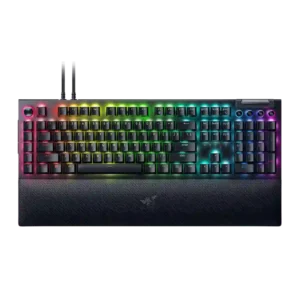
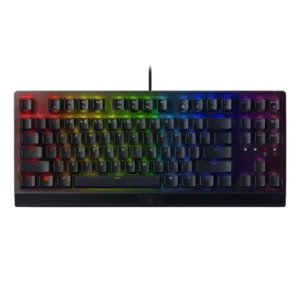
Compare Razer BlackWidow V4 Pro vs Razer BlackWidow V3

P1 Razer BlackWidow V4 Pro
P2 Razer BlackWidow V3

Comparison Takeaways

Razer BlackWidow V4 Pro

Where It Has the Edge

  • passthrough features is 3.6 vs 1.0. Passthrough is useful but limited: reviewers like having USB-A/USB 2.0 passthrough, yet note second-cable requirements and limited support...
  • sound dampening is 4.2 vs 1.8. Sound dampening is a consistent strength, with internal foam, bottom-case foam, switch dampening and other mods credited for...
  • hot-swappable switches is 3.3 vs 1.0. Hot-swappable support is split by model coverage: full-size reviewers criticize its absence, while 75%/Pro 75 reviews praise the...
  • wireless performance is 3.1 vs 1.0. Wireless performance is split by variant: the full-size model lacks wireless, while 75% Pro reviews praise fast wireless...

Razer BlackWidow V3

Where It Has the Edge

  • compatibility is 3.9 vs 2.5. Compatibility is adequate but not universal: plug-and-play setup, Windows software support and Linux/macOS keyboard use appear, but customization...
  • size and form factor is 3.6 vs 2.4. Form factor is context-dependent: the full-size model can feel huge, while TKL coverage highlights a more compact option.
  • legend visibility is 4.4 vs 3.4. Legend visibility has specific positive evidence from the TKL review, where Razer's lighting treatment improved readability for non-English...
  • ergonomics is 4.0 vs 3.1. Ergonomics are generally good thanks to angle feet and wrist-rest support, though comfort depends on desk space and...
Average score
Product 1: Razer BlackWidow V4 Pro
4.0
Product 2: Razer BlackWidow V3
3.7
acoustics
Product 1: Razer BlackWidow V4 Pro
3.8

Acoustics are mixed by switch and version: some reviews praise satisfying, lower-pitched or improved sound, while clicky Green units are described as loud, uneven or pingy.

Product 2: Razer BlackWidow V3
2.2

Acoustic impressions are weak overall because multiple reviews mention pinging, especially with forceful typing or particular setups.

actuation consistency
Product 1: Razer BlackWidow V4 Pro
4.5

Actuation consistency is supported by reviewers who reported no missed clicks, expected in-game actions, and protection against accidental triggers with tactile switches.

Product 2: Razer BlackWidow V3
4.1

Actuation evidence is mostly positive, with reviewers pointing to short pre-travel, 1.9 mm actuation behavior and quick activation, especially for gaming.

backlight brightness
Product 1: Razer BlackWidow V4 Pro
4.8

Backlight brightness is strong overall, with multiple reviewers calling the RGB bright or granular, though CNET wanted more individual brightness control.

Product 2: Razer BlackWidow V3
4.0

Brightness impressions vary: some found the lights toned down, others praised brightness on the TKL or noted practical brightness controls.

battery life
Product 1: Razer BlackWidow V4 Pro
2.3

Battery life evidence is variant-dependent and mixed, ranging from very poor battery drain in one 75% Pro review to acceptable multi-week use in another.

Product 2: Razer BlackWidow V3
No score yet
build quality
Product 1: Razer BlackWidow V4 Pro
4.8

Build quality is mostly praised as solid, premium and well-designed, despite some notes about plastic chassis components.

Product 2: Razer BlackWidow V3
4.3

Build quality is a consistent positive, with reviewers praising sturdy construction, a rugged feel and premium-feeling materials across full-size and TKL versions.

cable quality
Product 1: Razer BlackWidow V4 Pro
4.2

Cable quality is generally positive, with braided, detachable or long cables praised, though multi-cable passthrough setups can add clutter.

Product 2: Razer BlackWidow V3
3.9

Cable quality is mostly good on the full-size model thanks to braided, manageable or routed cables, but TKL evidence notes a weaker rubber cable.

compatibility
Product 1: Razer BlackWidow V4 Pro
2.5

Compatibility gets a notable caveat from the Mac-focused review evidence, which says the newer Synapse support was not really available on Mac.

Product 2: Razer BlackWidow V3
3.9

Compatibility is adequate but not universal: plug-and-play setup, Windows software support and Linux/macOS keyboard use appear, but customization is Windows-limited.

connectivity
Product 1: Razer BlackWidow V4 Pro
3.3

Connectivity is mixed: full-size reviews emphasize wired-only USB-C and lost wireless support, while 75% Pro coverage highlights Bluetooth, 2.4GHz and wired modes.

Product 2: Razer BlackWidow V3
2.9

Connectivity is wired-focused, using USB-A or USB cabling; reviews do not treat this as a wireless-capable board.

customization options
Product 1: Razer BlackWidow V4 Pro
4.7

Customization options are extensive, spanning Hypershift, macros, dial modes, lighting, profiles and remapping, although some reviewers found setup time-consuming or software-dependent.

Product 2: Razer BlackWidow V3
4.5

Customization options are broad, covering key programming, secondary functions, lighting, macros and Synapse-based personalization.

desk space efficiency
Product 1: Razer BlackWidow V4 Pro
2.8

Desk space efficiency is weak for the full-size model because the macro column and wrist rest take room, though 75% coverage shows a compact alternative that saves desk space.

Product 2: Razer BlackWidow V3
2.9

Desk-space efficiency is mixed, with the full-size board often called large or difficult to position, while TKL evidence shows more mouse room.

durability
Product 1: Razer BlackWidow V4 Pro
4.5

Durability evidence is positive, with reviews repeatedly citing 100-million-keystroke or keypress ratings and wear-focused keycap discussion.

Product 2: Razer BlackWidow V3
4.5

Durability is a standout, supported by doubleshot keycaps, an aluminum/metal top plate, braided cable mentions and 80-million-keystroke switch ratings.

ease of switch replacement
Product 1: Razer BlackWidow V4 Pro
4.8

Ease of switch replacement is strong in the 75%/Pro 75 coverage, where reviewers describe changing switches without soldering or popping them out easily.

Product 2: Razer BlackWidow V3
No score yet
ergonomics
Product 1: Razer BlackWidow V4 Pro
3.1

Ergonomics are mixed: the wrist rest helps comfort, but reviewers repeatedly mention adjustment time, awkward side buttons and accidental presses.

Product 2: Razer BlackWidow V3
4.0

Ergonomics are generally good thanks to angle feet and wrist-rest support, though comfort depends on desk space and the quality of the included rest.

extra gaming features
Product 1: Razer BlackWidow V4 Pro
3.5

Extra gaming features are mixed in the supplied review set: Snap Tap is praised in 75% coverage, while another reviewer criticizes the lack of Hall Effect on a Pro gaming model.

Product 2: Razer BlackWidow V3
4.1

Extra gaming features include Gaming Mode, Hypershift, game-integrated lighting and related controls, making the board more than a basic mechanical keyboard.

frame rigidity
Product 1: Razer BlackWidow V4 Pro
4.5

Frame rigidity is strong, with reviewers citing a stable aluminum alloy top plate, immovable frame feel and controlled gasket rigidity on the 75% Pro.

Product 2: Razer BlackWidow V3
4.2

Frame rigidity is mostly strong, especially where reviewers cite aluminum top frames and low flex, though one comparison noted less heft than Filco and Ducky boards.

gaming performance
Product 1: Razer BlackWidow V4 Pro
4.7

Gaming performance is a standout theme: reviewers found the keyboard excellent for MMOs, FPS play and general gaming, with fast response and macro-heavy control, though one 75% review questioned its stock gaming switch choice.

Product 2: Razer BlackWidow V3
4.5

Gaming performance is a major strength, with reviewers saying inputs felt responsive and reliable across games and heavy key-press situations.

hot-swappable switches
Product 1: Razer BlackWidow V4 Pro
3.3

Hot-swappable support is split by model coverage: full-size reviewers criticize its absence, while 75%/Pro 75 reviews praise the hot-swap sockets.

Product 2: Razer BlackWidow V3
1.0

Hot-swap support is not present; the only direct evidence states that the keyboard does not support hot swapping.

keycap quality
Product 1: Razer BlackWidow V4 Pro
3.8

Keycap quality is mixed: reviewers like the textured, shine-through doubleshot caps, but several criticize ABS on a premium keyboard while 75%/Pro 75 coverage praises PBT caps.

Product 2: Razer BlackWidow V3
3.8

Doubleshot ABS keycaps earned praise for texture and durability, but several reviewers noted ABS limitations, shine over time, or a cheaper feel on the TKL.

key responsiveness
Product 1: Razer BlackWidow V4 Pro
4.9

Key responsiveness is consistently positive: reviewers describe immediate response, fast actuation, smooth recovery, and no stutter or missed clicks in gaming and typing use.

Product 2: Razer BlackWidow V3
4.3

Key response was a recurring strength: reviewers called the board responsive in games and typing, though one review noted the switches do not suit a very light touch.

key spacing
Product 1: Razer BlackWidow V4 Pro
4.3

Key spacing is praised by two reviewers who found the separated or roomy keys reduced errors and helped without looking down.

Product 2: Razer BlackWidow V3
4.1

Key spacing receives positive evidence from reviewers who said the shape, spacing and layout were easy to adapt to.

key stability
Product 1: Razer BlackWidow V4 Pro
4.8

Key stability is praised in the video coverage that notes very little switch wobble and tight stems on the 75% variant.

Product 2: Razer BlackWidow V3
4.0

Key stability is generally good thanks to switch and cap design, but one review reported some wobble on larger keys such as the spacebar and Shift.

latency
Product 1: Razer BlackWidow V4 Pro
5.0

Latency is treated as a major strength in the wired full-size model, with reviewers reporting zero lag or low-latency behavior during gaming.

Product 2: Razer BlackWidow V3
4.7

The available latency evidence is strongly positive, describing the BlackWidow V3 as remarkably low-latency for fast gaming input.

layout options
Product 1: Razer BlackWidow V4 Pro
4.0

Layout options evidence is mostly from 75% coverage, where reviewers praise portability and practicality but also say the 75% layout will not fit everyone.

Product 2: Razer BlackWidow V3
4.1

Layout support is broad across full-size and TKL variants, giving users a traditional full-size option and compact tenkeyless alternatives.

legend visibility
Product 1: Razer BlackWidow V4 Pro
3.4

Legend visibility is mixed, with shine-through key legends earning praise but media-key legends drawing criticism for being hard to read.

Product 2: Razer BlackWidow V3
4.4

Legend visibility has specific positive evidence from the TKL review, where Razer's lighting treatment improved readability for non-English key legends.

macro customization
Product 1: Razer BlackWidow V4 Pro
4.9

Macro customization is the product's defining strength, with repeated praise for eight macro keys, Command Dial functions, remapping and productivity/game profiles.

Product 2: Razer BlackWidow V3
4.4

Macro customization is a strong point, with Synapse, Hypershift and on-the-fly recording repeatedly supporting key remapping and macros.

materials quality
Product 1: Razer BlackWidow V4 Pro
4.4

Materials quality is generally premium thanks to aluminum top plates and textured finishes, but one 75% Pro review criticizes continued plastic-case construction.

Product 2: Razer BlackWidow V3
4.1

Materials are generally strong, combining aluminum or metal top plates with plastic bases; reviewers liked the premium feel despite not being fully metal.

media controls
Product 1: Razer BlackWidow V4 Pro
4.3

Media controls are a major convenience in many reviews, especially volume and playback buttons, but some reviewers criticize awkward height or hard-to-read legends.

Product 2: Razer BlackWidow V3
3.9

Media controls are generally useful, especially the roller wheel and media key, though some reviewers wanted dedicated controls or backlighting.

noise level
Product 1: Razer BlackWidow V4 Pro
3.0

Noise level depends heavily on switch choice: Green/clicky units are repeatedly called loud, while Yellow/linear setups are described as quieter or not distracting.

Product 2: Razer BlackWidow V3
2.5

Noise level is a common drawback: clicky Green switches were enjoyed by some but repeatedly described as loud, cacophonous or annoying in shared spaces.

onboard memory
Product 1: Razer BlackWidow V4 Pro
3.8

Onboard memory exists and is useful for key mappings/profiles, but reviewers note that custom dial modes and some advanced functions still depend on Synapse.

Product 2: Razer BlackWidow V3
4.5

Onboard memory is positively supported by several reviews citing storage for up to five keyboard profiles.

passthrough features
Product 1: Razer BlackWidow V4 Pro
3.6

Passthrough is useful but limited: reviewers like having USB-A/USB 2.0 passthrough, yet note second-cable requirements and limited support for higher-power or high-speed devices.

Product 2: Razer BlackWidow V3
1.0

Passthrough features are a consistent absence, with reviews explicitly noting no USB passthrough and, on TKL, no audio passthrough.

per-key lighting control
Product 1: Razer BlackWidow V4 Pro
5.0

Per-key lighting control is supported by reviews noting per-key RGB lighting and bright per-key implementation.

Product 2: Razer BlackWidow V3
4.7

Per-key lighting is well supported by Synapse and Chroma Studio, giving users individual key control across the RGB spectrum.

polling rate
Product 1: Razer BlackWidow V4 Pro
4.3

The polling rate is frequently highlighted, especially 8,000Hz on the full-size model and 4K wireless polling on a later 75% Pro review, though some reviewers say the real-world benefit is hard to notice.

Product 2: Razer BlackWidow V3
4.4

The board is credited with a 1000 Hz polling rate, supporting responsive gaming and typing performance.

portability
Product 1: Razer BlackWidow V4 Pro
3.3

Portability is poor for the full-size deck but better in 75% coverage, where reviewers say it can fit in a bag or feels compact.

Product 2: Razer BlackWidow V3
3.5

Portability depends on version: the full-size wired model is not mobile-friendly, while reviewers described the TKL and lighter full-size handling more favorably.

profile management
Product 1: Razer BlackWidow V4 Pro
3.9

Profile management is useful but limited: reviewers value onboard profiles and app-linked settings, yet some functions stay locked to Synapse or do not fully export.

Product 2: Razer BlackWidow V3
4.3

Profile management is strong, with up to five profiles and profile switching or syncing mentioned across multiple reviews.

reliability
Product 1: Razer BlackWidow V4 Pro
3.0

Reliability has a few concerns, including one lighting glitch, an OLED screen going dark, and reports of switch double-clicking on earlier 75% boards.

Product 2: Razer BlackWidow V3
3.6

Reliability is mixed: one reviewer had no performance issues and another called it solid, while the TKL review reported missing profiles and Synapse problems.

RGB customization
Product 1: Razer BlackWidow V4 Pro
5.0

RGB customization is a strength, with reviewers pointing to programmable zones, per-key control, Chroma Studio effects and ecosystem syncing.

Product 2: Razer BlackWidow V3
4.4

RGB customization is a clear strength, with Chroma and Synapse allowing broad effects, color control and game-linked lighting.

RGB lighting quality
Product 1: Razer BlackWidow V4 Pro
4.5

RGB lighting quality receives strong praise for bright, vivid underglow, per-key effects, side strips and wrist-rest lighting across many reviews.

Product 2: Razer BlackWidow V3
3.9

RGB quality is widely discussed and mixed: reviewers liked the vibrant Chroma look, but Quartz and ABS keycap lighting could appear uneven, washed out, or bleed through.

size and form factor
Product 1: Razer BlackWidow V4 Pro
2.4

Size and form factor are the biggest tradeoff for the full-size model: reviewers call it massive, hefty or desk-hungry, while acknowledging that the size enables extra controls.

Product 2: Razer BlackWidow V3
3.6

Form factor is context-dependent: the full-size model can feel huge, while TKL coverage highlights a more compact option.

software quality
Product 1: Razer BlackWidow V4 Pro
3.5

Software quality is polarizing: Synapse enables deep customization and some reviewers found it intuitive, but many criticized needing it open or wanted richer, more reliable controls.

Product 2: Razer BlackWidow V3
3.3

Software quality is split: Synapse enables deep control and worked well for some, but others disliked multiple apps, Windows-only limits or serious bugs.

sound dampening
Product 1: Razer BlackWidow V4 Pro
4.2

Sound dampening is a consistent strength, with internal foam, bottom-case foam, switch dampening and other mods credited for reducing reverb and improving sound.

Product 2: Razer BlackWidow V3
1.8

Sound dampening appears poor in the available evidence, with a hollow spacebar thud called out during typing tests.

stabilizer quality
Product 1: Razer BlackWidow V4 Pro
3.7

Stabilizer quality is mixed: several reviewers praise pre-lubed or quiet stabilizers, while some 75%/video reviews report rattle, scratchiness or room for improvement.

Product 2: Razer BlackWidow V3
2.4

Stabilizer evidence is limited and negative, centered on the spacebar producing a hollow thud during typing.

switch feel
Product 1: Razer BlackWidow V4 Pro
4.5

Reviewers generally liked the switch feel, with clicky, linear and tactile variants described as smooth, responsive or satisfying, though some found certain switch choices loud, stiff or less ideal for gaming.

Product 2: Razer BlackWidow V3
4.3

Green switches were consistently described as tactile, clicky and satisfying, though that same clickiness can become intrusive in shared spaces.

switch options
Product 1: Razer BlackWidow V4 Pro
4.0

Switch choice is a strength in the full-size coverage with Green and Yellow options, while later variant reviews add orange tactile discussion and note the absence of some preferred options.

Product 2: Razer BlackWidow V3
3.9

Reviews confirm two main switch choices, Green clicky and Yellow linear, with praise for having options but some disappointment over the narrow selection and missing preferred variants.

typing comfort
Product 1: Razer BlackWidow V4 Pro
4.3

Typing comfort is generally strong, especially for long sessions and productivity, though one Green-switch review wanted more cushioning.

Product 2: Razer BlackWidow V3
4.1

Typing comfort is mostly positive, with reviewers praising gentle keys, enjoyable use and longer-session comfort despite some positioning concerns.

typing feel
Product 1: Razer BlackWidow V4 Pro
4.5

Typing feel is broadly favorable, with reviewers describing strong typing results, satisfying feel, and excellent 75% typing quality, though layout and switch preferences affected some experiences.

Product 2: Razer BlackWidow V3
4.1

Typing feel is broadly favorable, ranging from pleasant and easy to very nice, though one review only called the switches decent.

value for money
Product 1: Razer BlackWidow V4 Pro
3.4

Value for money is split: reviewers who use the full feature set see strong value, while others view the high price, 75% Pro premium or software limits as hard to justify.

Product 2: Razer BlackWidow V3
3.7

Value is mixed-to-positive for the full-size model, with reviewers citing sensible pricing and long-term durability, but the TKL review criticized value at $100.

volume control
Product 1: Razer BlackWidow V4 Pro
4.4

Volume control is well-liked, with reviewers praising the roller or dial for quick audio control, though some wished for more intuitive mute integration.

Product 2: Razer BlackWidow V3
4.3

Volume control is one of the best-liked convenience features, with several reviewers praising the roller wheel for quick audio adjustment.

wireless performance
Product 1: Razer BlackWidow V4 Pro
3.1

Wireless performance is split by variant: the full-size model lacks wireless, while 75% Pro reviews praise fast wireless but raise battery and value caveats.

Product 2: Razer BlackWidow V3
1.0

Wireless performance is effectively absent on the standard V3, with evidence that it lacks the Pro model's wireless and Bluetooth capabilities.

wrist rest quality
Product 1: Razer BlackWidow V4 Pro
4.6

The wrist rest is one of the most consistently praised parts, described as plush, premium, soft, comfortable and visually integrated with RGB, though a few reviewers had fit or height complaints.

Product 2: Razer BlackWidow V3
3.1

Wrist rest quality is mixed: some reviewers found it helpful or comfortable, while others criticized the hard plastic feel, lack of attachment or absence on TKL.