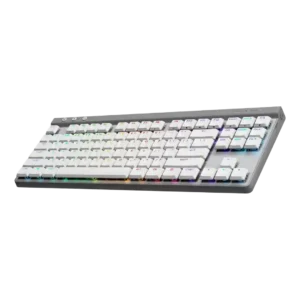
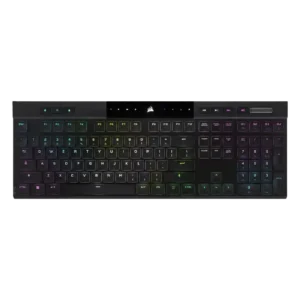
Compare Logitech G515 Lightspeed vs Corsair K100 AIR

P1 Logitech G515 Lightspeed
P2 Corsair K100 AIR

Comparison Takeaways

Logitech G515 Lightspeed

Where It Has the Edge

  • sound dampening is 4.5 vs 1.5. Sound dampening was one of the clearest strengths, with many reviews crediting foam and lubrication for a quieter,...
  • stabilizer quality is 4.1 vs 1.7. Stabilizer impressions were mixed-positive: several reviewers found little wobble or rattle, while one noted rattling typical of prebuilts.
  • acoustics is 4.2 vs 2.4. Reviewers generally found the sound profile controlled and pleasant for a mainstream low-profile gaming board, though one noted...
  • ergonomics is 4.4 vs 2.8. Most ergonomic comments were positive, citing the low profile, usable tilt options, and comfortable angles for typing without...

Corsair K100 AIR

Where It Has the Edge

  • volume control is 4.5 vs 2.4. The volume roller/knob was consistently praised as smooth, convenient, satisfying, or even flawless.
  • backlight brightness is 5.0 vs 3.2. The two direct brightness judgments were strongly positive, with reviewers calling the RGB bright or much brighter than...
  • media controls is 4.1 vs 2.5. Dedicated media controls were well received as handy, convenient, and welcome.
  • key stability is 4.5 vs 3.5. Key stability was praised where discussed, with reviewers citing balanced keys and very little wobble.
Average score
Product 1: Logitech G515 Lightspeed
3.9
Product 2: Corsair K100 AIR
3.8
acoustics
Product 1: Logitech G515 Lightspeed
4.2

Reviewers generally found the sound profile controlled and pleasant for a mainstream low-profile gaming board, though one noted some plastic-on-plastic character.

Product 2: Corsair K100 AIR
2.4

Sound impressions were mixed to negative: one reviewer liked the regular switch sound but called out the spacebar, while another criticized a loud, rattly clank.

actuation consistency
Product 1: Logitech G515 Lightspeed
4.6

The strongest actuation comments described the tactile switches as consistent across keys and comfortable under repeated use.

Product 2: Corsair K100 AIR
4.8

Reviewers who discussed input registration were very positive, citing correct multi-key registration, N-key rollover, and no ghosting.

backlight brightness
Product 1: Logitech G515 Lightspeed
3.2

Brightness impressions were mixed: some found it sufficient or excellent, while others thought parts of the legends or overall lighting were dimmer than competitors.

Product 2: Corsair K100 AIR
5.0

The two direct brightness judgments were strongly positive, with reviewers calling the RGB bright or much brighter than expected.

battery life
Product 1: Logitech G515 Lightspeed
4.2

Battery life drew mostly positive reactions in real-world use, especially with lighting managed, but several reviewers said it trails some competing wireless boards.

Product 2: Corsair K100 AIR
4.4

Battery life was one of the clearest strengths, with many reviewers reporting days, a week, or longer between charges and generally validating the 50-hour RGB claim.

build quality
Product 1: Logitech G515 Lightspeed
4.3

Build quality was usually praised as sturdy and substantial despite the plastic chassis, with a smaller set of reviews noticing cost-cutting or QC drawbacks.

Product 2: Corsair K100 AIR
4.4

Build quality was widely praised for solidity and premium feel, though a few reviewers noted flex, average supporting parts, or plastic elements.

cable quality
Product 1: Logitech G515 Lightspeed
4.2

The included USB-C cable was described as generous, flexible, and reasonably protected, with no major complaints about charging or wired use.

Product 2: Corsair K100 AIR
4.5

Only one reviewer evaluated the included cable, calling the supplied cable and dongle great.

compatibility
Product 1: Logitech G515 Lightspeed
3.5

Compatibility evidence centered on useful macOS support and a limitation around single-device Bluetooth, making it good but not universally flexible.

Product 2: Corsair K100 AIR
4.2

Compatibility evidence was positive overall, with reviewers noting successful use across PCs, consoles, Mac, and mobile devices, though one Mac layout caveat remained.

connectivity
Product 1: Logitech G515 Lightspeed
4.0

Reviewers liked the mix of Lightspeed, Bluetooth, and wired modes, but Bluetooth limitations and single-profile comments kept this from being uniformly perfect.

Product 2: Corsair K100 AIR
4.4

Connectivity was consistently praised for quick switching, Bluetooth and Slipstream flexibility, easy pairing, and stable multi-device use.

customization options
Product 1: Logitech G515 Lightspeed
4.6

Customization was one of the strongest themes, with reviewers praising broad remapping, profiles, lighting control, and KEYCONTROL depth.

Product 2: Corsair K100 AIR
3.7

Software and lighting customization were strong, but physical customization was a major limitation because the thin design restricts keycap and switch changes.

design aesthetics
Product 1: Logitech G515 Lightspeed
4.5

The design was widely praised as slim, clean, mature, and desk-friendly, with only a few reviewers calling the plastic look more generic.

Product 2: Corsair K100 AIR
4.5

Reviewers overwhelmingly liked the slim, premium, modern look, often describing the keyboard as sleek, stylish, gorgeous, or stunning.

desk space efficiency
Product 1: Logitech G515 Lightspeed
4.3

The TKL layout was treated as a useful space saver for mouse movement and cleaner desks, especially for users who do not need a numpad.

Product 2: Corsair K100 AIR
3.9

The ultra-thin body helped desk fit, but the full-size layout still took noticeable room for some reviewers.

durability
Product 1: Logitech G515 Lightspeed
4.7

Durability evidence was positive, focused on confidence in the construction and long-wearing PBT keycaps or replaceable-battery longevity.

Product 2: Corsair K100 AIR
4.8

Durability evidence was strong, including drop-test survival, sturdy aluminum construction, and long-term reports of no degradation.

ease of switch replacement
Product 1: Logitech G515 Lightspeed
1.5

Switch replacement scored poorly because the switches are soldered, limiting hardware customizability.

Product 2: Corsair K100 AIR
1.9

Repairability was a repeated weakness: reviewers warned that keycap removal could damage switches and wanted easier user serviceability.

ergonomics
Product 1: Logitech G515 Lightspeed
4.4

Most ergonomic comments were positive, citing the low profile, usable tilt options, and comfortable angles for typing without a wrist rest.

Product 2: Corsair K100 AIR
2.8

Ergonomic feedback was mixed: concave caps and low height helped comfort, but sharp edges, kickstand issues, and rough frame edges drew criticism.

extra gaming features
Product 1: Logitech G515 Lightspeed
3.5

Game Mode and key-disabling options were useful, but reviewers repeatedly noted the G515 is light on extra hardware features.

Product 2: Corsair K100 AIR
4.3

Reviewers liked the rich gaming feature set, including Stream Deck-style extras and gamer-focused controls.

frame rigidity
Product 1: Logitech G515 Lightspeed
4.5

Frame rigidity was praised, with several reviewers reporting little to no flex despite the all-plastic construction.

Product 2: Corsair K100 AIR
4.3

Most reviewers found the frame impressively rigid for its thinness, though a few detected minor flex.

gaming performance
Product 1: Logitech G515 Lightspeed
4.6

Gaming performance was consistently strong, with reviewers describing responsive, reliable, and enjoyable play across shooters and general gaming.

Product 2: Corsair K100 AIR
4.1

Gaming performance was generally praised for responsiveness and speed, but some reviewers felt the shallow switches or laptop-style feel were not ideal for serious gaming.

hot-swappable switches
Product 1: Logitech G515 Lightspeed
2.2

Hot-swap support was a clear weakness: reviewers repeatedly noted the switches are not hot-swappable or customizable at the hardware level.

Product 2: Corsair K100 AIR
2.0

Hot-swap capability was scored poorly because reviewers explicitly noted the switches or keycaps are not meant to be swapped.

keycap quality
Product 1: Logitech G515 Lightspeed
4.4

Keycap quality was mostly praised for PBT material, texture, grip, and shine-through legends, with isolated complaints about smoothness, wobble, or QC.

Product 2: Corsair K100 AIR
3.4

Keycap quality was mixed: some liked the shape and long-term appearance, while others criticized ABS material, texture, wear risk, and limited thickness.

key responsiveness
Product 1: Logitech G515 Lightspeed
4.6

Responsiveness was a major strength, supported by short actuation, fast-feeling inputs, and good results in games.

Product 2: Corsair K100 AIR
4.7

Key responsiveness was a standout positive, with reviewers describing immediate, accurate, or highly responsive inputs.

key spacing
Product 1: Logitech G515 Lightspeed
4.4

Key spacing was generally comfortable and familiar, with reviewers saying the standard layout avoided a steep learning curve.

Product 2: Corsair K100 AIR
4.0

Only one review directly judged spacing, positively noting that extra space between keys helped finger positioning.

key stability
Product 1: Logitech G515 Lightspeed
3.5

Key stability was mixed: some reviews found wobble minimal or improved, while others complained about loose keycaps or rattle.

Product 2: Corsair K100 AIR
4.5

Key stability was praised where discussed, with reviewers citing balanced keys and very little wobble.

latency
Product 1: Logitech G515 Lightspeed
4.8

Latency impressions were excellent over Lightspeed, with reviewers repeatedly saying the wireless connection felt indistinguishable from wired or showed no noticeable delay.

Product 2: Corsair K100 AIR
4.1

Latency was generally strong for wired and Slipstream use, though Bluetooth drew a lower judgment in one review.

layout options
Product 1: Logitech G515 Lightspeed
4.3

The TKL layout was considered easy to adapt to and standard enough for broad use, though numpad users may miss the extra keys.

Product 2: Corsair K100 AIR
3.0

Reviewers liked aspects of the full-size layout, but several wanted smaller TKL or compact versions.

legend visibility
Product 1: Logitech G515 Lightspeed
3.2

Legend visibility was uneven: shine-through legends were often readable, but some reviews found uneven lighting, darker legend areas, or non-backlit regional characters.

Product 2: Corsair K100 AIR
3.7

Main legends were generally visible and evenly lit, while secondary legends lacking backlight hurt the score.

macro customization
Product 1: Logitech G515 Lightspeed
4.6

Macro customization was a standout strength, with repeated praise for KEYCONTROL, layers, per-key assignments, and up to 15 functions per key.

Product 2: Corsair K100 AIR
3.7

Macro support was useful and programmable, but several reviewers disliked the less-accessible placement above the numpad.

materials quality
Product 1: Logitech G515 Lightspeed
4.1

Materials quality was generally seen as good for the price, especially the plastic and PBT keycaps, though not as premium as metal-bodied models.

Product 2: Corsair K100 AIR
3.9

Materials drew mixed-to-positive reactions: aluminum felt premium, but some reviewers wanted a more complete metal chassis.

media controls
Product 1: Logitech G515 Lightspeed
2.5

Media controls were one of the most repeated weaknesses because reviewers missed dedicated buttons and disliked relying on function-key shortcuts.

Product 2: Corsair K100 AIR
4.1

Dedicated media controls were well received as handy, convenient, and welcome.

noise level
Product 1: Logitech G515 Lightspeed
4.4

Noise levels were widely praised as quiet or muted for a mechanical gaming keyboard, helped by low-profile switches and dampening.

Product 2: Corsair K100 AIR
3.2

Noise was polarizing: some found it relatively quiet, while others called it louder than expected.

onboard memory
Product 1: Logitech G515 Lightspeed
4.5

Onboard memory was positively received because it lets users carry profiles or settings without relying on G Hub on every PC.

Product 2: Corsair K100 AIR
4.3

Onboard memory was praised for storing many profiles and allowing settings to travel without relying on iCUE.

passthrough features
Product 1: Logitech G515 Lightspeed
2.2

USB passthrough was only discussed as an absence, and that absence was framed as a potential weakness.

Product 2: Corsair K100 AIR
2.0

The only opinionated passthrough-related evidence was negative, with one reviewer calling the lack of extra ports a shame.

per-key lighting control
Product 1: Logitech G515 Lightspeed
4.5

Per-key RGB control was cited as a meaningful gamer-friendly advantage over some alternatives.

Product 2: Corsair K100 AIR
4.0

The one direct per-key lighting judgment was positive, with the reviewer appreciating configurable per-key RGB.

polling rate
Product 1: Logitech G515 Lightspeed
3.8

Polling-rate evidence was mixed: one review praised the steady 1,000 Hz implementation, while others treated missing adjustable polling as a competitive-feature gap.

Product 2: Corsair K100 AIR
3.4

High polling was appreciated as advanced tech, but several reviewers said it was overkill or hard to notice.

portability
Product 1: Logitech G515 Lightspeed
4.2

Portability was helped by the slim TKL size, dongle storage, and light-enough weight, though the lack of a carry case limited one reviewer's enthusiasm.

Product 2: Corsair K100 AIR
4.0

Thinness helped portability, but the full-size length made transport less practical for some reviewers.

profile management
Product 1: Logitech G515 Lightspeed
4.3

Profile management was viewed positively, with reviewers liking per-game or per-app profiles, shared presets, and onboard profile storage.

Product 2: Corsair K100 AIR
4.0

One reviewer praised profile management because settings could travel between systems without being reset.

rapid trigger support
Product 1: Logitech G515 Lightspeed
1.5

Rapid trigger support scored poorly because a reviewer specifically cited its absence versus similarly priced gaming boards.

Product 2: Corsair K100 AIR
No score yet
reliability
Product 1: Logitech G515 Lightspeed
4.1

Reliability was mostly positive for actual use, especially wireless stability and gaming dependability, but one review raised a double-pressing concern.

Product 2: Corsair K100 AIR
4.2

Reliability evidence was positive overall, especially in long-term use, though one reviewer expressed concern about future switch longevity.

RGB customization
Product 1: Logitech G515 Lightspeed
4.6

RGB customization was a strong point, with reviewers highlighting per-key color, effects, animations, presets, and deep G Hub control.

Product 2: Corsair K100 AIR
4.3

RGB customization was praised for layered effects, deep controls, and playful flexibility.

RGB lighting quality
Product 1: Logitech G515 Lightspeed
4.2

RGB lighting quality was generally praised for clean, bright, or tasteful output, though some reviews noted uneven or dimmer areas.

Product 2: Corsair K100 AIR
4.0

RGB quality was mostly positive, with bright and rich lighting praised, though some reviewers found it less vibrant, tame, or uneven.

size and form factor
Product 1: Logitech G515 Lightspeed
4.5

The slim low-profile TKL form factor was consistently liked for balancing compactness, desk fit, and a familiar key layout.

Product 2: Corsair K100 AIR
4.7

The ultra-thin form factor was one of the most admired traits, repeatedly described as shockingly thin or remarkable.

software quality
Product 1: Logitech G515 Lightspeed
4.1

Software was mostly praised for depth and polish, especially G Hub and KEYCONTROL, though some reviewers found it dense, difficult, or resource-heavy.

Product 2: Corsair K100 AIR
4.1

iCUE was usually praised for power and depth, but a few reviewers found it complex, resource-heavy, or not ideal.

sound dampening
Product 1: Logitech G515 Lightspeed
4.5

Sound dampening was one of the clearest strengths, with many reviews crediting foam and lubrication for a quieter, more refined sound.

Product 2: Corsair K100 AIR
1.5

Sound dampening scored poorly because one reviewer said there was no way to tame the switches or stabilizers.

stabilizer quality
Product 1: Logitech G515 Lightspeed
4.1

Stabilizer impressions were mixed-positive: several reviewers found little wobble or rattle, while one noted rattling typical of prebuilts.

Product 2: Corsair K100 AIR
1.7

Stabilizer quality was a repeated complaint, especially rattly or loose stabilizers and a poor-sounding spacebar.

switch feel
Product 1: Logitech G515 Lightspeed
4.5

Switch feel was strongly praised across reviews for smooth, tactile, snappy, and comfortable low-profile action, though a few preferences varied.

Product 2: Corsair K100 AIR
4.2

Switch feel was generally liked for tactile, fast, and satisfying feedback, but a minority found the shallow switches uncomfortable or gaming-limited.

switch options
Product 1: Logitech G515 Lightspeed
3.1

Switch options were limited in one review's view because the G515 lacks a clicky option and offers only tactile or linear.

Product 2: Corsair K100 AIR
2.5

Switch options scored low because a long-term reviewer wanted a linear version and felt limited to the tactile switches.

typing comfort
Product 1: Logitech G515 Lightspeed
4.6

Typing comfort was a major strength, with reviewers adapting quickly and reporting comfortable, accurate, or error-free work sessions.

Product 2: Corsair K100 AIR
4.1

Typing comfort was usually strong, with many reviewers saying it was comfortable for long sessions, though some needed adjustment or felt fatigue initially.

typing feel
Product 1: Logitech G515 Lightspeed
4.7

Typing feel was one of the most consistently praised attributes, often described as satisfying, superb, smooth, or excellent for productivity.

Product 2: Corsair K100 AIR
4.3

Typing feel was a major strength for many reviewers, especially those who liked chiclet or low-profile boards, but not universally loved.

value for money
Product 1: Logitech G515 Lightspeed
4.3

Value was generally positive because reviewers saw it as cheaper than premium Logitech alternatives while preserving most everyday strengths.

Product 2: Corsair K100 AIR
3.0

Value was the most divided area: some reviewers said it was worth the premium, while many said the price was hard to justify.

volume control
Product 1: Logitech G515 Lightspeed
2.4

Volume control was a frequent complaint because many reviewers wanted a dial or wheel instead of function-layer shortcuts.

Product 2: Corsair K100 AIR
4.5

The volume roller/knob was consistently praised as smooth, convenient, satisfying, or even flawless.

wireless performance
Product 1: Logitech G515 Lightspeed
4.8

Wireless performance was one of the strongest consensus points, with Lightspeed repeatedly described as stable, rock solid, and essentially lag-free.

Product 2: Corsair K100 AIR
4.6

Wireless performance was strongly praised for Slipstream reliability, low latency, and lack of noticeable lag.

wrist rest quality
Product 1: Logitech G515 Lightspeed
2.2

Wrist-rest evidence was negative because several reviewers noted the G515 does not include one, even if the low profile softened the impact.

Product 2: Corsair K100 AIR
No score yet