- Alternative: premium wireless gaming keyboard alternatives The reviewer names the Logitech G915 Lightspeed as a cheaper alternative some buyers may consider.
- Cheaper: price versus competition PCWorld says the K100 Air carries a price premium over competitors such as the Logitech G915.
- Cheaper: price and feature value PC Gamer notes the K100 Air costs more than the Logitech G915.
Corsair K100 AIR Review
Bottom Line
Choose the Corsair K100 Air if you want an ultra-thin, premium wireless keyboard with strong typing, RGB, battery life, and responsiveness. Skip it if price, repairability, quieter acoustics, or traditional full-height switches matter more.
Best for buyers who want a premium, ultra-thin full-size wireless keyboard with strong battery life, fast Slipstream or wired response, deep RGB control, and a laptop-like tactile typing feel.
Not for users who want a budget board, easy switch or keycap replacement, quiet stabilizers, compact layouts, or the deeper travel of conventional mechanical switches.
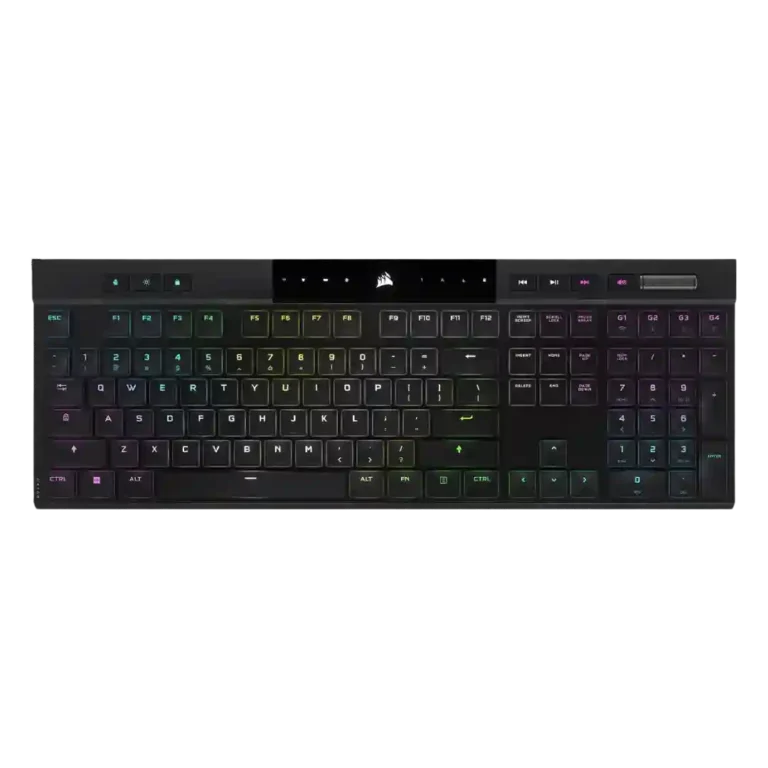
Reviewers treat the Corsair K100 Air as a standout ultra-thin wireless keyboard built around speed, premium looks, and a distinctive Cherry MX Ultra Low Profile tactile feel. The strongest agreement centers on its slim form factor, sturdy frame, responsive Slipstream or wired performance, deep iCUE customization, useful media controls, and battery life that usually meets expectations. The tradeoff is that the same thin design limits repairability and physical customization, while shallow switches, rattly stabilizers, louder acoustics, full-size length, and the high price divided reviewers. It performs like a flagship for buyers who value the format, but its premium is harder to defend for users who want conventional switches or easy servicing.
Compared in Reviews
Products reviewers directly compared with this model, grouped into quick takeaways.
- Better: price and value Man of Many points buyers toward the Corsair K70 RGB Pro because it costs far less.
- Alternative: non-gaming low-profile option The reviewer says the Nuphy Air75 is an excellent cheaper option if gaming features are unnecessary.
Feature Scorecards
Summary
49 reviewed features- Very positive 4.5-5.0 20% 10 features
- Positive 3.5-4.4 53% 26 features
- Neutral 2.5-3.4 14% 7 features
- Negative 1.5-2.4 12% 6 features
- Very negative below 1.5 0% 0 features
Pros
-
The two direct brightness judgments were strongly positive, with reviewers calling the RGB bright or much brighter than expected.
-
Reviewers who discussed input registration were very positive, citing correct multi-key registration, N-key rollover, and no ghosting.
-
Durability evidence was strong, including drop-test survival, sturdy aluminum construction, and long-term reports of no degradation.
-
Key responsiveness was a standout positive, with reviewers describing immediate, accurate, or highly responsive inputs.
-
The ultra-thin form factor was one of the most admired traits, repeatedly described as shockingly thin or remarkable.
-
Wireless performance was strongly praised for Slipstream reliability, low latency, and lack of noticeable lag.
-
Key stability was praised where discussed, with reviewers citing balanced keys and very little wobble.
-
Only one reviewer evaluated the included cable, calling the supplied cable and dongle great.
-
The volume roller/knob was consistently praised as smooth, convenient, satisfying, or even flawless.
-
Reviewers overwhelmingly liked the slim, premium, modern look, often describing the keyboard as sleek, stylish, gorgeous, or stunning.
-
Build quality was widely praised for solidity and premium feel, though a few reviewers noted flex, average supporting parts, or plastic elements.
-
Connectivity was consistently praised for quick switching, Bluetooth and Slipstream flexibility, easy pairing, and stable multi-device use.
-
Battery life was one of the clearest strengths, with many reviewers reporting days, a week, or longer between charges and generally validating the 50-hour RGB claim.
-
Onboard memory was praised for storing many profiles and allowing settings to travel without relying on iCUE.
-
RGB customization was praised for layered effects, deep controls, and playful flexibility.
-
Typing feel was a major strength for many reviewers, especially those who liked chiclet or low-profile boards, but not universally loved.
-
Most reviewers found the frame impressively rigid for its thinness, though a few detected minor flex.
-
Reviewers liked the rich gaming feature set, including Stream Deck-style extras and gamer-focused controls.
-
Compatibility evidence was positive overall, with reviewers noting successful use across PCs, consoles, Mac, and mobile devices, though one Mac layout caveat remained.
-
Reliability evidence was positive overall, especially in long-term use, though one reviewer expressed concern about future switch longevity.
-
Switch feel was generally liked for tactile, fast, and satisfying feedback, but a minority found the shallow switches uncomfortable or gaming-limited.
-
Dedicated media controls were well received as handy, convenient, and welcome.
-
iCUE was usually praised for power and depth, but a few reviewers found it complex, resource-heavy, or not ideal.
-
Latency was generally strong for wired and Slipstream use, though Bluetooth drew a lower judgment in one review.
-
Typing comfort was usually strong, with many reviewers saying it was comfortable for long sessions, though some needed adjustment or felt fatigue initially.
-
Gaming performance was generally praised for responsiveness and speed, but some reviewers felt the shallow switches or laptop-style feel were not ideal for serious gaming.
-
RGB quality was mostly positive, with bright and rich lighting praised, though some reviewers found it less vibrant, tame, or uneven.
-
Thinness helped portability, but the full-size length made transport less practical for some reviewers.
-
Only one review directly judged spacing, positively noting that extra space between keys helped finger positioning.
-
The one direct per-key lighting judgment was positive, with the reviewer appreciating configurable per-key RGB.
-
One reviewer praised profile management because settings could travel between systems without being reset.
-
Materials drew mixed-to-positive reactions: aluminum felt premium, but some reviewers wanted a more complete metal chassis.
-
The ultra-thin body helped desk fit, but the full-size layout still took noticeable room for some reviewers.
-
Software and lighting customization were strong, but physical customization was a major limitation because the thin design restricts keycap and switch changes.
-
Macro support was useful and programmable, but several reviewers disliked the less-accessible placement above the numpad.
-
Main legends were generally visible and evenly lit, while secondary legends lacking backlight hurt the score.
Cons
-
High polling was appreciated as advanced tech, but several reviewers said it was overkill or hard to notice.
-
Keycap quality was mixed: some liked the shape and long-term appearance, while others criticized ABS material, texture, wear risk, and limited thickness.
-
Noise was polarizing: some found it relatively quiet, while others called it louder than expected.
-
Reviewers liked aspects of the full-size layout, but several wanted smaller TKL or compact versions.
-
Value was the most divided area: some reviewers said it was worth the premium, while many said the price was hard to justify.
-
Ergonomic feedback was mixed: concave caps and low height helped comfort, but sharp edges, kickstand issues, and rough frame edges drew criticism.
-
Switch options scored low because a long-term reviewer wanted a linear version and felt limited to the tactile switches.
-
Sound impressions were mixed to negative: one reviewer liked the regular switch sound but called out the spacebar, while another criticized a loud, rattly clank.
-
Hot-swap capability was scored poorly because reviewers explicitly noted the switches or keycaps are not meant to be swapped.
-
The only opinionated passthrough-related evidence was negative, with one reviewer calling the lack of extra ports a shame.
-
Repairability was a repeated weakness: reviewers warned that keycap removal could damage switches and wanted easier user serviceability.
-
Stabilizer quality was a repeated complaint, especially rattly or loose stabilizers and a poor-sounding spacebar.
-
Sound dampening scored poorly because one reviewer said there was no way to tame the switches or stabilizers.
Compared With Category Average
Compared with other Gaming Keyboard, this product is below average in sound dampening, stabilizer quality, ease of switch replacement.
Summary
8 compared features- Above average 0.4+ pts higher 0% 0 features
- Same as average within 0.3 pts 0% 0 features
- Below average 0.4+ pts lower 100% 8 features
| Attribute | This product | Category average | Difference |
|---|---|---|---|
| sound dampening | 1.5 | 4.1 | -2.6 |
| stabilizer quality | 1.7 | 3.9 | -2.2 |
| ease of switch replacement | 1.9 | 3.7 | -1.9 |
| acoustics | 2.4 | 4.1 | -1.7 |
| hot-swappable switches | 2.0 | 3.4 | -1.4 |
| ergonomics | 2.8 | 3.9 | -1.1 |
| value for money | 3.0 | 3.7 | -0.7 |
| layout options | 3.0 | 4.0 | -1.0 |
FAQ
Is the Corsair K100 Air good for gaming?
Yes for most reviewers: wired and Slipstream use felt fast and responsive. A few reviewers still preferred conventional mechanical switches for serious gaming.
Is it comfortable for typing?
Most reviewers liked the low-profile tactile feel after adjustment, and several called it comfortable for long sessions. Reviewers who dislike shallow laptop-style keys were less convinced.
How is the battery life?
Battery life was widely praised. Reviewers commonly reported several days to a week or more between charges, and long-term use also supported strong endurance.
Can the switches or keycaps be replaced?
Reviewers repeatedly treated this as a weakness. The keycaps and switches are not user-friendly to remove, and several warned that removal can damage the switches.
Is the RGB lighting good?
The RGB lighting was mostly liked for brightness, per-key control, and deep customization. Some reviewers found it less vibrant, uneven, or more subdued than other Corsair boards.
Is iCUE required?
Basic use and some onboard functions work without iCUE, but reviewers said the full lighting, macro, profile, and performance controls depend on Corsair’s software.
Is it worth the price?
Value was the most divided area. Some reviewers said the feature set justified the premium, while many thought the price was hard to justify against cheaper alternatives.
Consider This Instead
If you want better ease of switch replacement
Choose Razer BlackWidow V4 Pro. It scores 5.0 vs 1.9 for ease of switch replacement, with a 3.8 overall score.
If you want better stabilizer quality
Choose Lemokey P1 HE. It scores 5.0 vs 1.7 for stabilizer quality, with a 4.2 overall score.
If you want better sound dampening
Choose Corsair K100 RGB. It scores 4.9 vs 1.5 for sound dampening, with a 4.0 overall score.
If you want better hot-swappable switches
Choose be quiet! Dark Mount. It scores 5.0 vs 2.0 for hot-swappable switches, with a 4.0 overall score.
Overall Top Gaming Keyboard Alternatives
Good if you want a premium 96% Hall Effect keyboard for work and gaming with excellent build, sound, and customization. Skip it if you need cheaper esports-first speed, 8,000Hz polling,...
Pros: cable quality, typing comfort
Cons: portability, switch options
Good if you want a premium full-size Hall Effect keyboard with smooth switches, quiet sound, and deep customization. Skip it if you need a portable, budget-friendly board or broad switch...
Pros: key stability, frame rigidity
Cons: portability, switch options
Good if you want a compact Hall Effect keyboard with smooth typing, strong gaming response, bright RGB, and good value. Skip it if you need polished software, quiet heavy presses,...
Pros: desk space efficiency, layout options
Cons: compatibility
Good if you want a premium, quiet TKL Hall Effect keyboard for typing and gaming. Skip it if price, portability, 8,000Hz polling, or broad switch choice matters most.
Pros: build quality, extra gaming features
Cons: switch options, hot-swappable switches