Reviews consistently praise the board for deeper, fuller sound than many analog competitors.
Acoustics are mixed to negative overall: some reviews found limited ping, but several others called out obvious pinging or a harsher sound profile.
One review framed the inductive design as offering more consistent response over long periods.
One measured review found actuation and peak-force behavior within spec, supporting consistent key triggering on the tested sample.
Reviews confirm support for adjustable actuation, rapid trigger, and multi-point style analog inputs.
Backlight brightness is usable, but not a standout strength across reviews.
Brightness control is available directly on the board, with stepped adjustment for the backlight.
Multiple reviews landed around 11 to 12 hours with RGB on, so battery life is workable but unimpressive.
Reviewers repeatedly describe the keyboard as solid, sturdy, and well-constructed despite the plastic shell.
Build quality is a major strength across reviews, with the board repeatedly described as sturdy, premium-feeling, and well put together.
The included USB-C cable is presented as a nice braided, color-matched in-box extra.
The detachable USB-C cable is viewed positively, with reviewers appreciating the quality, serviceability, and easier handling versus fixed cables.
Browser-based setup is limited by compatibility constraints, with one review specifically noting Chromium over Firefox.
Compatibility coverage is good for Windows, macOS, and Xbox based on the review set, though one review separately warned about PS5 limitations.
Tri-mode connectivity is a clear strength, with wired, Bluetooth, and 2.4 GHz support called out repeatedly.
Connectivity is stable and simple through wired USB-C, but reviews clearly frame the board as wired-only rather than wireless-flexible.
There is substantial remapping and actuation customization, but the software experience can make that flexibility harder to use well.
Overall customization is one of the board’s clearest strengths, spanning lighting, macros, key behavior, and saved presets.
The compact models help mouse room, but the full-size layout leaves less space for wider sweeps.
Its full-size footprint reduces desk efficiency compared with smaller boards, and at least one reviewer called the overall footprint fairly large.
Keycap wear resistance helps durability, but proprietary parts and fit concerns weaken long-term confidence.
Durability evidence centers on the stock keycaps, with one review noting the legends should effectively never wear away.
Hot-swap support helps, but proprietary switches and the lack of spare parts make replacement less convenient than it should be.
Because it is not hot-swappable, changing or replacing switches is treated as inconvenient compared with newer enthusiast-oriented boards.
Comfort is decent overall, but the tall profile and missing wrist rest hurt ergonomics for some users.
Ergonomics are generally decent, but not flawless: comfort is available, yet one review found the palm rest could interfere depending on positioning.
Rapid trigger, multi-point inputs, and adjustable actuation are real gaming extras, even if the feature depth trails top HE boards.
Gaming-specific extras are strong overall, especially tournament mode, Windows lock behavior, NKRO/anti-ghosting, and other competitive-use controls.
One review found little meaningful twist or bend, pointing to a rigid frame.
One review specifically reported very little flex, supporting a solid and rigid frame.
Gaming performance is generally fast and enjoyable, though not everyone saw it as a best-in-class esports board.
Gaming performance is one of the board’s strongest themes, with responsive inputs, dependable play, and useful full-size functionality for game controls.
The switches are hot-swappable, but the ecosystem is currently proprietary to Ducky’s inductive parts.
The board is explicitly described as not hot-swappable in review coverage.
High-purity or thick PBT caps are one of the keyboard’s most consistently praised strengths.
Double-shot PBT keycaps are repeatedly praised for thickness, texture, and overall quality, with durability also cited as a benefit.
Tap response and in-game responsiveness are consistently described as fast.
Key response is consistently strong, with reviews describing accurate command parsing and reliable registration under fast input.
Key spacing is manageable once adjusted to, but the full-size layout can feel wider if you come from smaller boards.
Key size and spacing are treated as comfortable and easy to navigate in the reviewed full-size layout.
Large keys and the switches themselves are praised for low wobble and stable feel.
One review noted some key wobble, but said it was not distracting during normal use.
Wireless latency is strong enough to feel close to wired in normal use, though this is still a 1,000 Hz board.
Latency performance is a clear strength in review coverage, with low-latency behavior praised in play and one review citing sub-0.25 ms figures.
The lineup offers both full-size and 60% options, along with layout variety.
Software support extends to alternate layouts, with one review explicitly mentioning options beyond QWERTY.
Standard legends are sharp and evenly lit, but some alternate caps are harder to read in low light.
One review explicitly says the keycaps are easier to read, pointing to strong legend clarity on the stock caps.
The web configurator supports macros, though that capability sits inside a broader software experience that still needs polish.
Macro setup is a strength, with reviews describing recording and remapping as straightforward and widely available.
The material mix is not flashy, but the plastic case, PBT caps, and internal stack still come across as well chosen and solid.
Materials quality is strong overall, with aluminum and solid plastics described as substantial rather than cheap.
You do get top-right media controls, but several reviews note that the board lacks richer dedicated playback extras.
Dedicated media controls are a recurring highlight, with reviewers praising their convenience and easy access.
Typing noise is generally kept low and muted, though one review noted light coil whine with RGB enabled.
Noise level is not especially low, with reviewers describing the board as noisy or overwhelmed by sound in quieter use.
Settings and profile data are described as saving on the keyboard itself rather than living only in software.
Onboard memory is a standout feature, with repeated praise for the large profile count and hardware storage capacity.
USB passthrough is treated as a missing feature on this model compared with older K70 variants.
Per-key RGB support exists, but at least one review found per-key editing limited in practice.
Per-key lighting control is clearly supported, with multiple reviews noting individual-key programmability and customization.
The 1,000 Hz polling rate is fine for most users, but it is not an aggressive headline spec versus faster rivals.
The 8,000Hz polling option is widely noted, but its real-world benefit is mixed: some reviewers noticed gaming gains, while others called it hard to perceive.
The full-size board is heavy enough that portability is not a strong point.
Portability gets a modest boost from the detachable cable, but this remains a full-size wired board rather than a travel-first design.
Review timing matters here: early coverage criticized missing profiles, while later coverage reported dual-profile support.
Profile handling is unusually deep, with lots of hardware profiles and easy switching called out across reviews.
Rapid trigger is supported, but the adjustment granularity is lighter than what some competing analog boards offer.
Later coverage mentioned bug fixes and improved system stability, suggesting the platform is getting steadier over time.
Reliability is excellent in the review set, with no-chatter behavior and consistent keystroke registration called out directly.
RGB modes and settings are available through the web configurator.
RGB customization is deep, with iCUE and onboard controls supporting presets, layers, and user-created lighting setups.
Lighting looks smooth and fairly uniform, but brightness is not class-leading.
RGB output is described as vivid and attractive, with strong effects and even unusually accurate white reproduction in one test.
The product family spans compact and full-size versions, so buyers can choose between desk space and a full layout.
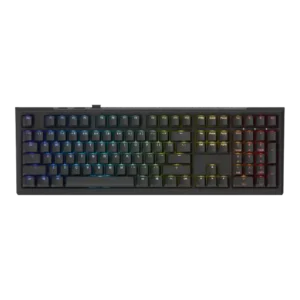
The board is consistently presented as a full-size layout with numpad and extra top-row controls.
The web configurator is the keyboard’s clearest weakness, with repeated complaints about bugs, confusion, limits, or unfinished behavior.
iCUE is widely seen as capable and feature-rich, though some reviewers mention extra digging or heavier system impact.
The dense internal foam and layered dampening clearly help suppress rattle and shape the sound.
Sound damping appears weak in the reviewed units, with case ping cited instead of a muted or cushioned sound.
Stabilizers are a strength, with reviewers calling out low rattle and solid larger keys.
One review found little stabilizer rattle, though broader review coverage suggests this is not a universally emphasized strength.
The inductive switches are widely praised as smooth and pleasant to use.
Switch feel is generally smooth and quick across Cherry options, but the Speed Silver implementation can feel overly sensitive for some users.
Switch choice is currently narrow because the board depends on Ducky’s proprietary inductive switch ecosystem.
Reviewers repeatedly highlight the broad Cherry MX selection as a strength, with multiple switch types available at purchase.
Long sessions are generally comfortable, though the larger chassis and lack of a wrist rest can still wear on some users.
Typing comfort is broadly good for longer sessions, helped by the key shape and included wrist rest in favorable reviews.
Typing feel is one of the clearest reasons reviewers kept reaching for this keyboard.
Typing feel is good enough for daily use and gaming, but not universally premium; sound and hollowness pull the experience down in weaker reviews.
Some reviews see the price as attractive for a wireless analog board, but the software caveats still affect the overall value story.
Value is mixed: some reviewers think the quality justifies the price, while others emphasize that it remains expensive for what you get.
Dedicated volume control is included rather than buried in generic function shortcuts.
The volume wheel/roller is consistently praised for smooth operation, texture, and day-to-day convenience.
Wireless mode is generally stable and responsive enough for everyday gaming use.
No wrist rest is included, so this area is a straightforward weakness.
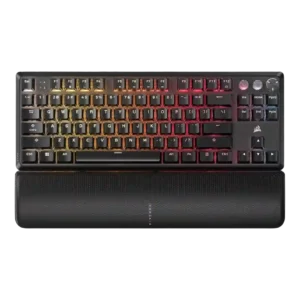
The magnetic wrist rest gets mostly positive marks for comfort and easy attachment, but reactions are mixed because some reviewers disliked the surface or magnetic security.