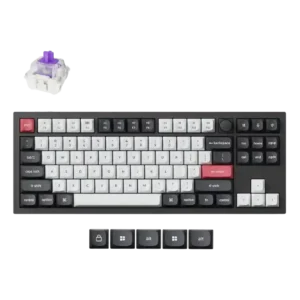
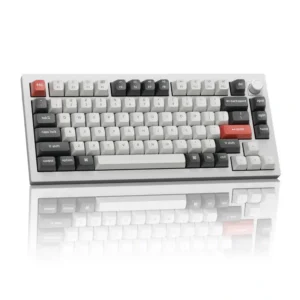
Compare Keychron Q3 HE vs Keychron Q1 Ultra 8K

P1 Keychron Q3 HE
P2 Keychron Q1 Ultra 8K

Comparison Takeaways

Keychron Q3 HE

Where It Has the Edge

  • actuation consistency is 4.7 vs 1.0. Reviewers praised the actuation behavior for detecting small presses and activating precisely, supporting high confidence in press registration.
  • rapid trigger support is 4.6 vs 1.0. Rapid Trigger support was treated as a strong gaming advantage, described as handy, ideal for fast games, and...
  • analog input support is 4.3 vs 1.0. Multi-depth input was useful for walk/run and steering-style control, though one reviewer questioned how useful the extra depth...
  • key responsiveness is 4.7 vs 2.5. Responsiveness was strongly praised, with reviewers describing accurate, ultra-responsive, twitch-fast key behavior that helped gaming and fast typing.

Keychron Q1 Ultra 8K

Where It Has the Edge

  • switch options is 4.5 vs 2.5. Red, Brown, and Banana variants cover gaming, mixed use, and stronger tactility, and the hot-swap design makes alternatives...
  • hot-swappable switches is 4.9 vs 3.0. The universal three- and five-pin hot-swap PCB makes switch experimentation and replacement straightforward without soldering.
  • battery life is 4.9 vs 3.9. Battery endurance is a standout strength, with claims up to 660 hours and real use ranging from a...
  • legend visibility is 5.0 vs 4.4. The white-on-dark legends are clean, well aligned, and easy to read, and the double-shot construction should prevent them...
Average score
Product 1: Keychron Q3 HE
4.3
Product 2: Keychron Q1 Ultra 8K
4.4
acoustics
Product 1: Keychron Q3 HE
4.6

Acoustics were a major strength: reviewers liked the quiet, muted, poppy, brilliant, or office-friendly sound profile.

Product 2: Keychron Q1 Ultra 8K
4.4

Most configurations produce a deep, smooth, thocky sound that testers loved, with the Q1 Ultra slightly quieter than its predecessor. One reviewer found it dull, overly muted, and less satisfying than the Q1 Max.

actuation consistency
Product 1: Keychron Q3 HE
4.7

Reviewers praised the actuation behavior for detecting small presses and activating precisely, supporting high confidence in press registration.

Product 2: Keychron Q1 Ultra 8K
1.0

One fast typist experienced missed double presses at the default 50ms debounce setting. Lowering debounce fixed the core issue, but the out-of-box behavior was unacceptable for that user.

analog input support
Product 1: Keychron Q3 HE
4.3

Multi-depth input was useful for walk/run and steering-style control, though one reviewer questioned how useful the extra depth mapping would be personally.

Product 2: Keychron Q1 Ultra 8K
1.0

The fixed mechanical actuation point cannot be freely adjusted like a magnetic keyboard. That limits analog-style control and actuation tuning.

backlight brightness
Product 1: Keychron Q3 HE
3.8

Backlight brightness was viewed as restrained rather than intense, with reviewers describing it as not overly bright or not super bright.

Product 2: Keychron Q1 Ultra 8K
4.0

The RGB lighting gets fairly bright, though internal dampening absorbs some of the glow and prevents a completely even light cloud.

battery life
Product 1: Keychron Q3 HE
3.9

Battery life was mixed: one reviewer found it really good, while another warned RGB wireless use noticeably taxes the battery.

Product 2: Keychron Q1 Ultra 8K
4.9

Battery endurance is a standout strength, with claims up to 660 hours and real use ranging from a full week with RGB to roughly a month or more between charges.

build quality
Product 1: Keychron Q3 HE
4.8

Build quality had unanimous strong praise, with every review describing the board as solid, sturdy, premium, or exceptionally well built.

Product 2: Keychron Q1 Ultra 8K
5.0

The heavy CNC-machined aluminum chassis is the clearest point of agreement. It feels exceptionally solid, premium, and far more substantial than budget or plastic boards.

cable quality
Product 1: Keychron Q3 HE
4.5

Cable quality was positively received, with reviewers liking the braided cable and its practical connection options.

Product 2: Keychron Q1 Ultra 8K
5.0

The flexible braided USB-C cable supports full 8K operation and includes a USB-A adapter for broader compatibility.

compatibility
Product 1: Keychron Q3 HE
4.7

Compatibility was praised for easy Mac and Windows use and usefulness across different platforms.

Product 2: Keychron Q1 Ultra 8K
4.6

Hardware switches and extra keycaps support both macOS and Windows, with wired, Bluetooth, and 2.4GHz options. Some Apple-specific controls, such as external display brightness, may need third-party software.

connectivity
Product 1: Keychron Q3 HE
4.5

Connectivity was mostly strong thanks to wired, Bluetooth, and 2.4GHz options, though one reviewer disliked flipping the rear switch between modes.

Product 2: Keychron Q1 Ultra 8K
5.0

Wired USB-C, Bluetooth 5.3, and 2.4GHz wireless provide flexible switching across multiple devices and use cases.

customization options
Product 1: Keychron Q3 HE
4.6

Customization options were a major strength, spanning actuation tuning, key remapping, macros, lighting, keycaps, and per-key settings.

Product 2: Keychron Q1 Ultra 8K
4.9

The board is highly modifiable through switch and keycap swaps, internal foam changes, remapping, macros, lighting, layers, and advanced firmware settings.

design aesthetics
Product 1: Keychron Q3 HE
4.6

Design aesthetics were widely praised, with reviewers liking the clean colors, shell-white styling, and premium-looking TKL design.

Product 2: Keychron Q1 Ultra 8K
4.7

The restrained retro-futurist styling, accent keys, metal finish, and hidden celestial plate look premium. The underside decoration is attractive but largely invisible during use.

desk space efficiency
Product 1: Keychron Q3 HE
4.7

Desk space efficiency was praised by one reviewer who liked the Mac Magic Keyboard-like footprint for a compact workspace.

Product 2: Keychron Q1 Ultra 8K
5.0

The compact layout frees meaningful mouse space while retaining a full function row, arrows, and a small navigation cluster.

durability
Product 1: Keychron Q3 HE
4.8

Durability evidence was positive, with reviewers expecting lasting construction and associating the materials with durability and stability.

Product 2: Keychron Q1 Ultra 8K
4.8

The chassis and replaceable components appear built for years of use, and several testers expect it to be a long-term purchase. Formal long-term testing remains limited.

ease of switch replacement
Product 1: Keychron Q3 HE
4.2

Ease of switch replacement was positive in the hands-on demonstration, where reinstalling a switch was described as simply clicking it back in.

Product 2: Keychron Q1 Ultra 8K
4.8

Included pullers and disassembly tools make switch changes simple, and broad switch compatibility helps users correct or personalize the stock feel.

ergonomics
Product 1: Keychron Q3 HE
3.6

Ergonomics were mixed: one reviewer had no hand cramping, while another needed a palm rest because of the fixed angle.

Product 2: Keychron Q1 Ultra 8K
3.0

The sculpted keycaps and angled case can be comfortable for long sessions, but there are no adjustable feet. Users who need a steeper or flatter angle may find that limitation significant.

extra gaming features
Product 1: Keychron Q3 HE
4.8

Extra gaming features were strongly praised, especially Rapid Trigger, Snap Tap, and multi-action key behavior.

Product 2: Keychron Q1 Ultra 8K
4.1

SOCD, full anti-ghosting, and 8K polling add competitive capability, though casual users may see them as overkill and magnetic-only features remain absent.

frame rigidity
Product 1: Keychron Q3 HE
4.7

Frame rigidity and desk stability were strong positives, with reviewers noting solidity, lack of movement, and clean manufacturing.

Product 2: Keychron Q1 Ultra 8K
5.0

The dense metal frame has virtually no flex and stays planted during aggressive typing or gaming.

gaming performance
Product 1: Keychron Q3 HE
4.6

Gaming performance was praised across reviews for responsive actuation, Rapid Trigger-style inputs, and competitive-feeling advantages.

Product 2: Keychron Q1 Ultra 8K
4.0

With Red switches, low-latency connections, SOCD, and full anti-ghosting, it performs strongly for gaming. The fixed actuation and one report of missed rapid inputs keep it from being a universal competitive recommendation.

hot-swappable switches
Product 1: Keychron Q3 HE
3.0

Hot-swap support was limited by compatibility, because the switches are swappable but not compatible with traditional mechanical switches.

Product 2: Keychron Q1 Ultra 8K
4.9

The universal three- and five-pin hot-swap PCB makes switch experimentation and replacement straightforward without soldering.

keycap quality
Product 1: Keychron Q3 HE
4.6

Keycaps received positive comments for softness, crisp legends, lack of cheap feel, and overall quality.

Product 2: Keychron Q1 Ultra 8K
4.8

The double-shot PBT KSA keycaps feel durable, sculpted, and premium, with concave tops that guide the fingers. Their tall profile can require an adjustment period.

key responsiveness
Product 1: Keychron Q3 HE
4.7

Responsiveness was strongly praised, with reviewers describing accurate, ultra-responsive, twitch-fast key behavior that helped gaming and fast typing.

Product 2: Keychron Q1 Ultra 8K
2.5

Most testing found inputs responsive and reliable, but one fast typist reported missed repeated presses with the default debounce and stock Brown switches.

key spacing
Product 1: Keychron Q3 HE
4.6

Key spacing was praised in the TKL layout because separated keys helped avoid accidental hits.

Product 2: Keychron Q1 Ultra 8K
No score yet
key stability
Product 1: Keychron Q3 HE
3.6

Key stability had a moderate caveat because the spacebar was described as a bit wobbly in one review.

Product 2: Keychron Q1 Ultra 8K
4.3

Large keys are generally praised for reduced wobble and tighter movement, and the switches themselves feel stable. One unit had a space bar that stuck and failed to return properly.

latency
Product 1: Keychron Q3 HE
4.5

Latency evidence was positive in testing, with no input lag noticed during use.

Product 2: Keychron Q1 Ultra 8K
4.1

Wired and 2.4GHz performance is consistently described as extremely responsive, with no noticeable delay in most tests. One reviewer found large stabilized keys slow to return, creating a serious outlier.

layout options
Product 1: Keychron Q3 HE
4.5

Layout options were praised for the full TKL arrangement and separated navigation area, especially for users who value a knob and traditional spacing.

Product 2: Keychron Q1 Ultra 8K
5.0

The compact 75% layout retains function keys, arrows, and navigation controls, while the wider Ultra family offers 80% and full-size alternatives.

legend visibility
Product 1: Keychron Q3 HE
4.4

Legend visibility was positive overall, with crisp legends and usable visibility despite non-shine-through keycaps.

Product 2: Keychron Q1 Ultra 8K
5.0

The white-on-dark legends are clean, well aligned, and easy to read, and the double-shot construction should prevent them from wearing away.

macro customization
Product 1: Keychron Q3 HE
4.0

Macro customization was mixed: reviewers recognized game usefulness but also questioned how often deeper press macros would matter.

Product 2: Keychron Q1 Ultra 8K
4.2

Macros are easy to create in Launcher, but mouse clicks are not captured automatically and must be inserted manually.

materials quality
Product 1: Keychron Q3 HE
4.8

Materials quality was repeatedly praised, especially the aluminum body, premium feel, sturdy construction, and included materials.

Product 2: Keychron Q1 Ultra 8K
5.0

Aluminum construction, double-shot PBT keycaps, layered foam, and premium fittings give the board a consistently high-end feel.

media controls
Product 1: Keychron Q3 HE
4.5

Media controls were praised through the clickable knob, including satisfying quick mute behavior and a nice click-down control.

Product 2: Keychron Q1 Ultra 8K
5.0

Dedicated media functions and Mac shortcuts add convenience without consuming much space.

noise level
Product 1: Keychron Q3 HE
4.6

Noise level was strongly positive, with reviewers repeatedly calling the keyboard quiet, subtle, not very loud, or free of annoying clickiness.

Product 2: Keychron Q1 Ultra 8K
3.5

It is not silent, but gentle typing and well-lubed stabilizers keep it reasonable for shared spaces. Sound preference is divisive because one tester found the board excessively quiet and subdued.

overall satisfaction
Product 1: Keychron Q3 HE
No score yet
Product 2: Keychron Q1 Ultra 8K
4.4

Most testers strongly recommend the keyboard as a premium typing and productivity board. A single highly negative review reported enough switch and stabilizer problems to return it, so consensus is positive but not unanimous.

per-key lighting control
Product 1: Keychron Q3 HE
No score yet
Product 2: Keychron Q1 Ultra 8K
5.0

Each key can be colored independently, making it easy to highlight shortcuts, gaming controls, or custom layers.

polling rate
Product 1: Keychron Q3 HE
3.6

Polling-rate impressions were mixed: one reviewer found it quick and useful, while another criticized 1,000Hz against cheaper 8,000Hz competitors.

Product 2: Keychron Q1 Ultra 8K
3.9

The 8,000Hz mode works over wired and 2.4GHz connections, but most testers could not feel a meaningful difference from 1,000Hz. It is more future-proofing than a daily-use breakthrough.

portability
Product 1: Keychron Q3 HE
3.1

Portability was a weakness because the compact layout helps, but the heavy metal board was described as best kept on a desk.

Product 2: Keychron Q1 Ultra 8K
1.5

The compact shape is deceptive: at about 3.8 pounds, this is a stationary desktop keyboard rather than a travel board.

profile management
Product 1: Keychron Q3 HE
No score yet
Product 2: Keychron Q1 Ultra 8K
5.0

Multiple programmable layers let users create alternate layouts and workflow-specific control schemes.

rapid trigger support
Product 1: Keychron Q3 HE
4.6

Rapid Trigger support was treated as a strong gaming advantage, described as handy, ideal for fast games, and outstanding.

Product 2: Keychron Q1 Ultra 8K
1.0

Rapid Trigger is absent because this is a conventional mechanical keyboard rather than a magnetic-switch model. Competitive players who rely on that feature should look elsewhere.

reliability
Product 1: Keychron Q3 HE
3.6

Reliability had a minor concern in one review due to rare Bluetooth reconnection issues.

Product 2: Keychron Q1 Ultra 8K
3.0

Most testing found dependable wireless and everyday performance, but one unit suffered missed presses and a sticking space bar. That outlier raises a meaningful quality-control concern.

RGB customization
Product 1: Keychron Q3 HE
4.5

RGB customization was received positively, especially lighting effects that react to key presses and the praised Pixel Rain-style effect.

Product 2: Keychron Q1 Ultra 8K
5.0

Keychron Launcher offers extensive color and pattern control, letting users create understated static looks or elaborate effects.

RGB lighting quality
Product 1: Keychron Q3 HE
4.3

RGB lighting quality was generally praised as gorgeous, subtle, pleasant, and visually strong, though one reviewer called it only fairly subtle.

Product 2: Keychron Q1 Ultra 8K
4.4

Lighting is polished and attractive with smooth effects, but the south-facing LEDs and dark internal dampening can make the glow less even. Full brightness also reduces battery life sharply.

size and form factor
Product 1: Keychron Q3 HE
4.3

Size and form factor were mostly positive for compact TKL use, though reviewers noted it is not a travel-focused board.

Product 2: Keychron Q1 Ultra 8K
4.9

The 75% footprint is compact without feeling stripped down, making it a strong fit for smaller desks and users who still need navigation keys.

software quality
Product 1: Keychron Q3 HE
4.5

Software quality was broadly praised as smooth, intuitive, easy, web-based, slick, and useful for actuation and remapping.

Product 2: Keychron Q1 Ultra 8K
4.3

The browser-based Launcher is powerful and generally easy to use for remapping, lighting, polling, and debounce. ZMK Studio is unsupported, browser compatibility is limited, and macro mouse clicks require manual entry.

sound dampening
Product 1: Keychron Q3 HE
4.7

Sound dampening was praised where discussed, with padding and internal construction credited for reducing unwanted noise and improving sound.

Product 2: Keychron Q1 Ultra 8K
4.4

Multiple foam and silicone layers reduce vibration and smooth the sound profile. The tuning appeals to most users but can feel overly damped to those who prefer a sharper, louder board.

stabilizer quality
Product 1: Keychron Q3 HE
4.4

Stabilizers were mostly praised as smooth, rattle-free, and excellent, with one review noting slight wobble on larger keys.

Product 2: Keychron Q1 Ultra 8K
4.3

Most testers found the screw-in stabilizers tighter, quieter, and less wobbly than earlier versions. One unit had excessive resistance and a sticking space bar, creating a serious quality-control concern.

switch feel
Product 1: Keychron Q3 HE
4.7

Reviewers consistently described the magnetic switches as smooth, responsive, bouncy, soft, and enjoyable, with several calling the feel highly refined.

Product 2: Keychron Q1 Ultra 8K
3.8

Most testers found the Silk POM switches smooth and satisfying, especially the Red and Banana options. A sharp dissent called the Brown switches mushy, slow, and barely tactile, so switch choice matters.

switch options
Product 1: Keychron Q3 HE
2.5

Switch choice was the clearest hardware limitation: reviewers noted one included switch set or proprietary magnetic-switch compatibility as disappointing or limiting.

Product 2: Keychron Q1 Ultra 8K
4.5

Red, Brown, and Banana variants cover gaming, mixed use, and stronger tactility, and the hot-swap design makes alternatives easy. The Brown option drew the harshest criticism.

typing comfort
Product 1: Keychron Q3 HE
4.7

Typing comfort was consistently positive, with reviewers reporting no fatigue, comfortable keycaps, and a satisfying all-day typing experience.

Product 2: Keychron Q1 Ultra 8K
4.5

Concave keycaps and a stable, cushioned feel support long typing sessions, though the tall KSA profile takes time to learn for some users.

typing feel
Product 1: Keychron Q3 HE
4.7

Typing feel was one of the strongest positives, repeatedly described as tactile, satisfying, fast, comfortable, unique, and enjoyable.

Product 2: Keychron Q1 Ultra 8K
4.5

The dominant impression is a smooth, solid, highly satisfying typing experience with substantial keycaps and a planted chassis. One reviewer found the stock Brown configuration mushy and slow enough to return the board.

USB dongle storage
Product 1: Keychron Q3 HE
No score yet
Product 2: Keychron Q1 Ultra 8K
2.0

There is no built-in compartment for the 2.4GHz receiver, making the small dongle easier to misplace when the keyboard is moved.

value for money
Product 1: Keychron Q3 HE
4.1

Value for money was split: some reviewers felt the premium build justified the price, while others said cheaper rivals offered better value.

Product 2: Keychron Q1 Ultra 8K
4.1

The $229 price is steep, but most testers believe the aluminum build, battery life, typing quality, and customization justify it. One reviewer considered the older Q1 Max a clearly better purchase.

volume control
Product 1: Keychron Q3 HE
4.4

Volume control was generally praised for the knob feel and convenience, though one reviewer preferred a different knob placement.

Product 2: Keychron Q1 Ultra 8K
5.0

The redesigned metal knob is consistently praised as tactile, convenient, and easy to remap.

wireless performance
Product 1: Keychron Q3 HE
4.5

Wireless performance was praised as accurate, responsive, and capable for wireless gaming.

Product 2: Keychron Q1 Ultra 8K
5.0

The 2.4GHz connection is repeatedly described as wired-like and stable, while Bluetooth also works reliably for lower-power everyday use.