Across reviews, the Air60 HE is repeatedly described as sounding unusually good for a low-profile board, with a deeper and more premium tone than expected.
The overall sound is generally liked, with reviewers calling it fantastic or delightfully clacky, but one review also notes metallic ping from some keys.
Reviewers describe the low-profile magnetic switches as stable and predictable, with travel and adjustable actuation behavior that feel consistent in use.
One review says the linear switches feel consistent and reliable.
One review explicitly highlights Hall Effect support for analog control in addition to multi-function key behavior.
The south-facing RGB is described as bright and easy to notice, even without relying on shine-through legends.
Brightness control is present and usually adequate, but one review finds the side underglow too weak to stand out much.
Several reviews emphasize the dual 4000mAh batteries and say battery life should not be a major worry.
Reviewers generally describe the board as solid and sturdy, with few complaints about the overall chassis construction.
Most reviews describe the board as solid or well built for the price, but there are conflicting impressions because some reviewers still report flex or only average refinement.
The included USB-C cable is described positively, especially its right-angled design and matching finish.
The included cable is described as braided and reliable in one review, and basic but serviceable in another.
Reviews mention support across Windows, Mac, and Linux, with one review also calling out Android and iOS compatibility.
Multiple reviews say the keyboard and software work on both Windows and Mac, though one notes the lack of Mac-specific replacement keys.
Wired USB-C helps keep performance fast, but the lack of wireless is the most common connectivity complaint.
Tri-mode connectivity is a clear strength, and reviewers repeatedly say switching among Bluetooth, 2.4GHz, and wired use is easy.
The browser-based configurator gives users broad control over remaps, actuation, layers, and gaming behaviors.
Reviewers say users can remap keys, change lighting, record macros, and otherwise tailor the board with little friction.
The compact 60% footprint is repeatedly praised for reclaiming desk space and leaving more room for mouse movement.
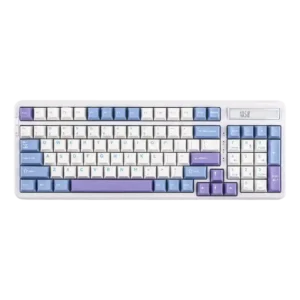
Reviewers repeatedly say the Cypher96 keeps a numeric keypad without taking too much desk space.
Materials and construction suggest decent longevity, but one reviewer reports scratch-prone caps and underside surfaces.
Reviewers specifically praise the PBT caps for resisting shine and being more durable than ABS caps.
Switch changes are possible thanks to the hot-swappable PCB, though the ecosystem is still limited.
Switch swapping is described as straightforward and solder-free.
The low profile and adjustable feet help comfort, but convenience is reduced by wired-only use and some foot design complaints.
One review straightforwardly describes the keyboard as comfortable to use.
Rapid Trigger, SOCD/LKP-style functions, DKS, HyperTap, and related Hall Effect tools are a major strength of this keyboard.
Reviewers mention programmable buttons, FN shortcuts, anti-ghosting, and N-key rollover.
Multiple reviews call the case rigid and sturdy, with no meaningful flex or creaking.
Frame rigidity is mixed: some reviews report no flex, while others describe noticeable flex or twisting.
Across reviews, gaming performance is a standout, with especially strong praise for responsiveness in fast-paced games.
One review says the Flamingo switches are well suited to fast-paced games.
Hot-swap support is present, but reviewers repeatedly note that compatible low-profile magnetic switch choices are scarce.
Hot-swap support is consistently confirmed, including compatibility with 3- and 5-pin switches.
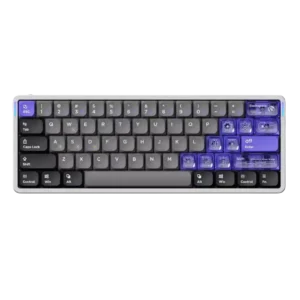
Keycap impressions are mixed: some reviewers praise the material choice and feel, while others dislike slipperiness, thinness, light bleed, or scratching.
The PBT double-shot caps are usually praised for feel and longevity, but one reviewer criticizes overall cap quality and inconsistent thinner legends.
Reviews describe the keys as quick and responsive, with fast, accurate behavior once actuation is tuned.
Reviewers describe the switches as responsive and say the board supports quicker typing and fast-paced play.
The flat low-profile layout can make mis-hits and typos easier for some users, especially if they rely on key shape for guidance.
One reviewer dislikes the compressed layout because the arrow keys are harder to find by feel.
Main keys are often described as stable, but the space bar and a few stabilizer-related behaviors draw criticism.
Larger stabilized keys are described as free from rattle.
Low latency is a recurring positive, with reviewers consistently framing the board as fast and responsive.
Wireless 2.4GHz is described as low latency, and wired mode is said to deliver minimal latency.
The Air60 HE is firmly a compact 60% board, and reviews note limited layout flexibility plus no ISO option.
The board is consistently described as a compact 96% or 90% layout, though one reviewer personally prefers a proper full-size layout.
Legend visibility is mixed, with complaints about soft legend clarity, visual busyness, and light bleed on some caps.
One review praises the legends as sharp and visible, while another says thinner legends look inconsistent.
Macro support appears in the specs and software coverage, but one review reported it missing at the time, so the experience looks mixed across review dates.
Reviews say macro recording is supported and simple to set up.
Reviewers consistently mention the aluminum top frame, ABS bottom, and PBT caps as good material choices for the price.
The ABS construction is usually framed as decent and better than cheap-feeling plastic, but not truly premium.
Media functions are available through layers rather than dedicated keys or controls.
The Air60 HE is generally described as quieter and more office-friendly than many gaming boards, even if it is not silent.
Most reviews say the keyboard stays controlled and not overly loud, though one review mentions metallic ping from some keys.
The board stores a small number of programmed layouts/profiles on-device, but that capacity is limited.
One review explicitly lists RGB per-key lighting alongside the board’s side lights.
One review explicitly mentions per key RGB underglow.
High polling is a core part of the Air60 HE’s performance story, with 8,000Hz repeatedly mentioned across reviews.
One review explicitly calls out an impressive 1000Hz polling rate.
The board is compact and easy to pack, but wired-only operation reduces some of its natural portability advantages.
One review explicitly calls the board lightweight and portable.
The physical switch makes profile changes quick, but the three-profile limit is one of the more common complaints.
One review highlights preset sharing and downloading other users’ configurations.
Rapid Trigger is widely highlighted and reviewers generally describe it as working as expected.
Everyday behavior is mostly described as solid, but one reviewer hit firmware-update bugs before reverting and recalibrating.
One reviewer says the wired connection never lets them down.
Reviews note a healthy range of lighting effects and app-based RGB controls.
Multiple reviews say the software lets users change colors, effects, brightness, and related lighting behavior with little fuss.
RGB looks bright and eye-catching, especially with the translucent accent caps, though some reviewers dislike the stock cap look or light bleed.
RGB is mostly described as vibrant, bright, or attractive without being overpowering, though one review says the side underglow is weak.
The ultra-compact low-profile 60% form is central to the product’s appeal, even if that shape is not ideal for everyone.
Several reviews praise the board for staying compact while still fitting a numpad.
NuPhy.io is one of the board’s biggest strengths, with repeated praise for being web-based, capable, and easy to use.
The companion software is repeatedly described as easy to use and good enough for common remaps, macros, and lighting changes.
Foam and silicone layers are repeatedly credited with softening the board’s sound and giving it a more muted tone.
Multiple reviews credit the multilayer dampening and gasket construction for reducing vibration, hollowness, and harshness.
Stabilizers are acceptable overall, but the space bar is repeatedly singled out for wobble, rattle, or weaker sound.
Stabilizers are mostly praised for keeping larger keys controlled, though a few reviewers mention looseness or a need for extra tuning.
The low-profile Jade and Jade Pro switches are widely praised for smoothness and satisfying feel, with Pro switches often preferred for control.
Reviews generally describe the stock switches as smooth, light, pre-lubed, and pleasant to use, though one reviewer calls the Wisterias fairly generic.
Switch choice is narrow right now, with reviewers only pointing to the Jade and Jade Pro low-profile magnetic options.
Stock choice is limited in one review, while others note two out-of-box switch options and hot-swap flexibility for changing them later.
Many reviewers find the Air60 HE comfortable for long sessions, especially given its low profile and optional wrist-rest support.
Typing comfort is a recurring strength, with reviewers calling the board pleasurable, cloud-like, or well suited to long sessions.
Typing is often described as surprisingly enjoyable for a gaming-focused low-profile board, though some reviewers still report tradeoffs in accuracy or excitement.
Typing is repeatedly described as lovely, soft, and thocky rather than harsh.
Most reviews frame the Air60 HE as strong value for its feature set and performance, though a few are less convinced against specific alternatives.
The keyboard is regularly framed as affordable, competitive, or good value despite some compromises.
Wireless use is described as fast, responsive, and low-lag in everyday use.
The optional wrist rest is described as comfortable, though one reviewer felt the low profile made it nonessential.