- Compared: price and convenience The Air60 HE is compared with the Keychron K2 HE on price, power, and convenience.
- Better: daily productivity layout The reviewer recommends the Keychron K2 HE instead for daily work because the Air60 HE’s 60% layout is limiting.
NuPhy Air60 HE Review
Bottom Line
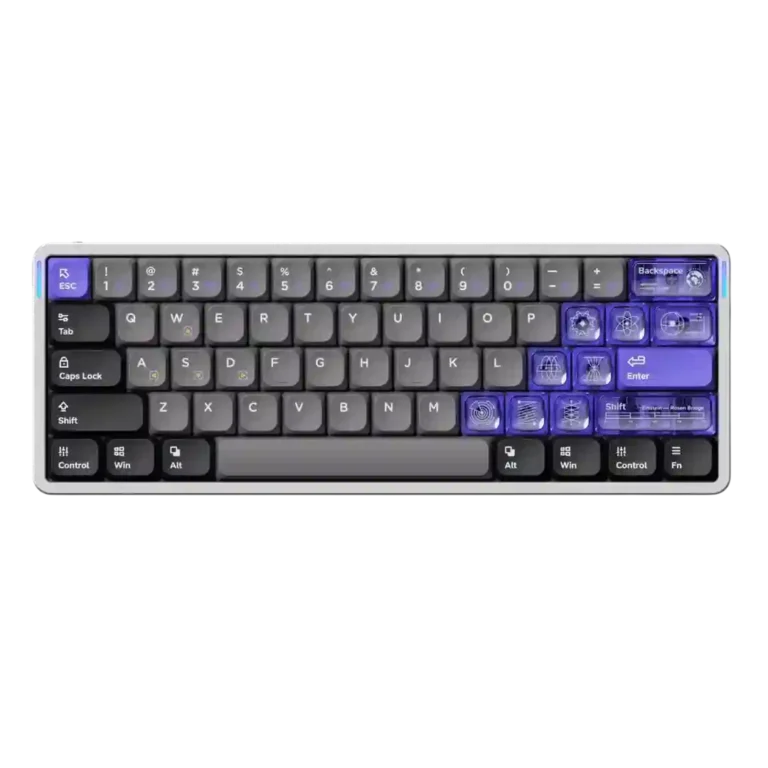
Choose the NuPhy Air60 HE if you want a compact wired Hall Effect board with fast response, rich tuning, and strong typing feel. Skip it if you need wireless freedom, arrow/function keys, broader switch options, or flawless keycaps.
Best for gamers who want a compact low-profile Hall Effect keyboard with strong trigger customization, fast response, and web-based software. It also suits users who like NuPhy’s bold styling and can work around layers.
Not for users who need wireless, dedicated arrow or function keys, broad switch-swapping options, or a conservative keycap design. It is also risky for buyers sensitive to light bleed, scratch concerns, or spacebar rattle.
The NuPhy Air60 HE earns its strongest praise as a compact Hall Effect gaming keyboard with fast response, broad trigger tuning, polished web software, and unusually good typing feel for a low-profile board. Reviewers repeatedly liked its sturdy build, distinctive styling, acoustics, and value versus other magnetic gaming keyboards. The tradeoff is that the same compact, wired-first design limits everyday flexibility: several reviewers missed arrow or function keys, disliked the side USB routing, or wanted wireless. Keycap impressions were also split, ranging from high-quality PBT praise to complaints about light bleed, slickness, scratching, and unclear legends. Overall evidence points to a fast, stylish specialist board rather than a universal daily driver.
Compared in Reviews
Products reviewers directly compared with this model, grouped into quick takeaways.
- More expensive: price and functionality The Air60 HE is presented as less expensive than the SteelSeries Apex Pro Mini while offering more functionality.
- Similar: responsiveness The Air60 HE’s responsiveness is described as similar to the Steelseries Apex Pro.
- Better: layout and arrow keys The Air60 HE is less appealing than the Varmilo Muse65 for users who want arrow keys, though the Varmilo is heavier.
Feature Scorecards
Summary
44 reviewed features- Very positive 4.5-5.0 36% 16 features
- Positive 3.5-4.4 36% 16 features
- Neutral 2.5-3.4 18% 8 features
- Negative 1.5-2.4 9% 4 features
- Very negative below 1.5 0% 0 features
Pros
-
Frame rigidity was strongly praised in the PC Gamer review, which reported no flex or creaking.
-
Rapid Trigger support was repeatedly praised as responsive and useful, with reviewers noting near-instant reset and practical gaming benefits.
-
Actuation behavior was described as stable and reliable, especially with the dual-rail switches and dependable Hall Effect functions.
-
Software quality was one of the most consistently praised attributes, with reviewers liking the web app, stability, clean UI, and broad controls.
-
Key stability was praised when reviewers focused on dual-rail or low-wobble behavior, with only limited criticism elsewhere.
-
Sound dampening was praised when reviewers mentioned the foam and silicone layers, which helped make the thin board sound more refined.
-
Latency was consistently praised as very low or imperceptible, with reviewers tying the board’s wired design and 8K capability to fast response.
-
Responsiveness was a major strength across reviews, with reviewers praising fast keystrokes, snappy switches, and responsive in-game behavior.
-
Gaming performance was one of the strongest areas, with reviewers praising speed, responsiveness, Hall Effect control, and compact competitive use.
-
Build quality was broadly praised, with reviewers describing the board as sturdy, solid, premium-feeling, or well put together.
-
Customization options were strongly praised for remapping, actuation tuning, lighting, layers, and Hall Effect controls.
-
RGB customization was viewed positively, with reviewers liking the available effects, side lighting, and web-based lighting controls.
-
Backlight brightness was praised as bright and usable without being obnoxious.
-
Desk space efficiency was praised for freeing mouse space in gaming setups.
-
The optional wrist rest was liked in the one review that evaluated it, where it was described as comfortable and stable.
-
Reviewers generally liked the low-profile magnetic Jade switches for smoothness, snappiness, and comfort, though one reviewer found the light force required adjustment.
-
Design aesthetics were usually praised as stylish, distinctive, and attractive, though a few reviewers disliked the keycap color mix in person.
-
Cable quality was mixed: the included angled cable was praised, while one reviewer found the side-port cable setup limiting for custom cables.
-
Compatibility was positive in the reviews that tested or valued laptop use plus Mac, PC, and Linux support.
-
Noise level was considered office-friendly or pleasantly controlled rather than truly silent.
-
Value for money was usually praised, especially versus other Hall Effect boards, but one negative review argued the price made little sense.
-
Acoustics were generally liked, especially the muted or satisfying low-profile sound, but some reviewers criticized the space bar or found the sound lackluster.
-
Extra gaming features were extensive and often praised, though SOCD/Hyper Tap-style features raised usefulness or fairness concerns for some reviewers.
-
Size and form factor were usually praised for compactness and novelty, though one reviewer questioned the low-profile value because travel distance felt full-size.
-
Typing comfort was praised by some reviewers as excellent, but others reported accuracy issues from the flat/light low-profile feel.
-
Switch replacement appeared physically easy in the one review that discussed removal directly.
-
Ergonomics received limited but positive support around comfort adjustments and wrist positioning.
-
Polling rate was viewed as a strong spec, though reviewers also cautioned that 8K may be imperceptible or cause jitter for some setups.
-
RGB lighting quality was usually praised for brightness and visual effect, but keycap light bleed made it look odd to some reviewers.
-
Materials quality was mixed: aluminum and PBT elements earned praise, while one reviewer criticized scratch-prone plastic and coatings.
-
Typing feel was the most divided core attribute: several reviewers loved it, while others found the keycaps, low-profile shape, or light actuation less satisfying.
-
Portability was mixed: reviewers liked the small, light body but repeatedly noted that wired-only operation undercuts travel appeal.
Cons
-
Durability was mixed, with PBT legends and solid keycaps praised, but one reviewer strongly criticized scratching during use and travel.
-
Macro customization was mixed because one review praised available macros and custom delays while another said macro creation was missing.
-
Profile management was mixed: the physical switch was appreciated, but the three-profile limit was a possible deal-breaker.
-
Keycap quality split reviewers sharply: some praised PBT feel and solidity, while others disliked slipperiness, light bleed, scratching, or average legends.
-
Layout options were a common limitation because the 60% layout omits arrows, function keys, and navigation keys that several reviewers missed.
-
Stabilizer quality was a recurring weak spot, mostly because multiple reviewers singled out the space bar for wobble, rattle, or clanky sound.
-
Hot-swap support was limited in practical value because compatible low-profile magnetic switch choices were narrow.
-
Key spacing was criticized by reviewers who felt the flat or wide keys could cause accidental presses or strange typing.
-
Connectivity was the most repeated drawback because the board is wired-only and side USB or cable placement bothered several reviewers.
-
Reliability drew concerns from firmware-update problems and feet that did not lock securely in one critical review.
-
Legend visibility drew criticism because several reviewers found the legends, translucent keys, or light bleed distracting or unclear.
-
Switch choice was criticized as narrow, with reviewers noting the current low-profile magnetic ecosystem leaves only the two Gateron LP Jade variants.
Compared With Category Average
Compared with other Gaming Keyboard, this product is above average in wrist rest quality, rapid trigger support, below average in connectivity, key spacing, layout options.
Summary
8 compared features- Above average 0.4+ pts higher 25% 2 features
- Same as average within 0.3 pts 0% 0 features
- Below average 0.4+ pts lower 75% 6 features
| Attribute | This product | Category average | Difference |
|---|---|---|---|
| connectivity | 2.4 | 3.9 | -1.5 |
| key spacing | 2.5 | 3.9 | -1.4 |
| layout options | 2.7 | 4.0 | -1.3 |
| reliability | 2.3 | 3.7 | -1.4 |
| stabilizer quality | 2.5 | 3.8 | -1.3 |
| legend visibility | 2.2 | 3.5 | -1.3 |
| wrist rest quality | 4.5 | 3.3 | +1.2 |
| rapid trigger support | 4.8 | 3.7 | +1.1 |
FAQ
Is the NuPhy Air60 HE good for gaming?
Yes. Reviewers repeatedly praised its fast response, low latency, Rapid Trigger support, and Hall Effect gaming features, especially for compact competitive setups.
Is it good for typing?
It can be excellent for typing if you like low-profile boards. Some reviewers called the typing feel unusually good, while others found the flat layout, light actuation, or keycaps less accurate.
Does the NuPhy Air60 HE have wireless?
No. Wired-only connectivity was the most repeated complaint, especially because the compact low-profile body feels naturally portable.
Are the keycaps good?
Opinions were split. Some reviewers praised the PBT feel and solidity, while others criticized slippery feel, light bleed, unclear legends, scratching, or the mixed color design.
How is the software?
The web-based NuPhy.io software was widely praised for ease of use, clean controls, actuation tuning, remapping, lighting options, and Hall Effect customization.
What are the biggest downsides?
The main drawbacks are wired-only connectivity, the 60% layout’s missing arrow/function keys, limited low-profile magnetic switch options, and inconsistent keycap impressions.
Consider This Instead
If you want better legend visibility
Choose Razer Huntsman V3 Pro. It scores 5.0 vs 2.2 for legend visibility, with a 3.9 overall score.
If you want better switch options
Choose MonsGeek M1 V5 HE. It scores 4.8 vs 2.0 for switch options, with a 4.3 overall score.
If you want better reliability
Choose ASUS ROG Azoth Extreme. It scores 5.0 vs 2.3 for reliability, with a 4.1 overall score.
If you want better connectivity
Choose Keychron Q6 HE. It scores 4.9 vs 2.4 for connectivity, with a 4.4 overall score.
Overall Top Gaming Keyboard Alternatives
Good if you want a premium 96% Hall Effect keyboard for work and gaming with excellent build, sound, and customization. Skip it if you need cheaper esports-first speed, 8,000Hz polling,...
Pros: cable quality, typing comfort
Cons: portability, switch options

Good if you want a premium full-size Hall Effect keyboard with smooth switches, quiet sound, and deep customization. Skip it if you need a portable, budget-friendly board or broad switch...
Pros: key stability, frame rigidity
Cons: portability, switch options

Good if you want a compact Hall Effect keyboard with smooth typing, strong gaming response, bright RGB, and good value. Skip it if you need polished software, quiet heavy presses,...
Pros: desk space efficiency, layout options
Cons: compatibility
Good if you want a premium, quiet TKL Hall Effect keyboard for typing and gaming. Skip it if price, portability, 8,000Hz polling, or broad switch choice matters most.
Pros: build quality, extra gaming features
Cons: switch options, hot-swappable switches