Compare Razer BlackWidow V3 vs Corsair K100 AIR

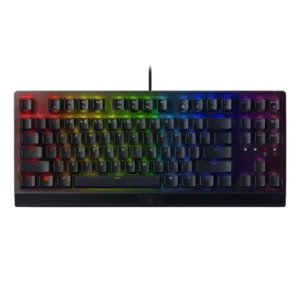
P1 Razer BlackWidow V3
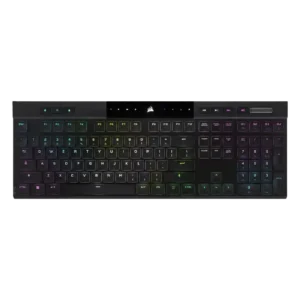
P2 Corsair K100 AIR

Comparison Takeaways

Razer BlackWidow V3

Where It Has the Edge

  • switch options is 3.7 vs 2.5. Switch choice was seen as useful because Green and Yellow options suit different preferences, but several reviewers wished...
  • ergonomics is 3.9 vs 2.8. Ergonomics were mixed: the wrist rest, feet, and angled setup helped comfort, but the full-size footprint made positioning...
  • polling rate is 4.5 vs 3.4. Polling rate received limited but positive support, with the reviewer tying the fast thousand-hertz rate to responsive keypress...
  • value for money is 4.1 vs 3.0. Value for money was generally positive for a sturdy, capable midrange board, but one TKL review argued the...

Corsair K100 AIR

Where It Has the Edge

  • connectivity is 4.4 vs 2.5. Connectivity was consistently praised for quick switching, Bluetooth and Slipstream flexibility, easy pairing, and stable multi-device use.
  • desk space efficiency is 3.9 vs 2.7. The ultra-thin body helped desk fit, but the full-size layout still took noticeable room for some reviewers.
  • backlight brightness is 5.0 vs 4.0. The two direct brightness judgments were strongly positive, with reviewers calling the RGB bright or much brighter than...
  • extra gaming features is 4.3 vs 3.3. Reviewers liked the rich gaming feature set, including Stream Deck-style extras and gamer-focused controls.
Average score
Product 1: Razer BlackWidow V3
3.9
Product 2: Corsair K100 AIR
3.8
acoustics
Product 1: Razer BlackWidow V3
2.8

Acoustics were highly preference-dependent: one reviewer enjoyed the clicky sound, while others criticized pinging and a cacophonous din.

Product 2: Corsair K100 AIR
2.4

Sound impressions were mixed to negative: one reviewer liked the regular switch sound but called out the spacebar, while another criticized a loud, rattly clank.

actuation consistency
Product 1: Razer BlackWidow V3
4.9

Actuation consistency was praised through no-missed-input comments, especially during gaming and heavy key-bashing scenarios.

Product 2: Corsair K100 AIR
4.8

Reviewers who discussed input registration were very positive, citing correct multi-key registration, N-key rollover, and no ghosting.

backlight brightness
Product 1: Razer BlackWidow V3
4.0

Backlight brightness drew mixed but mostly favorable comments, with vibrant Chroma praise balanced against one reviewer finding the lights more toned down.

Product 2: Corsair K100 AIR
5.0

The two direct brightness judgments were strongly positive, with reviewers calling the RGB bright or much brighter than expected.

battery life
Product 1: Razer BlackWidow V3
No score yet
Product 2: Corsair K100 AIR
4.4

Battery life was one of the clearest strengths, with many reviewers reporting days, a week, or longer between charges and generally validating the 50-hour RGB claim.

build quality
Product 1: Razer BlackWidow V3
4.6

Build quality was a major strength across reviews, with repeated praise for the sturdy feel, aluminum top, rugged construction, and quality overall.

Product 2: Corsair K100 AIR
4.4

Build quality was widely praised for solidity and premium feel, though a few reviewers noted flex, average supporting parts, or plastic elements.

cable quality
Product 1: Razer BlackWidow V3
4.3

Cable quality was mostly positive for the braided, durable, manageable cable, though one reviewer warned cable routing could kink it.

Product 2: Corsair K100 AIR
4.5

Only one reviewer evaluated the included cable, calling the supplied cable and dongle great.

compatibility
Product 1: Razer BlackWidow V3
3.3

Compatibility was mixed: basic USB PC use was easy, but deeper customization was limited for Linux and macOS users.

Product 2: Corsair K100 AIR
4.2

Compatibility evidence was positive overall, with reviewers noting successful use across PCs, consoles, Mac, and mobile devices, though one Mac layout caveat remained.

connectivity
Product 1: Razer BlackWidow V3
2.5

Connectivity was a limitation because reviewers repeatedly noted that the standard V3 is wired-only and lacks wireless or Bluetooth.

Product 2: Corsair K100 AIR
4.4

Connectivity was consistently praised for quick switching, Bluetooth and Slipstream flexibility, easy pairing, and stable multi-device use.

customization options
Product 1: Razer BlackWidow V3
4.6

Customization options were a recurring strength, covering key remapping, RGB, macros, Hypershift, and flexible Synapse controls despite software caveats.

Product 2: Corsair K100 AIR
3.7

Software and lighting customization were strong, but physical customization was a major limitation because the thin design restricts keycap and switch changes.

design aesthetics
Product 1: Razer BlackWidow V3
4.1

Design aesthetics were highly subjective, with praise for the pink, black, and minimalist looks offset by Quartz cosmetic complaints.

Product 2: Corsair K100 AIR
4.5

Reviewers overwhelmingly liked the slim, premium, modern look, often describing the keyboard as sleek, stylish, gorgeous, or stunning.

desk space efficiency
Product 1: Razer BlackWidow V3
2.7

Desk space efficiency was mixed to negative for the full-size model, with reviewers struggling for mouse room or noting the wrist rest consumed desk space.

Product 2: Corsair K100 AIR
3.9

The ultra-thin body helped desk fit, but the full-size layout still took noticeable room for some reviewers.

durability
Product 1: Razer BlackWidow V3
4.9

Durability was strongly praised, especially around the hard-wearing construction, robust product design, and tough keycaps.

Product 2: Corsair K100 AIR
4.8

Durability evidence was strong, including drop-test survival, sturdy aluminum construction, and long-term reports of no degradation.

ease of switch replacement
Product 1: Razer BlackWidow V3
No score yet
Product 2: Corsair K100 AIR
1.9

Repairability was a repeated weakness: reviewers warned that keycap removal could damage switches and wanted easier user serviceability.

ergonomics
Product 1: Razer BlackWidow V3
3.9

Ergonomics were mixed: the wrist rest, feet, and angled setup helped comfort, but the full-size footprint made positioning difficult for some.

Product 2: Corsair K100 AIR
2.8

Ergonomic feedback was mixed: concave caps and low height helped comfort, but sharp edges, kickstand issues, and rough frame edges drew criticism.

extra gaming features
Product 1: Razer BlackWidow V3
3.3

Extra gaming features were mixed: one review praised the loaded feature set, while another criticized the lack of gaming keys and other extras.

Product 2: Corsair K100 AIR
4.3

Reviewers liked the rich gaming feature set, including Stream Deck-style extras and gamer-focused controls.

frame rigidity
Product 1: Razer BlackWidow V3
4.3

Frame rigidity was mostly praised for low flex and stability, though one review found it less rigid than some Filco and Ducky boards.

Product 2: Corsair K100 AIR
4.3

Most reviewers found the frame impressively rigid for its thinness, though a few detected minor flex.

gaming performance
Product 1: Razer BlackWidow V3
4.7

Gaming performance was broadly praised for responsive in-game behavior, reliable combos, and suitability for both MMO and shooter-style play.

Product 2: Corsair K100 AIR
4.1

Gaming performance was generally praised for responsiveness and speed, but some reviewers felt the shallow switches or laptop-style feel were not ideal for serious gaming.

hot-swappable switches
Product 1: Razer BlackWidow V3
No score yet
Product 2: Corsair K100 AIR
2.0

Hot-swap capability was scored poorly because reviewers explicitly noted the switches or keycaps are not meant to be swapped.

keycap quality
Product 1: Razer BlackWidow V3
3.9

Keycap quality split reviewers: textured doubleshot ABS was often liked for grip and durability, but ABS material, uneven aesthetics, and cheap-feeling keys drew criticism.

Product 2: Corsair K100 AIR
3.4

Keycap quality was mixed: some liked the shape and long-term appearance, while others criticized ABS material, texture, wear risk, and limited thickness.

key responsiveness
Product 1: Razer BlackWidow V3
4.5

Key responsiveness was one of the clearest strengths, with reviewers reporting quick actuation, reliable in-game inputs, and no keypress problems in normal play.

Product 2: Corsair K100 AIR
4.7

Key responsiveness was a standout positive, with reviewers describing immediate, accurate, or highly responsive inputs.

key spacing
Product 1: Razer BlackWidow V3
4.2

Key spacing had limited positive support, with one review crediting the standard shape and spacing for comfortable typing.

Product 2: Corsair K100 AIR
4.0

Only one review directly judged spacing, positively noting that extra space between keys helped finger positioning.

key stability
Product 1: Razer BlackWidow V3
4.0

Key stability was mixed: some evidence praised the switch/keycap stabilizing design, while another review noted wobble on larger keys.

Product 2: Corsair K100 AIR
4.5

Key stability was praised where discussed, with reviewers citing balanced keys and very little wobble.

latency
Product 1: Razer BlackWidow V3
5.0

Latency evidence was strongly positive, with one review calling it remarkably low and another praising the fast Yellow switch for rapid-fire key presses.

Product 2: Corsair K100 AIR
4.1

Latency was generally strong for wired and Slipstream use, though Bluetooth drew a lower judgment in one review.

layout options
Product 1: Razer BlackWidow V3
3.5

Layout options received limited support, mainly from the suggestion that some users would be better served by the TKL version.

Product 2: Corsair K100 AIR
3.0

Reviewers liked aspects of the full-size layout, but several wanted smaller TKL or compact versions.

legend visibility
Product 1: Razer BlackWidow V3
3.3

Legend visibility was uneven; reviewers disliked missing or unlit identifiers, while one TKL reviewer praised improved foreign-key visibility.

Product 2: Corsair K100 AIR
3.7

Main legends were generally visible and evenly lit, while secondary legends lacking backlight hurt the score.

macro customization
Product 1: Razer BlackWidow V3
4.6

Macro customization was well supported through Synapse, on-the-fly recording, Hypershift, and broad key assignment flexibility.

Product 2: Corsair K100 AIR
3.7

Macro support was useful and programmable, but several reviewers disliked the less-accessible placement above the numpad.

materials quality
Product 1: Razer BlackWidow V3
4.5

Materials quality was generally positive thanks to the aluminum top, sturdy feel, and durable parts, with only some caveats around ABS keycaps elsewhere.

Product 2: Corsair K100 AIR
3.9

Materials drew mixed-to-positive reactions: aluminum felt premium, but some reviewers wanted a more complete metal chassis.

media controls
Product 1: Razer BlackWidow V3
4.3

Media controls were mostly liked, with reviewers praising the roller/button convenience even when some preferred dedicated media keys.

Product 2: Corsair K100 AIR
4.1

Dedicated media controls were well received as handy, convenient, and welcome.

noise level
Product 1: Razer BlackWidow V3
2.3

Noise level was the most consistent drawback, with multiple reviewers warning that Green switches are loud, pingy, or annoying in shared and quiet spaces.

Product 2: Corsair K100 AIR
3.2

Noise was polarizing: some found it relatively quiet, while others called it louder than expected.

onboard memory
Product 1: Razer BlackWidow V3
4.7

Onboard memory had limited but positive evidence, with up to five profiles described as convenient.

Product 2: Corsair K100 AIR
4.3

Onboard memory was praised for storing many profiles and allowing settings to travel without relying on iCUE.

passthrough features
Product 1: Razer BlackWidow V3
2.0

Passthrough features were criticized because reviewers noted the absence of USB or audio passthrough.

Product 2: Corsair K100 AIR
2.0

The only opinionated passthrough-related evidence was negative, with one reviewer calling the lack of extra ports a shame.

per-key lighting control
Product 1: Razer BlackWidow V3
No score yet
Product 2: Corsair K100 AIR
4.0

The one direct per-key lighting judgment was positive, with the reviewer appreciating configurable per-key RGB.

polling rate
Product 1: Razer BlackWidow V3
4.5

Polling rate received limited but positive support, with the reviewer tying the fast thousand-hertz rate to responsive keypress behavior.

Product 2: Corsair K100 AIR
3.4

High polling was appreciated as advanced tech, but several reviewers said it was overkill or hard to notice.

portability
Product 1: Razer BlackWidow V3
4.6

Portability evidence was positive, citing the lightweight full-size build and compact TKL packability.

Product 2: Corsair K100 AIR
4.0

Thinness helped portability, but the full-size length made transport less practical for some reviewers.

profile management
Product 1: Razer BlackWidow V3
3.6

Profile management was mixed: onboard/profile customization was convenient in positive reviews, but one long-term reviewer reported profiles going missing.

Product 2: Corsair K100 AIR
4.0

One reviewer praised profile management because settings could travel between systems without being reset.

reliability
Product 1: Razer BlackWidow V3
3.8

Reliability was mixed: some reviewers reported no performance issues or called it reliable, while one long-term TKL review reported missing profiles.

Product 2: Corsair K100 AIR
4.2

Reliability evidence was positive overall, especially in long-term use, though one reviewer expressed concern about future switch longevity.

RGB customization
Product 1: Razer BlackWidow V3
4.6

RGB customization was consistently praised through Razer Chroma and Synapse controls, with reviewers noting flexible profiles, custom effects, and game-integrated lighting.

Product 2: Corsair K100 AIR
4.3

RGB customization was praised for layered effects, deep controls, and playful flexibility.

RGB lighting quality
Product 1: Razer BlackWidow V3
4.1

RGB lighting quality was divisive: many liked the vibrant Chroma glow, but Quartz lighting bleed, uneven shine-through, and toned-down brightness disappointed others.

Product 2: Corsair K100 AIR
4.0

RGB quality was mostly positive, with bright and rich lighting praised, though some reviewers found it less vibrant, tame, or uneven.

size and form factor
Product 1: Razer BlackWidow V3
4.5

Size and form factor evidence came from TKL coverage, where the smaller layout was praised as compact.

Product 2: Corsair K100 AIR
4.7

The ultra-thin form factor was one of the most admired traits, repeatedly described as shockingly thin or remarkable.

software quality
Product 1: Razer BlackWidow V3
3.3

Software quality was sharply split: many liked Synapse customization, while others disliked multiple apps, clunkiness, or bugs.

Product 2: Corsair K100 AIR
4.1

iCUE was usually praised for power and depth, but a few reviewers found it complex, resource-heavy, or not ideal.

sound dampening
Product 1: Razer BlackWidow V3
1.9

Sound dampening appeared weak in the negative evidence, with pinging and hollow/cacophonous typing sounds standing out.

Product 2: Corsair K100 AIR
1.5

Sound dampening scored poorly because one reviewer said there was no way to tame the switches or stabilizers.

stabilizer quality
Product 1: Razer BlackWidow V3
2.5

Stabilizer quality had limited negative evidence, centered on a hollow spacebar thud during typing.

Product 2: Corsair K100 AIR
1.7

Stabilizer quality was a repeated complaint, especially rattly or loose stabilizers and a poor-sounding spacebar.

switch feel
Product 1: Razer BlackWidow V3
4.4

Reviewers generally liked the switch feel, describing the Green switches as tactile, clicky, responsive, and fun, though some treated the sound as a tradeoff.

Product 2: Corsair K100 AIR
4.2

Switch feel was generally liked for tactile, fast, and satisfying feedback, but a minority found the shallow switches uncomfortable or gaming-limited.

switch options
Product 1: Razer BlackWidow V3
3.7

Switch choice was seen as useful because Green and Yellow options suit different preferences, but several reviewers wished the lineup offered broader switch variety.

Product 2: Corsair K100 AIR
2.5

Switch options scored low because a long-term reviewer wanted a linear version and felt limited to the tactile switches.

typing comfort
Product 1: Razer BlackWidow V3
4.2

Typing comfort was mostly positive, with reviewers praising easy, enjoyable typing, but some slowed down or needed the wrist rest for longer sessions.

Product 2: Corsair K100 AIR
4.1

Typing comfort was usually strong, with many reviewers saying it was comfortable for long sessions, though some needed adjustment or felt fatigue initially.

typing feel
Product 1: Razer BlackWidow V3
4.2

Typing feel was mostly positive, ranging from enthusiastic praise to decent performance, with some criticism when forceful typing caused sound or underpressing issues.

Product 2: Corsair K100 AIR
4.3

Typing feel was a major strength for many reviewers, especially those who liked chiclet or low-profile boards, but not universally loved.

value for money
Product 1: Razer BlackWidow V3
4.1

Value for money was generally positive for a sturdy, capable midrange board, but one TKL review argued the price faced stronger alternatives.

Product 2: Corsair K100 AIR
3.0

Value was the most divided area: some reviewers said it was worth the premium, while many said the price was hard to justify.

volume control
Product 1: Razer BlackWidow V3
4.7

Volume control was one of the best-liked extras, with several reviewers calling the roller useful, handy, convenient, or life-giving.

Product 2: Corsair K100 AIR
4.5

The volume roller/knob was consistently praised as smooth, convenient, satisfying, or even flawless.

wireless performance
Product 1: Razer BlackWidow V3
No score yet
Product 2: Corsair K100 AIR
4.6

Wireless performance was strongly praised for Slipstream reliability, low latency, and lack of noticeable lag.

wrist rest quality
Product 1: Razer BlackWidow V3
3.2

Wrist rest quality was mixed to weak: some found it useful or comfortable, while others called it hard plastic, uncomfortable, or an afterthought.

Product 2: Corsair K100 AIR
No score yet