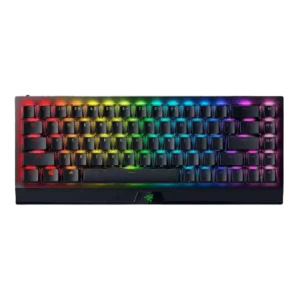

Sound is mixed: some reviewers like the sharper click or subtle tap, while others say larger keys sound louder or less refined.
The sound profile is widely praised as top-notch or great-sounding for a Hall Effect board.
One review notes keys register reliably and consistently during typing and gaming.
The review set confirms analog-style input features such as variable actuation, walk-versus-run behavior, and gamepad analog emulation.
Brightness can be adjusted directly in software alongside other lighting settings and effects.
Reviewers explicitly call the lighting bright and praise the underglow effect.
Battery life is highly dependent on lighting: reviewers cite very strong endurance with RGB off or dimmed, but much shorter runtimes at high brightness.
The quoted 100-hour battery figure is decent, but at least one review frames it as weaker than some other Keychron options.
Build is a consistent strength, with frequent praise for the sturdy aluminum-and-plastic construction and premium feel.
Build quality is one of the most consistent strengths in the review set, with repeated praise for the heavy, premium-feeling metal construction.
The included USB-C cable is generally viewed as useful and generous, with some reviews calling it long, braided, or easy to use while charging.
One review specifically calls out the included sleeved cable as premium.
It works with PCs, phones, tablets, and multiple Bluetooth devices, but compatibility is not universal and one reviewer could not use it with PS5.
Reviews explicitly confirm MacOS and Windows support, with easy platform switching.
Triple-mode connectivity is a major selling point, with USB-C, Bluetooth, and 2.4GHz HyperSpeed all repeatedly highlighted.
Wired USB-C, Bluetooth, and 2.4GHz connectivity are consistently highlighted.
Reviewers consistently highlight broad customization for keys, layers, macros, and lighting, especially through Synapse and HyperShift.
Per-key actuation tuning, multi-action keys, RGB control, and profile options make customization one of the keyboard’s clearest strengths.
Multiple reviewers explicitly say the board clears desk space and leaves more room for mouse movement or cluttered setups.
The 96% layout is specifically praised for packing in many features without the full footprint of a 100% keyboard.
Reviews cite tough construction, strong keystroke ratings, and even surviving drops or heavy use without obvious damage.
Reviewers repeatedly tie the solid chassis and premium materials to long-term sturdiness.
The compact layout can help posture and desk use, but the board’s height and lack of wrist support can strain wrists for some users.
Typing ergonomics are generally good, but the high-profile design can be less comfortable without a wrist rest.
One review specifically calls out a gaming mode that can lock the Windows key and disable Alt-Tab and Alt-F4.
Beyond Rapid Trigger, reviews mention quad actuation, Snap Tap, and other advanced gaming features.
The chassis is described as planted and solid, with no flex or creaking in use.
Reviews say the chassis stays planted and shows essentially no flex, reinforcing its premium desktop-first design.
Across many reviews, the keyboard is praised for fast inputs, compact gaming-friendly layout, and easy movement, making it excellent for gaming.
Reviewers say the Q5 HE performs very well in shooters and other games, especially thanks to Hall Effect tuning, even if it is not always the absolute fastest option.
Reviews indicate the board supports swapping among compatible Gateron double-rail magnetic switches, but not broad switch freedom.
Doubleshot ABS keycaps are repeatedly praised for thickness, durability, shine-through legends, and resistance to wear, though they are still ABS rather than PBT.
The included PBT keycaps are repeatedly described as high quality and well made.
Reviewers say inputs keep up well in games, with precise keypresses and fast response from the lighter switches.
Multiple reviews say inputs feel exceptionally responsive, especially in fast-paced games where quick movement and action changes matter.
One review specifically says the keys are properly spaced and easy to hit accurately.
Wider keys can wobble, especially the right Shift in one review, so stability is not as strong as the rest of the board.
Dual-rail switch design and low wobble are praised across reviews, with specific mentions of reduced wobble and strong key stability.
Wired is still seen as fastest, but HyperSpeed is usually near latency-free; Bluetooth is slower and can feel sluggish or less ideal for gaming.
Wired and wireless use are generally described as low-lag or free of noticeable input lag, though some reviews still note faster rivals exist.
The 65% layout is widely seen as a sweet spot because it keeps arrow or navigation access and secondary functions without taking full-size desk space.
Main legends are usually easy to read and shine through well, but secondary or darker legends are not equally clear in every setup.
Macro support is flexible through Fn-layer keys, Synapse, and on-the-fly recording, though the compact layout limits dedicated macro convenience.
Multiple reviews confirm macro support and multi-action key assignment.
Aluminum top or case materials help the board feel more premium than cheap plastic-only designs.
Evidence points to aluminum or all-metal construction as a major quality highlight.
Media control support exists through Fn-layer shortcuts, but reviewers also note the lack of dedicated media keys.
One review confirms software-side media shortcuts are available for mapping.
Noise is moderate overall: quieter than clicky alternatives with Yellow switches, but still loud enough that some reviewers noticed it.
The keyboard is generally described as controlled and not especially loud, making it workable in shared spaces.
The keyboard stores multiple profiles locally, but onboard use can be less obvious or more limited than the software experience.
At least one review says those profiles can be stored on the keyboard’s internal memory.
One review explicitly notes the keyboard has no USB passthrough.
Synapse gives granular control over individual key lighting and logo RGB.
One video review explicitly says HyperSpeed is required for 1000 Hz polling.
Reviews consistently cite a 1,000Hz polling rate. That is seen as fine for most users, but not class-leading beside 8,000Hz competitors.
The compact size, lighter carry profile, and dongle storage make it easy to move between rooms, desks, trips, or bags.
The heavy all-metal build is a clear downside for travel or moving between setups.
Multiple reviews mention easy profile setup and storage for games or apps, with both onboard and software-based profiles.
One review confirms support for saving up to three profiles for different games or work setups.
Rapid Trigger is a core strength here, with reviewers praising the adjustable near-instant reset behavior for competitive play.
General day-to-day reliability is strong in some reviews, but unified-dongle issues and device sleep or wake glitches keep it from being flawless.
Reviews note lots of color choices and effects, with the lighting flexible enough to suit different tastes.
The board offers meaningful RGB control, including single-color modes, multiple effects, and easy adjustment in software.
RGB is bright, vivid, and attractive, with shine-through keycaps and a strong visual effect.
Lighting is described as bright with a strong underglow, though reviews focus more on flexibility than on elaborate visual effects.
The compact 65% size is one of the board’s biggest strengths, balancing a small footprint with more practicality than 60% boards.
Multiple reviews praise the 96% or compressed full-size design for keeping a numpad while staying more compact than a traditional full-size board.
Synapse is generally viewed as capable and easy enough to use, though some reviewers still note bugs or dependence on software for advanced functions.
Keychron Launcher is repeatedly described as capable, lightweight, helpful, or easy to use, with strong Hall Effect controls.
The Yellow switches’ dampers do reduce noise versus louder mechanical options, but they do not make the board truly silent.
Reviews mention internal dampening and foam-based tuning that cut down ping and improve the overall sound profile.
Stabilizers are a recurring weak spot, with reports of rattling, catching, wobble, and poor lubrication on larger keys.
At least one review specifically praises the stock stabilizers as excellent out of the box.
Yellow switches are repeatedly described as smooth, fast, comfortable, and responsive, though a few reviewers needed time to adjust to the lighter touch.
Reviewers describe the magnetic switches as smooth, linear, and especially pleasant, with multiple reviews praising both feel and responsiveness.
Reviews confirm both clicky Green and quieter Yellow switch versions are sold, giving buyers a clear choice between louder tactile feedback and quieter linear action.
Switch choice is a recurring limitation. Reviews say the board stays within a narrower proprietary or Gateron double-rail magnetic ecosystem.
Comfort is decent once adjusted, but prolonged typing can expose wrist strain or cramped-feeling tradeoffs.
Reviewers say long typing sessions stay comfortable and not especially fatiguing.
Typing is generally smooth and direct, but the 65% layout and quicker switches can hurt accuracy or feel cramped for some typists.
Reviews consistently say the keyboard is excellent to type on, with a premium, smooth, and work-friendly feel.
Performance and features are praised, but the high price is one of the most common complaints across reviews.
Reviewers like the quality level, but pricing is a recurring caveat versus cheaper or faster magnetic boards.
Volume adjustment and mute are available through Fn-based shortcuts rather than a dedicated wheel or knob.
The knob is explicitly described as controlling volume by default.
HyperSpeed wireless is usually described as fast and reliable, but Bluetooth and unified-dongle use draw occasional lag, interference, or buffering complaints.
Multiple reviews say Bluetooth and 2.4GHz use feel strong, with stable behavior and little noticeable lag.
Reviewers repeatedly note there is no included wrist rest, which hurts comfort at this price.