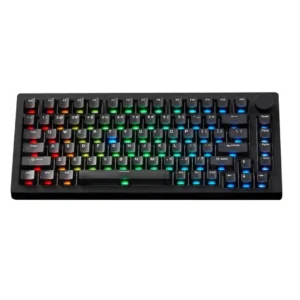
Keychron Q5 HE Review
Bottom Line
Choose the Keychron Q5 HE for premium build, flexible Hall Effect controls, and strong wireless versatility. Skip it if you want a lighter board, broader switch choice, or better value.
Gamers and power users who want a premium-feeling 96% board with Hall Effect tuning, wireless flexibility, and a typing experience that still feels polished for daily work.
Shoppers who want the lightest travel-friendly board, the broadest switch ecosystem, or the best value-per-dollar versus cheaper magnetic competitors.
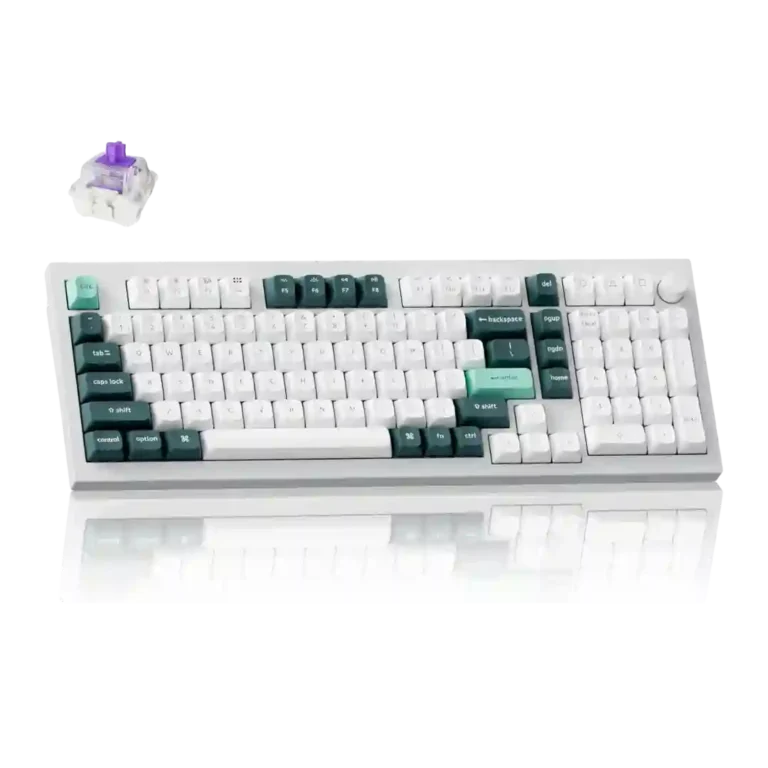
The Keychron Q5 HE stands out because it combines a heavy-duty metal chassis, a roomy 96% layout, strong wireless support, and deeply customizable Hall Effect features without sacrificing typing feel. Reviewers repeatedly praised its stability, sound, software, and responsiveness for both work and games. The main tradeoff is clear: you are paying a premium for versatility and build quality, while accepting a heavy body, a more limited switch ecosystem, and only mid-pack value versus some faster or cheaper magnetic boards. If those compromises do not bother you, the overall experience lands well above average.
Scored Features
Pros
-
Per-key actuation tuning, multi-action keys, RGB control, and profile options make customization one of the keyboard’s clearest strengths.
-
Reviews say the chassis stays planted and shows essentially no flex, reinforcing its premium desktop-first design.
-
Reviews explicitly confirm MacOS and Windows support, with easy platform switching.
-
Beyond Rapid Trigger, reviews mention quad actuation, Snap Tap, and other advanced gaming features.
-
Multiple reviews say inputs feel exceptionally responsive, especially in fast-paced games where quick movement and action changes matter.
-
Multiple reviews confirm macro support and multi-action key assignment.
-
Evidence points to aluminum or all-metal construction as a major quality highlight.
-
Rapid Trigger is a core strength here, with reviewers praising the adjustable near-instant reset behavior for competitive play.
-
Build quality is one of the most consistent strengths in the review set, with repeated praise for the heavy, premium-feeling metal construction.
-
Wired USB-C, Bluetooth, and 2.4GHz connectivity are consistently highlighted.
-
Dual-rail switch design and low wobble are praised across reviews, with specific mentions of reduced wobble and strong key stability.
-
Multiple reviews say Bluetooth and 2.4GHz use feel strong, with stable behavior and little noticeable lag.
-
The sound profile is widely praised as top-notch or great-sounding for a Hall Effect board.
-
The review set confirms analog-style input features such as variable actuation, walk-versus-run behavior, and gamepad analog emulation.
-
Reviewers repeatedly tie the solid chassis and premium materials to long-term sturdiness.
-
Reviews consistently say the keyboard is excellent to type on, with a premium, smooth, and work-friendly feel.
-
Reviews mention internal dampening and foam-based tuning that cut down ping and improve the overall sound profile.
-
At least one review specifically praises the stock stabilizers as excellent out of the box.
-
Reviewers say long typing sessions stay comfortable and not especially fatiguing.
-
The included PBT keycaps are repeatedly described as high quality and well made.
-
Reviewers describe the magnetic switches as smooth, linear, and especially pleasant, with multiple reviews praising both feel and responsiveness.
-
Keychron Launcher is repeatedly described as capable, lightweight, helpful, or easy to use, with strong Hall Effect controls.
-
Multiple reviews praise the 96% or compressed full-size design for keeping a numpad while staying more compact than a traditional full-size board.
-
Reviewers say the Q5 HE performs very well in shooters and other games, especially thanks to Hall Effect tuning, even if it is not always the absolute fastest option.
-
The keyboard is generally described as controlled and not especially loud, making it workable in shared spaces.
-
The board offers meaningful RGB control, including single-color modes, multiple effects, and easy adjustment in software.
-
Reviewers explicitly call the lighting bright and praise the underglow effect.
-
One review specifically calls out the included sleeved cable as premium.
-
The 96% layout is specifically praised for packing in many features without the full footprint of a 100% keyboard.
-
At least one review says those profiles can be stored on the keyboard’s internal memory.
-
One review confirms support for saving up to three profiles for different games or work setups.
-
Lighting is described as bright with a strong underglow, though reviews focus more on flexibility than on elaborate visual effects.
-
The knob is explicitly described as controlling volume by default.
-
Wired and wireless use are generally described as low-lag or free of noticeable input lag, though some reviews still note faster rivals exist.
-
One review confirms software-side media shortcuts are available for mapping.
-
Reviews indicate the board supports swapping among compatible Gateron double-rail magnetic switches, but not broad switch freedom.
-
Reviews consistently cite a 1,000Hz polling rate. That is seen as fine for most users, but not class-leading beside 8,000Hz competitors.
-
Typing ergonomics are generally good, but the high-profile design can be less comfortable without a wrist rest.
-
The quoted 100-hour battery figure is decent, but at least one review frames it as weaker than some other Keychron options.
Cons
-
Reviewers like the quality level, but pricing is a recurring caveat versus cheaper or faster magnetic boards.
-
Switch choice is a recurring limitation. Reviews say the board stays within a narrower proprietary or Gateron double-rail magnetic ecosystem.
-
The heavy all-metal build is a clear downside for travel or moving between setups.
Compared With Category Average
Compared with other Gaming Keyboard, this product is above average in analog input support, rapid trigger support, wireless performance, below average in portability, switch options.
| Attribute | This product | Category average | Difference |
|---|---|---|---|
| analog input support | 4.8 | 3.4 | +1.4 |
| portability | 2.2 | 3.4 | -1.2 |
| rapid trigger support | 4.9 | 3.8 | +1.1 |
| wireless performance | 4.8 | 3.7 | +1.1 |
| switch options | 2.6 | 3.6 | -1.0 |
| software quality | 4.7 | 3.8 | +0.9 |
| connectivity | 4.8 | 4.0 | +0.8 |
| compatibility | 5.0 | 4.2 | +0.8 |
FAQ
Is the Keychron Q5 HE good for both gaming and work?
Yes. Multiple reviews say the Hall Effect features help in fast games, while the 96% layout, number pad, and comfortable typing feel also make it strong for productivity.
How good is the wireless connectivity?
Reviews consistently praise the Bluetooth and 2.4GHz options. Several specifically describe wireless use as lag-free or free of noticeable input lag.
Can you swap switches on the Keychron Q5 HE?
The review set says it works with compatible Gateron Double-Rail magnetic switches, but reviewers also stress that switch choice is limited compared with broader ecosystems.
Is the battery life a standout feature?
Battery life is usually cited at up to 100 hours. That is respectable, but at least one review says it trails some other Keychron models.
Expert Reviews We Analyzed
Video Reviews
Article Reviews
Consider This Instead
If you want better portability
Choose ASUS ROG Falchion Ace 75 HE. It scores 4.7 vs 2.2 for portability, with a 4.2 overall score.
If you want better switch options
Choose MonsGeek M1 V5 HE. It scores 4.8 vs 2.6 for switch options, with a 4.4 overall score.
If you want better value for money
Choose Glorious GMMK 2. It scores 4.7 vs 3.1 for value for money, with a 4.4 overall score.
If you want better battery life
Choose ASUS ROG Azoth. It scores 4.8 vs 3.7 for battery life, with a 4.2 overall score.
Overall Top Gaming Keyboard Alternatives
Choose the Q3 HE for premium build, smooth Hall Effect typing, and flexible connectivity. Skip it if you want broader switch compatibility or better value.
Pros: rapid trigger support, build quality, durability, materials quality, desk space efficiency, customization options, compatibility
Cons: portability, switch options, reliability
Choose the Keychron Q5 HE for premium build, flexible Hall Effect controls, and strong wireless versatility. Skip it if you want a lighter board, broader switch choice, or...
Pros: frame rigidity, customization options, compatibility, key responsiveness, materials quality, macro customization, extra gaming features
Cons: portability, switch options, value for money
Choose the Keychron Q6 HE if you want a full-size premium Hall Effect keyboard with smooth typing and strong gaming tools. Skip it if you need easy portability...
Pros: key responsiveness, key stability, frame rigidity, connectivity, volume control, switch feel, RGB customization
Cons: portability, switch options, ease of switch replacement
Choose the GMMK 2 for smooth typing, bright RGB, and rare hot-swap flexibility at this price. Skip it if you want wireless features, analog controls, or more polished...
Pros: frame rigidity, durability, customization options, hot-swappable switches, compatibility, per-key lighting control, value for money
Cons: actuation consistency