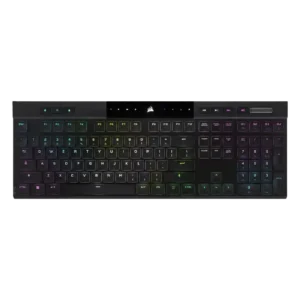
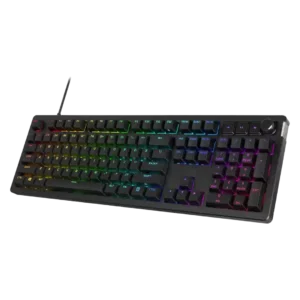
Compare Corsair K100 AIR vs HyperX Alloy Rise

P1 Corsair K100 AIR
P2 HyperX Alloy Rise

Comparison Takeaways

Corsair K100 AIR

Where It Has the Edge

  • cable quality is 4.5 vs 2.0. Only one reviewer evaluated the included cable, calling the supplied cable and dongle great.
  • portability is 4.0 vs 2.3. Thinness helped portability, but the full-size length made transport less practical for some reviewers.
  • extra gaming features is 4.3 vs 3.1. Reviewers liked the rich gaming feature set, including Stream Deck-style extras and gamer-focused controls.
  • frame rigidity is 4.3 vs 3.1. Most reviewers found the frame impressively rigid for its thinness, though a few detected minor flex.

HyperX Alloy Rise

Where It Has the Edge

  • sound dampening is 4.5 vs 1.5. Sound dampening is widely praised, with reviewers crediting foam, gaskets, or integrated dampening for reduced harshness and better...
  • stabilizer quality is 4.5 vs 1.7. Stabilizer quality is praised in the detailed reviews, especially for reduced rattle, stability, and factory lubrication.
  • hot-swappable switches is 4.5 vs 2.0. Hot-swappable switches are consistently positive, giving users functional flexibility and easy future upgrades without soldering.
  • switch options is 4.1 vs 2.5. Switch choice is positive but limited: reviewers appreciated linear/tactile options and replaceable kits, with most praise tied to...
Average score
Product 1: Corsair K100 AIR
3.8
Product 2: HyperX Alloy Rise
4.0
acoustics
Product 1: Corsair K100 AIR
2.4

Sound impressions were mixed to negative: one reviewer liked the regular switch sound but called out the spacebar, while another criticized a loud, rattly clank.

Product 2: HyperX Alloy Rise
3.9

Acoustics are mixed but mostly positive: several reviews praise clean or dampened sound, while IGN and Windows Central hear sharper, metallic, or clacky notes.

actuation consistency
Product 1: Corsair K100 AIR
4.8

Reviewers who discussed input registration were very positive, citing correct multi-key registration, N-key rollover, and no ghosting.

Product 2: HyperX Alloy Rise
4.0

Actuation consistency is mixed: some reviews praise consistent, controlled keypresses, while TechRadar reports misinputs from the sensitive switches.

backlight brightness
Product 1: Corsair K100 AIR
5.0

The two direct brightness judgments were strongly positive, with reviewers calling the RGB bright or much brighter than expected.

Product 2: HyperX Alloy Rise
4.5

Backlight brightness is praised for strong saturation and non-dim maximum brightness without becoming irritating.

battery life
Product 1: Corsair K100 AIR
4.4

Battery life was one of the clearest strengths, with many reviewers reporting days, a week, or longer between charges and generally validating the 50-hour RGB claim.

Product 2: HyperX Alloy Rise
4.7

Battery life is a clear wireless-model strength, with reviewers reporting long runtime and being impressed by endurance.

build quality
Product 1: Corsair K100 AIR
4.4

Build quality was widely praised for solidity and premium feel, though a few reviewers noted flex, average supporting parts, or plastic elements.

Product 2: HyperX Alloy Rise
4.5

Build quality is generally strong, with reviewers calling the keyboard solid, sturdy, high-grade, or robust despite some concerns around magnetic pieces.

cable quality
Product 1: Corsair K100 AIR
4.5

Only one reviewer evaluated the included cable, calling the supplied cable and dongle great.

Product 2: HyperX Alloy Rise
2.0

Cable quality is criticized by Noisy Pixel, which found the USB cable and mounting area poorly integrated into the keyboard's design.

compatibility
Product 1: Corsair K100 AIR
4.2

Compatibility evidence was positive overall, with reviewers noting successful use across PCs, consoles, Mac, and mobile devices, though one Mac layout caveat remained.

Product 2: HyperX Alloy Rise
4.8

Compatibility is positive where evaluated, with reviewers noting broad switch/keycap support and device versatility.

connectivity
Product 1: Corsair K100 AIR
4.4

Connectivity was consistently praised for quick switching, Bluetooth and Slipstream flexibility, easy pairing, and stable multi-device use.

Product 2: HyperX Alloy Rise
4.1

Connectivity is strong on wireless models thanks to tri-mode and multi-device support, while wired-only versions are treated as a limitation.

customization options
Product 1: Corsair K100 AIR
3.7

Software and lighting customization were strong, but physical customization was a major limitation because the thin design restricts keycap and switch changes.

Product 2: HyperX Alloy Rise
4.2

Customization options are a core strength, with broad praise for plates, badges, switches, RGB, and profiles, though some reviewers felt the ecosystem was premature or overpriced.

design aesthetics
Product 1: Corsair K100 AIR
4.5

Reviewers overwhelmingly liked the slim, premium, modern look, often describing the keyboard as sleek, stylish, gorgeous, or stunning.

Product 2: HyperX Alloy Rise
4.0

Design aesthetics are subjective: several reviewers like the clean, understated look, while others find the stock design plain or unremarkable.

desk space efficiency
Product 1: Corsair K100 AIR
3.9

The ultra-thin body helped desk fit, but the full-size layout still took noticeable room for some reviewers.

Product 2: HyperX Alloy Rise
4.2

Desk space efficiency is strongest on the 75% model, which reviewers say saves space while retaining important keys and improving wrist placement.

durability
Product 1: Corsair K100 AIR
4.8

Durability evidence was strong, including drop-test survival, sturdy aluminum construction, and long-term reports of no degradation.

Product 2: HyperX Alloy Rise
4.7

Durability is supported by PBT wear resistance, long-lasting keycaps, and reviewers' sense that the keyboard is built to last.

ease of switch replacement
Product 1: Corsair K100 AIR
1.9

Repairability was a repeated weakness: reviewers warned that keycap removal could damage switches and wanted easier user serviceability.

Product 2: HyperX Alloy Rise
2.8

Ease of switch replacement is mixed: Tom's Hardware finds the keyboard easy to customize, while Noisy Pixel reports stiff, challenging switch removal.

ergonomics
Product 1: Corsair K100 AIR
2.8

Ergonomic feedback was mixed: concave caps and low height helped comfort, but sharp edges, kickstand issues, and rough frame edges drew criticism.

Product 2: HyperX Alloy Rise
3.8

Ergonomics are mixed: compact models are praised for reach and wrist placement, while full-size or tall versions drew complaints about discomfort.

extra gaming features
Product 1: Corsair K100 AIR
4.3

Reviewers liked the rich gaming feature set, including Stream Deck-style extras and gamer-focused controls.

Product 2: HyperX Alloy Rise
3.1

Extra gaming features are mixed: anti-ghosting and game mode are useful, but some reviewers say the board lacks truly gamer-specific enhancements or sensitive actuation options.

frame rigidity
Product 1: Corsair K100 AIR
4.3

Most reviewers found the frame impressively rigid for its thinness, though a few detected minor flex.

Product 2: HyperX Alloy Rise
3.1

Frame rigidity is mixed: reviewers praise flex-free construction, but several criticize the magnetic top plate for looseness or easy removal.

gaming performance
Product 1: Corsair K100 AIR
4.1

Gaming performance was generally praised for responsiveness and speed, but some reviewers felt the shallow switches or laptop-style feel were not ideal for serious gaming.

Product 2: HyperX Alloy Rise
4.2

Gaming performance is broadly solid to excellent, with reviewers finding it competitive and responsive, though Noisy Pixel felt it lacked distinct gamer-focused behavior.

hot-swappable switches
Product 1: Corsair K100 AIR
2.0

Hot-swap capability was scored poorly because reviewers explicitly noted the switches or keycaps are not meant to be swapped.

Product 2: HyperX Alloy Rise
4.5

Hot-swappable switches are consistently positive, giving users functional flexibility and easy future upgrades without soldering.

keycap quality
Product 1: Corsair K100 AIR
3.4

Keycap quality was mixed: some liked the shape and long-term appearance, while others criticized ABS material, texture, wear risk, and limited thickness.

Product 2: HyperX Alloy Rise
4.6

Keycap quality is consistently strong, with praise for thick or textured PBT, grip, clean aesthetics, and long-wearing materials.

key responsiveness
Product 1: Corsair K100 AIR
4.7

Key responsiveness was a standout positive, with reviewers describing immediate, accurate, or highly responsive inputs.

Product 2: HyperX Alloy Rise
4.2

Responsiveness is a major strength, with multiple reviewers calling inputs instant or highly responsive; a few noted deep actuation or misfires depending on switch sensitivity.

key spacing
Product 1: Corsair K100 AIR
4.0

Only one review directly judged spacing, positively noting that extra space between keys helped finger positioning.

Product 2: HyperX Alloy Rise
4.1

Key spacing is mostly positive, with one reviewer calling it perfect, though TechRadar disliked the subtle F/J bumps.

key stability
Product 1: Corsair K100 AIR
4.5

Key stability was praised where discussed, with reviewers citing balanced keys and very little wobble.

Product 2: HyperX Alloy Rise
4.6

Key stability is praised where discussed, with reviewers noting stable switches and keys that stay in place even after customization.

latency
Product 1: Corsair K100 AIR
4.1

Latency was generally strong for wired and Slipstream use, though Bluetooth drew a lower judgment in one review.

Product 2: HyperX Alloy Rise
4.6

Latency is usually praised as essentially unnoticeable or extremely low, though Dexerto notes it cannot match faster hall-effect gaming boards.

layout options
Product 1: Corsair K100 AIR
3.0

Reviewers liked aspects of the full-size layout, but several wanted smaller TKL or compact versions.

Product 2: HyperX Alloy Rise
3.8

Layout options are mixed: reviewers value the 75% balance and full-size choice, but some dislike missing or remapped keys.

legend visibility
Product 1: Corsair K100 AIR
3.7

Main legends were generally visible and evenly lit, while secondary legends lacking backlight hurt the score.

Product 2: HyperX Alloy Rise
4.7

Legend visibility is praised for dark-room use and clear readability, with one reviewer also liking the visible function legends.

macro customization
Product 1: Corsair K100 AIR
3.7

Macro support was useful and programmable, but several reviewers disliked the less-accessible placement above the numpad.

Product 2: HyperX Alloy Rise
4.3

Macro customization is useful and appreciated, with reviewers noting key remaps, macro setup, and enough flexibility for game profiles.

materials quality
Product 1: Corsair K100 AIR
3.9

Materials drew mixed-to-positive reactions: aluminum felt premium, but some reviewers wanted a more complete metal chassis.

Product 2: HyperX Alloy Rise
4.6

Materials quality is positive where evaluated, especially for the aluminum top plate and sturdy, flex-free frame construction.

media controls
Product 1: Corsair K100 AIR
4.1

Dedicated media controls were well received as handy, convenient, and welcome.

Product 2: HyperX Alloy Rise
4.0

Media controls are mixed: reviewers often praise tactile dedicated buttons, but Tom's Hardware finds onboard controls limited and TechRadar finds the buttons cheap.

noise level
Product 1: Corsair K100 AIR
3.2

Noise was polarizing: some found it relatively quiet, while others called it louder than expected.

Product 2: HyperX Alloy Rise
3.9

Noise level is context-dependent: some reviewers call it quieter than peers, while IGN found it louder than a typical linear mechanical board.

onboard memory
Product 1: Corsair K100 AIR
4.3

Onboard memory was praised for storing many profiles and allowing settings to travel without relying on iCUE.

Product 2: HyperX Alloy Rise
4.7

Onboard memory is praised where discussed because settings or configurations can be saved directly to the keyboard.

passthrough features
Product 1: Corsair K100 AIR
2.0

The only opinionated passthrough-related evidence was negative, with one reviewer calling the lack of extra ports a shame.

Product 2: HyperX Alloy Rise
No score yet
per-key lighting control
Product 1: Corsair K100 AIR
4.0

The one direct per-key lighting judgment was positive, with the reviewer appreciating configurable per-key RGB.

Product 2: HyperX Alloy Rise
4.4

Per-key lighting control is generally well received, with reviewers noting individual key assignment and easier multi-key selection workflows.

polling rate
Product 1: Corsair K100 AIR
3.4

High polling was appreciated as advanced tech, but several reviewers said it was overkill or hard to notice.

Product 2: HyperX Alloy Rise
3.8

The 8,000Hz polling rate is recognized as high-end, but reviewers are split on practical benefit because some found the returns negligible.

portability
Product 1: Corsair K100 AIR
4.0

Thinness helped portability, but the full-size length made transport less practical for some reviewers.

Product 2: HyperX Alloy Rise
2.3

Portability is a weakness because the magnetic top cover can come off when lifting or require a special grip.

profile management
Product 1: Corsair K100 AIR
4.0

One reviewer praised profile management because settings could travel between systems without being reset.

Product 2: HyperX Alloy Rise
3.9

Profile management is mixed: onboard/profile switching is praised, but Tom's Hardware and How-To Geek found profile or lighting control limitations.

reliability
Product 1: Corsair K100 AIR
4.2

Reliability evidence was positive overall, especially in long-term use, though one reviewer expressed concern about future switch longevity.

Product 2: HyperX Alloy Rise
4.2

Reliability is mixed: some reviews describe consistent, reliable operation, while Windows Central reports intermittent inconsistency.

RGB customization
Product 1: Corsair K100 AIR
4.3

RGB customization was praised for layered effects, deep controls, and playful flexibility.

Product 2: HyperX Alloy Rise
4.5

RGB customization is a strength, with reviewers liking layered effects, presets, per-user patterns, and broad software control.

RGB lighting quality
Product 1: Corsair K100 AIR
4.0

RGB quality was mostly positive, with bright and rich lighting praised, though some reviewers found it less vibrant, tame, or uneven.

Product 2: HyperX Alloy Rise
4.4

RGB lighting quality is often praised as bright, vibrant, sharp, or evenly distributed, but Windows Central reported occasional lighting shutoffs.

size and form factor
Product 1: Corsair K100 AIR
4.7

The ultra-thin form factor was one of the most admired traits, repeatedly described as shockingly thin or remarkable.

Product 2: HyperX Alloy Rise
4.3

Size and form factor are mostly positive, especially the compact 75% model, though full-size reviewers warn about reduced mouse space.

software quality
Product 1: Corsair K100 AIR
4.1

iCUE was usually praised for power and depth, but a few reviewers found it complex, resource-heavy, or not ideal.

Product 2: HyperX Alloy Rise
3.4

Software quality is divisive: some reviewers find NGENUITY easy or even great, while many call it basic, limited, buggy, or frustrating.

sound dampening
Product 1: Corsair K100 AIR
1.5

Sound dampening scored poorly because one reviewer said there was no way to tame the switches or stabilizers.

Product 2: HyperX Alloy Rise
4.5

Sound dampening is widely praised, with reviewers crediting foam, gaskets, or integrated dampening for reduced harshness and better sound.

stabilizer quality
Product 1: Corsair K100 AIR
1.7

Stabilizer quality was a repeated complaint, especially rattly or loose stabilizers and a poor-sounding spacebar.

Product 2: HyperX Alloy Rise
4.5

Stabilizer quality is praised in the detailed reviews, especially for reduced rattle, stability, and factory lubrication.

switch feel
Product 1: Corsair K100 AIR
4.2

Switch feel was generally liked for tactile, fast, and satisfying feedback, but a minority found the shallow switches uncomfortable or gaming-limited.

Product 2: HyperX Alloy Rise
4.4

Reviewers generally liked the HyperX switches for their smooth, satisfying, responsive feel, though IGN and TechRadar found them harsher or too sensitive for some users.

switch options
Product 1: Corsair K100 AIR
2.5

Switch options scored low because a long-term reviewer wanted a linear version and felt limited to the tactile switches.

Product 2: HyperX Alloy Rise
4.1

Switch choice is positive but limited: reviewers appreciated linear/tactile options and replaceable kits, with most praise tied to the ability to tune feel.

typing comfort
Product 1: Corsair K100 AIR
4.1

Typing comfort was usually strong, with many reviewers saying it was comfortable for long sessions, though some needed adjustment or felt fatigue initially.

Product 2: HyperX Alloy Rise
4.0

Typing comfort is usually strong thanks to softness and reduced fatigue, but some reviewers found the board harsh or palm pressure problematic.

typing feel
Product 1: Corsair K100 AIR
4.3

Typing feel was a major strength for many reviewers, especially those who liked chiclet or low-profile boards, but not universally loved.

Product 2: HyperX Alloy Rise
4.5

Typing feel is one of the strongest themes, ranging from outstanding and premium to smooth and satisfying, though IGN found the keystroke harsher than rivals.

value for money
Product 1: Corsair K100 AIR
3.0

Value was the most divided area: some reviewers said it was worth the premium, while many said the price was hard to justify.

Product 2: HyperX Alloy Rise
3.2

Value for money is the biggest split: reviewers like the keyboard more on sale, but many criticize full MSRP against strong alternatives.

volume control
Product 1: Corsair K100 AIR
4.5

The volume roller/knob was consistently praised as smooth, convenient, satisfying, or even flawless.

Product 2: HyperX Alloy Rise
4.1

Volume control is generally good, with praise for tactile or notched feel, though Noisy Pixel wanted smoother rotation.

wireless performance
Product 1: Corsair K100 AIR
4.6

Wireless performance was strongly praised for Slipstream reliability, low latency, and lack of noticeable lag.

Product 2: HyperX Alloy Rise
4.2

Wireless performance is mostly strong, with praise for low latency and no input delay, but Windows Central experienced occasional disconnects.

wrist rest quality
Product 1: Corsair K100 AIR
No score yet
Product 2: HyperX Alloy Rise
2.0

Wrist rest quality is effectively a weakness because multiple reviewers specifically wished one was included or needed for comfort.