The few reviews that discuss sound describe the K100 as more solid and low-rattle than older Corsair boards, though not silent.
Reviewers describe the sound as pleasant overall, with a lovely sound profile, a soft thud, and strong overall acoustics.
One gaming-focused review says the board kept up even under rapid input, suggesting consistent key registration.
Reviews mention analog-style features including a gamepad simulator and variable movement based on how far keys are pressed.
RGB brightness is described as extra bright, and the control wheel can adjust brightness directly.
Shine-through, north-facing lighting is repeatedly described as bright and effective at illuminating the legends.
Battery life is decent rather than standout, ranging from a few days to about a week of moderate use, with better longevity when lighting is off.
Reviews that address construction describe the K100 as sturdy, premium, and clearly flagship-grade.
Multiple reviews call out the P1 HE's solid aluminum construction and high-quality feel.
The cable is consistently described as thick and braided, but several reviews note that it is fixed and bulky.
One review explicitly confirms support for PC, Mac, and Xbox One.
It works with Windows, macOS, and Linux, but Mac support is less polished because Mac keycaps and some Mac mappings are missing.
The K100 is presented as a wired dual-USB keyboard, favoring stable desktop use over flexibility.
Wired, 2.4GHz, and Bluetooth modes are all present and reviewers say switching and general use work smoothly.
Multiple reviews emphasize deep remapping, lighting, macro, and control-wheel customization, even if setup can take effort.
The keyboard offers deep customization through actuation tuning, remapping, macros, RGB settings, and other Hall-effect controls.
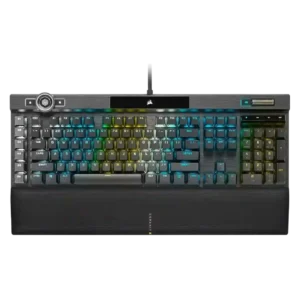
Reviews describe the K100 as large and desk-hungry, especially once the wrist rest is attached.
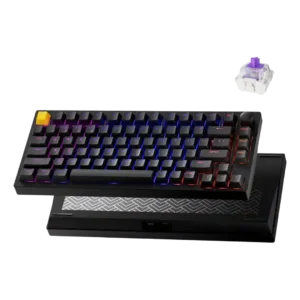
The 75% layout frees up mouse room while keeping the arrow keys and function row.
The OPX version is repeatedly framed as long-lasting, backed by durable PBT caps and very high switch lifespan claims.
Reviewers expect good longevity from the full-metal build and Hall-effect components.
The switches are explicitly described as non-hot-swappable, so replacement flexibility is poor.
The board can be disassembled and rebuilt, but switch changes still involve disassembly rather than effortless swapping.
One review highlights the board angle and wrist support as helping create a more comfortable typing posture.
One review says the gasket-mounted feel is better for long productivity sessions.
Macro keys, the control wheel, profile switching, Windows lock, and Stream Deck support are recurring standout extras.
Reviews repeatedly highlight quad-actuation and dynamic keystroke features, snap and last-key tools, and other advanced gaming extras.
Reviews repeatedly mention minimal flex and a sturdy frame.
The CNC aluminum chassis and full-metal construction give the board a very rigid, substantial shell.
Gaming performance is broadly praised for fast, dependable input, though several reviewers say the 4000Hz advantage is subtle in practice.
Reviewers describe it as excellent for gaming, with Hall-effect features that keep performance competitive in fast games.
At least one review directly states the switches are not hot-swappable, making this a weak point.
Magnetic switch swapping exists, but support is limited to compatible Gateron Double-Rail magnetic options.
Double-shot PBT caps are praised across reviews for feel, durability, and improved aftermarket compatibility.
The included double-shot PBT keycaps are highlighted as soft-touch, sturdy, and generally high quality.
Reviews consistently describe the board as very fast and responsive to input.
Keys are described as highly responsive, with analog switches feeling quicker than conventional ones.
One review specifically praises the spacious case layout.
One review specifically praises the keys for having almost no tilt, helping presses feel more controlled.
The strongest gaming review reports effectively no lag in use.
Input lag is described as low enough to be a non-issue in testing, though this is not a bleeding-edge 8K board.
Reviews praise the move to a standard bottom row, which broadens keycap compatibility.
Reviews describe a 75% layout, with one noting that ISO is not currently available.
Reviewers call out the cleaner font and bright, crisp legends as improvements.
Shine-through legends and north-facing lighting make the legends easier to see than on darker Keychron boards.
Dedicated G-keys, Elgato support, and broad remapping options make macro control one of the K100’s strengths.
Lemokey Launcher supports recording or assigning macros, including multi-action key behavior.
Brushed or anodized aluminum and other premium-feeling materials are highlighted repeatedly.
Reviews consistently point to aluminum construction, PBT keycaps, and premium-feeling materials.
Dedicated media buttons and rollers are seen as useful, polished, and in some cases highly configurable.
The knob can handle media-related tasks and is customizable beyond the default behavior.
Noise is mixed to negative overall: some reviews call the board loud, while others say it sounds better than past Corsair boards.
The board is generally quiet to moderate in noise, though some reviewers note a louder space bar or a bit of spring ping.
Onboard storage is repeatedly praised for holding many profiles or lighting layers.
One review explicitly mentions three profiles saved in the keyboard's internal memory.
USB passthrough is regularly described as a convenient extra.
Per-key lighting control is explicitly supported and treated as a premium feature.
Reviews specifically criticize the lack of true per-key RGB control.
The 4000Hz polling rate is a headline feature, but reviews split between future-proof enthusiasm and skepticism about real-world gains.
The 1,000Hz polling rate is presented as sufficient for most players, even if some competitors go higher.
The K100’s weight and full-size build make it a poor choice for portable use.
Wireless modes help, but the heavy metal body makes this a keyboard most reviewers would rather keep on a desk.
Large onboard profile storage and easy profile switching are mentioned often.
Reviews mention multiple profiles, including onboard storage and software-based switching.
Rapid Trigger is repeatedly highlighted and described as easy to enable or use.
Reliability is mixed because a few reviews report hardware or crash issues even though others praise the hardware overall.
In testing, reviewers report no input lag issues and no obvious connectivity or software hiccups.
Lighting customization is deep and flexible, though some reviews find the setup process clunky.
RGB customization exists through presets and modes, but several reviews say it stops short of full per-key freedom.
RGB presentation is one of the board’s clearest strengths, with vivid per-key and edge lighting praised often.
The RGB looks brighter and more functional than older Keychron designs, though one review notes uneven case glow between keys.
This is a large full-size flagship board; some reviews like its streamlined look, but it remains sizable.
The compact 75% format is widely praised as a strong balance between gaming space savings and everyday usability.
iCUE and related software offer lots of control, but many reviews call the experience clunky, unintuitive, or overly complex.
The browser-based software is generally seen as useful and easy enough to use, but it has limits around Mac mapping and deeper RGB control.
A few reviews say the K100 sounds more muted or damped than earlier Corsair boards, though this is not universal.
Reviews credit the gasket mount and internal sound-absorbing materials for the soft, damped sound.
Reviews that mention stabilizers say Corsair improved them noticeably versus older boards.
Stabilizers are described as screw-in and lightly lubed, with one reviewer saying the H version's stabilizers are clearly improved over the non-H model.
OPX and Speed switches are usually praised for speed and smoothness, but several reviewers note the feel is very sensitive or taste-dependent.
The magnetic switches are described as smoother, quieter, and better-feeling than expected.
Reviews confirm OPX and Cherry MX Speed variants are available.
There are some magnetic switch choices, but overall switch compatibility is narrow and tied to Gateron Double-Rail magnetic options.
Reviews note good wrist support and low-fatigue typing once users adjust to the switches.
Low actuation force and the cushioned typing feel help keep longer sessions comfortable.
Typing feel is generally positive and quick, though some reviewers found the shallow actuation unforgiving at first.
Multiple reviews praise the typing experience as highly enjoyable, comfortable, or close to ideal.
Value is the main tradeoff: many reviewers like the features, but several question the premium price.
Across reviews, the $169 price is framed as very competitive for the materials and Hall-effect feature set.
The volume wheel or roller is widely praised for feel and usefulness.
The knob handles volume by default.
Bluetooth and 2.4GHz use are described as stable, with no major issues in testing.
The magnetic cushioned wrist rest is one of the most consistently praised parts of the keyboard.