- Similar: overall feature and design overlap The reviewer notes that the P1 HE shares much in common with Keychron’s Q1 HE.
- More expensive: price versus typing quality and RGB appeal The reviewer recommends the P1 HE over the Keychron Q1 HE for a cheaper, more fun-looking option with little typing sacrifice.
- More expensive: price for Hall-effect gaming features The P1 HE is framed as more accessible than the Keychron Q1 HE while still offering gaming features.
Lemokey P1 HE Review
Bottom Line
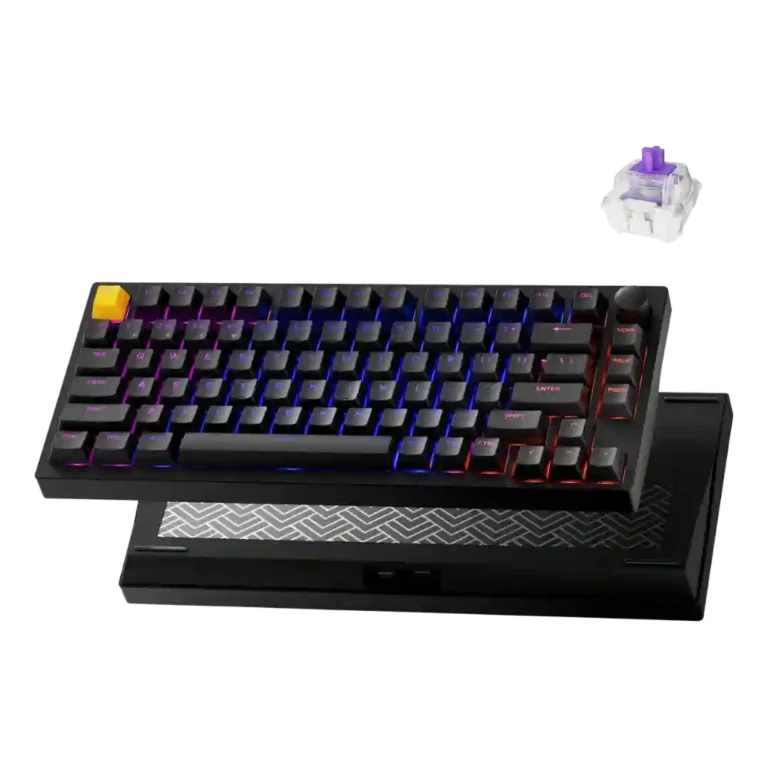
Choose the Lemokey P1 HE if you want a premium-feeling Hall-effect keyboard with responsive gaming controls, smooth typing, and strong value. Skip it if you need advanced per-key RGB, effortless Mac layout support, or a lightweight travel board.
Best for gamers and typists who want a sturdy 75% Hall-effect keyboard with responsive actuation control, strong typing feel, and flexible wired or wireless connectivity.
Not for users who need a light portable keyboard, advanced per-key RGB effects, seamless Mac-specific layout support, or broad mechanical-switch hot-swap freedom.
Across the review set, the Lemokey P1 HE lands as a high-value Hall-effect gaming keyboard with unusually strong crossover appeal. Reviewers consistently praised its aluminum build, responsive magnetic switches, rapid-trigger and analog features, smooth typing feel, useful wireless connectivity, and approachable browser-based software. The clearest tradeoff is that it favors performance, materials, and customization depth over polish in every corner: Mac users may need manual remapping, RGB control is more limited than some gaming rivals, and the heavy metal body hurts portability. Switch flexibility is also narrower than traditional hot-swap expectations. Even with those caveats, the evidence points to a premium-feeling board whose gaming features and typing quality justify its price.
Compared in Reviews
Products reviewers directly compared with this model, grouped into quick takeaways.
- Similar: quad-actuation feature support The P1 HE shares quad-actuation functionality with the Keychron K2 HE.
K2 HE
- Worse: form factor and hand space The P1 HE is favored over the K2 HE for providing the desired magnetic switches without the cramped feel.
Feature Scorecards
Summary
46 reviewed features- Very positive 4.5-5.0 57% 26 features
- Positive 3.5-4.4 28% 13 features
- Neutral 2.5-3.4 13% 6 features
- Negative 1.5-2.4 2% 1 feature
- Very negative below 1.5 0% 0 features
Pros
-
Desk space efficiency was praised because the 75% layout leaves more mouse room while keeping practical keys.
-
Frame rigidity was supported by the sturdy full-metal construction and reviewer confidence in long-term use.
-
Stabilizer quality received strong praise, especially for the space bar feel.
-
Gaming performance was a standout, with reviewers repeatedly calling the board powerful, responsive, and effective for FPS play.
-
Build quality was one of the strongest points, with repeated praise for the high-quality full-metal aluminum body.
-
Value for money was one of the strongest themes, with reviewers praising its price against the feature set and competing boards.
-
Customization options were a major strength, spanning actuation, remapping, lighting, macros, profiles, and physical modification.
-
Extra gaming features were broadly praised, including rapid trigger, quad/dynamic actuation, analog behavior, and other Hall-effect tools.
-
Switch feel was a major strength, with reviewers describing the magnetic linear switches as smooth, responsive, and among the best around.
-
Analog input support was treated as a major gaming advantage, with reviewers calling the Hall-effect behavior game-changing and price-distinguishing.
-
Durability received strong support from comments about the lasting full-metal build and longer-lived Hall-effect components.
-
Sound dampening was praised for gasket mounting and sound-absorbing materials that made the keyboard sound softer.
-
Wireless performance was praised for issue-free Bluetooth and 2.4GHz use.
-
Connectivity was consistently positive, with wired, 2.4GHz, and Bluetooth options described as versatile and reliable.
-
Key responsiveness was highly rated, especially for snappy movement, Hall-effect behavior, and smoother analog response.
-
Materials quality was repeatedly praised, especially the CNC aluminum body and premium-feeling construction.
-
Software quality was mostly positive because the web launcher was easy and streamlined, though setup could take time for some users.
-
Typing feel was strongly positive, with reviewers calling it superb, smooth, and close to ideal despite minor sound caveats.
-
Backlight brightness was praised because the shine-through keycaps and north-facing lighting made legends clearly illuminated.
-
Size and form factor were praised as a practical 75% layout that balances gaming minimalism and productivity.
-
Rapid trigger support was praised as useful for faster repeated inputs and reliable recognition.
-
Actuation consistency was praised through reliable repeated recognition, especially when rapid trigger was enabled.
-
Ease of switch or component replacement was positive where reviewers discussed disassembly and rebuilding, though switch compatibility remained limited elsewhere.
-
Ergonomics were supported by the lighter switches reducing hand fatigue during use.
-
Macro customization received positive attention because firmware macros were available and could be assigned through the launcher.
-
Reliability was supported by reviewer confidence that the keyboard avoided missed inputs.
-
Reviewers generally liked the P1 HE’s sound, calling it soft, satisfying, and inoffensive, with one note of minor spring-ping resonance.
-
Keycap quality was mostly praised for double-shot PBT feel and shine-through usefulness, with one reviewer noting off-center legends.
-
Latency was considered good enough for most users, with no input-lag problems reported, though not at the fastest esports tier.
-
Legend visibility was praised because the shine-through labels and backlighting made the legends easy to see.
-
Media controls were viewed positively thanks to the customizable knob and reprogrammable dial.
-
Typing comfort was praised due to light switch force, lower fatigue, and a more cushioned productivity feel.
-
Volume control was positive because the knob could handle volume and be remapped to other functions.
-
RGB lighting quality was mixed: reviewers liked the brighter, fun shine-through look but criticized gaps and lack of cohesion.
-
Key spacing was supported by the spacious tenkeyless/75% case, which reviewers found practical rather than cramped.
-
Noise level was mostly favorable, ranging from coworker-friendly and quiet to a minor spring-ping caveat.
-
The 1,000Hz polling rate was considered sufficient for most users, though reviewers noted faster 8,000Hz competitors exist.
-
Battery life was considered good enough or standard, though one reviewer called it decent rather than standout.
-
Design aesthetics split reviewers: some liked the minimalist or improved look, while one felt the P1 HE lost the P1 Pro’s visual flair.
Cons
-
Compatibility was mixed: reviewers said it works across platforms, but Mac setup and missing Mac-specific conveniences drew criticism.
-
Layout options were treated as serviceable but not expansive, with one reviewer noting the layout was not packed with extra keys.
-
Hot-swappable switch support was mixed to negative: some valued magnetic hot-swap support, but others emphasized the narrow compatible-switch range.
-
Switch options were mixed to negative: some magnetic variants are supported, but reviewers repeatedly criticized the limited compatible-switch ecosystem.
-
Portability was a weakness because the heavy aluminum body makes the keyboard better suited to a desk than a backpack.
-
RGB customization was limited compared with some gaming keyboards, despite useful presets and brighter shine-through lighting.
-
Per-key lighting control was a weak point because reviewers complained that true per-key RGB customization was missing.
Compared With Category Average
Compared with other Gaming Keyboard, this product is above average in analog input support, value for money, stabilizer quality, below average in per-key lighting control, RGB customization, layout options.
Summary
8 compared features- Above average 0.4+ pts higher 50% 4 features
- Same as average within 0.3 pts 0% 0 features
- Below average 0.4+ pts lower 50% 4 features
| Attribute | This product | Category average | Difference |
|---|---|---|---|
| per-key lighting control | 2.0 | 4.1 | -2.1 |
| RGB customization | 2.5 | 4.3 | -1.8 |
| analog input support | 4.8 | 3.2 | +1.5 |
| value for money | 4.8 | 3.7 | +1.1 |
| stabilizer quality | 5.0 | 3.8 | +1.2 |
| layout options | 3.0 | 4.0 | -1.0 |
| portability | 2.5 | 3.5 | -1.0 |
| desk space efficiency | 5.0 | 4.1 | +0.9 |
FAQ
Is the Lemokey P1 HE good for gaming?
Yes. Reviewers praised its Hall-effect switches, adjustable actuation, rapid trigger, and responsive feel, especially for FPS-style movement and fast repeated inputs.
How does it feel for typing?
Typing impressions were strongly positive, with reviewers calling it smooth, comfortable, and close to ideal. One reviewer noted minor spring-ping resonance, but most sound and feel comments were favorable.
Is the software easy to use?
Mostly yes. Reviewers liked the browser-based Lemokey/Keychron Launcher and found it simple or streamlined, though some setup can take time and Mac remapping was criticized.
How is the wireless performance?
Wireless feedback was positive. Reviewers reported no issues with Bluetooth or 2.4GHz, and the keyboard also supports wired use.
Is it portable?
Not really. Several reviewers emphasized the heavy aluminum body, making it better for staying on a desk than carrying in a backpack all day.
Can you swap the switches?
Only within a limited magnetic-switch ecosystem. Reviewers noted some hot-swap support, but also criticized that the board is limited to compatible Gateron Double-Rail magnetic switches.
Consider This Instead
If you want better per-key lighting control
Choose ASUS ROG Strix Scope II 96 Wireless. It scores 5.0 vs 2.0 for per-key lighting control, with a 4.0 overall score.
If you want better RGB customization
Choose Razer Huntsman V3 Pro. It scores 5.0 vs 2.5 for RGB customization, with a 3.9 overall score.
If you want better switch options
Choose MonsGeek M1 V5 HE. It scores 4.8 vs 2.7 for switch options, with a 4.3 overall score.
If you want better portability
Choose Razer BlackWidow V3 Mini HyperSpeed. It scores 4.6 vs 2.5 for portability, with a 4.0 overall score.
Overall Top Gaming Keyboard Alternatives
Good if you want a premium 96% Hall Effect keyboard for work and gaming with excellent build, sound, and customization. Skip it if you need cheaper esports-first speed, 8,000Hz polling,...
Pros: cable quality, typing comfort
Cons: portability, switch options

Good if you want a premium full-size Hall Effect keyboard with smooth switches, quiet sound, and deep customization. Skip it if you need a portable, budget-friendly board or broad switch...
Pros: key stability, frame rigidity
Cons: portability, switch options

Good if you want a compact Hall Effect keyboard with smooth typing, strong gaming response, bright RGB, and good value. Skip it if you need polished software, quiet heavy presses,...
Pros: desk space efficiency, layout options
Cons: compatibility
Good if you want a premium, quiet TKL Hall Effect keyboard for typing and gaming. Skip it if price, portability, 8,000Hz polling, or broad switch choice matters most.
Pros: build quality, extra gaming features
Cons: switch options, hot-swappable switches