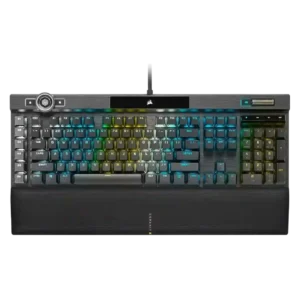
The few reviews that discuss sound describe the K100 as more solid and low-rattle than older Corsair boards, though not silent.
Case foam and internal tuning keep the sound controlled, with reviewers describing the board as full and free of obvious ping.
One gaming-focused review says the board kept up even under rapid input, suggesting consistent key registration.
Switch feel may need break-in, with some early inconsistency noted before the board feels more even from key to key.
RGB brightness is described as extra bright, and the control wheel can adjust brightness directly.
Backlighting is bright and vivid, helped by transparent switch housings and shine-through design.
Reviews that address construction describe the K100 as sturdy, premium, and clearly flagship-grade.
Build quality feels solid overall, with sturdy construction and enough weight to avoid a flimsy impression.
The cable is consistently described as thick and braided, but several reviews note that it is fixed and bulky.
The included braided USB-C cable is generally viewed as decent and serviceable rather than a weak extra.
One review explicitly confirms support for PC, Mac, and Xbox One.
Reviews confirm official Windows and Mac support, plus successful use on PlayStation, Xbox, and Android.
The K100 is presented as a wired dual-USB keyboard, favoring stable desktop use over flexibility.
Wired connectivity is reliable in the available testing, with direct no-issue reports over USB.
Multiple reviews emphasize deep remapping, lighting, macro, and control-wheel customization, even if setup can take effort.
Customization is one of the keyboard’s biggest strengths, spanning switches, keycaps, lighting, and broader build choices.
Reviews describe the K100 as large and desk-hungry, especially once the wrist rest is attached.
The compact footprint saves desk space without stripping away core functionality.
The OPX version is repeatedly framed as long-lasting, backed by durable PBT caps and very high switch lifespan claims.
The board survived a drop test and is helped by replaceable switches for longer-term use.
The switches are explicitly described as non-hot-swappable, so replacement flexibility is poor.
Replacing switches is easy and beginner-friendly, with multiple reviews emphasizing simple, tool-based swapping.
One review highlights the board angle and wrist support as helping create a more comfortable typing posture.
Ergonomics are decent thanks to usable typing angles, but the high profile and lack of an included wrist rest can reduce comfort for some users.
Macro keys, the control wheel, profile switching, Windows lock, and Stream Deck support are recurring standout extras.
Gaming extras include hotkey-based onboard controls plus features like N-key rollover and Windows key lock.
Reviews repeatedly mention minimal flex and a sturdy frame.
The frame feels very rigid, with reviewers specifically noting no twisting, creaking, or flex.
Gaming performance is broadly praised for fast, dependable input, though several reviewers say the 4000Hz advantage is subtle in practice.
Gaming performance is strong, with reviewers reporting responsive play and noticeable benefits from tuning latency.
At least one review directly states the switches are not hot-swappable, making this a weak point.
Hot-swap support is a major selling point, with broad 5-pin support repeatedly highlighted.
Double-shot PBT caps are praised across reviews for feel, durability, and improved aftermarket compatibility.
The stock doubleshot ABS caps feel comfortable in use, but reviewers still flag ABS as a step down from PBT.
Reviews consistently describe the board as very fast and responsive to input.
Reviewers consistently call the keys responsive in use, with quick reactions that work well for games.
Key spacing is a mixed point: some find it fine, but the tighter 96% layout can cause adjustment errors.
One review specifically praises the keys for having almost no tilt, helping presses feel more controlled.
Keys are described as stable and pleasant to type on in the standardized usage review.
The strongest gaming review reports effectively no lag in use.
Input latency is adjustable down to 2ms, and reviewers reported a more competitive feel after lowering it.
Reviews praise the move to a standard bottom row, which broadens keycap compatibility.
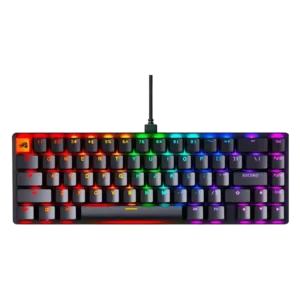
Reviewers like the choice between 65% and 96%, with both sizes seen as useful rather than filler.
Reviewers call out the cleaner font and bright, crisp legends as improvements.
Shine-through doubleshot legends stay readable and are integrated well into the keycaps.
Dedicated G-keys, Elgato support, and broad remapping options make macro control one of the K100’s strengths.
Macro support is robust, with dedicated layers and macro creation available through the software.
Brushed or anodized aluminum and other premium-feeling materials are highlighted repeatedly.
Material choices balance an aluminum top with plastic or polymer sections, landing as good rather than all-premium.
Dedicated media buttons and rollers are seen as useful, polished, and in some cases highly configurable.
Media controls are available directly on the keyboard through function combinations.
Noise is mixed to negative overall: some reviews call the board loud, while others say it sounds better than past Corsair boards.
For a mechanical keyboard, noise is kept moderate enough that reviewers call it quiet or non-bothersome in shared use.
Onboard storage is repeatedly praised for holding many profiles or lighting layers.
Users can save up to three onboard profiles directly on the keyboard.
USB passthrough is regularly described as a convenient extra.
Per-key lighting control is explicitly supported and treated as a premium feature.
Per-key RGB control is confirmed across multiple reviews, including individual color setting and individually lit keys.
The 4000Hz polling rate is a headline feature, but reviews split between future-proof enthusiasm and skepticism about real-world gains.
Users can tune polling rate up to 1000Hz, giving the board a full-speed wired setup.
The K100’s weight and full-size build make it a poor choice for portable use.
The 65% version is presented as a better fit for on-the-go use than larger layouts.
Large onboard profile storage and easy profile switching are mentioned often.
Profile management is present, with multiple onboard profiles available for different setups.
Reliability is mixed because a few reviews report hardware or crash issues even though others praise the hardware overall.
Reviewers report dependable day-to-day behavior, with the board working without issue and seeming built for repeated refreshes.
Lighting customization is deep and flexible, though some reviews find the setup process clunky.
Lighting customization is flexible, with easy setup, preset selection, and manual per-key adjustment options.
RGB presentation is one of the board’s clearest strengths, with vivid per-key and edge lighting praised often.
Reviews praise the RGB for richer colors, smoother transitions, and an overall strong visual presentation.
This is a large full-size flagship board; some reviews like its streamlined look, but it remains sizable.
The 65% and 96% variants keep the board compact while retaining the functions reviewers cared about.
iCUE and related software offer lots of control, but many reviews call the experience clunky, unintuitive, or overly complex.
Glorious Core is capable and sometimes easy to use, but reviews also call out bugs and limited Mac support.
A few reviews say the K100 sounds more muted or damped than earlier Corsair boards, though this is not universal.
Internal case and PCB foam are repeatedly credited for reducing hollowness and sharpening the sound profile.
Reviews that mention stabilizers say Corsair improved them noticeably versus older boards.
Stock stabilizers are generally decent and pre-lubed, though some larger keys still show mild rattle or less-refined feel.
OPX and Speed switches are usually praised for speed and smoothness, but several reviewers note the feel is very sensitive or taste-dependent.
Across reviews, the Fox linear switches are described as smooth and satisfying, with strong feel for both typing and games.
Reviews confirm OPX and Cherry MX Speed variants are available.
Switch choice is flexible through barebones builds and configurator options, though prebuilt buyers are largely limited to Fox linears.
Reviews note good wrist support and low-fatigue typing once users adjust to the switches.
Typing comfort is a clear strength, with reviewers reporting low fatigue, smooth movement, and long-session comfort.
Typing feel is generally positive and quick, though some reviewers found the shallow actuation unforgiving at first.
Typing feel is a standout, with reviews repeatedly calling it smooth, satisfying, and impressive out of the box.
Value is the main tradeoff: many reviewers like the features, but several question the premium price.
Value is one of the strongest themes, with several reviews arguing the feature set feels especially compelling at the asking price.
The volume wheel or roller is widely praised for feel and usefulness.
Volume control is available on-board through function-layer shortcuts.
The magnetic cushioned wrist rest is one of the most consistently praised parts of the keyboard.