Compare Corsair K100 RGB vs Corsair K65 PRO Mini

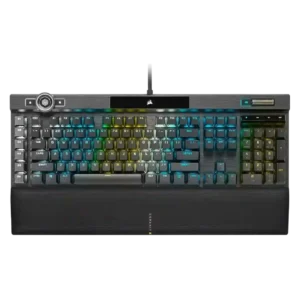
P1 Corsair K100 RGB
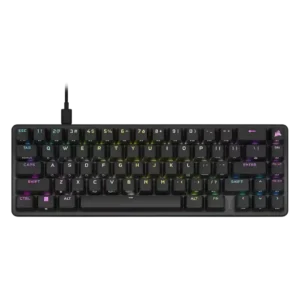
P2 Corsair K65 PRO Mini

Comparison Takeaways

Corsair K100 RGB

Where It Has the Edge

  • wrist rest quality is 4.6 vs 1.8. The magnetic cushioned wrist rest is one of the most consistently praised parts of the keyboard.
  • switch options is 4.3 vs 2.2. Reviews confirm OPX and Cherry MX Speed variants are available.
  • typing comfort is 4.5 vs 3.4. Reviews note good wrist support and low-fatigue typing once users adjust to the switches.
  • stabilizer quality is 4.5 vs 3.5. Reviews that mention stabilizers say Corsair improved them noticeably versus older boards.

Corsair K65 PRO Mini

Where It Has the Edge

  • desk space efficiency is 4.8 vs 2.0. The compact 65% footprint repeatedly earns praise for freeing up desk room while staying gaming-friendly.
  • reliability is 4.8 vs 2.3. One review reports stable performance with no dropouts or inconsistent response.
  • portability is 4.5 vs 2.0. The compact body and detachable cable make it easy to move or travel with.
  • noise level is 4.4 vs 2.5. The board is generally described as pleasant and quieter than older Corsair designs, though not silent or universally...
Average score
Product 1: Corsair K100 RGB
4.2
Product 2: Corsair K65 PRO Mini
4.3
acoustics
Product 1: Corsair K100 RGB
4.5

The few reviews that discuss sound describe the K100 as more solid and low-rattle than older Corsair boards, though not silent.

Product 2: Corsair K65 PRO Mini
4.8

Most reviews praise the sound as pleasing and better controlled than typical gaming boards, even if it is not framed as full enthusiast-level acoustics.

actuation consistency
Product 1: Corsair K100 RGB
5.0

One gaming-focused review says the board kept up even under rapid input, suggesting consistent key registration.

Product 2: Corsair K65 PRO Mini
4.8

One review specifically describes the actuation as consistently super responsive.

backlight brightness
Product 1: Corsair K100 RGB
4.5

RGB brightness is described as extra bright, and the control wheel can adjust brightness directly.

Product 2: Corsair K65 PRO Mini
4.1

Brightness is adjustable and generally strong enough for visibility, though one review notes some visual blur and less-than-perfect punch.

build quality
Product 1: Corsair K100 RGB
4.8

Reviews that address construction describe the K100 as sturdy, premium, and clearly flagship-grade.

Product 2: Corsair K65 PRO Mini
4.8

Reviews consistently describe the chassis and overall construction as premium, sturdy, and well finished.

cable quality
Product 1: Corsair K100 RGB
3.7

The cable is consistently described as thick and braided, but several reviews note that it is fixed and bulky.

Product 2: Corsair K65 PRO Mini
4.4

The detachable braided USB-C cable is broadly seen as a plus, with standard, non-proprietary connectivity.

compatibility
Product 1: Corsair K100 RGB
4.5

One review explicitly confirms support for PC, Mac, and Xbox One.

Product 2: Corsair K65 PRO Mini
4.6

Reviewers mention support for PC, Mac, PlayStation, Xbox, and general console use.

connectivity
Product 1: Corsair K100 RGB
3.3

The K100 is presented as a wired dual-USB keyboard, favoring stable desktop use over flexibility.

Product 2: Corsair K65 PRO Mini
4.1

The wired USB-C connection is mostly reliable and low-latency, though one reviewer hit disconnects at 8000Hz on older hardware.

customization options
Product 1: Corsair K100 RGB
5.0

Multiple reviews emphasize deep remapping, lighting, macro, and control-wheel customization, even if setup can take effort.

Product 2: Corsair K65 PRO Mini
4.8

iCUE and onboard controls give the board deep control over lighting, key assignments, macros, and performance settings.

desk space efficiency
Product 1: Corsair K100 RGB
2.0

Reviews describe the K100 as large and desk-hungry, especially once the wrist rest is attached.

Product 2: Corsair K65 PRO Mini
4.8

The compact 65% footprint repeatedly earns praise for freeing up desk room while staying gaming-friendly.

durability
Product 1: Corsair K100 RGB
5.0

The OPX version is repeatedly framed as long-lasting, backed by durable PBT caps and very high switch lifespan claims.

Product 2: Corsair K65 PRO Mini
4.7

Durable PBT caps and long switch-life claims support strong longevity expectations.

ease of switch replacement
Product 1: Corsair K100 RGB
1.5

The switches are explicitly described as non-hot-swappable, so replacement flexibility is poor.

Product 2: Corsair K65 PRO Mini
3.3

Switch access is possible with a puller, but the replacement experience is not especially open or tool-inclusive.

ergonomics
Product 1: Corsair K100 RGB
4.2

One review highlights the board angle and wrist support as helping create a more comfortable typing posture.

Product 2: Corsair K65 PRO Mini
3.9

Tilt feet and compact sizing help, but several reviews still wanted more height adjustment or a wrist rest.

extra gaming features
Product 1: Corsair K100 RGB
4.4

Macro keys, the control wheel, profile switching, Windows lock, and Stream Deck support are recurring standout extras.

Product 2: Corsair K65 PRO Mini
4.6

Helpful extras include function-layer lighting hints and mouse controls alongside gaming-focused shortcuts.

frame rigidity
Product 1: Corsair K100 RGB
5.0

Reviews repeatedly mention minimal flex and a sturdy frame.

Product 2: Corsair K65 PRO Mini
4.8

Multiple reviews note minimal flex and a notably solid frame.

gaming performance
Product 1: Corsair K100 RGB
4.6

Gaming performance is broadly praised for fast, dependable input, though several reviewers say the 4000Hz advantage is subtle in practice.

Product 2: Corsair K65 PRO Mini
4.9

Fast OPX switches, short travel, and gaming-focused tuning make performance a clear strength.

hot-swappable switches
Product 1: Corsair K100 RGB
1.0

At least one review directly states the switches are not hot-swappable, making this a weak point.

Product 2: Corsair K65 PRO Mini
1.5

Reviews explicitly note that the K65 Pro Mini lacks true hot-swap support.

keycap quality
Product 1: Corsair K100 RGB
4.8

Double-shot PBT caps are praised across reviews for feel, durability, and improved aftermarket compatibility.

Product 2: Corsair K65 PRO Mini
4.8

The textured double-shot PBT keycaps are widely praised for grip, feel, and durability.

key responsiveness
Product 1: Corsair K100 RGB
5.0

Reviews consistently describe the board as very fast and responsive to input.

Product 2: Corsair K65 PRO Mini
4.9

Inputs are repeatedly described as fast, direct, and highly responsive.

key spacing
Product 1: Corsair K100 RGB
No score yet
Product 2: Corsair K65 PRO Mini
4.7

One review highlights the full-sized keys and ample spacing as unusually comfortable for a compact board.

key stability
Product 1: Corsair K100 RGB
5.0

One review specifically praises the keys for having almost no tilt, helping presses feel more controlled.

Product 2: Corsair K65 PRO Mini
4.4

Larger keys are generally described as controlled and stable, with only minor wobble mentioned.

latency
Product 1: Corsair K100 RGB
5.0

The strongest gaming review reports effectively no lag in use.

Product 2: Corsair K65 PRO Mini
4.8

One review specifically highlights very quick input processing and transfer.

layout options
Product 1: Corsair K100 RGB
5.0

Reviews praise the move to a standard bottom row, which broadens keycap compatibility.

Product 2: Corsair K65 PRO Mini
No score yet
legend visibility
Product 1: Corsair K100 RGB
4.7

Reviewers call out the cleaner font and bright, crisp legends as improvements.

Product 2: Corsair K65 PRO Mini
4.7

Sub-legends and function hints are easy to read, with Fn-layer lighting further improving clarity.

macro customization
Product 1: Corsair K100 RGB
4.7

Dedicated G-keys, Elgato support, and broad remapping options make macro control one of the K100’s strengths.

Product 2: Corsair K65 PRO Mini
4.6

Macros are widely supported through iCUE and, in some cases, hardware-only recording.

materials quality
Product 1: Corsair K100 RGB
4.6

Brushed or anodized aluminum and other premium-feeling materials are highlighted repeatedly.

Product 2: Corsair K65 PRO Mini
4.8

Aluminum and PBT materials are consistently described as premium and pleasing.

media controls
Product 1: Corsair K100 RGB
5.0

Dedicated media buttons and rollers are seen as useful, polished, and in some cases highly configurable.

Product 2: Corsair K65 PRO Mini
4.6

Media commands are available through the function layer across several reviews.

noise level
Product 1: Corsair K100 RGB
2.5

Noise is mixed to negative overall: some reviews call the board loud, while others say it sounds better than past Corsair boards.

Product 2: Corsair K65 PRO Mini
4.4

The board is generally described as pleasant and quieter than older Corsair designs, though not silent or universally low-noise.

onboard memory
Product 1: Corsair K100 RGB
5.0

Onboard storage is repeatedly praised for holding many profiles or lighting layers.

Product 2: Corsair K65 PRO Mini
4.9

Onboard storage and profile capacity are a major strength, with up to 50 profiles repeatedly cited.

passthrough features
Product 1: Corsair K100 RGB
4.0

USB passthrough is regularly described as a convenient extra.

Product 2: Corsair K65 PRO Mini
No score yet
per-key lighting control
Product 1: Corsair K100 RGB
4.8

Per-key lighting control is explicitly supported and treated as a premium feature.

Product 2: Corsair K65 PRO Mini
4.7

Reviews note thorough per-key or zone-based lighting control.

polling rate
Product 1: Corsair K100 RGB
4.2

The 4000Hz polling rate is a headline feature, but reviews split between future-proof enthusiasm and skepticism about real-world gains.

Product 2: Corsair K65 PRO Mini
4.4

The 8000Hz polling option is a headline feature, even if some reviewers found limited real-world benefit.

portability
Product 1: Corsair K100 RGB
2.0

The K100’s weight and full-size build make it a poor choice for portable use.

Product 2: Corsair K65 PRO Mini
4.5

The compact body and detachable cable make it easy to move or travel with.

profile management
Product 1: Corsair K100 RGB
4.9

Large onboard profile storage and easy profile switching are mentioned often.

Product 2: Corsair K65 PRO Mini
5.0

Profile handling is robust, with many onboard slots and easy switching or saving.

reliability
Product 1: Corsair K100 RGB
2.3

Reliability is mixed because a few reviews report hardware or crash issues even though others praise the hardware overall.

Product 2: Corsair K65 PRO Mini
4.8

One review reports stable performance with no dropouts or inconsistent response.

RGB customization
Product 1: Corsair K100 RGB
4.8

Lighting customization is deep and flexible, though some reviews find the setup process clunky.

Product 2: Corsair K65 PRO Mini
4.7

RGB effects are broad and highly customizable both in software and onboard.

RGB lighting quality
Product 1: Corsair K100 RGB
4.8

RGB presentation is one of the board’s clearest strengths, with vivid per-key and edge lighting praised often.

Product 2: Corsair K65 PRO Mini
4.4

Lighting quality is usually described as vibrant and crisp, though not every reviewer loved the stock presentation.

size and form factor
Product 1: Corsair K100 RGB
3.1

This is a large full-size flagship board; some reviews like its streamlined look, but it remains sizable.

Product 2: Corsair K65 PRO Mini
4.7

The 65% layout is consistently praised for balancing compactness with arrow keys and useful navigation.

software quality
Product 1: Corsair K100 RGB
3.3

iCUE and related software offer lots of control, but many reviews call the experience clunky, unintuitive, or overly complex.

Product 2: Corsair K65 PRO Mini
3.9

iCUE offers strong functionality, but reviewer sentiment is mixed because of clunkiness, complexity, and one pre-launch crash issue.

sound dampening
Product 1: Corsair K100 RGB
4.5

A few reviews say the K100 sounds more muted or damped than earlier Corsair boards, though this is not universal.

Product 2: Corsair K65 PRO Mini
4.5

Most reviewers noticed the foam and dampening layers improving sound versus older Corsair boards.

stabilizer quality
Product 1: Corsair K100 RGB
4.5

Reviews that mention stabilizers say Corsair improved them noticeably versus older boards.

Product 2: Corsair K65 PRO Mini
3.5

Stabilizers are decent but not exceptional, with some rattle and mushiness still called out.

switch feel
Product 1: Corsair K100 RGB
4.2

OPX and Speed switches are usually praised for speed and smoothness, but several reviewers note the feel is very sensitive or taste-dependent.

Product 2: Corsair K65 PRO Mini
4.7

The OPX switches are usually described as smooth, quick, and satisfying, with a few comments about sensitivity.

switch options
Product 1: Corsair K100 RGB
4.3

Reviews confirm OPX and Cherry MX Speed variants are available.

Product 2: Corsair K65 PRO Mini
2.2

One review flags the proprietary OPX focus as limiting for buyers who want broader switch choice.

typing comfort
Product 1: Corsair K100 RGB
4.5

Reviews note good wrist support and low-fatigue typing once users adjust to the switches.

Product 2: Corsair K65 PRO Mini
3.4

Typing comfort is mixed: some found the switches comfortable, while others reported accidental presses or more mistakes.

typing feel
Product 1: Corsair K100 RGB
4.2

Typing feel is generally positive and quick, though some reviewers found the shallow actuation unforgiving at first.

Product 2: Corsair K65 PRO Mini
4.7

Typing feel is widely liked for its smoothness, sound, and textured caps.

value for money
Product 1: Corsair K100 RGB
3.1

Value is the main tradeoff: many reviewers like the features, but several question the premium price.

Product 2: Corsair K65 PRO Mini
3.6

Reviewers usually like the board, but many still call the pricing high for a wired mini keyboard.

volume control
Product 1: Corsair K100 RGB
4.8

The volume wheel or roller is widely praised for feel and usefulness.

Product 2: Corsair K65 PRO Mini
4.6

Volume adjustment is available through the function layer.

wrist rest quality
Product 1: Corsair K100 RGB
4.6

The magnetic cushioned wrist rest is one of the most consistently praised parts of the keyboard.

Product 2: Corsair K65 PRO Mini
1.8

No wrist rest is included, and several reviewers saw that as a downside.