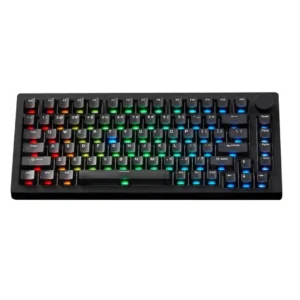
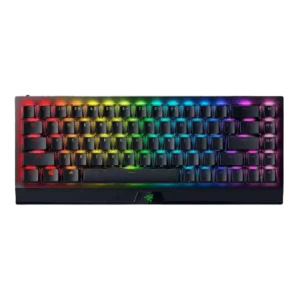
Compare MonsGeek M1 V5 HE vs Razer BlackWidow V3 Mini HyperSpeed

P1 MonsGeek M1 V5 HE
P2 Razer BlackWidow V3 Mini HyperSpeed

Comparison Takeaways

MonsGeek M1 V5 HE

Where It Has the Edge

  • stabilizer quality is 4.5 vs 2.0. Stabilizers are generally praised as lubed, stable, rattle-free, or minimally wobbly, with included extras adding flexibility.
  • media controls is 4.3 vs 2.4. Media controls are useful through the knob and software remapping, but one reviewer found the knob's default usefulness...
  • compatibility is 3.9 vs 2.0. Compatibility is positive for OS, switch, and device support, but repeatedly held back by the hidden Caps Lock...
  • value for money is 4.6 vs 3.0. Value for money is very strong across reviews, especially for aluminum build, wireless, battery, modding, and gaming features...

Razer BlackWidow V3 Mini HyperSpeed

Where It Has the Edge

  • portability is 4.6 vs 1.8. Portability was consistently strong because reviewers liked the compact size, wireless use, travel friendliness, and easy movement around...
  • cable quality is 4.4 vs 3.0. Cable quality was praised when mentioned, with reviewers liking the long, braided, thick cable and practical wired charging...
  • size and form factor is 4.6 vs 3.9. The compact 65% form factor was one of the strongest positives, repeatedly described as useful, functional, and well...
  • RGB lighting quality is 4.5 vs 3.9. RGB lighting quality was praised as bright, vivid, even, and visually appealing across multiple reviews.
Average score
Product 1: MonsGeek M1 V5 HE
4.3
Product 2: Razer BlackWidow V3 Mini HyperSpeed
4.0
acoustics
Product 1: MonsGeek M1 V5 HE
4.5

Acoustics are a major positive, with reviewers describing the stock sound as pleasant, clean, dampened, refined, or excellent, though one found it merely good rather than great.

Product 2: Razer BlackWidow V3 Mini HyperSpeed
3.7

Acoustics were mixed: several reviewers liked the soft clack or subtle tap, while others heard pinging, rattle, or an irritating clack.

actuation consistency
Product 1: MonsGeek M1 V5 HE
4.4

Actuation consistency is strong at practical settings, with reviewers generally avoiding accidental inputs, while very sensitive settings or mechanical switches with rapid trigger can need adjustment.

Product 2: Razer BlackWidow V3 Mini HyperSpeed
4.6

One review gave clear positive evidence that key registration was consistent, saying every key registered as expected during typing and gaming.

backlight brightness
Product 1: MonsGeek M1 V5 HE
4.1

Backlight brightness is praised in several VIA/HE variants but criticized on one TMR setup as not bright enough for side legends.

Product 2: Razer BlackWidow V3 Mini HyperSpeed
4.7

One review gave explicit positive evidence for brightness, describing the RGB as nice, bright, and vivid.

battery life
Product 1: MonsGeek M1 V5 HE
4.8

Battery life is one of the most consistently praised areas, helped by the 8000mAh pack and multi-week or high-percentage real-world reports.

Product 2: Razer BlackWidow V3 Mini HyperSpeed
3.4

Battery life was the most mixed major attribute: reviewers praised long life with lighting off or low, but full RGB drained the battery quickly.

build quality
Product 1: MonsGeek M1 V5 HE
4.7

Build quality is one of the strongest areas, with repeated praise for aluminum construction, premium feel, weight, and overall solidity.

Product 2: Razer BlackWidow V3 Mini HyperSpeed
4.7

Build quality was one of the strongest consensus areas, with reviews calling it excellent, sturdy, robust, substantial, and well built.

cable quality
Product 1: MonsGeek M1 V5 HE
3.0

Cable quality is mixed, from acceptable and nice-feeling to clearly not durable or lacking premium coiled/braided treatment.

Product 2: Razer BlackWidow V3 Mini HyperSpeed
4.4

Cable quality was praised when mentioned, with reviewers liking the long, braided, thick cable and practical wired charging use.

compatibility
Product 1: MonsGeek M1 V5 HE
3.9

Compatibility is positive for OS, switch, and device support, but repeatedly held back by the hidden Caps Lock mode switch.

Product 2: Razer BlackWidow V3 Mini HyperSpeed
2.0

Compatibility scored low from one review because the keyboard could not connect to the reviewer’s PlayStation 5.

connectivity
Product 1: MonsGeek M1 V5 HE
4.0

Connectivity is broadly strong thanks to tri-mode support, though Bluetooth delays, cable-fit issues, and the hidden mode switch create caveats.

Product 2: Razer BlackWidow V3 Mini HyperSpeed
4.2

Connectivity was broadly strong thanks to USB-C, Bluetooth, HyperSpeed, and multi-device support, but a few reviews noted buggy pairing or inconvenient mode switching.

customization options
Product 1: MonsGeek M1 V5 HE
4.8

Customization options are a central strength, spanning disassembly, switch swaps, actuation, macros, lighting, knob functions, and sound tuning.

Product 2: Razer BlackWidow V3 Mini HyperSpeed
4.6

Customization options were a major strength, with reviewers praising key remaps, macros, RGB, power settings, and broad Synapse controls.

design aesthetics
Product 1: MonsGeek M1 V5 HE
4.5

Design aesthetics are mostly praised as clean, premium, appealing, or elegant, though simpler/minimal styling depends on taste.

Product 2: Razer BlackWidow V3 Mini HyperSpeed
4.2

Design aesthetics were mostly positive, with reviewers liking the sleek Razer styling, RGB look, and compact desk presence, though some found it plain or fingerprint-prone.

desk space efficiency
Product 1: MonsGeek M1 V5 HE
No score yet
Product 2: Razer BlackWidow V3 Mini HyperSpeed
4.6

Desk space efficiency was highly praised, with reviewers valuing the extra mouse room, reduced footprint, and less clutter.

durability
Product 1: MonsGeek M1 V5 HE
4.8

Durability is supported by direct reviewer confidence that the hardware feels built to last.

Product 2: Razer BlackWidow V3 Mini HyperSpeed
4.7

Durability evidence was strong, including confidence against scratches, surviving drops, child use, and expectations of long service life.

ease of switch replacement
Product 1: MonsGeek M1 V5 HE
4.8

Ease of switch replacement and modding is a standout because the ball-catch case and hot-swap design make opening, tinkering, and cleaning fast.

Product 2: Razer BlackWidow V3 Mini HyperSpeed
4.5

One review gave positive opinionated evidence that swapping between the two sets of keys or switches was easy.

ergonomics
Product 1: MonsGeek M1 V5 HE
3.5

Ergonomics are mixed: the typing angle and slanted case can feel comfortable, but fixed feet, sharp edges, or flatter angles bother some reviewers.

Product 2: Razer BlackWidow V3 Mini HyperSpeed
3.3

Ergonomics were mixed: the small layout and feet could help posture, but height, wrist angle, and lack of palm rest caused discomfort for some.

extra gaming features
Product 1: MonsGeek M1 V5 HE
4.7

Extra gaming features are a major strength, with SOCD, DKS, rapid trigger, snap key, actuation tuning, and FPS-focused controls all praised.

Product 2: Razer BlackWidow V3 Mini HyperSpeed
4.5

Extra gaming features were praised for strong 65% gaming functionality, macro-ready keys, and dongle-related gaming features.

frame rigidity
Product 1: MonsGeek M1 V5 HE
4.1

Frame rigidity is mostly strong thanks to the aluminum case, though a few reviewers noticed looseness in ball-catch handling or uneven flex after foam removal.

Product 2: Razer BlackWidow V3 Mini HyperSpeed
4.5

Frame rigidity scored well where discussed, with reviewers describing the keyboard as planted, rigid, free of flex, and unlikely to budge.

gaming performance
Product 1: MonsGeek M1 V5 HE
4.8

Gaming performance is repeatedly praised as responsive and feature-rich, with reviewers saying it did not hold them back and can give gamers an edge.

Product 2: Razer BlackWidow V3 Mini HyperSpeed
4.5

Gaming performance was a consistent highlight thanks to the compact footprint, quick switches, and responsive wireless, though one review reported a shift-key catch while gaming.

hot-swappable switches
Product 1: MonsGeek M1 V5 HE
4.8

Hot-swappable switch support is highly praised, especially the ability to use 3-pin, 5-pin, magnetic, and mechanical switches depending on version.

Product 2: Razer BlackWidow V3 Mini HyperSpeed
No score yet
keycap quality
Product 1: MonsGeek M1 V5 HE
4.0

Keycap quality is mostly positive, with praise for PBT, frosted, gradient, or transparent caps, but some reviewers dislike smoothness, removal difficulty, or hollow feel.

Product 2: Razer BlackWidow V3 Mini HyperSpeed
4.3

Keycap quality drew praise for doubleshot ABS construction, clean legends, and durability, but reviewers still noted ABS tradeoffs such as slipperiness, shine, or clamminess.

key responsiveness
Product 1: MonsGeek M1 V5 HE
4.4

Responsiveness is a clear strength in gaming-focused reviews, though one VIA review reported lag after plugging the board in.

Product 2: Razer BlackWidow V3 Mini HyperSpeed
4.6

Key responsiveness was a major strength, with reviewers repeatedly saying inputs felt fast, precise, and able to keep up during games and typing.

key spacing
Product 1: MonsGeek M1 V5 HE
No score yet
Product 2: Razer BlackWidow V3 Mini HyperSpeed
4.3

Key spacing was mostly praised for making inputs easier and avoiding distractions, with one review finding the keys slightly cramped.

key stability
Product 1: MonsGeek M1 V5 HE
4.6

Key stability receives strong praise, especially for minimal stem wobble and stable switch feel.

Product 2: Razer BlackWidow V3 Mini HyperSpeed
4.7

Key stability evidence was mostly positive where scored, with reviewers noting no wobble or very minimal wobble on the keys they tested.

latency
Product 1: MonsGeek M1 V5 HE
4.7

Latency evidence is positive overall, with reviewers reporting very low measured latency and no meaningful lag in wired or wireless use.

Product 2: Razer BlackWidow V3 Mini HyperSpeed
4.5

Latency feedback was mostly strong for wired and HyperSpeed use, with reviewers seeing little or no delay; lag mainly appeared with Bluetooth, low battery, or unified dongle issues.

layout options
Product 1: MonsGeek M1 V5 HE
4.5

Layout options are well received, especially 75% navigation keys, knob placement, ISO availability, and Windows/Mac support, even with the hidden mode switch caveat.

Product 2: Razer BlackWidow V3 Mini HyperSpeed
4.5

The 65% layout with arrows was widely praised as a useful middle ground, although some reviewers noted a learning curve and missing full-size keys.

legend visibility
Product 1: MonsGeek M1 V5 HE
3.9

Legend visibility is mixed: standard legends are readable, but side-printed or dimmer RGB variants can require visual adjustment.

Product 2: Razer BlackWidow V3 Mini HyperSpeed
4.0

Legend visibility was usually good, especially side legends and clean lettering, but a few reviewers criticized dark keys or non-backlit secondary legends.

macro customization
Product 1: MonsGeek M1 V5 HE
4.4

Macro customization is supported through VIA or web software and generally viewed as a useful plus, though most reviewers mention it briefly.

Product 2: Razer BlackWidow V3 Mini HyperSpeed
3.7

Macro customization was useful for the right-side keys and software recording, but some reviewers found Synapse requirements or limited dedicated buttons restrictive.

materials quality
Product 1: MonsGeek M1 V5 HE
4.7

Materials quality is consistently high, centered on the aluminum case, premium feel, and quality finishes, with minor finish and cable caveats.

Product 2: Razer BlackWidow V3 Mini HyperSpeed
4.1

Materials were generally praised for aluminum, textured plastic, and component quality, but one review criticized fingerprint-prone surfaces.

media controls
Product 1: MonsGeek M1 V5 HE
4.3

Media controls are useful through the knob and software remapping, but one reviewer found the knob's default usefulness limited.

Product 2: Razer BlackWidow V3 Mini HyperSpeed
2.4

Media controls were a drawback for reviewers who wanted dedicated keys and missed full-size media/function controls.

noise level
Product 1: MonsGeek M1 V5 HE
4.2

Noise level varies by switch and variant: clicky switches are louder, but many magnetic or foam-filled builds are described as quiet, muted, or resonance-free.

Product 2: Razer BlackWidow V3 Mini HyperSpeed
3.8

Noise level was context-dependent: many found the Yellow switches relatively quiet, but reviewers stressed the board was not silent and could still bother people nearby.

onboard memory
Product 1: MonsGeek M1 V5 HE
4.5

Onboard memory is praised for preserving settings across computers without making PC changes an issue.

Product 2: Razer BlackWidow V3 Mini HyperSpeed
4.0

Onboard memory was useful for saved profiles and basic settings, but reviewers noted limitations such as RGB settings not carrying over.

passthrough features
Product 1: MonsGeek M1 V5 HE
No score yet
Product 2: Razer BlackWidow V3 Mini HyperSpeed
1.5

Passthrough features scored poorly because a review explicitly criticized the lack of USB passthrough.

per-key lighting control
Product 1: MonsGeek M1 V5 HE
No score yet
Product 2: Razer BlackWidow V3 Mini HyperSpeed
4.8

One review specifically praised per-key RGB control through Synapse, supporting a strong score for granular lighting control.

polling rate
Product 1: MonsGeek M1 V5 HE
4.7

Polling-rate evidence is positive, especially for TMR and HE models with 8K claims or tests; the VIA model's lower rates are still described as acceptable.

Product 2: Razer BlackWidow V3 Mini HyperSpeed
No score yet
portability
Product 1: MonsGeek M1 V5 HE
1.8

Portability is poor because multiple reviewers emphasize the keyboard is extremely heavy and not suited for travel.

Product 2: Razer BlackWidow V3 Mini HyperSpeed
4.6

Portability was consistently strong because reviewers liked the compact size, wireless use, travel friendliness, and easy movement around the home.

profile management
Product 1: MonsGeek M1 V5 HE
4.8

Profile management gets limited but positive evidence, especially quick profile switching that one reviewer explicitly loved.

Product 2: Razer BlackWidow V3 Mini HyperSpeed
4.0

Profile management was helpful thanks to onboard/local profiles, though one review found toggling profiles unintuitive and onboard behavior limited.

rapid trigger support
Product 1: MonsGeek M1 V5 HE
4.7

Rapid trigger support is a major gaming strength, offering fine adjustment and low thresholds that reviewers found useful when tuned properly.

Product 2: Razer BlackWidow V3 Mini HyperSpeed
No score yet
reliability
Product 1: MonsGeek M1 V5 HE
3.1

Reliability is mixed: most gaming and daily-use reports are clean, but reviewers also mention double-click behavior at edge settings and one unit's ghost volume inputs.

Product 2: Razer BlackWidow V3 Mini HyperSpeed
3.2

Reliability had limited mixed evidence, with one review reporting missed keystrokes over Bluetooth.

RGB customization
Product 1: MonsGeek M1 V5 HE
4.0

RGB customization is useful through VIA or MonsGeek software, but built-in effects can be standard and small issues such as charging indicators remain.

Product 2: Razer BlackWidow V3 Mini HyperSpeed
4.6

RGB customization was a clear strength, with reviewers noting broad Chroma color options, effects, sync, and onboard or software-based control.

RGB lighting quality
Product 1: MonsGeek M1 V5 HE
3.9

RGB lighting quality ranges from vibrant and clean to dull or blocked by keycaps, making lighting one of the more mixed attributes.

Product 2: Razer BlackWidow V3 Mini HyperSpeed
4.5

RGB lighting quality was praised as bright, vivid, even, and visually appealing across multiple reviews.

size and form factor
Product 1: MonsGeek M1 V5 HE
3.9

Size and form factor evidence favors the 75% layout as compact and capable, though weight and productivity/travel use limit its appeal.

Product 2: Razer BlackWidow V3 Mini HyperSpeed
4.6

The compact 65% form factor was one of the strongest positives, repeatedly described as useful, functional, and well suited to gaming or travel.

software quality
Product 1: MonsGeek M1 V5 HE
4.2

Software quality is mixed-positive: VIA and web software are powerful and accessible, but TMR software still has quirks, bugs, and plugin friction.

Product 2: Razer BlackWidow V3 Mini HyperSpeed
4.0

Software quality was generally good because Synapse is powerful and improved, but reviewers disliked dependence on it, navigation friction, and occasional bugs.

sound dampening
Product 1: MonsGeek M1 V5 HE
4.3

Sound dampening is effective in most builds, helping reduce hollowness and resonance, though some reviewers consider the foams typical or limiting for foamless builds.

Product 2: Razer BlackWidow V3 Mini HyperSpeed
4.5

Sound dampening was praised in the Yellow-switch versions, with reviewers saying the dampeners made the board quieter and worked well.

stabilizer quality
Product 1: MonsGeek M1 V5 HE
4.5

Stabilizers are generally praised as lubed, stable, rattle-free, or minimally wobbly, with included extras adding flexibility.

Product 2: Razer BlackWidow V3 Mini HyperSpeed
2.0

Stabilizer quality was the clearest repeated weakness, with reviews citing rattly stabilizers, loud larger keys, a catching shift key, and poor sound on stabilized keys.

switch feel
Product 1: MonsGeek M1 V5 HE
4.5

Switch feel is widely praised as smooth, stable, satisfying, or fantastic, with a few reviewers noting switch preference depends on force and sound taste.

Product 2: Razer BlackWidow V3 Mini HyperSpeed
4.6

Reviewers broadly liked the switch feel, especially the smooth Yellow switches and tactile Green option; the main caveat was that the light actuation could feel sensitive for some typists.

switch options
Product 1: MonsGeek M1 V5 HE
4.8

Reviewers consistently value the switch ecosystem, especially the TMR model's ability to mix magnetic and mechanical switches and the availability of multiple Akko options.

Product 2: Razer BlackWidow V3 Mini HyperSpeed
4.3

The Green and Yellow switch choices were viewed positively because they suit different typing and gaming preferences, though reviewers did not describe a wider switch ecosystem.

typing comfort
Product 1: MonsGeek M1 V5 HE
4.7

Typing comfort is positive overall, with reviewers calling it comfortable, accurate, pleasant for daily use, or a joy to type on.

Product 2: Razer BlackWidow V3 Mini HyperSpeed
4.1

Typing comfort was mostly positive once users adjusted, but prolonged work, cramped keys, and wrist fatigue produced mixed evidence.

typing feel
Product 1: MonsGeek M1 V5 HE
4.5

Typing feel is generally comfortable, cushioned, and satisfying, though foam removal or softer gasket behavior can make the feel less even for some users.

Product 2: Razer BlackWidow V3 Mini HyperSpeed
3.9

Typing feel was generally smooth and satisfying, but compact-layout adjustment, sensitive switches, and accidental inputs made it mixed for heavier typists.

value for money
Product 1: MonsGeek M1 V5 HE
4.6

Value for money is very strong across reviews, especially for aluminum build, wireless, battery, modding, and gaming features at the stated prices.

Product 2: Razer BlackWidow V3 Mini HyperSpeed
3.0

Value was divisive and often critical: the keyboard’s feature set impressed some reviewers, but most repeatedly called the price high, premium, or hard to justify.

volume control
Product 1: MonsGeek M1 V5 HE
3.8

Volume control is mixed but generally useful: the knob can handle volume and mute, while one reviewer saw random volume inputs and another wanted more utility.

Product 2: Razer BlackWidow V3 Mini HyperSpeed
2.5

Volume control had limited negative evidence from one reviewer who specifically wanted a volume scroll wheel.

wireless performance
Product 1: MonsGeek M1 V5 HE
4.4

Wireless performance is mostly strong, with stable 2.4GHz/Bluetooth results and low wireless latency, though one review noted Bluetooth wake delays.

Product 2: Razer BlackWidow V3 Mini HyperSpeed
4.2

Wireless performance was usually excellent on HyperSpeed, but the unified dongle, Bluetooth, or interference produced notable negative cases in some reviews.

wrist rest quality
Product 1: MonsGeek M1 V5 HE
No score yet
Product 2: Razer BlackWidow V3 Mini HyperSpeed
2.2

Wrist rest feedback was negative because reviewers felt the tall board needed a compact wrist rest and none was included.