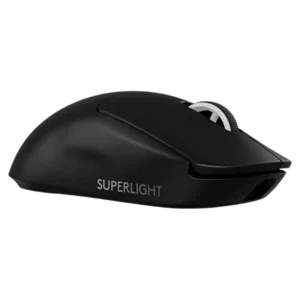
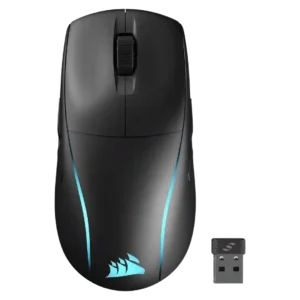
Average score
Logitech G PRO X Superlight 2
4.0
fingertip grip comfort
Logitech G PRO X Superlight 2
5.0
Fingertip grip comfort was praised by reviewers who found the shape comfortable for fingertip use.
Corsair M75 Wireless
2.1
Fingertip grip comfort was weak, with reviewers describing the mouse as unwieldy or stiff in fingertip use.
software stability
Logitech G PRO X Superlight 2
4.5
Software stability had limited but positive evidence from one review calling the G Hub interface stable.
Corsair M75 Wireless
2.0
Software stability had one clear negative report: iCUE reset Windows mouse settings when launched.
skate durability
Logitech G PRO X Superlight 2
2.0
Skate durability was a repeated concern, with reviewers calling the PTFE feet thin, meh, or unlikely to last long.
Corsair M75 Wireless
4.2
Skate durability received one positive mention for resisting dust and fluff on mouse mats.
MOBA gaming suitability
Logitech G PRO X Superlight 2
2.5
MOBA suitability was weaker because one reviewer found the heavier clicks worse for spam-click games.
Corsair M75 Wireless
4.6
MOBA gaming suitability was positive in one review, which found it delightful and responsive for League of Legends.
balance and weight distribution
Logitech G PRO X Superlight 2
4.5
Weight distribution received positive evidence from a reviewer who specifically praised the balance.
Corsair M75 Wireless
2.6
Weight distribution was a concern for some reviewers, especially imbalance toward the front or back, though one liked the added control for sniping.
palm grip comfort
Logitech G PRO X Superlight 2
2.5
Palm grip comfort was limited by one review saying palm-grip players may be better served elsewhere.
Corsair M75 Wireless
4.3
Palm grip support was mostly strong thanks to the high back and hand-filling body, with one reviewer finding it less natural than claw grip.
cable flexibility
Logitech G PRO X Superlight 2
2.0
Cable quality was a recurring complaint, with reviewers criticizing drag, resistance, and the dated rubber cable.
Corsair M75 Wireless
3.6
Cable flexibility was mixed: one reviewer liked the braided cable, while another reported cable drag during charging.
programmable buttons
Logitech G PRO X Superlight 2
4.5
Programmable side buttons were useful to one reviewer for DPI adjustment, especially because the mouse lacks a dedicated DPI button.
Corsair M75 Wireless
3.0
Reviewers found the programmable button count limiting for a gaming mouse, especially at the price.
weight
Logitech G PRO X Superlight 2
4.7
Reviewers strongly praised the low weight, calling it excellent, effortless, and well balanced for the mouse size.
Corsair M75 Wireless
3.2
Weight was polarizing, with some calling it lightweight enough and others finding it chunky, sluggish, or too heavy for FPS-first play.
premium feel
Logitech G PRO X Superlight 2
4.5
Premium feel was positive overall, with reviewers saying the mouse feels sturdy, premium, and high quality.
Corsair M75 Wireless
3.1
Premium feel was divided between an elegant, measured design and complaints that the mouse felt cheap.
grip texture
Logitech G PRO X Superlight 2
4.4
Grip texture was well received, with reviewers praising the grippy surface, recessed sides, or usefulness for clammy hands.
Corsair M75 Wireless
3.1
Grip texture was mixed: the coating handled marks well, but the smooth sides caused grip problems or finger discomfort for some.
handedness options
Logitech G PRO X Superlight 2
3.5
Handedness support was mixed because the symmetrical shape helps lefties, but the side buttons remain left-side only.
Corsair M75 Wireless
4.7
Handedness options were a core strength, with reviewers repeatedly praising true ambidextrous support and left-handed usefulness.
FPS gaming suitability
Logitech G PRO X Superlight 2
5.0
FPS suitability was one of the strongest areas, with repeated praise for speed, responsiveness, and competitive first-person shooter use.
Corsair M75 Wireless
3.8
FPS gaming suitability was mixed: casual and general FPS play worked well, but pure competitive or solo FPS users may prefer lighter/faster mice.
RGB features
Logitech G PRO X Superlight 2
4.3
The lack of RGB was generally accepted as a worthwhile tradeoff for battery life, weight, and the mouse’s clean look.
Corsair M75 Wireless
3.3
RGB features were highly mixed: customization and desktop style were praised, but hidden zones, weak underglow, and battery drain drew criticism.
connection stability
Logitech G PRO X Superlight 2
5.0
Connection stability was praised in one review for not faltering even in a difficult RF environment.
Corsair M75 Wireless
4.0
Connection stability was mostly reliable, but one review reported update-time spikes that undercut confidence.
build quality
Logitech G PRO X Superlight 2
4.8
Build quality was repeatedly praised as solid, squeak-free, well put together, and elite despite the light shell.
Corsair M75 Wireless
3.9
Build quality leaned positive for solidity and finish, but several reviewers noted looseness, cheap feel, or disappointment.
wireless performance
Logitech G PRO X Superlight 2
5.0
Wireless performance was praised as seamless and flawless, with no cable-related compromise in use.
Corsair M75 Wireless
4.2
Wireless performance was usually praised as responsive and dependable, though one reviewer found Corsair's connection less flawless than Razer's.
side button quality
Logitech G PRO X Superlight 2
2.6
Side button quality was the most contested control area, ranging from well-placed and improved to repeatedly described as mushy.
Corsair M75 Wireless
3.4
Side button quality was the most divided area: some praised easy swapping and placement, while many criticized looseness, low profiles, and fiddly use.
left and right click quality
Logitech G PRO X Superlight 2
4.8
Left and right clicks were praised for satisfying tactility, light rapid tapping, and improved main-button feel.
Corsair M75 Wireless
4.0
Main click quality was mostly praised for tactile feedback and responsiveness, though one reviewer found the feel cheap or off.
materials quality
Logitech G PRO X Superlight 2
4.5
Materials quality was praised for a cool, soft matte plastic feel.
Corsair M75 Wireless
3.8
Materials quality was mixed, with plastic feeling sturdy in one review but RGB-frame gaps and dust concerns in another.
scroll wheel quality
Logitech G PRO X Superlight 2
3.0
Scroll wheel feedback was mixed, with some praise for tactility but repeated criticism that it felt stiff, mushy, vague, or less precise.
Corsair M75 Wireless
3.7
Scroll wheel quality was mixed, ranging from tactile and pleasant to too stiff, sluggish, or loud.
macro support
Logitech G PRO X Superlight 2
5.0
Macro support was praised for an easy-to-use macro tool that guides users through setup.
Corsair M75 Wireless
4.3
Macro support was viewed positively where mentioned, with iCUE allowing shortcuts, media controls, app launches, and macros.
glide smoothness
Logitech G PRO X Superlight 2
3.5
Glide smoothness was highly mixed: some reviewers praised effortless glide, while others disliked stock-skate drag or control-heavy movement.
Corsair M75 Wireless
4.2
Glide smoothness was broadly praised due to PTFE feet, though some reviewers felt weight or skate slipperiness held it back.
ergonomic design
Logitech G PRO X Superlight 2
4.0
Ergonomics were generally positive for comfort and contouring, but one review noted large hands may find the shape less ergonomic.
Corsair M75 Wireless
4.7
Ergonomic design was praised for comfort, control, and avoiding awkward wrist or hand angles.
2.4GHz connectivity
Logitech G PRO X Superlight 2
5.0
The 2.4GHz connection was praised through an instant, fast connection experience with the included dongle.
Corsair M75 Wireless
4.4
2.4GHz connectivity was praised for speed, responsiveness, and practical wireless switching.
long-session comfort
Logitech G PRO X Superlight 2
5.0
Long-session comfort was strongly positive in one review that reported almost no hand fatigue after long sessions.
Corsair M75 Wireless
4.5
Long-session comfort was positive, with reviewers citing low fatigue and extended-session comfort.
button responsiveness
Logitech G PRO X Superlight 2
4.0
Button responsiveness was mostly praised for tactile, responsive clicks, though one reviewer disliked the heavier actuation for spam clicking.
Corsair M75 Wireless
4.5
Button responsiveness was a strength, with reviewers reporting responsive switches, solid performance, and no missed clicks.
wireless latency
Logitech G PRO X Superlight 2
5.0
Wireless latency was praised directly, with reviewers reporting no latency issues or seemingly no latency at all.
Corsair M75 Wireless
4.6
Wireless latency was praised where tested, especially the sub-millisecond 2.4GHz response.
click noise
Logitech G PRO X Superlight 2
3.3
Click noise was mixed: some liked the satisfying click sound, while others found it loud or high-pitched.
Corsair M75 Wireless
2.9
Click noise was a drawback in multiple reviews, with louder or noisier clicks than expected.
polling rate
Logitech G PRO X Superlight 2
4.1
Polling-rate opinions were mixed: several reviewers felt clear responsiveness gains, while others saw 2,000Hz as fine but not industry-leading.
Corsair M75 Wireless
3.6
Polling rate was viewed as adequate for most gamers, but several reviewers criticized it for lagging behind 4,000Hz and 8,000Hz rivals.
durability over time
Logitech G PRO X Superlight 2
4.5
Durability over time had limited but positive evidence from a longer-use reviewer whose unit remained rock solid.
Corsair M75 Wireless
4.1
Durability over time had limited but positive short-term evidence from one reviewer saying it still looked new after days of use.
sensor performance
Logitech G PRO X Superlight 2
4.9
The HERO 2 sensor was widely praised as crisp, precise, fast, and close to flawless, though some reviewers framed the higher specs as incremental.
Corsair M75 Wireless
4.6
The Marksman sensor was broadly described as reliable, responsive, and precise, with only isolated surface-related reservations.
shape comfort
Logitech G PRO X Superlight 2
4.4
Shape comfort was broadly praised as safe, familiar, and very comfortable, though a few reviewers disliked the rounded shape personally.
Corsair M75 Wireless
4.0
Shape comfort was generally positive for palm/claw and larger hands, but a few reviewers found the shape generic, uncomfortable, or not ideal.
charging convenience
Logitech G PRO X Superlight 2
4.6
Charging convenience was praised for USB-C, faster charging, and fewer desk cables.
Corsair M75 Wireless
4.3
Charging convenience was positive thanks to fast recharge and easy USB-C top-ups.
switch feel
Logitech G PRO X Superlight 2
4.2
Switch feel split reviewers: many loved the crisp, tactile Lightforce feel, while others found the clicks heavier or too tactile.
Corsair M75 Wireless
4.6
Switch feel was praised for tactile, premium, crisp, and fast feedback.
profile switching
Logitech G PRO X Superlight 2
3.0
Profile behavior was mixed: app-linked settings were useful, but onboard-profile handling was described as confusing in G Hub.
Corsair M75 Wireless
2.7
Profile and DPI switching drew mixed reactions: one reviewer liked on-device tuning, but several disliked the underside DPI control or missing automatic profile switching.
lift-off distance
Logitech G PRO X Superlight 2
4.2
Lift-off distance control was viewed as useful and noticeably adjustable, especially for players who fine-tune mouse behavior.
Corsair M75 Wireless
4.5
Lift-off behavior received positive remarks, with reviewers noting strong lift and a nice low-distance feel.
ecosystem integration
Logitech G PRO X Superlight 2
4.5
Ecosystem integration was praised for Logitech presets, backward compatibility, and community/profile support.
Corsair M75 Wireless
4.2
Ecosystem integration was supported by Corsair lighting-link syncing across multiple Corsair devices.
click latency
Logitech G PRO X Superlight 2
4.2
Click latency was praised as very low by some reviewers, though one technical reviewer found it merely good rather than flagship-leading.
Corsair M75 Wireless
4.5
Click latency was usually praised as essentially instant, although one reviewer felt longer travel slightly slowed actuation.
software usability
Logitech G PRO X Superlight 2
3.9
Software usability was split sharply: some reviewers found G Hub easy and powerful, while others called it unintuitive or frustrating.
Corsair M75 Wireless
4.2
Software usability was generally positive for iCUE customization and layout, though Bluetooth limitations and learning curve were noted.
battery life
Logitech G PRO X Superlight 2
4.7
Battery life was generally praised as long-lasting, though reviewers noted it drops with higher polling rates.
Corsair M75 Wireless
4.4
Battery life was one of the strongest consensus positives, with many reviewers reporting impressive or accurate endurance.
value for money
Logitech G PRO X Superlight 2
3.1
Value was mixed: reviewers praised the performance tier but often questioned the price and upgrade value from the original Superlight.
Corsair M75 Wireless
3.3
Value for money was sharply split, with praise at discounted prices or for lefties but criticism at full premium pricing.
Accuracy and tracking precision
Logitech G PRO X Superlight 2
4.9
Reviewers consistently described the mouse as accurate in games, with especially strong praise for tracking, pointer accuracy, and shot control.
Corsair M75 Wireless
4.7
Reviewers repeatedly praised accurate tracking and precise aiming, including smooth shot lining and strong control over 2.4GHz and Bluetooth.
DPI range
Logitech G PRO X Superlight 2
3.7
DPI coverage was seen as technically strong and granular, but one reviewer felt the extreme ceiling is more marketing than everyday value.
Corsair M75 Wireless
3.9
The DPI ceiling was considered strong for most players, though one reviewer noted it is not the highest available.
acceleration control
Logitech G PRO X Superlight 2
4.5
Acceleration feel received direct praise in one review, where the reviewer enjoyed its smoothness in Diablo IV.
Corsair M75 Wireless
4.4
Acceleration handling was judged more than sufficient, with reviewers saying rapid movements were tracked accurately.
onboard memory
Logitech G PRO X Superlight 2
4.0
Onboard memory was supported by the ability to save multiple profiles, though evidence was more about usefulness than enthusiasm.
Corsair M75 Wireless
4.1
Onboard memory was appreciated because settings could be saved and iCUE avoided after setup, though only one profile was noted.
button customization
Logitech G PRO X Superlight 2
4.7
Customization drew positive comments for granular controls and strong software-hardware integration, though it still depends heavily on G Hub.
Corsair M75 Wireless
4.6
Button customization was consistently praised for flexible remapping and personalized layouts.
motion consistency
Logitech G PRO X Superlight 2
4.8
Motion consistency was described positively, with reviewers calling motion smooth, sharp, and accurate.
Corsair M75 Wireless
4.6
Motion consistency was praised for responding naturally to hand movement and keeping up with both micro-movements and frantic play.
claw grip comfort
Logitech G PRO X Superlight 2
4.6
Claw grip comfort was broadly positive, with reviewers calling the mouse comfortable or easy to use for claw grip.
Corsair M75 Wireless
4.5
Claw grip comfort was praised by reviewers who found the hump and control well-suited to that grip.
portability
Logitech G PRO X Superlight 2
4.5
Portability was supported by the dongle-storage cover, which one reviewer framed as essential for esports travel.
Corsair M75 Wireless
4.4
Portability was helped by the dongle storage slot, which one reviewer called a nice touch.
surface compatibility
Logitech G PRO X Superlight 2
3.8
Surface compatibility was mixed, with good results across many surfaces but complaints on softer pads and warnings to tune surface modes.
Corsair M75 Wireless
3.9
Surface compatibility was mostly positive across varied surfaces, but one reviewer noticed hitching on imperfect surfaces.
Bluetooth support
Logitech G PRO X Superlight 2No score yet
Corsair M75 Wireless
4.0
Bluetooth support was useful for battery life and device switching, but it was also described as slower than 2.4GHz.
cross-platform compatibility
Logitech G PRO X Superlight 2
4.5
Cross-platform compatibility was praised through G Hub support for both Windows and macOS.
Corsair M75 WirelessNo score yet
dock compatibility
Logitech G PRO X Superlight 2
4.3
PowerPlay compatibility was viewed positively, though one reviewer called the accessory expensive.
Corsair M75 WirelessNo score yet
drag click support
Logitech G PRO X Superlight 2
4.0
Drag click support had limited positive evidence from one reviewer who called drag clicking pretty awesome.
Corsair M75 WirelessNo score yet
firmware reliability
Logitech G PRO X Superlight 2No score yet
Corsair M75 Wireless
4.2
Firmware reliability received a positive mention for seamless firmware updates.
MMO gaming suitability
Logitech G PRO X Superlight 2No score yet
Corsair M75 Wireless
3.0
MMO gaming suitability was limited by button count, despite one reviewer saying it could work across varied titles.
switch durability
Logitech G PRO X Superlight 2
4.7
Switch durability evidence centered on optical-switch reliability and reduced double-click concerns, with reviewers treating it as a meaningful benefit.
Corsair M75 WirelessNo score yet
tilt gesture controls
Logitech G PRO X Superlight 2No score yet
Corsair M75 Wireless
1.5
Tilt gesture controls were a weakness because one reviewer specifically expressed disappointment that tilt controls were absent.
weight tuning
Logitech G PRO X Superlight 2
2.0
Weight tuning was weakly received because the swappable cover options were seen as features most people would not find useful.
Corsair M75 WirelessNo score yet