- Compared: shape preference 9to5Toys preferred the DeathAdder V3 Pro's ergonomic shape but still found the Superlight 2 enjoyable to use.
- Compared: premium gaming mouse positioning Trusted Reviews positioned the Superlight 2 alongside the DeathAdder V3 Pro among premium mice and later favored Logitech's complete package.
- Worse: battery life PCWorld said the Superlight 2's rated battery life exceeds the Razer DeathAdder V3 Pro by five hours.
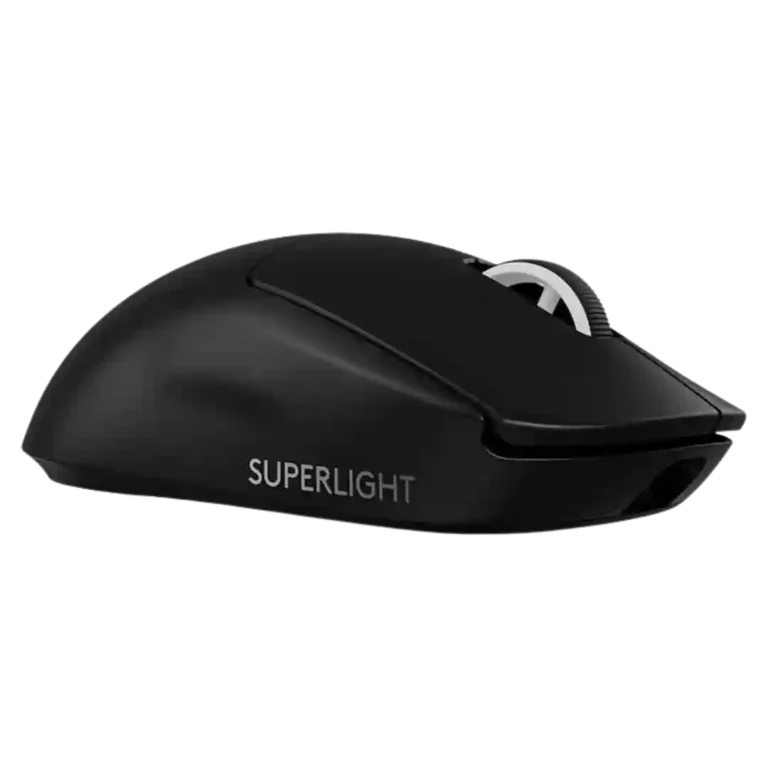
Logitech G PRO X Superlight 2 Review
Bottom Line
Choose the Logitech G PRO X Superlight 2 if you want a light, fast, comfortable FPS mouse with strong battery life. Skip it if you need a cheaper mouse, onboard DPI controls, Bluetooth, RGB, or many MMO buttons.
Best for competitive FPS players and Superlight fans who value a familiar light shape, fast HERO 2 tracking, strong wireless performance, and deep G Hub tuning more than extra buttons or lighting.
Not for buyers who need Bluetooth, RGB, a physical DPI button, lots of MMO controls, a soft braided cable, or the cheapest upgrade path from the original Superlight.
Reviewers broadly describe the Logitech G PRO X Superlight 2 as a refinement of a proven esports mouse rather than a reinvention. Its strongest case is performance: the HERO 2 sensor, high polling options, low wireless latency, light body, and familiar shape repeatedly earn praise in FPS use. The tradeoff is that Logitech keeps the design very minimal. Several reviewers like the no-frills focus, but the lack of a dedicated DPI button, Bluetooth, RGB, and richer side-button setup makes the price feel high for anyone outside competitive play. Switch feel is also polarizing: many praise the tactile Lightforce clicks, while some find them heavier than ideal for spam-clicking.
Compared in Reviews
Products reviewers directly compared with this model, grouped into quick takeaways.
- Compared: weight and software Can Buy or Not described the Superlight 2 as heavier than the cheaper Harpe Ace but stronger on software.
- More expensive: value and ultralight wireless benefit PCMag argued many gamers could get similar ultralight benefit from the much cheaper HyperX option.
Feature Scorecards
Pros
-
Wireless performance is consistently strong, with LIGHTSPEED, 2.4GHz, and no-falter wireless behavior earning praise.
-
Tracking accuracy is one of the strongest consensus areas, with reviewers repeatedly calling aim, sensor response, and high-DPI control precise.
-
Wireless latency is strongly praised, with reviewers reporting no lag, 0.5ms latency claims, and responsive wireless play.
-
Motion consistency is strong overall, with reviewers noting no smoothing/filtering, smooth implementation, consistent aiming, and flawless 2K polling.
-
Connection stability is positive in the reviews that discuss it, with no connectivity issues and perfect tracking reported.
-
Macro support is confirmed through G Hub, including an easy-to-use macro creation tool.
-
Sensor performance is a major strength, with HERO 2 repeatedly praised for speed, accuracy, DPI range, and smooth implementation.
-
Left and right click quality is praised in several reviews for crisp, tactile Lightforce clicks, though feel depends on click-weight preference.
-
The DPI ceiling is very high, ranging from 32,000 DPI in many reviews to 44,000 CPI/DPI in updated-firmware coverage.
-
FPS suitability is one of the clearest strengths, with many reviewers calling it ideal for competitive shooters and quick aim correction.
-
Button responsiveness is generally strong thanks to Lightforce switches and low-latency input, though click weight is not universally loved.
-
Build quality earns strong marks for a rigid, creak-free shell that keeps weight low without honeycomb cutouts or obvious flex.
-
Onboard memory is a clear strength, with multiple reviews noting saved settings or up to five onboard profiles.
-
Switch durability is a strength because optical-mechanical switches are tied to reduced double-click risk, durability, and long actuation ratings.
-
Durability evidence centers on optical-mechanical switches, reduced double-click risk, and rated actuation durability rather than long multi-year testing.
-
Long-session comfort is positive where discussed, helped by low weight, low fatigue, and a comfortable speed-focused shape.
-
Software stability has limited but positive evidence, with one review specifically calling G Hub's interface stable.
-
Weight is a clear strength, with most reviews placing the mouse around 58g to 60g or roughly 2.1 ounces.
-
Charging convenience improves over the original with USB-C, fast charging mentions, and PowerPlay-related accessory options in several reviews.
-
Premium feel is generally positive, with reviewers describing a sturdy matte build and refined feel despite the minimalist look.
-
Lift-off distance control is a strong customization point, with multiple reviews noting low, medium, high, or per-DPI adjustment options.
-
Weight balance is described favorably where reviewers mention it, with the light body still feeling controlled rather than hollow or unstable.
-
Portability is helped by the very low weight and built-in USB receiver storage, making it more travel-friendly than many esports mice.
-
Battery life is consistently praised, commonly around 95 hours at default/lower polling, with high polling modes reducing runtime.
-
Logitech ecosystem integration appears through G Hub, older Logitech device compatibility, community profiles, PowerPlay, and cross-device programming.
-
Ergonomics are generally praised for a safe symmetrical body, light contouring, and broad hand-size compatibility, with some hand-size caveats.
-
Shape comfort is broadly strong because the familiar Superlight shape is safe and comfortable, though some reviewers find it boring or not ideal.
-
Claw grip comfort is broadly positive because the familiar symmetrical shape works well for claw users across many hand sizes.
-
Profile switching is handled through G Hub and onboard/profile presets rather than dedicated physical profile buttons.
-
Materials are described as matte, grippy, durable-feeling plastic that stays solid despite the ultralight construction.
-
Polling rate is heavily covered and generally strong, from 2,000Hz in many reviews to 4,000Hz or 8,000Hz in updated coverage.
-
Reviews describe the mouse as relying on low-latency 2.4GHz wireless via a USB receiver or dongle, rather than Bluetooth.
-
Fingertip grip comfort is mostly positive, though a few reviewers prefer flatter or smaller shapes for purer fingertip use.
-
Palm grip comfort is positive for many reviewers, especially with the safe hump and familiar shape, though one review says palm players may prefer elsewhere.
-
Button customization is available through G Hub, including remapping, G-Shift, DPI functions, app-linked settings, and other assignments.
-
Acceleration specs are presented as high-end and stable, with 40G to 88G figures and smooth acceleration noted in game use.
-
Software usability is mixed: several reviewers praise G Hub customization and navigation, while others find it convoluted or frustrating.
-
Drag clicking is only directly mentioned once, where the reviewer says the coating and click setup can support it.
-
Grip texture is generally favorable, with reviewers noting a grippy matte coating and included tape for users who want more traction.
-
Switch feel is polarizing: many love the tactile, crisp Lightforce clicks, while others find them heavier or worse for spam clicking.
-
PowerPlay and charging-mat compatibility are repeatedly mentioned, though accessory costs and compatibility caveats keep it from being universal praise.
-
Cross-platform compatibility is mainly Windows and macOS, with G Hub support on both and Windows 10/11 explicitly mentioned.
-
Click latency is mostly praised, especially in optical mode, though one measurement-focused reviewer found it less impressive than some competitors.
-
Click noise is mixed: some like the bassier or clicky sound, while others call the clicks loud or high-pitched.
-
Programmable buttons are present but limited in count, with five programmable buttons cited and remapping available in software.
-
Glide is mixed: PTFE feet and light weight help smooth movement, but several reviewers dislike the stock skates or find them slow.
-
Surface compatibility is positive overall but not flawless, with good performance across surfaces and surface modes, yet rough or soft pads can expose skate issues.
-
Weight tuning is limited to small puck-related changes rather than true adjustable weights.
-
Value for money is mixed: reviewers praise top-tier performance but repeatedly question the premium price and upgrade value from the original.
Cons
-
Scroll wheel quality is mixed, ranging from precise and workable to stiff, mushy, smoother than before, or less tactile.
-
Side button quality is the most repeated control weakness, often described as mushy, unchanged, or less tactile than the main clicks.
-
Handedness is limited: the shape is symmetrical or ambidextrous in form, but left-side thumb buttons make it effectively right-hand focused.
-
MOBA suitability is mixed to weak in the one direct mention, because stiffer clicks can be worse for spam-clicking games.
-
Cable feedback is mixed to negative: USB-C is welcomed, but reviewers criticize the rubber cable and wish it were softer or braided.
-
MMO suitability is weak because reviewers note the mouse has only a handful of buttons and lacks the button count MMO players may expect.
-
Skate durability and stock skate quality draw repeated criticism, including thin feet, compatibility changes, and recommendations for aftermarket skates.
-
RGB features are intentionally absent; reviewers usually treat this as a battery and weight tradeoff rather than a surprise.
-
Bluetooth support is explicitly absent; reviewers frame the mouse as a performance-focused 2.4GHz wireless device instead.
-
Tilt gesture controls are not supported in the evidence; the only direct mention says tilt support is missing.
Compared With Category Average
Compared with other Gaming Mouse, this product is above average in weight tuning, software stability, below average in Bluetooth support, tilt gesture controls, RGB features.
| Attribute | This product | Category average | Difference |
|---|---|---|---|
| Bluetooth support | 1.0 | 3.3 | -2.3 |
| tilt gesture controls | 1.0 | 2.6 | -1.6 |
| weight tuning | 3.7 | 2.4 | +1.3 |
| RGB features | 2.0 | 3.1 | -1.1 |
| software stability | 4.5 | 3.3 | +1.2 |
| skate durability | 2.6 | 3.6 | -1.0 |
| MOBA gaming suitability | 2.8 | 3.9 | -1.1 |
| cable flexibility | 2.7 | 3.6 | -0.9 |
FAQ
Is the Logitech G PRO X Superlight 2 good for FPS gaming?
Yes. Reviewers repeatedly describe it as especially strong for FPS because of its light weight, precise HERO 2 sensor, fast polling, and responsive clicks.
Is it worth upgrading from the original Superlight?
The reviews are mixed. USB-C, better sensor specs, new switches, and higher polling help, but several reviewers say the upgrade is minor if the original still works well.
Does it have Bluetooth?
No. Reviewers explicitly note that it relies on low-latency 2.4GHz wireless rather than Bluetooth.
Does it have a DPI button?
No dedicated DPI button is built into the mouse. DPI changes are handled in G Hub or by remapping one of the limited buttons.
How is the battery life?
Battery life is a strength, with many reviews citing up to about 95 hours. Higher polling rates and optical-only modes can reduce that runtime.
Are the clicks light?
Not always. Many reviewers like the crisp tactile Lightforce switches, but several say the clicks feel heavier than the original and are less ideal for spam-clicking.
What are the main drawbacks?
The most repeated drawbacks are the high price, missing physical DPI switch, no Bluetooth or RGB, mixed side buttons, rubber cable, and stock skates that some reviewers dislike.
Consider This Instead
If you want better Bluetooth support
Choose Razer Basilisk V3 Pro 35K. It scores 5.0 vs 1.0 for Bluetooth support, with a 4.5 overall score.
If you want better tilt gesture controls
Choose Turtle Beach Kone II. It scores 4.6 vs 1.0 for tilt gesture controls, with a 4.2 overall score.
If you want better RGB features
Choose Razer Cobra Pro. It scores 4.6 vs 2.0 for RGB features, with a 4.0 overall score.
If you want better cable flexibility
Choose ASUS ROG Harpe Ace Mini. It scores 4.8 vs 2.7 for cable flexibility, with a 4.4 overall score.
Overall Top Gaming Mouse Alternatives
Best for a 47g, high-performance 8K wireless mouse with excellent shape, skates, clicks, and web controls. Skip it if stiff side buttons, shorter high-polling battery life, or app/cable quirks would...
Pros: Accuracy and tracking precision, sensor performance
Cons: cable flexibility
Choose it if you want a comfortable, feature-rich wireless mouse for mixed gaming and productivity. Skip it if you need ultralight FPS speed, left-handed support, or better value than discounted...
Pros: programmable buttons, Bluetooth support
Cons: handedness options, firmware reliability
Good if you want an ultra-light esports mouse with 8K wireless, precise tracking, and web setup. Skip it if you need MMO buttons, onboard memory, large-hand palm support, or the...
Pros: polling rate, click latency
Cons: onboard memory, tilt gesture controls
Good if you want ergonomic wireless gaming with hot-swappable batteries and strong tuning. Skip it if price, dock clutter, or short 8K battery life matters most.
Pros: switch durability, DPI range
Cons: grip texture, portability