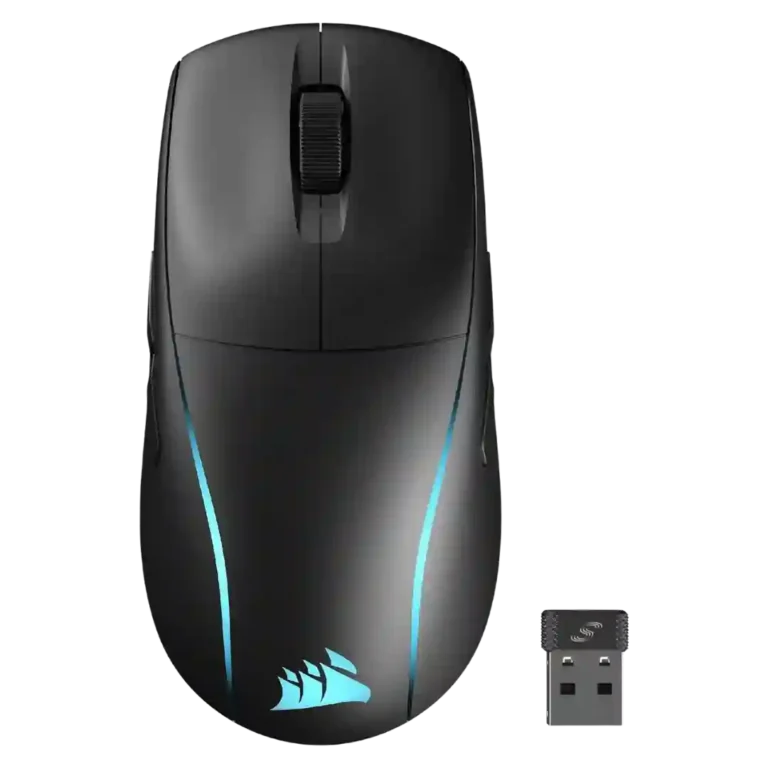
- Older model: ambidextrous support and DPI switch The M75 Wireless is framed as fixing the Air model's missing ambidextrous support and DPI switch.
- Similar: shape and weight The M75 Wireless is described as the same shape as the M75 Air but heavier with added RGB and magnetic buttons.
- Alternative: ultra-light feel The M75 Air is presented as the lighter alternative for users who do not need RGB or ambidextrous extras.
Corsair M75 Wireless Review
Bottom Line
Choose the Corsair M75 Wireless if you want a true ambidextrous wireless mouse with strong battery life and precise tracking. Skip it if you need ultralight speed, more MMO buttons, or a premium-feeling side-button/wheel setup.
Best for left-handed gamers, shared gaming setups, and palm or claw grip users who want accurate wireless tracking, long battery life, and customizable side buttons.
Not for ultralight esports purists, fingertip grip users, or MMO players who need more buttons and a more premium-feeling wheel and side-button setup.
Reviewers frame the Corsair M75 Wireless as a capable all-round gaming mouse whose biggest advantage is genuine ambidextrous use: buttons on both sides, swappable caps, and left-handed software modes. Its Marksman sensor, quick optical switches, stable 2.4GHz wireless, and long battery life are repeatedly praised, and several reviewers found the shape comfortable for palm or claw grips. The tradeoff is that its added features make it heavier than the M75 Air and less ideal for pure esports speed. Side buttons and the wheel also draw repeated criticism for being low, loose, stiff, or not premium enough, while the price feels uneven against lighter or cheaper rivals.
Compared in Reviews
Products reviewers directly compared with this model, grouped into quick takeaways.
- Better: speed, weight, and gaming feel The reviewer says Razer's DeathAdder V3 Pro costs more but feels lighter, faster, and better for gaming.
- Better: polling rate and value The reviewer says Razer's Viper V3 Hyperspeed beats the M75 Wireless on base performance and high polling support.
Feature Scorecards
Pros
-
Motion consistency is strong in the reviews that addressed it, with praise for predictable response and no awkward stuttering.
-
Connection stability receives direct positive evidence from one review that reported no lag, connectivity, or latency issues.
-
Click latency is a major positive, with reviews praising instant registration, optical-switch speed, and very low measured or perceived latency.
-
Handedness support is the standout consensus strength, with many reviews highlighting true ambidextrous use and left-handed side buttons.
-
Accuracy is a clear strength, with reviewers describing precise aiming, reliable tracking, and confident small adjustments in shooters.
-
Switch durability is a strength, with multiple reviews citing optical switches rated for 100 million clicks.
-
The Marksman sensor is repeatedly praised as reliable, accurate, and fast enough for gaming, even where reviewers criticize weight or value.
-
Battery life is one of the strongest points, with many reviewers reporting long real-world use and validating Corsair's high estimates.
-
Button responsiveness is rated highly overall, with reviewers reporting quick, responsive clicks and few or no missed inputs.
-
Macro support is clearly available through iCUE, with reviews noting macro creation and command assignment options.
-
The 26K DPI Marksman sensor and multi-stage DPI controls are consistently documented, giving the mouse a strong sensitivity range.
-
Claw grip support is positive overall, with multiple reviewers saying the shape suits claw grip or works well across palm and claw styles.
-
Customization is a major strength thanks to swappable side buttons, remappable controls, handedness modes, and software-based assignments.
-
Reviewers consistently identify 2.4GHz/Slipstream as a core wireless mode and generally treat it as the fastest or gaming-focused connection.
-
Long-session comfort is positive where reviewers report low fatigue or comfort during extended gaming sessions.
-
Portability is helped by onboard dongle storage, Bluetooth, and travel-friendly receiver handling.
-
Palm grip comfort is broadly positive, especially due to the raised rear hump and hand-filling shape.
-
Charging is generally convenient through USB-C, with one review praising a quick full charge and others noting practical cable or port access.
-
Lift-off distance receives limited but positive support through iCUE adjustment options and reviewer testing of low/medium/high settings.
-
Cross-platform compatibility is supported by iCUE being available on Mac and Windows, though customization limits appear in Bluetooth mode.
-
Ecosystem integration is supported through Corsair iCUE lighting-link syncing across multiple Corsair devices.
-
Firmware reliability has limited direct evidence, with one review describing seamless firmware updates through iCUE.
-
Bluetooth is widely noted as part of the mouse's three-way connectivity and is valued mainly for longer battery life and multi-device flexibility.
-
Glide is generally praised because of the PTFE feet, though some reviewers say weight or pad choice can hold it back.
-
Software usability is generally good: reviewers call iCUE easy, clean, and capable, though some mention learning curves or missing features.
-
Shape comfort is mostly positive for palm and claw users, though a few reviewers disliked the grip feel or found the body too large.
-
Wireless latency is usually praised as low, though one review's testing found update-time spikes.
-
Materials quality is generally respectable for plastic, with reviewers saying the shell feels tough or does not feel cheap.
-
Onboard memory is useful but limited, with reviewers noting saved settings and usually just one onboard profile.
-
Surface compatibility is positive overall through surface calibration and reports of tracking across many surfaces.
-
Ergonomics are mostly positive for larger or well-matched hands, though one review says smaller hands may struggle with the large shape.
-
Durability over time has limited but positive evidence from a reviewer who found the coating still looked new after days of heavy use.
-
Software stability has limited evidence, with one reviewer specifically saying the concern was not iCUE crashing.
-
Left and right click quality is mostly good, especially where reviewers praise responsiveness, though one review found the click feel cheap or off.
-
Wireless performance is generally responsive and dependable, but one review found Corsair's wireless less flawless than Razer's.
-
The sensor specs support high acceleration, but one review flags iCUE unexpectedly enabling Windows mouse acceleration, making control less universally clean.
-
Switch feel is mixed-positive, with reviewers praising tactile feedback but one reviewer saying the optical click feel seemed cheap.
-
Build quality lands in the middle: some reviews call the shell solid or excellent, while others criticize cheap-feeling buttons or premium shortcomings.
-
FPS suitability is mixed-positive: the mouse tracks well and works for casual shooters, but weight and speed concerns limit serious esports appeal.
-
Programmable-button support is decent but not exceptional, with enough buttons for general use but not enough for button-heavy gamers.
-
Skate durability has limited evidence, but reviewers note PTFE feet and one reviewer says the feet did not collect dust or discolor.
-
Cable feedback is mixed: some reviewers like the included braided cable, while others find it less flexible and more drag-prone than gaming-focused cables.
-
Scroll wheel quality is mixed, praised for tactile steps by some but criticized as stiff, sluggish, or loose by others.
Cons
-
Polling rate is mixed: reviewers recognize 1,000Hz to 2,000Hz support, but several compare it unfavorably to newer 4K or 8KHz rivals.
-
RGB is divisive: reviewers like the zones and desk appeal, but several say placement is subtle, hidden, or not worth the battery cost.
-
MOBA suitability is mixed, with one review saying it is not a macro MOBA mouse and another saying it worked well in League of Legends.
-
Value is sharply mixed: some reviewers find sale prices or left-handed functionality compelling, while others say MSRP is too high.
-
Grip texture is mixed; the matte or smooth coating can feel clean, but several reviewers wanted more grip or comfort shaping.
-
Profile switching is limited: profiles exist, but reviewers wanted more onboard profiles or automatic profile switching.
-
Weight is the main tradeoff: many reviews note 89g as usable but heavier than the M75 Air and not truly ultralight.
-
Side button quality is the most repeated hardware complaint, ranging from easy swapping to low, loose, mushy, or hard-to-hit buttons.
-
MMO suitability is limited: the mouse can handle general play, but several reviews say it lacks enough buttons for MMO-heavy users.
-
Premium feel is a recurring weakness, with reviewers saying the wheel, side buttons, or overall feel fall short of the price.
-
Weight balance is divisive: one reviewer liked the centered feel, while others felt the mass distribution made the mouse cumbersome or rear-heavy.
-
Click noise is a drawback; several reviewers describe the clicks as louder, hollow, or robust rather than quiet.
-
Fingertip comfort is weak: reviewers found the larger, heavier body unwieldy or stiff for fingertip use.
-
Dust resistance is a weakness in the only direct evidence, where a reviewer notes a gap that can collect dust.
-
Tilt controls are not supported in the reviewed evidence; one reviewer explicitly notes there are no tilt controls.
Compared With Category Average
Compared with other Gaming Mouse, this product is above average in handedness options, Bluetooth support, below average in tilt gesture controls, balance and weight distribution, fingertip grip comfort.
| Attribute | This product | Category average | Difference |
|---|---|---|---|
| handedness options | 4.7 | 2.7 | +1.9 |
| tilt gesture controls | 1.0 | 2.6 | -1.6 |
| balance and weight distribution | 2.7 | 4.1 | -1.4 |
| fingertip grip comfort | 2.4 | 3.8 | -1.4 |
| premium feel | 2.8 | 4.1 | -1.3 |
| weight | 3.2 | 4.1 | -1.0 |
| water and dust resistance | 2.2 | 3.4 | -1.2 |
| Bluetooth support | 4.2 | 3.2 | +1.0 |
FAQ
Is the Corsair M75 Wireless good for left-handed gamers?
Yes. Reviewers repeatedly highlight its true ambidextrous layout, with side buttons on both sides, swappable caps, and software modes for left-handed use.
Is it a good FPS mouse?
It is good for casual and mixed FPS play because reviewers praised its tracking, responsiveness, and low-latency wireless. It is less ideal for pure esports players who want a much lighter mouse or higher polling-rate headroom.
How good is the battery life?
Battery life is one of the clearest strengths. Reviewers cite long use between charges, with several saying the mouse lasted about a week or longer depending on RGB and connection mode.
Are the side buttons useful?
They are useful for ambidextrous control and customization, but they are also the most common hardware complaint. Reviews describe them as swappable and versatile, yet sometimes low, loose, fiddly, or hard to press in-game.
Does it support Bluetooth and 2.4GHz wireless?
Yes. Reviews consistently list 2.4GHz Slipstream wireless, Bluetooth, and wired USB-C as connection options, with 2.4GHz treated as the gaming-focused mode and Bluetooth as the battery-friendly mode.
Is the Corsair M75 Wireless worth the price?
Value depends heavily on whether you need the true ambidextrous design. Reviewers are more positive when it is on sale or serving left-handed/shared setups, but more critical at full price against lighter or cheaper rivals.
Consider This Instead
If you want better tilt gesture controls
Choose Logitech G502 X Wired. It scores 4.8 vs 1.0 for tilt gesture controls, with a 4.1 overall score.
If you want better weight
Choose ASUS ROG Keris II Ace. It scores 5.0 vs 3.2 for weight, with a 4.2 overall score.
If you want better water and dust resistance
Choose SteelSeries Aerox 3 Wireless. It scores 4.6 vs 2.2 for water and dust resistance, with a 4.0 overall score.
If you want better balance and weight distribution
Choose Turtle Beach Burst II Air. It scores 5.0 vs 2.7 for balance and weight distribution, with a 4.1 overall score.
Overall Top Gaming Mouse Alternatives
Best for a 47g, high-performance 8K wireless mouse with excellent shape, skates, clicks, and web controls. Skip it if stiff side buttons, shorter high-polling battery life, or app/cable quirks would...
Pros: Accuracy and tracking precision, sensor performance
Cons: cable flexibility
Choose it if you want a comfortable, feature-rich wireless mouse for mixed gaming and productivity. Skip it if you need ultralight FPS speed, left-handed support, or better value than discounted...
Pros: programmable buttons, Bluetooth support
Cons: handedness options, firmware reliability
Good if you want an ultra-light esports mouse with 8K wireless, precise tracking, and web setup. Skip it if you need MMO buttons, onboard memory, large-hand palm support, or the...
Pros: polling rate, click latency
Cons: onboard memory, tilt gesture controls
Good if you want ergonomic wireless gaming with hot-swappable batteries and strong tuning. Skip it if price, dock clutter, or short 8K battery life matters most.
Pros: switch durability, DPI range
Cons: grip texture, portability