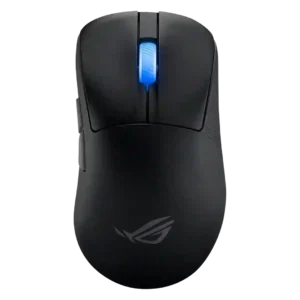
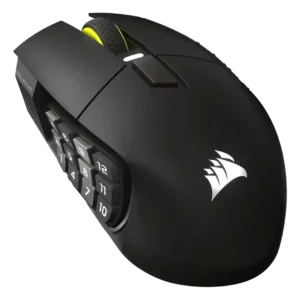
Compare ASUS ROG Keris II Ace vs Corsair Scimitar Elite Wireless SE

P1 ASUS ROG Keris II Ace
P2 Corsair Scimitar Elite Wireless SE

Comparison Takeaways

ASUS ROG Keris II Ace

Where It Has the Edge

  • FPS gaming suitability is 4.7 vs 3.2. FPS suitability is excellent, with reviewers repeatedly tying the mouse to esports, Valorant, Counter-Strike, and high-speed competitive aim.
  • cable flexibility is 4.3 vs 2.8. The included cable is usually described as flexible, light, or low-drag, though one reviewer found it somewhat stiff...
  • weight is 5.0 vs 3.5. Weight is a clear strength, with nearly every review emphasizing the 54g or 1.9-ounce design as exceptionally light...
  • durability over time is 4.7 vs 3.4. Durability evidence centers on optical switches, double-click resistance, consistent performance over time, and serviceability such as hot-swappable switches.

Corsair Scimitar Elite Wireless SE

Where It Has the Edge

  • MMO gaming suitability is 4.7 vs 3.2. MMO gaming suitability is the strongest use case, supported by the 12-button side grid, adjustable placement, macros, and...
  • grip texture is 4.6 vs 3.6. Grip texture is a strength, especially the rubberized right-side rest and textured side buttons that help control and...
  • motion consistency is 4.7 vs 3.8. Motion consistency is positive where tested, with reviewers describing smooth and consistent movement or reliable performance in varied...
  • profile switching is 4.6 vs 3.8. Profile switching is a strength, with hardware profile buttons, onboard profiles, app-specific assignments, and Stream Deck profile switching...
Average score
Product 1: ASUS ROG Keris II Ace
4.2
Product 2: Corsair Scimitar Elite Wireless SE
4.1
2.4GHz connectivity
Product 1: ASUS ROG Keris II Ace
4.6

Reviewers consistently find the tri-mode setup useful, with 2.4GHz wireless treated as the main gaming connection and Bluetooth/USB adding flexibility.

Product 2: Corsair Scimitar Elite Wireless SE
4.6

Reviewers consistently confirm 2.4GHz wireless support through Corsair Slipstream or the USB receiver, usually treating it as the primary gaming connection.

acceleration control
Product 1: ASUS ROG Keris II Ace
4.6

The sensor's 50g acceleration rating is repeatedly cited as part of its top-tier performance spec, with no practical complaints about acceleration handling.

Product 2: Corsair Scimitar Elite Wireless SE
4.3

Acceleration is discussed as part of the sensor specification rather than a separate tuning feature, with multiple reviews citing 50G acceleration capability.

Accuracy and tracking precision
Product 1: ASUS ROG Keris II Ace
4.6

Tracking is one of the strongest consensus wins: reviewers describe precise, smooth, accurate movement across games and surfaces, though one noted very high DPI becomes impractical.

Product 2: Corsair Scimitar Elite Wireless SE
4.7

Tracking precision is a clear strength: reviewers repeatedly describe accurate, consistent, and responsive tracking across gaming and productivity use.

balance and weight distribution
Product 1: ASUS ROG Keris II Ace
4.6

Most reviewers praise the balance as centered and easy to control, but one detailed teardown-style review found a slight forward bias.

Product 2: Corsair Scimitar Elite Wireless SE
4.6

Weight distribution is praised by video reviewers who found the 114g body heavier than FPS mice but balanced enough to feel lighter in hand.

battery life
Product 1: ASUS ROG Keris II Ace
4.3

Battery life is generally considered strong at normal wireless settings, though several reviewers note high polling rates and RGB reduce runtime.

Product 2: Corsair Scimitar Elite Wireless SE
4.7

Battery life is one of the strongest consensus points, with reviewers citing up to 150 hours on 2.4GHz and much longer Bluetooth endurance.

Bluetooth support
Product 1: ASUS ROG Keris II Ace
4.5

Bluetooth is a well-liked convenience feature, especially for multi-device and non-gaming use, while reviewers still favor 2.4GHz for competitive play.

Product 2: Corsair Scimitar Elite Wireless SE
4.6

Bluetooth support is widely confirmed and treated as best for productivity, travel, or casual use rather than serious competitive gaming.

build quality
Product 1: ASUS ROG Keris II Ace
4.4

Build quality is mostly praised as rigid and solid for a 54g mouse, with only a few unit-level notes about creaking, rattle, or average feel.

Product 2: Corsair Scimitar Elite Wireless SE
4.5

Build quality is generally strong, though one review flags the dongle door and long-term plastic wear as caveats.

button customization
Product 1: ASUS ROG Keris II Ace
4.3

Button remapping and control customization are well supported through Armoury Crate or onboard controls, including DPI, polling, and command assignment.

Product 2: Corsair Scimitar Elite Wireless SE
4.7

Customization is a major selling point, with remappable buttons, Stream Deck actions, DPI changes, RGB, and profile-based layouts repeatedly mentioned.

button responsiveness
Product 1: ASUS ROG Keris II Ace
4.6

Button responsiveness is broadly positive, with reviewers calling clicks snappy, low-latency, precise, or consistent, even when switch feel is debated.

Product 2: Corsair Scimitar Elite Wireless SE
4.7

Button responsiveness is rated highly overall, especially for the side panel and MMO use, with reviewers noting quick, clicky, and reliable activation.

cable flexibility
Product 1: ASUS ROG Keris II Ace
4.3

The included cable is usually described as flexible, light, or low-drag, though one reviewer found it somewhat stiff and another called it only medium.

Product 2: Corsair Scimitar Elite Wireless SE
2.8

The included cable receives mixed-to-negative comments: some find it fairly stiff, while others describe it as lightweight or serviceable for charging.

charging convenience
Product 1: ASUS ROG Keris II Ace
4.3

Charging convenience is positive overall thanks to USB-C, an included cable, and a universally sized port, though charging was not a major focus of most reviews.

Product 2: Corsair Scimitar Elite Wireless SE
4.6

Charging is convenient overall because the mouse uses USB-C, can be used while charging, and recharges quickly in about 90 minutes to 2 hours.

claw grip comfort
Product 1: ASUS ROG Keris II Ace
4.2

Claw comfort is generally good for relaxed claw users and smaller-to-medium hands, but not every reviewer found the shape ideal for aggressive or large-hand claw use.

Product 2: Corsair Scimitar Elite Wireless SE
3.1

Claw grip comfort is mixed because the mouse can support claw or flat grips for some users, but its wide shape often pushes users toward palm contact.

click latency
Product 1: ASUS ROG Keris II Ace
4.8

Measured and reported click latency is very low, with reviewers citing roughly 1ms or sub-millisecond behavior depending on mode.

Product 2: Corsair Scimitar Elite Wireless SE
4.8

Click latency is a strength where discussed, with reviewers noting no perceived delay and immediate activation in games.

click noise
Product 1: ASUS ROG Keris II Ace
3.6

Click noise is divisive: some reviewers found it quiet and pleasant, while others said the optical switches are louder, hollow, or not suited to silent-click preferences.

Product 2: Corsair Scimitar Elite Wireless SE
3.7

Click noise is mixed: some reviewers like the audible click, while another finds the optical switches somewhat loud.

connection stability
Product 1: ASUS ROG Keris II Ace
4.7

Connection stability is a major strength, with reviewers repeatedly reporting no dropouts, no stutters, no hiccups, and stable high-polling wireless use.

Product 2: Corsair Scimitar Elite Wireless SE
4.7

Connection stability is consistently positive, with reviewers reporting no lag, dropout, interference, or slow wake-up over wireless.

cross-platform compatibility
Product 1: ASUS ROG Keris II Ace
4.6

Multi-device support is a meaningful advantage because Bluetooth can pair with several devices and the mouse is described as useful across PC, laptop, console, or travel setups.

Product 2: Corsair Scimitar Elite Wireless SE
4.4

Cross-platform evidence is limited but positive, especially from reviews noting Mac support and PC/Mac connectivity.

debounce customization
Product 1: ASUS ROG Keris II Ace
2.2

Debounce customization is weak because the available evidence says there is no debounce setting or that debounce is not adjustable.

Product 2: Corsair Scimitar Elite Wireless SE
No score yet
dock compatibility
Product 1: ASUS ROG Keris II Ace
No score yet
Product 2: Corsair Scimitar Elite Wireless SE
1.5

Dock compatibility is weak because the mouse has no wireless charging option or dock, even though USB-C charging is convenient.

DPI range
Product 1: ASUS ROG Keris II Ace
5.0

The 42,000 DPI ceiling is repeatedly highlighted as class-leading, though reviewers often note most players will never use the upper range.

Product 2: Corsair Scimitar Elite Wireless SE
4.6

DPI range is very strong on paper and in software, with many reviews citing the 33,000 DPI ceiling and adjustable DPI stages.

durability over time
Product 1: ASUS ROG Keris II Ace
4.7

Durability evidence centers on optical switches, double-click resistance, consistent performance over time, and serviceability such as hot-swappable switches.

Product 2: Corsair Scimitar Elite Wireless SE
3.4

Durability evidence is mixed: switch ratings and build quality are positive, but reviewers mention older scroll-wheel issues and plastic wear concerns.

ecosystem integration
Product 1: ASUS ROG Keris II Ace
4.4

Ecosystem integration is positive through Aura Sync, Windows Dynamic Lighting mentions, and the ROG Omni Receiver's ability to pair with other ROG peripherals.

Product 2: Corsair Scimitar Elite Wireless SE
4.8

Ecosystem integration is one of the product’s defining advantages, especially through Elgato Stream Deck, Virtual Stream Deck, iCUE, and broader Corsair integrations.

ergonomic design
Product 1: ASUS ROG Keris II Ace
4.6

The right-handed ergonomic design is a core strength, frequently described as comfortable, esports-focused, and well-shaped for palm or relaxed claw use.

Product 2: Corsair Scimitar Elite Wireless SE
4.3

Ergonomics are generally good for palm-oriented MMO use, but reviewers disagree on the side-panel curve, width, and fit for smaller hands.

fingertip grip comfort
Product 1: ASUS ROG Keris II Ace
2.8

Fingertip comfort is mixed: a few reviewers could use it or liked the control, but several said the ergonomic shell is awkward or not recommended for fingertip.

Product 2: Corsair Scimitar Elite Wireless SE
No score yet
firmware reliability
Product 1: ASUS ROG Keris II Ace
2.8

Firmware reliability is a minor concern because at least one review described updates as inconvenient and limiting software reconfiguration until completed.

Product 2: Corsair Scimitar Elite Wireless SE
1.6

Firmware reliability has a notable negative data point from Tom’s Hardware, where the final firmware update failed in iCUE.

FPS gaming suitability
Product 1: ASUS ROG Keris II Ace
4.7

FPS suitability is excellent, with reviewers repeatedly tying the mouse to esports, Valorant, Counter-Strike, and high-speed competitive aim.

Product 2: Corsair Scimitar Elite Wireless SE
3.2

FPS suitability is context-dependent: the sensor is capable, but the large, heavy, button-heavy body is not ideal for fast flicks or esports play.

glide smoothness
Product 1: ASUS ROG Keris II Ace
4.5

Glide is consistently praised thanks to smooth PTFE feet, spare feet, and strong performance on cloth, glass, and other surfaces.

Product 2: Corsair Scimitar Elite Wireless SE
4.5

Glide is generally smooth and easy across pads and desks, though one reviewer notes the feet feel slower than FPS-oriented skates.

grip texture
Product 1: ASUS ROG Keris II Ace
3.6

Grip texture is the most disputed physical trait: some like the ridges or roughened surface, while others call the coating slippery and dependent on grip tape.

Product 2: Corsair Scimitar Elite Wireless SE
4.6

Grip texture is a strength, especially the rubberized right-side rest and textured side buttons that help control and orientation.

handedness options
Product 1: ASUS ROG Keris II Ace
2.3

Handedness is a clear limitation because the shape is right-handed, with left-handed and ambidextrous users directed elsewhere.

Product 2: Corsair Scimitar Elite Wireless SE
2.0

Handedness is limited because the available review evidence describes it as a right-handed mouse without left-handed options.

left and right click quality
Product 1: ASUS ROG Keris II Ace
4.4

Left/right click quality is generally strong, with PBT or optical construction and consistent feel praised, though a few reviewers criticized travel or hollow feel.

Product 2: Corsair Scimitar Elite Wireless SE
4.5

Left and right clicks are mostly praised for crispness, feedback, and responsiveness, though some reviewers find them slightly mushy or inconsistent.

lift-off distance
Product 1: ASUS ROG Keris II Ace
3.9

Lift-off distance is adjustable but not universally loved; reviewers liked having the control, while some found the low/high choices too limited.

Product 2: Corsair Scimitar Elite Wireless SE
4.0

Lift-off distance is only lightly covered through iCUE performance settings rather than detailed testing, so support is limited.

long-session comfort
Product 1: ASUS ROG Keris II Ace
4.3

Long-session comfort is mostly strong due to low weight and ergonomic support, though some hand sizes reported cramps or fit issues.

Product 2: Corsair Scimitar Elite Wireless SE
4.4

Long-session comfort is strong for palm-oriented users, with several reviewers reporting low fatigue and comfortable extended gaming or work sessions.

macro support
Product 1: ASUS ROG Keris II Ace
4.2

Macro support exists through Armoury Crate, but it is not a headline strength and onboard macro behavior is more limited.

Product 2: Corsair Scimitar Elite Wireless SE
4.8

Macro support is a core strength, with reviewers using iCUE, Stream Deck, and onboard profiles for shortcuts, game actions, and productivity commands.

materials quality
Product 1: ASUS ROG Keris II Ace
4.3

Materials quality is mixed-positive: the nylon/PBT construction supports low weight and rigidity, but coating feel and premium texture divide reviewers.

Product 2: Corsair Scimitar Elite Wireless SE
4.0

Materials quality is mostly positive, with matte plastic, rubber grips, and braided cable mentioned, though one reviewer questions plastic aging.

MMO gaming suitability
Product 1: ASUS ROG Keris II Ace
3.2

Evidence for MMO use is limited but mildly positive where reviewers mention Final Fantasy XIV, Diablo IV, or mapping side buttons for raids; it is not an MMO-first mouse.

Product 2: Corsair Scimitar Elite Wireless SE
4.7

MMO gaming suitability is the strongest use case, supported by the 12-button side grid, adjustable placement, macros, and repeated MMO-specific praise.

MOBA gaming suitability
Product 1: ASUS ROG Keris II Ace
No score yet
Product 2: Corsair Scimitar Elite Wireless SE
4.7

MOBA gaming suitability is also positive, with reviewers grouping the mouse with MMO/MOBA needs and one reporting good MOBA use in practice.

motion consistency
Product 1: ASUS ROG Keris II Ace
3.8

Motion consistency is strong in practice through smooth high-polling movement and stable tracking, but MotionSync and ripple controls are not fully configurable.

Product 2: Corsair Scimitar Elite Wireless SE
4.7

Motion consistency is positive where tested, with reviewers describing smooth and consistent movement or reliable performance in varied scenarios.

onboard memory
Product 1: ASUS ROG Keris II Ace
4.3

Onboard memory and onboard controls are meaningful positives, with reviewers citing hardware profiles, on-device controls, and software-free settings changes.

Product 2: Corsair Scimitar Elite Wireless SE
4.4

Onboard memory is a strength, with reviews citing three to five stored profiles and settings that can persist without iCUE running.

palm grip comfort
Product 1: ASUS ROG Keris II Ace
4.4

Palm grip comfort is a major strength for small-to-medium or relaxed palm users, though very large hands may prefer bigger ergonomic mice.

Product 2: Corsair Scimitar Elite Wireless SE
4.4

Palm grip comfort is strong because the body is large, supportive, and repeatedly described as designed for palm grip users.

polling rate
Product 1: ASUS ROG Keris II Ace
4.7

Polling rate support is one of the main selling points: 4,000Hz wireless and 8,000Hz wired are repeatedly highlighted, but 8,000Hz is not wireless.

Product 2: Corsair Scimitar Elite Wireless SE
4.2

Polling rate support is adequate to strong, with 1000Hz widely cited and some reviews noting 2000Hz over 2.4GHz.

portability
Product 1: ASUS ROG Keris II Ace
4.3

Portability is helped by Bluetooth, dongle storage, multi-device use, and travel-friendly wireless operation, even if the booster setup can be bulky.

Product 2: Corsair Scimitar Elite Wireless SE
4.5

Portability is helped by dongle storage, Bluetooth, and laptop/tablet use, though the large mouse body itself is not especially travel-focused.

premium feel
Product 1: ASUS ROG Keris II Ace
4.1

Premium feel is mixed: many call the mouse solid or feature-rich, but coating, price, and button feel stop some reviewers from calling it universally premium.

Product 2: Corsair Scimitar Elite Wireless SE
4.6

Premium feel is supported by reviewers describing the mouse as premium, polished, or high-end, especially for MMO users.

profile switching
Product 1: ASUS ROG Keris II Ace
3.8

Profile switching is supported through profiles and button combinations, but the underside DPI/profile button placement is sometimes criticized.

Product 2: Corsair Scimitar Elite Wireless SE
4.6

Profile switching is a strength, with hardware profile buttons, onboard profiles, app-specific assignments, and Stream Deck profile switching all discussed.

programmable buttons
Product 1: ASUS ROG Keris II Ace
4.4

Programmable button coverage is solid for an FPS mouse, typically five or six physical buttons plus scroll directions through software.

Product 2: Corsair Scimitar Elite Wireless SE
4.7

Programmable buttons are central to the product, with nearly every review emphasizing 16 total buttons or the 12-button side grid.

RGB features
Product 1: ASUS ROG Keris II Ace
4.2

RGB is limited to the scroll wheel but appreciated because many ultralight esports mice omit lighting entirely; some reviewers dislike the execution.

Product 2: Corsair Scimitar Elite Wireless SE
4.2

RGB features are useful but secondary, with two-zone lighting and side-button illumination discussed more as customization and visibility than spectacle.

scroll wheel quality
Product 1: ASUS ROG Keris II Ace
3.7

Scroll wheel quality is mixed: several reviewers praise tactile, quiet, or smooth behavior, while others report average tactility, light resistance, or overscrolling.

Product 2: Corsair Scimitar Elite Wireless SE
4.0

Scroll wheel quality is mixed: many like the feel and tactility, but several criticize stiffness, lack of tilt, or limited scroll modes.

sensor performance
Product 1: ASUS ROG Keris II Ace
4.7

Sensor performance is a standout strength, with the AimPoint Pro repeatedly described as accurate, high-spec, smooth, and reliable.

Product 2: Corsair Scimitar Elite Wireless SE
4.6

Sensor performance is a clear strength, centered on the Marksman S 33K optical sensor and strong real-world responsiveness.

shape comfort
Product 1: ASUS ROG Keris II Ace
4.5

Shape comfort is broadly positive, especially for small-to-medium ergonomic users, but fit varies by hand size and grip preference.

Product 2: Corsair Scimitar Elite Wireless SE
3.5

Shape comfort is polarized: some find the familiar Scimitar shape solid, while others call it wide, clunky, or restrictive.

side button quality
Product 1: ASUS ROG Keris II Ace
3.8

Side button quality is one of the more mixed areas, with praise for crispness and placement offset by repeated complaints about small size, stiffness, or high placement.

Product 2: Corsair Scimitar Elite Wireless SE
4.3

Side button quality is generally strong thanks to tactile feel, texturing, and adjustability, though learning curve and occasional mushiness/jitter are noted.

skate durability
Product 1: ASUS ROG Keris II Ace
4.4

Skate durability evidence is limited but positive, with one reviewer reporting the stock skates held up well and no dust or grinding on glass.

Product 2: Corsair Scimitar Elite Wireless SE
No score yet
software stability
Product 1: ASUS ROG Keris II Ace
4.0

Software stability is acceptable in the lighter Armoury Crate Gear experience, but broader Armoury Crate concerns remain around bloat and background processes.

Product 2: Corsair Scimitar Elite Wireless SE
3.1

Software stability is mixed-to-negative for iCUE because of bugs, restarts, and update friction, while Stream Deck reliability is viewed more positively.

software usability
Product 1: ASUS ROG Keris II Ace
3.0

Software usability is mixed-to-negative: it exposes deep settings, but many reviewers call Armoury Crate bloated, slow, heavy, or inconvenient.

Product 2: Corsair Scimitar Elite Wireless SE
3.6

Software usability is mixed: reviewers find powerful customization, but iCUE can be unintuitive, clunky, or hard for newcomers.

surface compatibility
Product 1: ASUS ROG Keris II Ace
4.6

Surface compatibility is excellent, with reviewers citing glass tracking, surface calibration, and reliable behavior across mouse pads, tables, and other surfaces.

Product 2: Corsair Scimitar Elite Wireless SE
4.6

Surface compatibility is strong where tested, with tracking on many surfaces and iCUE surface calibration both noted.

switch durability
Product 1: ASUS ROG Keris II Ace
5.0

Switch durability is excellent on paper and in reviewer discussion thanks to ROG optical switches rated for 100 million clicks and reduced double-click risk.

Product 2: Corsair Scimitar Elite Wireless SE
4.4

Switch durability is positive on paper, with optical switches rated at 90 million or 100 million clicks.

switch feel
Product 1: ASUS ROG Keris II Ace
4.0

Switch feel is mixed-positive: many like the crisp optical clicks, but some find them mushy, hollow, heavier, or less satisfying than mechanical alternatives.

Product 2: Corsair Scimitar Elite Wireless SE
3.9

Switch feel is mostly good but not unanimous, with praise for tactile optical clicks and criticism of mushiness or inconsistent feel.

tilt gesture controls
Product 1: ASUS ROG Keris II Ace
No score yet
Product 2: Corsair Scimitar Elite Wireless SE
4.0

Tilt control evidence is conflicting: PCMag says tilt inputs are present, while other reviews say the wheel is not a tilt wheel.

value for money
Product 1: ASUS ROG Keris II Ace
3.8

Value is context-dependent: reviewers agree it is expensive, but several justify the price for competitive FPS users while others recommend cheaper alternatives.

Product 2: Corsair Scimitar Elite Wireless SE
4.2

Value is mixed: reviewers call the price high for casual users but fair or compelling when considering Stream Deck-style functionality and MMO specialization.

weight
Product 1: ASUS ROG Keris II Ace
5.0

Weight is a clear strength, with nearly every review emphasizing the 54g or 1.9-ounce design as exceptionally light for an ergonomic wireless mouse.

Product 2: Corsair Scimitar Elite Wireless SE
3.5

Weight is a tradeoff: around 113-114g is light for an MMO mouse but heavy compared with modern FPS mice.

wireless latency
Product 1: ASUS ROG Keris II Ace
4.7

Wireless latency is treated as excellent over 2.4GHz with high polling, while Bluetooth is repeatedly framed as a convenience mode rather than a competitive mode.

Product 2: Corsair Scimitar Elite Wireless SE
4.6

Wireless latency is consistently strong where tested, with reviewers reporting low-latency 2.4GHz and no noticeable lag.

wireless performance
Product 1: ASUS ROG Keris II Ace
4.8

Wireless performance is excellent overall, with stable 4,000Hz operation, no dropouts, and strong sensor performance frequently reported.

Product 2: Corsair Scimitar Elite Wireless SE
4.6

Wireless performance is broadly strong, with stable 2.4GHz operation, responsive gaming, and no reported dropouts in most reviews.