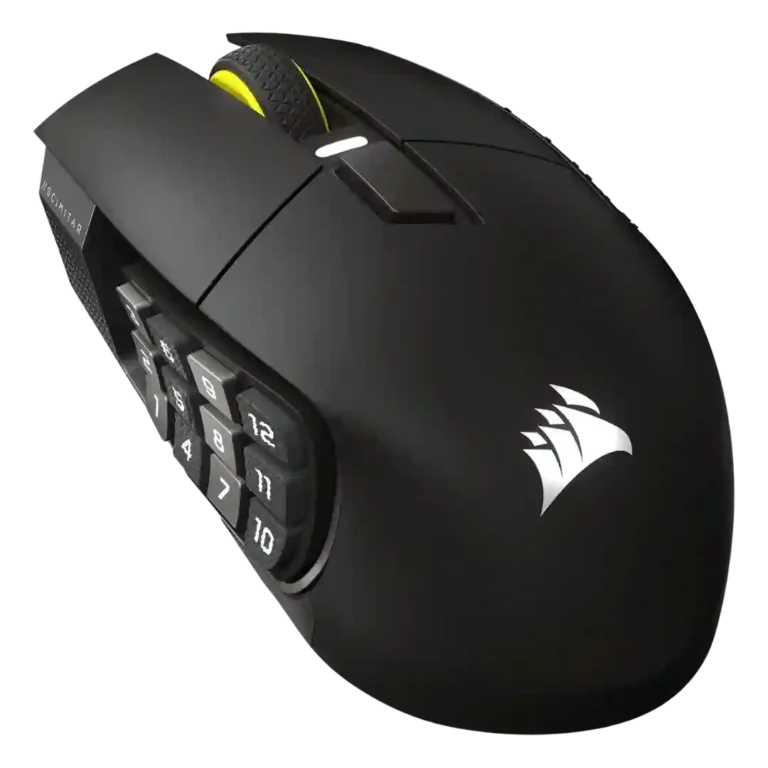
Corsair Scimitar Elite Wireless SE Review
Bottom Line
Choose it for MMO controls, long battery life, and Stream Deck productivity. Skip it if you want a light FPS mouse or dislike large button-heavy shapes.
Best for MMO and MOBA players, streamers, creators, and productivity users who want many thumb-accessible commands, strong battery life, and Stream Deck-style control in one mouse.
Not for competitive FPS players, small-hand users, or anyone who dislikes large palm-grip mice, iCUE setup, or a crowded 12-button thumb grid.
The Corsair Scimitar Elite Wireless SE stands out as a specialized MMO and productivity mouse built around its adjustable 12-button thumb grid, strong wireless performance, long battery life, and Stream Deck integration. Reviews repeatedly praise its accurate sensor, reliable 2.4GHz connection, deep button mapping, and comfortable palm-oriented support for long sessions. The tradeoff is clear: the large, wide shape and 113-114g weight make it less appealing for fast FPS swipes, smaller hands, or users who prefer minimal mice. Software feedback is also mixed, since iCUE is powerful but can feel clunky or unstable. Overall, it is strongest for MMO, MOBA, streaming, editing, and power-user workflows where extra controls matter more than ultralight agility.
What Reviewers Agree On
Across the reviews, the Corsair Scimitar Elite Wireless SE earns its best marks as a purpose-built control hub rather than a simple pointer. The adjustable 12-button side panel is the recurring highlight because it lets users place the thumb grid where it fits their hand, then map game commands, productivity shortcuts, macros, or Stream Deck actions. Reviewers also repeatedly point to strong battery life, stable 2.4GHz wireless, Bluetooth for productivity use, and precise Marksman S 33K sensor performance. For MMO and MOBA players, the extra inputs make ability-heavy games easier to manage; for streamers and creators, the Elgato integration makes the mouse feel like a compact command pad.
The biggest shared caution is physical fit. This is a wide, palm-oriented mouse, and several reviewers say its size, weight, or inward-curved side panel will not suit everyone. It can handle shooters casually because the sensor and wireless link are responsive, but the body is not built for quick flicks, repeated lifting, or ultralight FPS play. Button feel is mostly positive, especially on the thumb grid, but some reviews mention mushier side buttons, inconsistent main-click feel, a stiff or basic scroll wheel, or a learning curve when distinguishing all 12 thumb buttons by touch.
Software is the other mixed area. iCUE and Stream Deck support unlock the mouse’s strongest features, including macros, profiles, lighting, DPI control, and app-specific layouts, but reviewers also describe setup complexity, confusing menu placement, and occasional update problems. The most satisfied buyer is someone who actively wants many physical controls under the thumb and is willing to spend time configuring them. For that audience, the reviews present the Scimitar Elite Wireless SE as a premium, flexible, long-lasting MMO and productivity mouse. For casual users or competitive FPS players, the same features may feel excessive.
Scored Features
Pros
-
Programmable buttons are the central feature, with many reviews citing the 16-button design and 12-button thumb grid.
-
Button customization is a core strength, with iCUE and Stream Deck support enabling remaps, shortcuts, macros, and app-specific assignments across the side buttons and other inputs.
-
Macro support is a major strength, with reviews describing iCUE macros, Stream Deck actions, hotkeys, and multi-step productivity or gaming commands.
-
The DPI range is heavily supported, with multiple reviews citing the 33,000 DPI ceiling and software control over DPI stages.
-
Ecosystem integration is a standout strength, especially the link between Corsair iCUE, Elgato Stream Deck, Virtual Stream Deck, and broader creator workflows.
-
MMO suitability is the product’s strongest use case, with reviews repeatedly calling it an excellent or favorite MMO mouse thanks to its buttons, comfort, and customization.
-
Wireless latency is a strength, with reviewers reporting instantaneous, delay-free, or lag-free wireless use.
-
Battery life was one of the clearest strengths: reviewers cited 150-hour 2.4GHz claims, very long real-world runtime, and 500-hour Bluetooth figures, with only RGB reducing endurance.
-
Connection stability was consistently strong, with reviews reporting no lag, no drops, quick wake behavior, and reliable 2.4GHz operation.
-
Click latency and input delay were viewed positively, with reviewers reporting no noticeable delay and responsive behavior in wireless use.
-
Tracking precision was repeatedly praised, with reviewers reporting accurate, consistent sensor behavior across games, fast inputs, and multiple surfaces.
-
Sensor performance is a clear strength, centered on the Marksman S 33K optical sensor and its high DPI, speed, and reliable tracking.
-
Premium feel was a common positive, with reviewers describing polish, premium construction, and high-quality feel.
-
Build quality was usually described as premium, sturdy, or excellent, though one review raised longer-term concerns around exterior plastic wear.
-
Wireless performance is broadly positive, with stable 2.4GHz connectivity, reliable inputs, and strong battery life supporting wireless use.
-
Motion consistency was praised through reports of smooth, consistent tracking and reliable movement handling across slow and fast motions.
-
Surface compatibility is strong, with several reviews reporting tracking across multiple surfaces and iCUE surface calibration.
-
Profile switching is well supported through onboard profiles, game profiles, DPI/macro memory, and Stream Deck smart profile switching.
-
Button responsiveness was generally praised, especially the side buttons and main inputs, though some reviewers preferred a crisper or less mushy feel.
-
Charging convenience was favorable thanks to USB-C, use-while-charging support, quick recharge comments, and long runtime that reduces charging frequency.
-
Reviewers consistently supported the wireless mode set: 2.4GHz is treated as the primary gaming connection, often paired with Bluetooth and wired operation as alternate modes.
-
The reviews that discussed acceleration focused on the high 50G rating, 750 IPS tracking, and ability to handle sharp movements rather than any user-facing acceleration tuning.
-
Bluetooth support is repeatedly mentioned as a secondary mode for productivity, travel, or long battery life, while 2.4GHz remains the gaming-focused connection.
-
MOBA suitability is also supported because reviewers repeatedly mention MMO/MOBA targeting and ability-heavy games benefiting from the side-button layout.
-
Cross-platform compatibility was supported by mentions of PC, Mac, tablet/laptop use, and MacOS support for the software ecosystem.
-
Glide quality was mostly positive, with reviewers saying the feet glide evenly, move smoothly across surfaces, and feel good for an MMO mouse.
-
Onboard memory is well supported, with reviews mentioning stored settings, three to five onboard profiles, and saved DPI/macros.
-
Grip texture was praised, especially the rubberized right-side panel and textured side-button columns that improve control and tactile navigation.
-
Polling-rate evidence is positive, with reviews citing 1000Hz and 2000Hz modes depending on connection and source.
-
Palm grip comfort is strong, with many reviewers describing the body as palm-oriented and supportive, especially for larger hands.
-
Long-session comfort was generally favorable for palm-oriented MMO use, with support points for palm and ring-finger rests, though the large shape may not suit everyone.
-
Side button quality is generally strong thanks to adjustability, tactile texture, and clear actuation, but some reviewers found the grid hard to learn, mushy, or jittery.
-
Weight balance was mostly positive for an MMO mouse, with several reviewers saying the 113-114g body felt balanced or appropriate despite being heavier than FPS mice.
-
Left and right click quality was generally good, with crisp or snappy feel in some reviews, but a few found the switches inconsistent or slightly mushy.
-
Switch feel is mixed-positive: several reviews liked the quick or crisp action, while others called the clicks mushy or inconsistent.
-
Switch durability is supported by 90-million and 100-million click ratings, though one review still expressed concern about long-term feel.
-
RGB features are present and customizable in two main zones, but reviewers often treat lighting as secondary to productivity, battery life, and button utility.
-
Portability is helped by the storable dongle and multi-device modes, though the mouse remains large for travel.
-
Skate durability and feet evidence is limited but positive, with reviews noting PTFE feet, smooth glide, no scratching, and good-feeling skates.
-
Materials quality is mostly solid, with matte plastic and rubber grips praised, though at least one review questioned how the body plastic may wear.
-
Ergonomics depend on hand size and grip: many reviews praised comfort and the adjustable side panel, while others found the large body or inward curve clunky.
-
Scroll wheel quality was mixed: some liked its precision and tactile feel, while others disliked stiffness, lack of smooth scrolling, or softer notches.
-
Shape comfort is divisive: the palm-oriented, wide body gives support, but several reviews found it bulky, clunky, or specialized.
-
Value for money is mixed: the $139-$140 price is high for casual users, but reviewers who value Stream Deck integration or MMO controls saw it as fair or reasonable.
-
Click noise was mixed: one review liked the audible click, another found the switches somewhat loud, and others focused more on quiet or satisfying control feel.
-
Software usability is mixed: powerful customization is clear, but reviewers often describe learning curves, awkward menus, or slow update workflows.
-
Weight is divisive: 113-114g is light for an MMO mouse but heavy next to FPS-focused ultralights, which reviewers repeatedly noted.
-
Durability over time is mixed: switch ratings are strong, but some reviews raised uncertainty around long-term plastic, scroll-wheel, or click durability.
-
Software stability is mixed: iCUE and Stream Deck can work well, but multiple reviews criticized iCUE bugs, setup issues, or confusing behavior.
-
Cable feedback was mixed: several reviews described a braided or durable cable, but Tom’s Hardware noted it was fairly stiff and not ideal as a drag-free gaming cable.
-
Lift-off related evidence is sparse and mixed, limited to one review mentioning liftoff-distance settings in software and another warning about thumb lift-off causing misclick risk.
Cons
-
FPS suitability is limited: the sensor can handle FPS use, but reviewers repeatedly describe the mouse as too large or button-heavy for quick swipes and competitive shooters.
-
Firmware reliability is mixed to negative because one reviewer could not complete a firmware update, though another noted the adapter can be updated through iCUE.
-
Handedness support appears limited to right-handed use; reviews describe it as right-handed or shaped for palm use rather than ambidextrous.
-
Claw grip support was mixed to weak: one reviewer found the shape restrictive for claw use, while another said the body can support claw grips for some hands.
-
Dock compatibility is a weak point because one review explicitly says there is no wireless charging option or dock.
FAQ
Is the Corsair Scimitar Elite Wireless SE worth buying?
It is worth considering if you play MMOs or MOBAs, stream, edit, or want many thumb-accessible shortcuts. It is harder to justify for casual users who do not need 16 programmable inputs.
Who is this mouse best for?
It best fits MMO and MOBA players, streamers, creators, and productivity users who will actually use the adjustable 12-button side grid and Stream Deck integration.
What is the main drawback?
The main drawback is the large, wide, palm-oriented shape. Several reviews say it can feel bulky or clunky, especially for FPS play, smaller hands, or grip styles that avoid palm contact.
Is it good for FPS games?
The sensor and wireless connection are responsive enough for casual FPS use, but reviewers do not frame it as an esports or fast-flick mouse. Its weight and side-button layout make it better for MMO-style control than speed.
How good is the battery life?
Battery life is a consistent strength. Reviews cite up to 150 hours on 2.4GHz with lighting off and much longer Bluetooth runtime, with some reviewers reporting very infrequent charging.
Does the Stream Deck integration matter?
It matters most for streamers, creators, and power users. Reviews describe it as useful for mapping OBS controls, app shortcuts, macros, and productivity commands directly to the mouse buttons.
Is iCUE easy to use?
iCUE is powerful and unlocks the mouse’s key features, but reviews are mixed on usability. Some found it flexible and intuitive, while others criticized confusing menus, setup friction, or update issues.
Video Reviews
Article Reviews
Best Gaming Mouse Alternatives
Choose the Model D3 for flexible wireless gaming, comfort, and precise control. Skip it if the high price or shorter high-polling battery life matters more.
Pros: Accuracy and tracking precision, switch durability, FPS gaming suitability, charging convenience, sensor performance, click latency, wireless latency
Cons: none
Choose the Harpe II Ace for ultralight FPS control, 8K wireless, and easy web setup. Skip it if you need many buttons or steady long battery life in...
Pros: polling rate, weight, wireless performance, DPI range, switch durability, sensor performance, motion consistency
Cons: onboard memory, MMO gaming suitability, software stability, profile switching
Choose the Razer Basilisk V3 Pro 35K for ergonomic comfort, precise tracking, and feature-rich wireless control. Skip it if you want an ultralight FPS mouse or better value...
Pros: motion consistency, sensor performance, DPI range, build quality, macro support, click latency, acceleration control
Cons: handedness options, value for money, weight, fingertip grip comfort
Choose it for precise tracking, comfortable right-handed shape, and swappable switches. Skip it if you need ultralight weight, left-handed ergonomics, or cleaner software value.
Pros: click latency, durability over time, wireless latency, switch durability, Accuracy and tracking precision, 2.4GHz connectivity, sensor performance
Cons: software stability, handedness options, firmware reliability