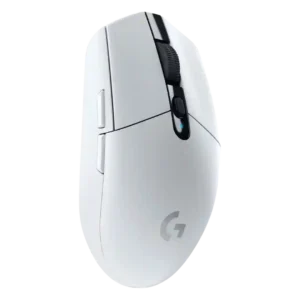

The G305 is consistently described as using Logitech Lightspeed over a 2.4GHz dongle rather than Bluetooth. Supporting reviews treat the 2.4GHz connection as central to its stable low-latency wireless performance.
2.4 GHz connectivity is well supported through the bundled dongle or receiver, with reviewers tying it to full 4K polling and better gaming performance.
Acceleration handling is supported by review evidence that the HERO sensor runs with zero smoothing, filtering, or acceleration. This points to clean motion behavior rather than user-adjustable acceleration controls.
Acceleration control is supported mainly through software-level acceleration and precision settings plus the sensor specification of 40G acceleration.
Tracking accuracy is one of the most consistently praised areas. Reviews describe accurate, reliable, precise, or near-wired tracking across games and general use, with a few comfort or balance caveats affecting precision rather than the sensor itself.
Tracking precision is repeatedly described as accurate, one-to-one, and reliable, with several reviews tying that precision to flicks, aiming, and high-speed movement.
Weight balance is mixed to negative. Several reviews note the AA battery pushes weight toward the back, creating a rear-heavy feel or lack of balance that can affect control for sensitive users.
Balance feedback is mixed and limited: one reviewer found the balance spot-on, while another felt weight was biased toward the middle and rear.
Battery life is a clear strength. Reviewers repeatedly cite 250-hour AA runtime, endurance modes, and long real-world use, with some long-term comments reporting months or more from one battery.
Battery life is generally strong at Bluetooth or 1,000 Hz 2.4 GHz settings, but several reviews note a sharp drop at 4,000 Hz and high RGB brightness.
Bluetooth support is weak because the G305 relies on its USB dongle. Multiple reviews explicitly mention the lack of Bluetooth as a flexibility drawback, even though several also say gamers may prefer the 2.4GHz link.
Bluetooth support is widely documented and valued for laptops, tablets, travel, and non-competitive use, though some advanced features require 2.4 GHz or wired mode.
Build quality is generally strong. Reviews describe a sturdy, tight, well-constructed plastic shell with good fit, though the removable cover and long-term switch durability receive isolated criticism elsewhere.
Build quality is mostly strong, with praise for fit, finish, shell integrity, lack of flex, and improved creaking or mushiness concerns.
Button customization is well supported through Logitech software. Reviews mention remapping buttons, assigning functions, DPI changes, profiles, and macros, though the simple six-button layout limits how much can be customized.
Button customization is supported through freely configurable side buttons, remapping, app controls, and profile-based settings changes.
Button responsiveness is mostly positive. Main clicks are described as light, sharp, tactile, crisp, and reactive, though a few reviewers warn that very light clicks can cause accidental presses or that side buttons feel weaker.
Button responsiveness is generally strong, with reviewers describing clicky, snappy, responsive buttons and few complaints about missed inputs.
There is no attached cable in normal use, so reviewers frame cable freedom as a benefit rather than cable quality. Evidence focuses on avoiding snagging and cord resistance, plus the included receiver extension cable.
Cable flexibility is supported by repeated praise for the included mesh, braided, or fabric USB-C cable and its smooth movement on a desk.
Charging convenience is a drawback. The G305 uses an AA battery and does not support USB-C, wired play, or built-in recharging, though some reviewers like being able to swap batteries quickly.
Charging convenience is supported by USB-C charging, wired-while-charging use, quick charging comments, and included adapters or cables.
Claw grip comfort is generally favorable. Several reviews say the small egg shape works well for claw grip, though comfort depends on hand size and battery weight.
Claw grip comfort is one of the clearest ergonomic strengths, with multiple reviewers saying the rear flare and compact shape suit claw grip users.
Click and wireless latency are strong. Reviews repeatedly cite 1ms response, lag-free behavior, wired-like feel, or no noticeable input delay in gaming.
Click latency evidence is limited but positive, with two reviews citing the 1.2 ms response figure tied to the higher-performance internals.
Click noise is mixed. Some reviews describe average noise, while others call the clicks or wheel loud enough to notice in an office or shared room.
Click noise is mixed: some reviewers liked the click sound or quieter scroll wheel, while others found the switches loud.
Connection stability is a major strength. Reviews report no lag, no dropouts, no freezes, stable receiver performance, and reliable operation across typical desk or room distances.
Connection stability is mostly positive, with stable Bluetooth and 2.4 GHz experiences plus dongle placement or hub evidence for stronger signal.
Cross-platform evidence is limited but positive where mentioned. Reviews cite Windows, Mac, Chrome OS, Android, or broad Windows use, while the USB dongle requirement limits use with some devices.
Cross-platform compatibility is supported by Bluetooth, multi-device use, smartphone or MacBook mentions, and settings saved for use across different systems.
Debounce customization is not a G305 strength. The main evidence is a comparison noting that cheaper alternatives can offer adjustable debounce time among features the G305 lacks.
DPI range is consistently described as adequate but not extreme. The mouse reaches 12,000 DPI or CPI, which reviewers say is enough for most users, though lower than some competitors.
The 26,000 DPI ceiling is widely documented, with reviewers treating it as more range than most users need but useful for sensitivity flexibility.
Durability over time is mixed. Several reviews praise the shell staying in good shape or sturdy construction, while long-term evidence includes faded cosmetic branding, squeaks, and one failure after about two years.
Durability evidence is strong, covering IP54 protection, tough shell behavior, drop or spill resistance, and general resistance to daily travel abuse.
Ecosystem integration is supported mainly through Logitech G Hub and G-Shift. Reviews mention Discord, OBS, Logitech keyboard compatibility, and input analysis, but this is not the mouse’s main strength.
Ecosystem integration is supported through SteelSeries GG, SteelSeries accessory integration, and coordinated setups with other SteelSeries gear.
Ergonomics are mixed. Some reviewers find the simple shape comfortable, while others say it lacks ergonomic support and can be too flat or small for larger hands and marathon use.
Ergonomic design is praised by some for the flat symmetrical shape and small-hand fit, but one review criticizes the overall comfort compared with alternatives.
Fingertip grip comfort is favorable. Multiple reviewers say the compact shape suits fingertip use, especially for smaller or average hands, and some suggest larger hands may need fingertip rather than palm grip.
Fingertip grip comfort is mixed: some reviews include fingertip users in the target audience, while others found the flared rear awkward for fingertip control.
FPS suitability is strong. Reviews test or discuss Counter-Strike, Valorant, Overwatch, Fortnite, and other shooters, usually tying good FPS use to the sensor, latency, and light compact shell.
FPS suitability is strongly supported, with repeated Counter-Strike, shooter, and competitive gaming evidence tied to low latency, tracking, and 4K polling.
Glide is generally good but not unanimous. Many reviewers praise smooth PTFE movement, while some note small stock feet, dragging, friction, or improvements from aftermarket skates.
Glide smoothness is mostly positive, with PTFE feet described as smooth across mouse pads, desks, and cloth surfaces.
Grip texture is mixed. Smooth plastic, matte finish, side texture, and dual texture are praised in some reviews, while others want more texture or find the coating sweat-prone.
Grip texture is polarizing, with some reviewers finding the texture grippy and others saying the sides or plastic finish feel slippery.
Handedness is mixed. The shape is often described as symmetrical or ambidextrous, but the left-side thumb buttons make practical use better for right-handed users.
Handedness evidence points to a right-handed practical layout despite the symmetrical shell, because the side buttons are only on one side.
Left and right click quality is generally positive. Reviews cite mechanical buttons, low actuation force, satisfying feedback, and button tensioning, with some concern about long-term switch durability.
Main click quality is mostly praised for satisfying, clicky feedback, with evidence focused on left/right click feel rather than unusual customization.
Lift-off distance is repeatedly supported as an adjustable software setting, usually mentioned alongside DPI, polling, and other advanced tuning controls.
Long-session comfort is polarized. Light clicks can reduce fatigue, but the small, flat shape and side-finger support can become uncomfortable for some users during long sessions.
Long-session comfort is generally positive for smaller hands, light use, and fatigue reduction, though one reviewer reported hand cramps with the smaller shape.
Macro support is present through Logitech software. Reviews mention assigning macros, extra layers of keybindings, or custom commands, although the small number of buttons limits complex setups.
Macro support appears in software-focused reviews, with explicit evidence that custom macros and game profile macros can be configured.
Materials quality is positive where directly discussed. Reviewers describe good-feeling plastic, a matte body, high-quality components, and a smooth substantive case at the price.
Materials quality trends positive for plastics and shell construction, though one review criticizes the finish for lacking grip.
MMO suitability is only lightly supported. Some reviews mention World of Warcraft or Diablo III working well, but the six-button layout limits heavy MMO command mapping compared with mice built for many side buttons.
MOBA suitability is supported by click-heavy game comments. Reviewers mention League of Legends or DOTA-style use, with mechanical switches and repeated clicking called out as useful.
Motion consistency is strong. Reviews cite no smoothing, no filtering, smooth acceleration, accurate consistent performance, and resilient tracking.
Motion consistency is described positively through smooth aiming, reliable tracking, fluid movement, and the lack of missed tracking during gameplay.
Onboard memory is a useful strength. Multiple reviews say the mouse can save profiles or settings onboard, making it easier to travel or use without reinstalling software.
Onboard memory is supported by references to storable profiles and settings saved directly to the mouse for use beyond one system.
Palm grip comfort is mixed. Some reviewers find the G305 comfortable in palm grip, but others say the low, narrow, compact shell is awkward or poorly supportive for palm users, especially with larger hands.
Palm grip comfort is mixed to weak overall, with smaller-hand praise offset by repeated comments that larger palm-grip users may prefer the Aerox 5 or another shape.
Polling rate support is solid for the price. Reviews repeatedly cite 1000Hz or 1ms operation, with endurance mode lowering responsiveness to extend battery life.
The move from 1,000 Hz to 4,000 Hz polling is a major upgrade across the reviews, improving responsiveness most clearly in competitive and high-refresh-rate play.
Portability is strong. Reviews point to small size, light build, receiver storage, laptop-bag use, travel convenience, and easy setup as practical advantages.
Portability is mostly favorable because of durability, Bluetooth, compact size, and travel use, but one review criticizes the lack of onboard dongle storage.
Premium feel is moderate to good. The G305 feels sturdy, smooth, and well built for its price, but reviewers also call it basic, plain, no-frills, and less feature-rich than premium mice.
Premium feel is supported by solid construction, low-weight feel that does not seem compromised, and descriptions of a more premium mouse experience.
Profile switching is supported through software and onboard storage. Reviews mention game-specific profiles, per-program profiles, DPI presets, saved profiles, and profile changes based on apps or games.
Profile switching evidence is narrower but clear, with game-based saved settings and automatic profile switching described in the reviews.
Programmable buttons are well supported, but the count is modest. Reviews consistently mention six programmable or customizable buttons, with some criticism that there are not many extra buttons.
Programmable button support is well supported through evidence for remapping, six programmable buttons, and software-controlled button behavior.
RGB features are essentially absent. Reviews repeatedly say there is no RGB or lighting, sometimes treating this as a drawback and sometimes as a clean, battery-saving design choice.
RGB support is broad, with reviews mentioning three-zone lighting, Prism controls, presets, effects, and the battery impact of brighter lighting.
Scroll wheel quality is generally solid. Reviews describe it as tactile, smooth, snappy, rubberized, or pleasant, though some note noise or lack of horizontal scrolling.
Scroll wheel quality is generally positive, with reviewers noting responsive scrolling, tactile feedback, and in some cases quieter or grippier revisions.
Sensor performance is a major strength. The HERO sensor is repeatedly described as excellent, accurate, efficient, responsive, and strong for gaming at the price.
The TrueMove 26K sensor is one of the most consistently supported strengths, with reviews describing smooth tracking, no missed beats, and strong gaming performance.
Shape comfort depends on hand size and grip. Some reviews like the simple egg shell, while others find the dimensions small, flat, or awkward for large hands.
Shape comfort is divisive: many reviewers liked the familiar Aerox shape, while others found the flared rear uncomfortable or polarizing.
Side button quality is mixed. Reviews like the placement in some cases, but several criticize resistance, mushiness, lack of right-side buttons, or limited side-button count.
Side button feedback is mixed: several reviewers found them easier to reach or improved, while others found the long shape easy to hit accidentally.
Skate durability is supported by PTFE foot comments and a travel rating. Some reviews praise durable smooth PTFE feet, while others suggest aftermarket skates to improve glide.
Software stability has limited evidence. One review says G Hub became much more usable after earlier buggy behavior, and other reviews do not report major stability problems.
Software usability is generally positive. Reviews describe Logitech software or G Hub as simple, easy, useful, or straightforward for remapping, DPI, polling, profiles, and macros.
Software usability is one of the strongest repeated positives, especially SteelSeries GG, sensitivity tools, aim trainer features, live previews, and accessible customization.
Surface compatibility is mostly good. Reviews cite use on mousepads, desks, cloth, hard and soft surfaces, and many surfaces, while glass is repeatedly the weak spot.
Surface compatibility evidence is positive but narrower, with reviews noting smooth movement on pads and usable performance on desks or different surfaces.
Switch durability is mixed. Specs and reviews mention 10 million or 50 million click ratings, but long-term user evidence includes a failed left click and minor squeak.
Switch durability is mostly supported by the 80 million click rating, with one review also noting consistent clicks after extended testing.
Switch feel is mostly positive. Reviewers describe crisp, springy, tactile, light, clicky, or satisfying primary buttons, though a few prefer the feel of other Logitech models.
Switch feel trends positive, with tactile, crisp, clicky feedback noted by several reviewers, though the feel remains more traditional mechanical than optical.
Value for money is one of the strongest themes. Reviewers repeatedly emphasize low price, affordability, and high wireless performance for the money, while some note competing mice now offer more features.
Value is mixed-to-positive: reviewers often call the price competitive or reasonable, but several note strong competition around the same or lower price.
Weight is divisive. The G305 is light for an AA-powered wireless mouse in some reviews, but heavy for its size or compared with newer ultralight mice in others.
The 68 g weight is often praised as light and agile, though a few reviewers note it is heavier or less competitive by current ultralight standards.
Weight tuning is limited but possible through battery swaps and mods. Reviews mention no official adjustable weight system, but lighter lithium or AAA battery changes can reduce weight.
Wireless latency is excellent. Reviews repeatedly describe 1ms latency, wired-like response, imperceptible lag, and no discernible delay in real gaming.
Wireless latency is consistently favorable where tested, with low latency, no noticeable lag, and near-zero delay tied to 2.4 GHz or 4K operation.
Wireless performance is a headline strength. Reviews describe Lightspeed as stable, responsive, fast, lag-free, and comparable to wired mice under normal gaming conditions.
Wireless performance is a major strength, with reviews praising 4K wireless, reliable tracking, stable use, and no stutters or delays in several tests.