- Review score
- 3.8
Logitech G305 Lightspeed Gaming Mouse Review
Bottom Line
Choose the Logitech G305 for affordable, lag-free 2.4GHz wireless gaming, strong sensor accuracy, and long AA battery life. Skip it if you need Bluetooth, USB-C charging, large-hand ergonomics, lighter weight, or advanced tuning.
Best for budget-minded gamers who want reliable low-latency wireless performance, strong tracking, and long battery life in a compact mouse. It suits small-to-medium hands, travel setups, and claw or fingertip grips best.
Not for users who need Bluetooth, USB-C charging, lots of extra buttons, deep sensor/debounce tuning, or a truly lightweight modern feel. Large-hand palm grippers are also the most likely to find it uncomfortable.
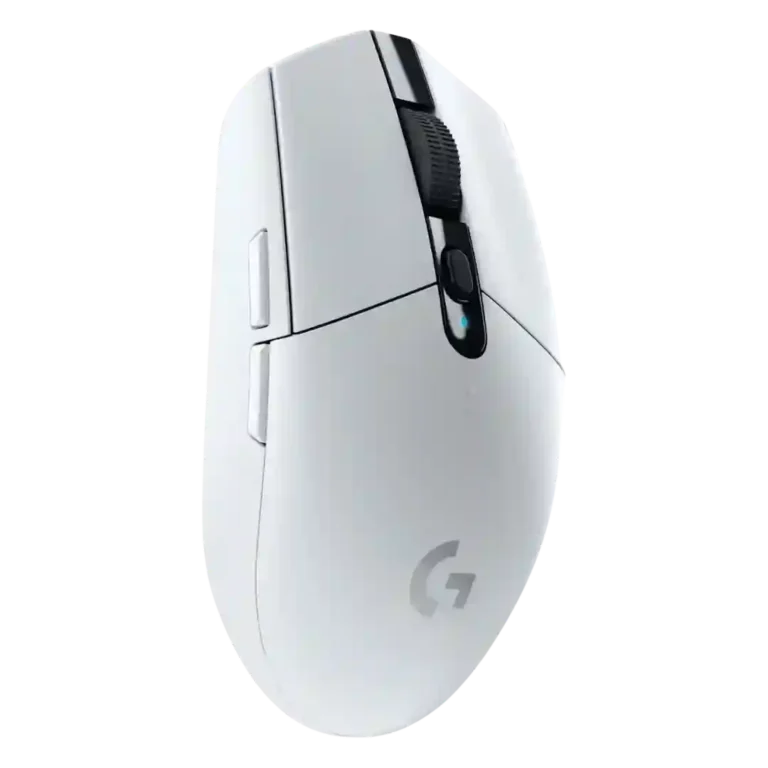
The Logitech G305 Lightspeed comes across as a budget wireless gaming mouse that succeeds most where performance matters: reviewers repeatedly praised its Lightspeed connection, low perceived latency, HERO sensor accuracy, battery life, and price. The tradeoff is convenience and fit. Its AA-only power keeps runtime high but hurts charging flexibility and can make the rear feel heavy, while the compact egg shape works best for small-to-medium hands, fingertip users, and claw grippers. It also omits Bluetooth, RGB, richer sensor tuning, and extra buttons. Overall evidence points to a simple, fast, reliable mouse with strong value, but not a feature-rich or universally comfortable one.
Feature Scorecards
Summary
56 reviewed features- Very positive 4.5-5.0 25% 14 features
- Positive 3.5-4.4 52% 29 features
- Neutral 2.5-3.4 13% 7 features
- Negative 1.5-2.4 11% 6 features
- Very negative below 1.5 0% 0 features
Pros
-
Motion consistency was praised, especially for smooth tracking, accurate stops, and the absence of smoothing or filtering.
-
Wireless latency was consistently excellent, with reviewers repeatedly describing lag-free or wired-like responsiveness.
-
Connection stability was a standout strength, with reviewers reporting no dropouts, lag, freezes, or range problems in normal setups.
-
Wireless performance was consistently praised as reliable, fast, and suitable for gaming, often described as the mouse’s main appeal.
-
Click latency was consistently praised as low or effectively wired-like across reviews that tested responsiveness.
-
Materials quality was praised for solid plastics and high-quality plastic components that feel smooth and well fitted.
-
Sensor performance was one of the strongest areas, with repeated praise for the HERO sensor’s precision, smoothness, and gaming readiness.
-
Tracking accuracy drew broad praise, with reviewers repeatedly calling the HERO sensor responsive, precise, smooth, and reliable, though one noted balance could affect precision.
-
FPS suitability was a major strength thanks to low latency, strong tracking, quick movement, and repeated positive shooter-game impressions.
-
Battery life was one of the strongest points, with reviewers repeatedly validating or praising long AA runtime, even when they disliked disposable batteries.
-
Button responsiveness was generally strong, with reviewers praising light, crisp, reactive clicks, though several warned that very light clicks can cause accidental presses.
-
Build quality was usually praised as sturdy, tight, and well assembled, with only isolated caveats about batches or long-term issues.
-
Firmware-like reliability was supported by the mouse waking immediately from power-saving behavior without frustrating delay.
-
MMO suitability had limited but positive evidence, with World of Warcraft reported as working great.
-
Portability was consistently strong thanks to the compact body, wireless use, dongle storage, and laptop-bag friendliness.
-
Value for money was one of the strongest consensus points, with most reviewers calling it affordable, competitive, or unusually good for wireless performance.
-
Scroll wheel quality was mostly positive for tactile, crisp, or smooth scrolling, though one review found it merely average and another noted noise.
-
Claw grip comfort was usually positive, especially for small to medium hands, though some large-hand users still found the mouse small.
-
Onboard memory was useful for travel and multi-PC use because settings can be stored on the mouse rather than only in software.
-
Reviewers found the 2.4GHz Lightspeed dongle dependable over normal use distances, with strong gaming performance despite one note about the crowded band.
-
Ecosystem integration was a plus for users in Logitech’s software and keyboard ecosystem, including G-Shift and app integrations.
-
Premium feel was positive for the price, with reviewers highlighting solid construction and a more substantive plastic case than expected.
-
Skate durability was positive in limited evidence, with reviewers describing durable PTFE and little concern about wear.
-
Button customization was widely liked because the six buttons and DPI controls can be remapped easily in Logitech software.
-
Software usability was mostly positive, with reviewers calling G Hub or Logitech software easy, simple, and useful for remapping and profiles.
-
Macro support was viewed as a useful part of Logitech’s customization package, with reviewers noting it was available and easy enough to use.
-
Surface compatibility was generally good across pads, desks, and varied surfaces, but several reviewers noted weakness on glass.
-
Profile switching was generally useful through G Hub and onboard memory, though limited onboard profile storage drew one complaint.
-
The 12,000 DPI range was mostly considered enough for mainstream users, though reviewers noted it trails newer or higher-end gaming mice.
-
Switch feel was generally positive for tactile, clicky, light switches, though some reviewers found them dull or overhyped.
-
Polling-rate opinions were mostly positive for 500-1000Hz use, though reviewers saw higher modern rates as mostly unnecessary for average players.
-
MOBA suitability was positive in limited evidence because reviewers connected the light mechanical clicks to repeated click-heavy games.
-
Software stability had limited positive evidence from a reviewer who said Logitech had improved the once-buggy G Hub experience.
-
Glide smoothness was mostly praised for PTFE feet and easy movement, though several reviewers disliked the stock skates or felt extra drag.
-
Fingertip grip comfort was usually favorable, especially for small or medium hands, but stock weight and balance hurt some fingertip users.
-
Shape comfort was highly subjective: some reviewers loved the egg-like compact shape, while others found it too flat, narrow, short, or awkward.
-
Primary click quality was mostly strong, with praise for crisp, springy, satisfying clicks, offset by one long-term left-click failure report.
-
RGB features were mixed but often acceptable; many reviewers did not mind the lack of RGB because colors, simplicity, and battery life helped compensate.
-
Cross-platform compatibility was mixed: reviewers liked PC/Mac or broad device support, but software and Linux limitations reduced flexibility.
-
Programmable button feedback was mixed: remapping was useful, but the small six-button layout left some reviewers wanting more controls.
-
Weight tuning was mostly discussed through battery swaps or mods, which helped reduce weight but also highlighted the lack of built-in tuning.
-
Grip texture was mixed: some liked the smooth or lightly textured finish, while others disliked the lack of side texture or sweat resistance.
-
Weight was divisive: many liked it for a wireless mouse, but others found it heavy for its size or too rear-loaded with the AA battery.
Cons
-
Side button quality was mixed, with praise for placement but criticism for non-swappability, extra resistance, or mushy feel.
-
Palm grip comfort was highly hand-size dependent, with some reviewers comfortable but others finding palm support poor or awkward.
-
Long-session comfort was mixed: light clicks reduced fatigue, but the small, flat body and side grip could become uncomfortable for some users.
-
Switch durability was mixed: rated switch life impressed one reviewer, another saw downgraded switch endurance, and one reported failure.
-
Handedness was mixed because the shell is symmetrical, but left-side thumb buttons make it less useful for left-handed users.
-
Durability over time was mixed: one long-term review found only minor cosmetic wear, while another reported click failure after a little over two years.
-
Click noise was mixed to negative, ranging from average to noticeably loud or distracting depending on the reviewer and environment.
-
Ergonomics were mixed to weak, with reviewers praising the simple shape for some hands but criticizing the lack of palm or ergonomic support.
-
Charging convenience was weak because the mouse relies on replaceable AA batteries and lacks USB charging, wired use, or rechargeable convenience.
-
Balance was one of the more consistent physical complaints, with reviewers calling the mouse back-heavy or unusually weighted because of the rear AA battery.
-
Advanced acceleration-related tuning was a weak point because the G305 lacks the kind of sensor adjustment features some competitors offer.
-
Debounce customization was a weakness because reviewers noted competing budget mice offer adjustable debounce while the G305 does not.
-
Bluetooth support was a recurring limitation because reviewers liked the dongle performance but disliked being unable to use Bluetooth or non-USB devices.
Compared With Category Average
Compared with other Gaming Mice, this product is above average in firmware reliability, below average in acceleration control, balance and weight distribution, ergonomic design.
Summary
8 compared features- Above average 0.4+ pts higher 13% 1 feature
- Same as average within 0.3 pts 0% 0 features
- Below average 0.4+ pts lower 88% 7 features
| Attribute | This product | Category average | Difference |
|---|---|---|---|
| acceleration control | 2.0 | 4.5 | -2.5 |
| balance and weight distribution | 2.0 | 4.2 | -2.2 |
| ergonomic design | 2.4 | 4.3 | -2.0 |
| charging convenience | 2.2 | 4.0 | -1.8 |
| firmware reliability | 4.5 | 2.7 | +1.8 |
| Bluetooth support | 1.9 | 3.6 | -1.6 |
| debounce customization | 2.0 | 3.7 | -1.7 |
| long-session comfort | 3.2 | 4.4 | -1.3 |
FAQ
Is the Logitech G305 good for FPS gaming?
Yes. Reviewers repeatedly praised its low latency, HERO sensor precision, and responsive wireless performance in shooters and competitive-style play.
Does the G305 feel like a wired mouse?
Several reviewers said the Lightspeed wireless connection felt indistinguishable from wired use, with no noticeable lag or dropouts in normal gaming setups.
How is the battery life?
Battery life is a major strength. Reviews repeatedly cited or validated long AA runtime, including 250-hour claims and multi-month real-world use.
Is the AA battery a downside?
It depends. Reviewers liked the long runtime and easy battery swap, but many disliked the lack of USB charging, wired use, or built-in rechargeable convenience.
Who will find the shape comfortable?
Small-to-medium hands, fingertip users, and claw grippers had the most positive fit feedback. Large hands and palm-grip users drew the most complaints.
Does it support Bluetooth?
No. Reviewers repeatedly noted that it relies on the USB dongle, which helps gaming performance but limits flexibility with tablets, phones, and port-limited devices.
Sample Expert Reviews We Analyzed
These are a few of the reviews included in our analysis.
Video Reviews
Article Reviews
- Review score
- 4.6
Compared in Reviews
Products reviewers directly compared with this model, grouped into quick takeaways.
g203
- Better: click feel and coating Several physical features are described as better on the g203 than on the G305.
G900
- Better: extra features and colors The G900 is framed as the better feature-rich choice for buyers with more money.
Kain 200 Aimo
- Better: DPI ceiling The G305 has a lower CPI ceiling than the Kain 200 Aimo.
Consider This Instead
If you want better charging convenience
Choose Logitech G502 X Wired. It scores 5.0 vs 2.2 for charging convenience, with a 4.2 overall score.
If you want better balance and weight distribution
Choose Razer Viper V4 Pro. It scores 5.0 vs 2.0 for balance and weight distribution, with a 4.2 overall score.
If you want better Bluetooth support
Choose Glorious Model I 2 Wireless. It scores 4.8 vs 1.9 for Bluetooth support, with a 4.0 overall score.
If you want better acceleration control
Choose ASUS ROG Harpe II Ace. It scores 5.0 vs 2.0 for acceleration control, with a 4.4 overall score.
Overall Top Gaming Mice Alternatives
Choose the ROG Harpe II Ace for ultralight FPS play, precise tracking, smooth glide, and web-based tuning. Skip it if you need palm-grip support, MMO buttons, onboard profiles, or long...
Pros: acceleration control, wireless latency
Cons: onboard memory, MMO gaming suitability
Best for MMO/MOBA control, swappable panels, strong wireless performance, and long battery life. Skip it if you want a light FPS mouse, low price, or no Synapse quirks.
Pros: sensor performance, click latency
Cons: software stability, Bluetooth support
Choose the Aerox 3 Wireless Gen 2 if you want a light, fast wireless FPS mouse with strong software and battery life. Skip it if you dislike honeycomb shells, need...
Pros: click latency, motion consistency
Cons: palm grip comfort, fingertip grip comfort
Choose the Kone II if you want a large, ergonomic mouse with deep customization and strong sensor performance. Skip it if you have small hands, need an ambidextrous mouse, or...
Pros: click latency, motion consistency
Cons: handedness options, portability