- Better: tracking speed ceiling Basic Tutorials notes that pro-tier mice can reach much higher tracking-speed specs, even if normal gamers may not notice.
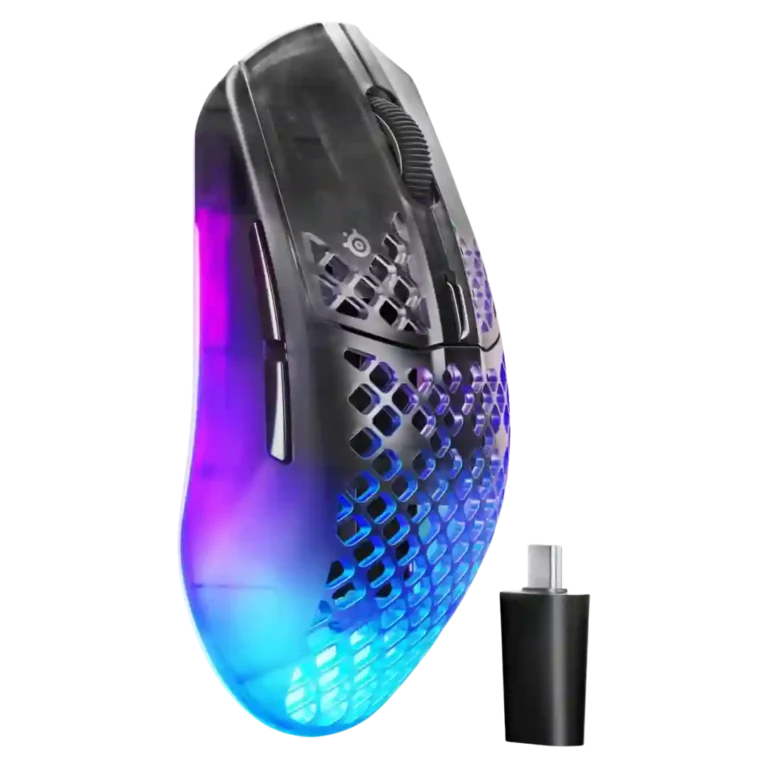
SteelSeries Aerox 3 Wireless Gen 2 Review
Bottom Line
Choose it for lightweight 4K wireless FPS performance, strong battery life, Bluetooth, and deep GG tuning. Skip it if you need palm-grip comfort, many MMO buttons, or the lightest possible mouse.
Best for claw-grip FPS players, smaller-hand users, and people who want a lightweight wireless mouse with 4K polling, Bluetooth, IP54 protection, and deep GG customization. It also suits users who move between a gaming PC and laptop or tablet.
Not for buyers who want a palm-focused ergonomic shape, a button-heavy MMO mouse, onboard dongle storage, or the absolute lightest competitive mouse. It is also less ideal if you dislike honeycomb shells or slippery side panels.
The SteelSeries Aerox 3 Wireless Gen 2 lands as a capable mid-range wireless gaming mouse built around speed, portability, and customization. Reviewers consistently praise the TrueMove 26K sensor, 4K polling, stable 2.4GHz wireless, Bluetooth flexibility, IP54 protection, and SteelSeries GG software tools. The main tradeoff is physical fit: claw grip users and smaller hands get the best experience, while several reviewers found the flared rear, slippery sides, honeycomb shell, or palm/fingertip comfort less convincing. Battery life is strong at lower polling rates, but 4K mode and RGB cut runtime noticeably. Overall, the evidence points to a fast, durable, feature-rich mouse whose value depends heavily on whether the Aerox shape suits your hand.
Compared in Reviews
Products reviewers directly compared with this model, grouped into quick takeaways.
- Alternative: extra buttons versus 4K polling The reviewer personally prefers the Aerox 5 for its extra side buttons, while acknowledging the Aerox 3 Gen 2 has the newer 4K polling advantage.
Endgame Gear OP1w 4K
- Compared: polling rate and competitive responsiveness PC Gamer frames the Aerox 3 Gen 2 as catching up to newer mid-range competitors with its 4K wireless polling rate.
Feature Scorecards
Pros
-
Connection stability receives strong praise, with multiple reviewers reporting stable operation across 2.4GHz, Bluetooth, or the included dongle setup.
-
Wireless latency is a strength, with reviewers reporting low or near-zero delay at 4K polling and no noticeable input lag in games.
-
Tracking precision is one of the strongest points: reviews repeatedly describe accurate, clean, one-to-one movement and dependable targeting in games.
-
Motion consistency is strong, with reviews citing smooth aiming, precise tracking, and no missed tracking in game use.
-
Wireless performance is broadly strong, especially over 2.4GHz, with reviews praising stable, low-latency, fluid, and reliable wireless behavior.
-
Polling rate is a headline upgrade: reviewers consistently cite 4K/4000Hz wireless polling as a major improvement over the previous 1K model.
-
Water and dust resistance is a clear strength, with multiple reviews emphasizing IP54/AquaBarrier protection against dust, sweat, spills, and water exposure.
-
Sensor performance is highly praised around the TrueMove 26K optical sensor, with strong accuracy and responsiveness across many reviews.
-
Glide is consistently praised, with PTFE feet described as smooth across mousepads, desks, and cloth mats.
-
Onboard memory is supported by up to five storable onboard profiles and profile saving directly to the mouse.
-
Click latency is strongly supported by 1.2ms and 0.25ms claims in the reviews, with reviewers linking the upgraded polling system to low-latency clicks.
-
FPS suitability is one of the strongest supported use cases, with reviews repeatedly testing Counter-Strike 2 and other shooters and praising the 4K polling, precision, and responsiveness.
-
Reviewers consistently found the 2.4GHz mode central to the mouse’s high-performance wireless use, especially because it unlocks the higher polling-rate experience through the dongle.
-
Button and input responsiveness is rated highly, especially in gaming where reviewers report snappy clicks, direct inputs, and no incorrect inputs.
-
Materials are generally praised, especially the quality plastics and carefully assembled lightweight shell.
-
Bluetooth is a frequent positive because it makes the Aerox useful across laptops, tablets, and travel setups, though some advanced features require 2.4GHz or wired mode.
-
Durability is a major theme, with reviewers citing drop resistance, IP54 protection, consistent clicks, and a shell that feels solid over use.
-
Button customization is supported through GG, with reviewers highlighting remapping, configurable side buttons, and DPI-related customization.
-
The included cable is viewed positively because it is braided or Super Mesh, flexible on the desk, and useful for both charging and wired use.
-
Cross-platform compatibility is helped by Bluetooth, onboard profiles, software availability, and profile storage that can move settings across systems.
-
DPI range is broad and repeatedly highlighted at 26,000 DPI, with reviewers appreciating the flexibility even if most users will run much lower settings.
-
Build quality is generally strong, with reviewers citing solid shell integrity, good fit and finish, and durable construction despite the lightweight honeycomb design.
-
Profile switching is supported by DPI profiles, game-based settings, Quickset-style switching, and saved settings by game.
-
Main click quality is generally positive, with reviewers describing consistent, satisfying, clicky left/right button feedback.
-
Software usability is a recurring strength, with GG described as clear, intuitive, deep, customizable, and useful for both basic and advanced tuning.
-
Battery life is widely praised at lower polling rates or Bluetooth, but several reviewers note that 4K polling and RGB meaningfully reduce runtime.
-
Switch durability is well supported through repeated references to mechanical switches rated for 80 million clicks.
-
Macro support exists through GG and game profiles, but evidence is mostly from video reviewers describing custom macros rather than deep MMO-style macro use.
-
Lift-off distance is adjustable in GG, and several reviewers call out lift-off tuning as one of the advanced settings.
-
Switch feel is generally positive, with reviewers describing tactile, crisp, clicky, and satisfying feedback.
-
RGB features are well supported through three-zone lighting, Prism controls, presets, and colorway interaction, though RGB can reduce battery life.
-
SteelSeries’ ecosystem is a strength because GG, Prism, 3D Aim Trainer, Sensitivity Finder, and related QcK/SteelSeries gear are repeatedly mentioned as useful integrations.
-
The GG app provides acceleration and precision controls, giving advanced users room to tune response behavior beyond basic DPI and polling settings.
-
Premium feel is generally positive, with reviewers calling out solid feel, premium impression, and good fit and finish for the price.
-
Charging convenience is good thanks to USB-C, charge-and-play support, fast-charging comments, and a long cable, though frequent charging can be needed at 4K polling.
-
Scroll wheel quality is mostly positive, with reviewers noting responsive scrolling, tactile bumps, and improved or quieter wheel feel.
-
Ergonomics are positive for smaller hands and right-handed use, but the shape is not universally comfortable across every grip style.
-
Programmable buttons are present but limited to six, which is enough for standard gaming but not a button-heavy layout.
-
Surface compatibility is positive where tested, with reviewers reporting smooth glide on mousepads, desks, wood, and cloth mats.
-
Weight is mostly positive at around 68g, but a few reviewers note it is no longer class-leading against newer ultralight mice.
-
Portability is strong because the mouse is light, durable, Bluetooth-capable, and travel-friendly, though the lack of onboard dongle storage hurts one review’s score.
-
Long-session comfort depends on hand size and grip: some reviewers praise all-day use, while others report hand cramps or comfort issues from the shape.
-
Claw grip is the best-supported grip style; several reviewers explicitly say the Aerox 3 shape comes alive or is intended for claw grip users.
-
Shape comfort is polarizing: some reviewers love the Aerox shape, while others find the rear flare and honeycomb shell uncomfortable.
-
Value is mixed-positive: many consider the price reasonable for the features, but several note strong competition and cheaper alternatives.
-
Side button quality is mixed: several reviews praise the larger, easier-to-find buttons, while others find them too long or easy to hit accidentally.
-
Firmware reliability evidence is limited but generally fine; reviewers mention updates through GG and a guided update process rather than persistent firmware problems.
-
Grip texture is divisive: some reviewers like the grippier texture, while others find the sides slippery and lacking rubber pads.
-
Balance impressions are split: one reviewer found the weight distribution spot-on, while another felt the internals made the mouse back-heavy.
-
Handedness is only partially supported: the shell is symmetrical, but side buttons on one side and right-handed framing make it less compelling for left-handed users.
Cons
-
Skate durability evidence is limited and mixed, with one reviewer wishing the feet extended farther to avoid base scratching under aggressive pressure.
-
Palm grip comfort is mixed to weak: smaller-hand reviewers sometimes liked it, but multiple reviews say larger palm-grip users should consider the Aerox 5 instead.
-
Fingertip grip support is mixed to weak: one review says it suits fingertip fans, while others say the flared rear pushes fingers into awkward positions.
-
Click noise is mixed: some reviewers like the click sound, but TrustedReviews found the switches louder and requiring adjustment.
-
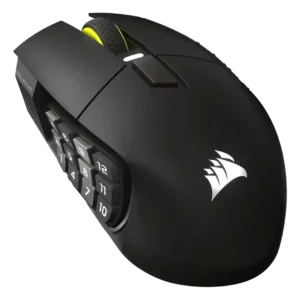
MMO suitability is weak because reviewers repeatedly frame the Aerox 3 as a simple, lightweight mouse with few extra buttons rather than a button-heavy MMO mouse.
Compared With Category Average
Compared with other Gaming Mouse, this product is above average in RGB features, water and dust resistance, Bluetooth support, below average in palm grip comfort, fingertip grip comfort.
| Attribute | This product | Category average | Difference |
|---|---|---|---|
| RGB features | 4.4 | 3.1 | +1.3 |
| water and dust resistance | 4.6 | 3.3 | +1.3 |
| Bluetooth support | 4.5 | 3.2 | +1.3 |
| cable flexibility | 4.5 | 3.6 | +1.0 |
| software usability | 4.5 | 3.9 | +0.5 |
| palm grip comfort | 3.2 | 3.9 | -0.7 |
| polling rate | 4.6 | 4.2 | +0.4 |
| fingertip grip comfort | 3.0 | 3.7 | -0.7 |
FAQ
Is the SteelSeries Aerox 3 Wireless Gen 2 good for FPS games?
Yes. Reviewers repeatedly praised its 4K polling, low wireless latency, 26K sensor, and strong performance in shooters such as Counter-Strike 2.
Which grip style fits this mouse best?
Claw grip is the safest match. Several reviewers said palm and fingertip users may struggle with the flared rear or compact shape, especially with larger hands.
How is the battery life?
Battery life is strong in Bluetooth or 2.4GHz at 1000Hz, with many reviews citing up to 200 hours over Bluetooth and 120 hours over 2.4GHz. At 4000Hz polling, several reviews cite about 35 hours.
Does it support Bluetooth and 2.4GHz wireless?
Yes. Reviews consistently mention Bluetooth, 2.4GHz wireless through the dongle, and wired/charging use, with the best performance features tied to 2.4GHz or wired mode.
Is the software useful?
Yes. SteelSeries GG is described as clear and feature-rich, with DPI, polling, lift-off, acceleration, RGB, profiles, macros, Aim Trainer, and Sensitivity Finder controls.
Is the honeycomb design a problem?
It depends on preference. Some reviewers liked the lightweight shell and visual style, while others disliked the look, dust visibility, finger contact with holes, or less grippy side feel.
Consider This Instead
If you want better MMO gaming suitability
Choose ASUS ROG Gladius III Wired. It scores 4.8 vs 2.7 for MMO gaming suitability, with a 4.2 overall score.
If you want better palm grip comfort
Choose Turtle Beach Kone II Air. It scores 4.8 vs 3.2 for palm grip comfort, with a 4.3 overall score.
If you want better fingertip grip comfort
Choose ASUS ROG Harpe Ace Mini. It scores 4.6 vs 3.0 for fingertip grip comfort, with a 4.4 overall score.
If you want better weight
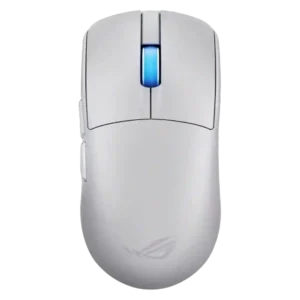
Choose ROG Harpe Ace Extreme. It scores 5.0 vs 4.2 for weight, with a 4.1 overall score.
Overall Top Gaming Mouse Alternatives
Best for a 47g, high-performance 8K wireless mouse with excellent shape, skates, clicks, and web controls. Skip it if stiff side buttons, shorter high-polling battery life, or app/cable quirks would...
Pros: Accuracy and tracking precision, sensor performance
Cons: cable flexibility
Choose it if you want a comfortable, feature-rich wireless mouse for mixed gaming and productivity. Skip it if you need ultralight FPS speed, left-handed support, or better value than discounted...
Pros: programmable buttons, Bluetooth support
Cons: handedness options, firmware reliability
Good if you want an ultra-light esports mouse with 8K wireless, precise tracking, and web setup. Skip it if you need MMO buttons, onboard memory, large-hand palm support, or the...
Pros: polling rate, click latency
Cons: onboard memory, tilt gesture controls
Good if you want ergonomic wireless gaming with hot-swappable batteries and strong tuning. Skip it if price, dock clutter, or short 8K battery life matters most.
Pros: switch durability, DPI range
Cons: grip texture, portability