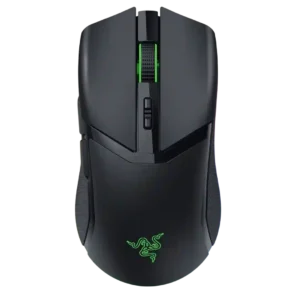
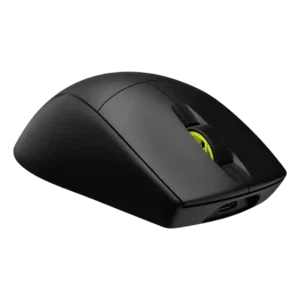
Compare Razer Cobra Pro vs Corsair M75 AIR Wireless

P1 Razer Cobra Pro
P2 Corsair M75 AIR Wireless

Comparison Takeaways

Razer Cobra Pro

Where It Has the Edge

  • RGB features is 4.6 vs 2.5. RGB features are one of the most praised differentiators, with reviewers highlighting underglow, Chroma zones, bright lighting, and...
  • weight tuning is 2.5 vs 1.2. Weight tuning is very limited, with one reviewer only noting a small 2g reduction by removing the underside...
  • programmable buttons is 4.0 vs 3.0. Programmable buttons are a core feature, usually advertised as 10 controls, though reviewers sometimes count fewer practical top-side...
  • connection stability is 4.9 vs 4.0. Connection stability is mostly strong, with several reviewers reporting no lag, no reliability issues, or no connectivity problems...

Corsair M75 AIR Wireless

Where It Has the Edge

  • weight is 4.7 vs 3.3. Weight is the product’s defining strength, with nearly every reviewer emphasizing the 60g ultralight Air design.
  • MOBA gaming suitability is 3.6 vs 2.3. MOBA suitability is mixed: one reviewer found it performed well in MOBA play, while another noted MOBA players...
  • palm grip comfort is 4.5 vs 3.5. Palm grip comfort is generally good, especially for hands that suit the high back and taller shell.
  • motion consistency is 4.6 vs 3.8. Motion consistency is strong across positive reviews, with smooth sensor behavior, no wobble, and reliable stopping/control repeatedly noted.
Average score
Product 1: Razer Cobra Pro
4.0
Product 2: Corsair M75 AIR Wireless
3.9
2.4GHz connectivity
Product 1: Razer Cobra Pro
4.9

Reviewers consistently cite flexible 2.4GHz wireless or HyperSpeed use alongside wired and Bluetooth modes, treating the low-latency dongle mode as the main gaming connection.

Product 2: Corsair M75 AIR Wireless
4.4

Reviewers consistently describe 2.4GHz Slipstream/dongle use as the primary gaming mode, usually fast and stable, though setup can require software or dongle management.

acceleration control
Product 1: Razer Cobra Pro
4.5

Sensor specs and testing repeatedly point to high acceleration handling, usually framed around the Focus Pro sensor’s 70G capability rather than user-tunable acceleration controls.

Product 2: Corsair M75 AIR Wireless
4.5

The mouse is repeatedly credited with 50G acceleration handling and fast motion control, supporting rapid competitive flicks rather than deep acceleration customization.

Accuracy and tracking precision
Product 1: Razer Cobra Pro
4.7

Tracking precision is one of the strongest areas, with reviewers describing accurate tracking, precision-shooter suitability, and reliable movement across demanding game and surface tests.

Product 2: Corsair M75 AIR Wireless
4.6

Tracking accuracy is one of the strongest themes, with reviewers praising precise aiming, stable sensor behavior, and dependable target control.

balance and weight distribution
Product 1: Razer Cobra Pro
3.3

Weight balance is mixed: some reviewers found the added mass helpful for control, while others called the mouse back-heavy or unusually weighted.

Product 2: Corsair M75 AIR Wireless
4.0

Only limited evidence addresses balance directly; one reviewer liked the in-game weight balance while another noted front heaviness when cabled.

battery life
Product 1: Razer Cobra Pro
4.1

Battery life is generally usable to strong, but reviewers repeatedly note that RGB brightness, high polling, and HyperPolling can cut runtime far below headline claims.

Product 2: Corsair M75 AIR Wireless
3.9

Battery life is useful but divisive: Bluetooth can reach around 100 hours, while 2.4GHz figures around 30-45 hours are adequate for some and disappointing for others.

Bluetooth support
Product 1: Razer Cobra Pro
3.7

Bluetooth is widely supported and useful for travel or productivity, though reviewers often warn it adds latency compared with 2.4GHz wireless.

Product 2: Corsair M75 AIR Wireless
4.5

Bluetooth is widely present and useful for productivity or multi-device use, while reviewers generally prefer 2.4GHz for gaming latency.

build quality
Product 1: Razer Cobra Pro
4.3

Build quality is broadly praised, with reviewers describing solid construction, no rattles, and sturdy materials, though a few critical reviews still question the overall product direction.

Product 2: Corsair M75 AIR Wireless
3.9

Build quality is mixed: several reviewers found the shell solid and flex-free, while others thought the lightweight plastic felt cheap or had quality concerns.

button customization
Product 1: Razer Cobra Pro
4.3

Button customization is a major strength through Synapse, with reviewers noting remapping, extra functions, profiles, and secondary-function options.

Product 2: Corsair M75 AIR Wireless
3.6

Button remapping and iCUE customization are supported, but several reviewers disliked relying on software because the mouse lacks a physical DPI control.

button responsiveness
Product 1: Razer Cobra Pro
4.7

Button responsiveness is praised where discussed, especially fast primary-switch triggering and solid in-game button feel.

Product 2: Corsair M75 AIR Wireless
4.4

Button responsiveness is generally a strength, with optical switches and Quickstrike feedback described as fast and immediate.

cable flexibility
Product 1: Razer Cobra Pro
3.5

Cable feedback is mixed: some reviewers liked the flexible braided cable, while others found it stiff or prone to pull when used wired.

Product 2: Corsair M75 AIR Wireless
3.3

Cable feedback is limited and mixed: one reviewer found it stiff, while others found charging or wired use acceptable.

charging convenience
Product 1: Razer Cobra Pro
4.2

Charging convenience is strong because the mouse can charge over USB-C while in use and can add magnetic wireless charging through optional accessories.

Product 2: Corsair M75 AIR Wireless
4.1

Charging is mostly convenient thanks to USB-C and roughly 75-minute full charges, but one setup experience criticized the need for the included cable for firmware/dongle pairing.

claw grip comfort
Product 1: Razer Cobra Pro
4.1

Claw grip comfort is well supported, especially for small to medium hands, though a few reviewers with larger hands found the small body less comfortable over time.

Product 2: Corsair M75 AIR Wireless
3.7

Claw grip comfort depends on hand size and preference, with some reviewers finding it natural and others finding the shape too long or finicky.

click latency
Product 1: Razer Cobra Pro
4.8

Click latency is rated highly, with optical switches, low-latency wired behavior, and no debounce delay cited as performance advantages.

Product 2: Corsair M75 AIR Wireless
4.7

Click latency is rated highly across reviews, with optical switches, Quickstrike, and wireless latency repeatedly described as effectively instant.

click noise
Product 1: Razer Cobra Pro
3.8

Click noise is mixed but mostly acceptable: some reviewers found the clicks pronounced or loud, while others described the sound as pleasant.

Product 2: Corsair M75 AIR Wireless
3.8

Click noise is mixed, ranging from quiet or acceptable to louder/noisier than expected depending on reviewer and use.

connection stability
Product 1: Razer Cobra Pro
4.9

Connection stability is mostly strong, with several reviewers reporting no lag, no reliability issues, or no connectivity problems in wireless use.

Product 2: Corsair M75 AIR Wireless
4.0

Connection stability is generally good once configured, though a few reviewers criticized mode switching or initial wireless setup.

cross-platform compatibility
Product 1: Razer Cobra Pro
4.2

Cross-platform use is supported mainly through Bluetooth, dongle, and wired modes across computers, laptops, tablets, phones, and multiple devices.

Product 2: Corsair M75 AIR Wireless
4.5

Compatibility evidence is positive where mentioned, including Windows/macOS support and the ability to connect to computers or consoles.

dock compatibility
Product 1: Razer Cobra Pro
4.1

Dock compatibility is present but accessory-dependent, with reviewers noting Mouse Dock Pro support and separate-purchase limitations.

Product 2: Corsair M75 AIR Wireless
No score yet
DPI range
Product 1: Razer Cobra Pro
4.6

The DPI range is very strong on paper and in software, with many reviewers referencing the 30,000 DPI sensor and adjustable DPI stages.

Product 2: Corsair M75 AIR Wireless
4.4

DPI range is a clear strength, with many reviews citing the 26,000 DPI ceiling and fine 1-DPI adjustment, even while criticizing the missing DPI button.

durability over time
Product 1: Razer Cobra Pro
4.5

Durability over time is supported mainly through switch life claims and reviewer confidence in long-term clicking, not through extended multi-year wear testing.

Product 2: Corsair M75 AIR Wireless
4.3

Durability evidence is mostly positive for the optical switches and cable/connectors, though body and skate durability receive more mixed treatment elsewhere.

ecosystem integration
Product 1: Razer Cobra Pro
4.2

Ecosystem integration is a clear Razer strength, including Chroma lighting, Synapse, HyperSpeed multi-device pairing, dock support, and single-dongle setups.

Product 2: Corsair M75 AIR Wireless
4.1

Corsair ecosystem integration is useful for iCUE users and some reviewers noted dongle consolidation or multipoint support across Corsair devices.

ergonomic design
Product 1: Razer Cobra Pro
3.8

Ergonomic impressions are mixed: many liked the compact symmetrical feel, while others said it lacks the comfort of larger ergonomic mice.

Product 2: Corsair M75 AIR Wireless
4.5

Ergonomics are generally positive for a minimalist FPS-focused shape, though the right-handed side-button layout limits symmetry in practice.

fingertip grip comfort
Product 1: Razer Cobra Pro
4.3

Fingertip grip comfort is consistently strong because the compact, low-profile shape suits fingertip use for many hand sizes.

Product 2: Corsair M75 AIR Wireless
4.5

Fingertip grip receives positive support, especially from reviewers who found the light, symmetrical body easy to control.

firmware reliability
Product 1: Razer Cobra Pro
2.5

Firmware reliability has limited negative evidence, with one reviewer reporting inconsistent DPI behavior between Bluetooth and wireless modes.

Product 2: Corsair M75 AIR Wireless
2.3

Firmware reliability has limited but negative evidence, mostly around setup friction and needing the included cable for a firmware/dongle process.

FPS gaming suitability
Product 1: Razer Cobra Pro
4.1

FPS suitability is mixed-positive: the sensor and clicks suit shooters, but the weight and compact body make it less ideal for strict ultralight esports users.

Product 2: Corsair M75 AIR Wireless
4.6

FPS suitability is one of the strongest attributes, with reviewers repeatedly positioning the M75 Air as a competitive FPS/esports mouse.

glide smoothness
Product 1: Razer Cobra Pro
4.5

Glide smoothness is a major strength, with PTFE skates repeatedly described as smooth, consistent, controlled, or effortless.

Product 2: Corsair M75 AIR Wireless
4.4

Glide is broadly praised as smooth and low-friction, but a few reviewers criticized stock skates as slow or not durable.

grip texture
Product 1: Razer Cobra Pro
3.7

Grip texture is divisive: reviewers praise the rubberized sides for control, but critics warn they wear down, feel slippery, or cannot be removed.

Product 2: Corsair M75 AIR Wireless
3.8

Grip texture is mixed: many liked the matte or textured coating, while some found the plastic slippery or lacking grip.

handedness options
Product 1: Razer Cobra Pro
2.8

Handedness is limited despite the symmetrical body because side buttons are on the left; right-handers benefit most and left-handers face compromises.

Product 2: Corsair M75 AIR Wireless
2.5

Handedness is a weakness for the M75 Air because the symmetrical shape still uses left-side buttons, making it primarily right-handed; one regular M75 review differs.

left and right click quality
Product 1: Razer Cobra Pro
4.3

Left and right click quality is generally positive, with reviewers calling the clicks tactile, expected for Razer, or nicely implemented.

Product 2: Corsair M75 AIR Wireless
3.4

Main click quality is mixed: many liked the responsiveness and spacious feel, while some reported accidental actuation or mushy/flexy click panels.

lift-off distance
Product 1: Razer Cobra Pro
4.3

Lift-off distance and tracking-distance options are supported through Synapse calibration, adjustable cut-off, and reviewer comments on liftoff settings.

Product 2: Corsair M75 AIR Wireless
4.2

Lift-off distance is configurable in iCUE and surface calibration tools, though it is not a central review focus.

long-session comfort
Product 1: Razer Cobra Pro
4.1

Long-session comfort is mixed: some reviewers reported fatigue-free or long-term comfort, while others found the small body or weight tiring.

Product 2: Corsair M75 AIR Wireless
4.7

Long-session comfort is generally positive, helped by low weight and a comfortable shape that several reviewers used for extended periods.

macro support
Product 1: Razer Cobra Pro
3.9

Macro support is mixed-positive: several reviewers cite macros and Synapse functions, but one notes the mouse is not fully macro-programmable in the broadest sense.

Product 2: Corsair M75 AIR Wireless
4.2

Macro support exists through iCUE key assignments, but the limited number of buttons reduces its practical depth.

materials quality
Product 1: Razer Cobra Pro
4.4

Materials quality is usually praised through sturdy plastic, matte finishes, rubberized grips, and solid feel, though grip material durability raises concerns.

Product 2: Corsair M75 AIR Wireless
3.6

Materials quality splits reviewers: some praise solid construction, while others criticize the fully plastic lightweight shell as less robust or premium.

MMO gaming suitability
Product 1: Razer Cobra Pro
2.5

MMO suitability is weak because reviewers repeatedly say the Cobra Pro lacks the extra inputs expected from MMO-focused mice.

Product 2: Corsair M75 AIR Wireless
2.4

MMO suitability is weak because reviewers consistently frame the mouse as minimalist and lacking the extra buttons MMO players often need.

MOBA gaming suitability
Product 1: Razer Cobra Pro
2.3

MOBA suitability is also weak-to-mixed, with reviewers saying it lacks the extra keys common for MOBA/MMO play despite being usable as an all-rounder.

Product 2: Corsair M75 AIR Wireless
3.6

MOBA suitability is mixed: one reviewer found it performed well in MOBA play, while another noted MOBA players often prefer more buttons.

motion consistency
Product 1: Razer Cobra Pro
3.8

Motion consistency is mostly strong thanks to smooth tracking and strong sensor performance, though one reviewer noticed jitter at very high DPI.

Product 2: Corsair M75 AIR Wireless
4.6

Motion consistency is strong across positive reviews, with smooth sensor behavior, no wobble, and reliable stopping/control repeatedly noted.

onboard memory
Product 1: Razer Cobra Pro
4.4

Onboard memory is a strength, with repeated evidence of five stored profiles and software-free profile use after setup.

Product 2: Corsair M75 AIR Wireless
3.7

Onboard memory is present but limited, with one-profile or profile-saving comments suggesting basic but not expansive support.

palm grip comfort
Product 1: Razer Cobra Pro
3.5

Palm grip comfort is limited to smaller hands; reviewers commonly say claw and fingertip fit better, while palm grip can feel cramped.

Product 2: Corsair M75 AIR Wireless
4.5

Palm grip comfort is generally good, especially for hands that suit the high back and taller shell.

polling rate
Product 1: Razer Cobra Pro
4.3

Polling rate support is strong but accessory-dependent: 1,000Hz is standard, while 4,000Hz or 8,000Hz requires optional Razer hardware.

Product 2: Corsair M75 AIR Wireless
4.0

Polling rate evidence is sharply mixed: many cite or verify 2,000Hz, while some reviewers failed to achieve it or considered it effectively 1,000Hz.

portability
Product 1: Razer Cobra Pro
4.5

Portability is strong thanks to compact size, Bluetooth, dongle storage, and laptop-bag usefulness.

Product 2: Corsair M75 AIR Wireless
4.3

Portability is helped by the dongle storage compartment and compact wireless setup.

premium feel
Product 1: Razer Cobra Pro
3.9

Premium feel is generally positive, with reviewers citing refined feel, premium finish, and well-engineered construction, though one negative review disputed the modern premium impression.

Product 2: Corsair M75 AIR Wireless
3.2

Premium feel divides reviewers: some call it solid or premium despite plastic, while others say the lightweight shell feels surprisingly cheap.

profile switching
Product 1: Razer Cobra Pro
3.7

Profile switching is supported through onboard profiles and a bottom profile button, though some reviewers question the placement or usefulness.

Product 2: Corsair M75 AIR Wireless
2.9

Profile switching is a notable weakness because DPI/profile changes often require iCUE or app-triggered profiles rather than an easy hardware switch.

programmable buttons
Product 1: Razer Cobra Pro
4.0

Programmable buttons are a core feature, usually advertised as 10 controls, though reviewers sometimes count fewer practical top-side buttons.

Product 2: Corsair M75 AIR Wireless
3.0

Programmable button support is basic: the mouse has a small set of remappable buttons, enough for FPS but sparse for feature-heavy users.

RGB features
Product 1: Razer Cobra Pro
4.6

RGB features are one of the most praised differentiators, with reviewers highlighting underglow, Chroma zones, bright lighting, and customization.

Product 2: Corsair M75 AIR Wireless
2.5

RGB features are intentionally minimal or absent, which saves weight and battery but disappoints users who want lighting.

scroll wheel quality
Product 1: Razer Cobra Pro
4.0

Scroll wheel quality is mixed-positive: most found it tactile and stable, while some disliked the fixed wheel or lack of advanced wheel settings.

Product 2: Corsair M75 AIR Wireless
3.6

Scroll wheel quality is mixed, with praise for tactile feel and resistance balanced by complaints about scratchiness or louder scrolling.

sensor performance
Product 1: Razer Cobra Pro
4.9

Sensor performance is outstanding across reviews, centered on the Focus Pro 30K sensor, high resolution, high speed, and accurate tracking.

Product 2: Corsair M75 AIR Wireless
4.6

Sensor performance is consistently strong, with the Marksman sensor repeatedly described as fast, precise, and high-spec.

shape comfort
Product 1: Razer Cobra Pro
4.2

Shape comfort is broadly positive for small and medium hands, but reviewers with larger hands or Viper Mini expectations were less convinced.

Product 2: Corsair M75 AIR Wireless
4.2

Shape comfort is broadly positive but size- and grip-dependent, with several reviewers liking the fuller symmetrical body and others noting fit caveats.

side button quality
Product 1: Razer Cobra Pro
4.2

Side button quality is generally positive, with reviewers praising access, resistance, minimal travel, and tactility despite limited left-side-only placement.

Product 2: Corsair M75 AIR Wireless
3.8

Side button quality is mixed: placement is often praised, but some reviewers wanted more protrusion or less slick/recessed buttons.

skate durability
Product 1: Razer Cobra Pro
No score yet
Product 2: Corsair M75 AIR Wireless
2.3

Skate durability is a concern where tested over time, with scratches appearing quickly and some complaints about stock skate quality.

software stability
Product 1: Razer Cobra Pro
2.5

Software stability has limited negative evidence, mainly one reviewer describing Synapse as less stable than before.

Product 2: Corsair M75 AIR Wireless
No score yet
software usability
Product 1: Razer Cobra Pro
3.7

Software usability is mixed: Synapse offers deep control, but reviewers also complain that it is unpleasant, bloated, or requires extra apps.

Product 2: Corsair M75 AIR Wireless
3.8

Software usability is polarized: iCUE can be powerful and easy for some, but others found it intrusive or frustrating.

surface compatibility
Product 1: Razer Cobra Pro
5.0

Surface compatibility is excellent, with multiple reviewers noting tracking on glass and other surfaces.

Product 2: Corsair M75 AIR Wireless
4.1

Surface compatibility is helped by calibration and good pad performance, but metal surfaces and some stock-skate experiences caused caveats.

switch durability
Product 1: Razer Cobra Pro
4.9

Switch durability is very strong on paper, with repeated references to Gen-3 optical switches rated for 90 million clicks.

Product 2: Corsair M75 AIR Wireless
4.6

Switch durability is strong on paper thanks to optical switches and 100M-click ratings, with multiple reviews citing reliability benefits.

switch feel
Product 1: Razer Cobra Pro
4.4

Switch feel is generally positive, described as tactile, clicky, precise, satisfying, or nicely implemented, though a few reviewers found them heavier.

Product 2: Corsair M75 AIR Wireless
4.1

Switch feel is generally crisp or satisfying, though some reviewers noted pre-travel or uneven click feel.

tilt gesture controls
Product 1: Razer Cobra Pro
1.0

Tilt controls are essentially absent; reviewers explicitly note there is no tilt wheel or left/right scroll-wheel push.

Product 2: Corsair M75 AIR Wireless
No score yet
value for money
Product 1: Razer Cobra Pro
3.7

Value for money is split: many reviewers justify the price through features and performance, while others call the base price and accessory costs high.

Product 2: Corsair M75 AIR Wireless
3.2

Value for money is the most mixed theme: performance can justify the price for esports users, but many reviewers felt cheaper or fuller-featured rivals were better buys.

weight
Product 1: Razer Cobra Pro
3.3

Weight is one of the most divisive attributes: 77g feels manageable or even balanced to some, but too heavy for ultralight-focused reviewers.

Product 2: Corsair M75 AIR Wireless
4.7

Weight is the product’s defining strength, with nearly every reviewer emphasizing the 60g ultralight Air design.

weight tuning
Product 1: Razer Cobra Pro
2.5

Weight tuning is very limited, with one reviewer only noting a small 2g reduction by removing the underside cover.

Product 2: Corsair M75 AIR Wireless
1.2

Weight tuning is essentially absent; reviewers note the mouse cannot have its weight changed.

wireless latency
Product 1: Razer Cobra Pro
4.7

Wireless latency is mostly excellent in 2.4GHz mode, with reviewers reporting no perceptible latency or seamless response; Bluetooth is slower.

Product 2: Corsair M75 AIR Wireless
4.7

Wireless latency is generally praised as low or near-zero, especially over 2.4GHz/Slipstream rather than Bluetooth.

wireless performance
Product 1: Razer Cobra Pro
4.6

Wireless performance is a major strength in HyperSpeed/2.4GHz mode, with reviewers describing responsive, stable, low-latency wireless behavior.

Product 2: Corsair M75 AIR Wireless
4.6

Wireless performance is usually positive, with stable low-latency gaming experiences once setup is complete.