If you want better weight
Choose ASUS ROG Harpe Ace Mini. It scores 4.7 vs 3.3 for weight, with a 4.2 overall score.
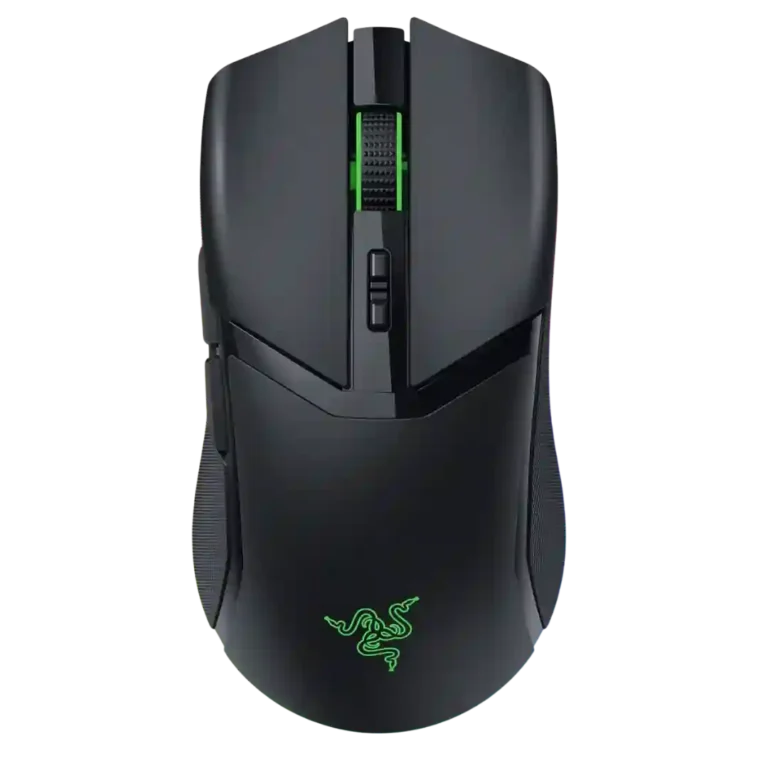
Choose the Razer Cobra Pro for sharp tracking, rich RGB, flexible wireless, and small-to-medium-hand comfort. Skip it if you want an ultralight FPS mouse, big-hand palm comfort, included dock charging, or budget pricing.
Best for gamers with small to medium hands who want a versatile wireless mouse with premium tracking, strong RGB, onboard profiles, Bluetooth, and 2.4GHz performance. It also suits Razer ecosystem users who value Chroma, HyperSpeed pairing, and optional dock charging.
Not for ultralight-focused FPS players, large-hand palm grippers, or MMO/MOBA players who need many easy-access inputs. It is also a weaker fit for buyers who dislike Synapse, rubber side grips, or paying extra for dock charging and higher polling.
The Razer Cobra Pro comes across as a polished all-rounder rather than a purist esports mouse. Reviewers consistently praise the Focus Pro sensor, low-latency wireless, smooth glide, vivid underglow RGB, and compact shape for claw or fingertip grips. The tradeoff is that the same feature-rich design adds weight, rear heft, rubber side grips, and accessory costs that frustrated reviewers expecting a true lightweight Viper Mini-style wireless mouse. Battery life is strong with restrained lighting, but drops sharply with RGB or higher polling. Its best case is versatile gaming plus daily use, especially for small and medium hands, while large-hand palm users, MMO players, and ultralight-focused FPS players get clearer alternatives.
Compared with other Gaming Mice, this product is above average in RGB features, fingertip grip comfort, side button quality, near average in value for money, glide smoothness, below average in MOBA gaming suitability, balance and weight distribution, durability over time.
| Attribute | This product | Category average | Difference |
|---|---|---|---|
| MOBA gaming suitability | 2.2 | 3.9 | -1.7 |
| balance and weight distribution | 2.5 | 4.1 | -1.6 |
| durability over time | 2.5 | 4.0 | -1.5 |
| MMO gaming suitability | 2.2 | 3.5 | -1.3 |
| RGB features | 4.6 | 3.6 | +1.0 |
| weight | 3.3 | 4.1 | -0.9 |
| fingertip grip comfort | 4.5 | 3.7 | +0.8 |
| software stability | 2.2 | 3.0 | -0.8 |
Choose ASUS ROG Harpe Ace Mini. It scores 4.7 vs 3.3 for weight, with a 4.2 overall score.
Choose Razer Basilisk V3 Pro 35K. It scores 4.8 vs 2.2 for MOBA gaming suitability, with a 4.2 overall score.
Choose Razer Viper V4 Pro. It scores 5.0 vs 2.5 for balance and weight distribution, with a 4.4 overall score.
Choose Corsair Katar Elite Wireless. It scores 5.0 vs 2.2 for software stability, with a 4.0 overall score.
Products reviewers directly compared with this model, grouped into quick takeaways.
Yes for many casual and mixed-genre FPS players because reviewers praised its tracking, wireless response, and smooth glide. Ultralight-focused FPS reviewers often preferred lighter mice.
Large-hand comfort is mixed. Several reviewers found it best for small to medium hands, claw grip, or fingertip grip, while big-hand users reported cramped or less comfortable use.
Battery life can be strong with restrained lighting or Bluetooth, with some reviewers reporting about a week or more of use. RGB brightness and higher polling reduce runtime sharply.
Bluetooth is useful for travel, laptops, and productivity. Reviewers generally treated 2.4GHz HyperSpeed as the better low-latency mode for serious gaming.
Reviewers repeatedly praised the underglow RGB as stylish, vivid, and well integrated. The tradeoff is battery drain, especially when lighting is bright or always on.
Value is split. Positive reviews saw a premium all-rounder with strong performance and features, while critical reviews argued the mouse is expensive and key extras cost more.
These are a few of the reviews included in our analysis.




Choose the ROG Harpe II Ace for ultralight FPS play, precise tracking, smooth glide, and web-based tuning. Skip it if you need palm-grip support, MMO buttons, onboard profiles, or long...
Pros: acceleration control, wireless latency
Cons: onboard memory, MMO gaming suitability

Choose it if you want a premium MMO/productivity mouse with 12 adjustable side buttons, strong battery life, and Stream Deck integration. Skip it if you need an ultralight FPS mouse,...
Pros: click latency, macro support
Cons: firmware reliability, tilt gesture controls

Best for ultra-light, competition-focused speed, precise tracking, stable wireless, and long battery life. Skip it if you need quieter clicks, left-handed support, Bluetooth, more buttons, or better value for casual...
Pros: balance and weight distribution, build quality
Cons: dock compatibility, Bluetooth support

Best for precise wireless tracking, smooth glide, strong battery life, and unusually good 8K value. Skip it if you need polished software, quiet snappy clicks, true left-handed controls, or gentle...
Pros: Accuracy and tracking precision, click latency
Cons: software stability, profile switching