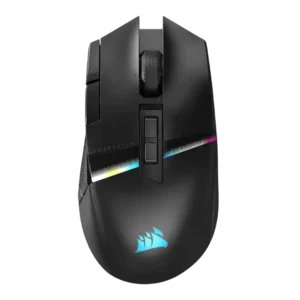
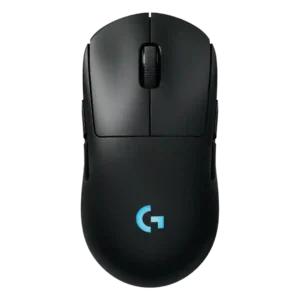
Compare Corsair Darkstar RGB vs Logitech G Pro 2 Lightspeed

P1 Corsair Darkstar RGB
P2 Logitech G Pro 2 Lightspeed

Comparison Takeaways

Corsair Darkstar RGB

Where It Has the Edge

  • Bluetooth support is 4.2 vs 1.0. Bluetooth support was widely noted as a useful secondary mode for travel, productivity, or extra devices, though not...
  • MMO gaming suitability is 4.3 vs 2.2. MMO suitability was strongly supported across every review, mainly because of the programmable controls, side cluster, and genre-focused...
  • polling rate is 4.5 vs 3.0. Reviewers repeatedly highlighted the 2,000Hz wireless polling capability, though one measured run averaged below the advertised maximum.
  • click noise is 4.3 vs 3.4. Click noise was generally acceptable to quiet, with reviewers describing clicks as whisper quiet, not overly noisy, or...

Logitech G Pro 2 Lightspeed

Where It Has the Edge

  • handedness options is 4.8 vs 2.0. Handedness is one of the strongest areas, with repeated praise for true ambidextrous use and swappable side-button layouts.
  • battery life is 4.5 vs 2.4. Battery life is a clear strength, repeatedly described around 60 hours with lighting and up to roughly 95...
  • charging convenience is 4.5 vs 3.0. Charging convenience is strong thanks to USB-C, fast top-ups, and Power Play compatibility in supported setups.
  • cable flexibility is 3.5 vs 2.2. Cable impressions are mixed: one reviewer liked the long or rubberized cable, while another wished Logitech included a...
Average score
Product 1: Corsair Darkstar RGB
4.0
Product 2: Logitech G Pro 2 Lightspeed
4.1
2.4GHz connectivity
Product 1: Corsair Darkstar RGB
4.5

2.4GHz connectivity was repeatedly highlighted through Slipstream or dongle support and was consistently treated as the best gaming connection.

Product 2: Logitech G Pro 2 Lightspeed
4.5

Review evidence confirms the included dongle-based 2.4GHz wireless connection, with no repeated complaints about the radio link itself.

acceleration control
Product 1: Corsair Darkstar RGB
4.5

The reviews that mentioned acceleration treated the 50G rating as part of the mouse’s strong sensor specification set.

Product 2: Logitech G Pro 2 Lightspeed
4.6

Reviewers consistently describe very high acceleration specifications and no smoothing or acceleration behavior, though one review frames those specs as more than most players need.

Accuracy and tracking precision
Product 1: Corsair Darkstar RGB
4.5

Reviewers consistently found tracking accurate and precise across games and surfaces, with strong flick performance and only minor caveats versus slimmer FPS-focused mice.

Product 2: Logitech G Pro 2 Lightspeed
4.2

Most reviewers found tracking precise and accurate in games, while one comparison-heavy video felt less accurate because of the heavier feel and skates.

balance and weight distribution
Product 1: Corsair Darkstar RGB
4.4

Weight distribution was consistently positive where discussed, with reviewers saying the mouse felt balanced or easier to flick than heavier MMO competitors.

Product 2: Logitech G Pro 2 Lightspeed
3.7

Weight balance is context-dependent: one review praised the balanced simple design, another found the 80 g weight deliberate, and one felt the skates and weight hurt balance.

battery life
Product 1: Corsair Darkstar RGB
2.4

Battery life was the most repeated weakness, especially with RGB enabled, where reviewers cited roughly 20-25 hours and lagging rivals.

Product 2: Logitech G Pro 2 Lightspeed
4.5

Battery life is a clear strength, repeatedly described around 60 hours with lighting and up to roughly 95 hours without it.

Bluetooth support
Product 1: Corsair Darkstar RGB
4.2

Bluetooth support was widely noted as a useful secondary mode for travel, productivity, or extra devices, though not the preferred gaming connection.

Product 2: Logitech G Pro 2 Lightspeed
1.0

Bluetooth support is a weakness because one reviewer explicitly notes that Bluetooth is absent at this price point.

build quality
Product 1: Corsair Darkstar RGB
4.4

Build quality was repeatedly praised as solid, premium, high-quality, and free of creaking or rattly parts.

Product 2: Logitech G Pro 2 Lightspeed
3.7

Build quality is mostly solid, with praise for button fit and general quality, but one reviewer noted some side-to-side wobble.

button customization
Product 1: Corsair Darkstar RGB
4.6

Button customization was one of the strongest themes, with iCUE enabling remapping, assignments, gestures, lighting, DPI, and macros.

Product 2: Logitech G Pro 2 Lightspeed
4.5

Button customization is a standout thanks to swappable magnetic side buttons, remapping, and G Hub assignment options.

button responsiveness
Product 1: Corsair Darkstar RGB
4.4

Click and button response were usually praised as responsive or snappy, although one reviewer noted accidental DPI-button brushing.

Product 2: Logitech G Pro 2 Lightspeed
4.6

Button responsiveness is praised where reviewed, especially for the LIGHTFORCE switches and side buttons.

cable flexibility
Product 1: Corsair Darkstar RGB
2.2

Cable flexibility was a repeated weakness: reviewers described the cable as stiff, hard, or not paracord-style.

Product 2: Logitech G Pro 2 Lightspeed
3.5

Cable impressions are mixed: one reviewer liked the long or rubberized cable, while another wished Logitech included a lighter cable for wired play.

charging convenience
Product 1: Corsair Darkstar RGB
3.0

Charging convenience was mixed: USB-C wired use helps, but reviewers criticized the lack of a dongle extender, stiff cable, and no wireless charging.

Product 2: Logitech G Pro 2 Lightspeed
4.5

Charging convenience is strong thanks to USB-C, fast top-ups, and Power Play compatibility in supported setups.

claw grip comfort
Product 1: Corsair Darkstar RGB
4.3

Claw grip comfort had limited but positive support, with reviewers saying palm and claw grips felt good or were suitable.

Product 2: Logitech G Pro 2 Lightspeed
4.1

Claw grip evidence is limited but positive, with reviewers saying the shape suits most grip styles and can be used in claw grip.

click latency
Product 1: Corsair Darkstar RGB
4.5

Click and wireless input response were described as fast, instant, or below 1 ms, supporting strong latency impressions.

Product 2: Logitech G Pro 2 Lightspeed
4.4

Click latency and response feel are strong, with multiple reviewers describing quick, immediate, responsive clicks.

click noise
Product 1: Corsair Darkstar RGB
4.3

Click noise was generally acceptable to quiet, with reviewers describing clicks as whisper quiet, not overly noisy, or moderate in volume.

Product 2: Logitech G Pro 2 Lightspeed
3.4

Click noise is mixed: reviewers liked the crisp click feedback, but some noted clickiness or right-click ping could bother sensitive users.

connection stability
Product 1: Corsair Darkstar RGB
4.1

Connection stability was mostly positive, but one reviewer had out-of-box dongle recognition trouble that required updating iCUE.

Product 2: Logitech G Pro 2 Lightspeed
4.4

Connection stability is generally positive, with reviewers calling performance reliable and noting no major in-game hiccups.

cross-platform compatibility
Product 1: Corsair Darkstar RGB
4.2

Cross-platform support has limited positive evidence, with reviewers showing Steam Deck use and stating Windows and Mac compatibility.

Product 2: Logitech G Pro 2 Lightspeed
No score yet
debounce customization
Product 1: Corsair Darkstar RGB
4.0

Debounce-style customization had limited support through the Button Response Optimization setting mentioned in iCUE.

Product 2: Logitech G Pro 2 Lightspeed
No score yet
dock compatibility
Product 1: Corsair Darkstar RGB
No score yet
Product 2: Logitech G Pro 2 Lightspeed
4.6

Dock or charging-mat compatibility is supported through Logitech Power Play puck and mat support.

DPI range
Product 1: Corsair Darkstar RGB
4.6

The 26K DPI ceiling and fine DPI adjustment were widely noted as high-end, even if several reviewers implied most players would not need the full range.

Product 2: Logitech G Pro 2 Lightspeed
4.7

DPI range is consistently a major spec advantage, with several reviewers citing the HERO 2 range up to 44,000 DPI after updates or in final specs.

durability over time
Product 1: Corsair Darkstar RGB
4.3

Durability over time has limited but positive support from the click rating and durable-feeling switch performance.

Product 2: Logitech G Pro 2 Lightspeed
No score yet
ecosystem integration
Product 1: Corsair Darkstar RGB
4.2

Ecosystem integration was supported through iCUE, Corsair gear management, device syncing, and Corsair lighting or profile control.

Product 2: Logitech G Pro 2 Lightspeed
4.2

Ecosystem integration is supported through G Hub, LightSync, RGB syncing, and Power Play use with other Logitech gear.

ergonomic design
Product 1: Corsair Darkstar RGB
4.2

The ergonomic design was usually praised for comfort, control, and a right-handed shape, but it remains specialized around its thumb-grip layout.

Product 2: Logitech G Pro 2 Lightspeed
4.3

Ergonomics are broadly praised for comfort and ambidextrous usability, with the main caveat that smaller hands may prefer another shape.

fingertip grip comfort
Product 1: Corsair Darkstar RGB
3.3

Fingertip comfort was split: one reviewer could transition easily, while another found fingertip grip uncomfortable due to side-button access.

Product 2: Logitech G Pro 2 Lightspeed
No score yet
firmware reliability
Product 1: Corsair Darkstar RGB
2.6

Firmware reliability has limited evidence, but one review linked a DPI-dropout concern to possible future firmware fixes.

Product 2: Logitech G Pro 2 Lightspeed
No score yet
FPS gaming suitability
Product 1: Corsair Darkstar RGB
4.2

FPS suitability was better than typical MMO mice thanks to sensor quality and flickability, though it was not framed as a pure FPS specialist.

Product 2: Logitech G Pro 2 Lightspeed
4.1

FPS suitability is mostly strong because reviewers praised Counter-Strike-style tracking and esports use, but one FPS-focused reviewer preferred lighter Superlight models.

glide smoothness
Product 1: Corsair Darkstar RGB
4.3

Glide was mostly praised thanks to large PTFE feet and smooth movement, though one reviewer noticed edge drag when the mouse was tilted.

Product 2: Logitech G Pro 2 Lightspeed
3.9

Glide opinions are split: several reviewers found it smooth or very good, while one video disliked the slower-feeling stock skates.

grip texture
Product 1: Corsair Darkstar RGB
4.4

Grip texture was a consistent strength, with rubberized or textured side areas helping control, pickup, and stability.

Product 2: Logitech G Pro 2 Lightspeed
4.0

Grip texture and coating receive light but positive coverage, mainly around the smooth matte finish and acceptable coating.

handedness options
Product 1: Corsair Darkstar RGB
2.0

Handedness support is limited because reviewers described it as right-handed and explicitly warned left-handed gamers away.

Product 2: Logitech G Pro 2 Lightspeed
4.8

Handedness is one of the strongest areas, with repeated praise for true ambidextrous use and swappable side-button layouts.

left and right click quality
Product 1: Corsair Darkstar RGB
4.4

The left and right clicks were widely praised for optical switches, crisp feel, snappiness, and a pleasant clicking experience.

Product 2: Logitech G Pro 2 Lightspeed
4.0

Main click quality is good overall, but not flawless: reviewers praise crispness and tactility while noting reduced tactility versus Superlight 2 or right-click ping.

lift-off distance
Product 1: Corsair Darkstar RGB
4.3

Lift-off distance was configurable through iCUE or lift-height settings, with reviewers noting it as part of the performance tuning toolkit.

Product 2: Logitech G Pro 2 Lightspeed
No score yet
long-session comfort
Product 1: Corsair Darkstar RGB
4.0

Long-session comfort was mostly positive thanks to grip, shape, and weight, though one smaller-hand reviewer reported temporary wrist and finger pain.

Product 2: Logitech G Pro 2 Lightspeed
4.4

Long-session comfort is positive where discussed, especially for bigger hands and palm grip, with reduced cramping versus smaller mice.

macro support
Product 1: Corsair Darkstar RGB
4.5

Macro support was broadly supported through iCUE assignments, in-game macros, productivity mappings, and programmable actions.

Product 2: Logitech G Pro 2 Lightspeed
4.1

Macro support is supported through G Hub assignment options, though it is not a main focus of the reviews.

materials quality
Product 1: Corsair Darkstar RGB
4.4

Materials were generally viewed positively, with soft-touch matte plastic, rubberized grips, and premium-feeling construction noted across reviews.

Product 2: Logitech G Pro 2 Lightspeed
4.1

Materials quality is mostly positive, supported by the smooth matte finish, well-done magnetic attachments, and solid construction comments.

MMO gaming suitability
Product 1: Corsair Darkstar RGB
4.3

MMO suitability was strongly supported across every review, mainly because of the programmable controls, side cluster, and genre-focused design.

Product 2: Logitech G Pro 2 Lightspeed
2.2

MMO suitability is weak because the mouse lacks the many thumb buttons expected for more involved MMO play.

MOBA gaming suitability
Product 1: Corsair Darkstar RGB
4.3

MOBA suitability was also strongly supported, with reviewers repeatedly grouping the mouse with MOBA/MMO play and complex-control games.

Product 2: Logitech G Pro 2 Lightspeed
No score yet
motion consistency
Product 1: Corsair Darkstar RGB
4.3

Motion was generally smooth, precise, and consistent, though one reviewer noted accuracy and speed were not as pinpoint as a lighter FPS mouse.

Product 2: Logitech G Pro 2 Lightspeed
4.2

Motion consistency is mostly strong, with smooth tracking, no stutter, and no smoothing mentioned, though one reviewer felt the weight and skates made motion sluggish.

onboard memory
Product 1: Corsair Darkstar RGB
4.4

Onboard or hardware profiles were repeatedly noted, including up to five stored profiles and hardware-level settings for use without iCUE running.

Product 2: Logitech G Pro 2 Lightspeed
4.3

Onboard memory is directly noted in one review and treated as a carried-over feature from the prior model.

palm grip comfort
Product 1: Corsair Darkstar RGB
4.1

Palm grip support was generally positive, especially for larger hands, while one smaller-hand reviewer found the taller shape somewhat unwieldy.

Product 2: Logitech G Pro 2 Lightspeed
4.5

Palm grip comfort is directly praised, with the hump and length fitting the reviewer’s palm-grip hand position well.

polling rate
Product 1: Corsair Darkstar RGB
4.5

Reviewers repeatedly highlighted the 2,000Hz wireless polling capability, though one measured run averaged below the advertised maximum.

Product 2: Logitech G Pro 2 Lightspeed
3.0

Polling rate is a repeated limitation: the standard receiver is described as 1000Hz while competitors or Logitech alternatives reach higher rates.

portability
Product 1: Corsair Darkstar RGB
3.7

Portability was decent thanks to dongle storage and Bluetooth, but accessory omissions and the lack of a cover or extender limit convenience.

Product 2: Logitech G Pro 2 Lightspeed
3.9

Portability is moderate, helped by dongle storage and bag-friendly use, but limited by the absence of Bluetooth.

premium feel
Product 1: Corsair Darkstar RGB
4.4

Premium feel was a common strength, tied to the styling, materials, build, lighting, and overall flagship presentation.

Product 2: Logitech G Pro 2 Lightspeed
4.5

Premium feel is positive but not unanimous; one reviewer calls it a premium mouse while others frame it as familiar rather than exciting.

profile switching
Product 1: Corsair Darkstar RGB
4.3

Profile switching was supported through top buttons, on-the-fly changes, software presets, and multiple profile systems, though the software could be confusing.

Product 2: Logitech G Pro 2 Lightspeed
3.9

Profile switching is supported through per-game DPI settings and multi-stage DPI profiles in G Hub, although the bottom DPI button is less convenient.

programmable buttons
Product 1: Corsair Darkstar RGB
4.7

Reviewers repeatedly emphasized the 15 programmable inputs as a core strength for MMO, MOBA, productivity, and complex-control use.

Product 2: Logitech G Pro 2 Lightspeed
4.6

Programmable-button coverage is strong, with multiple reviews noting four-to-eight configurable buttons depending on side-button setup.

RGB features
Product 1: Corsair Darkstar RGB
4.0

RGB lighting was feature-rich and customizable, but reviewers often noted that some zones are subtle, hidden by the hand, or costly to battery life.

Product 2: Logitech G Pro 2 Lightspeed
3.8

RGB is present but minimal, usually limited to the Logitech G logo and often recommended off for battery life.

scroll wheel quality
Product 1: Corsair Darkstar RGB
3.4

The scroll wheel drew mixed feedback, with tactile texture and readable steps offset by repeated complaints that it was stiff or hard to press.

Product 2: Logitech G Pro 2 Lightspeed
4.5

Scroll wheel quality is generally good, with reviewers praising the ratcheted feel and tactile wheel response.

sensor performance
Product 1: Corsair Darkstar RGB
4.6

The Marksman 26K sensor was repeatedly treated as flagship-grade, reliable, and strong for both MMO/MOBA play and faster shooters.

Product 2: Logitech G Pro 2 Lightspeed
4.5

Sensor performance is a major strength, repeatedly praised for HERO 2 accuracy and high-end specs, even when value is questioned.

shape comfort
Product 1: Corsair Darkstar RGB
4.3

Shape comfort was generally praised, especially for larger or medium hands, though smaller-hand and fingertip use could feel less natural.

Product 2: Logitech G Pro 2 Lightspeed
4.2

Shape comfort is mostly positive for users who like the familiar symmetrical Pro shape, though one reviewer wanted lighter weight for that shape.

side button quality
Product 1: Corsair Darkstar RGB
3.4

Side-button opinions were mixed: some reviewers found them accessible, while others criticized the unique layout as awkward or hard to manage.

Product 2: Logitech G Pro 2 Lightspeed
4.5

Side-button quality is a highlight thanks to magnetic removable buttons, low wiggle, good positioning, and ambidextrous flexibility.

skate durability
Product 1: Corsair Darkstar RGB
3.0

Skate durability remains uncertain because reviewers praised glide but explicitly said long-term smoothness was still unknown.

Product 2: Logitech G Pro 2 Lightspeed
No score yet
software stability
Product 1: Corsair Darkstar RGB
2.4

Software stability was a concern in multiple reviews, including detection issues, profile problems, and random DPI dropouts.

Product 2: Logitech G Pro 2 Lightspeed
3.0

Software stability is mixed: one review had repeated G Hub loading failures, while another found core adjustments reliable.

software usability
Product 1: Corsair Darkstar RGB
3.3

Software usability was mixed: iCUE enables deep control, but several reviewers called it confusing, unintuitive, or a slog.

Product 2: Logitech G Pro 2 Lightspeed
3.8

Software usability is mixed to positive: G Hub provides deep customization, but some reviewers dislike needing it or prefer web-based setup.

surface compatibility
Product 1: Corsair Darkstar RGB
4.4

Surface compatibility was supported by surface calibration and reports of smooth tracking across surfaces.

Product 2: Logitech G Pro 2 Lightspeed
4.0

Surface compatibility evidence is limited to strong performance on Logitech’s Power Play/charging pad rather than many surfaces.

switch durability
Product 1: Corsair Darkstar RGB
4.5

Optical-switch durability was supported by claims of greater reliability and a 100-million-click rating, suggesting strong long-term switch confidence.

Product 2: Logitech G Pro 2 Lightspeed
No score yet
switch feel
Product 1: Corsair Darkstar RGB
4.4

Switch feel was described as crisp, snappy, quiet, cushiony, or satisfying across reviewers, giving the main clicks a premium feel.

Product 2: Logitech G Pro 2 Lightspeed
4.4

Switch feel is broadly positive, with LIGHTFORCE clicks described as satisfying, light, crisp, immediate, or tactile.

tilt gesture controls
Product 1: Corsair Darkstar RGB
4.4

Tilt gestures were a signature feature praised by most reviewers as useful and innovative, though a few found them sensitive or unreliable.

Product 2: Logitech G Pro 2 Lightspeed
No score yet
value for money
Product 1: Corsair Darkstar RGB
3.3

Value is mixed: reviewers liked the features and innovation, but the $170-$250 pricing was repeatedly called steep or a deterrent.

Product 2: Logitech G Pro 2 Lightspeed
3.1

Value is the most debated category: reviewers like the mouse itself but often question the price versus the older Pro Wireless or Superlight 2.

weight
Product 1: Corsair Darkstar RGB
3.9

At about 96-98 grams, reviewers treated the mouse as lighter than some MMO rivals but still heavier than ultralight FPS mice.

Product 2: Logitech G Pro 2 Lightspeed
3.8

Weight is divisive at about 80 grams: light enough for some, deliberate for others, but heavy compared with ultralight esports mice.

wireless latency
Product 1: Corsair Darkstar RGB
4.4

Wireless latency was usually treated as low, with sub-1 ms claims and reviewers reporting little to no practical latency concern.

Product 2: Logitech G Pro 2 Lightspeed
4.6

Wireless latency is strong where tested, with no noticeable latency reported and low-latency wireless play mentioned.

wireless performance
Product 1: Corsair Darkstar RGB
4.5

Wireless performance was broadly praised for Slipstream speed, stable feel, and strong 2.4GHz operation, despite setup caveats in one review.

Product 2: Logitech G Pro 2 Lightspeed
4.5

Wireless performance is generally reliable, especially through Lightspeed dongle or Power Play use, with no recurring connection complaints.