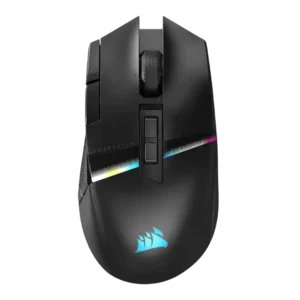
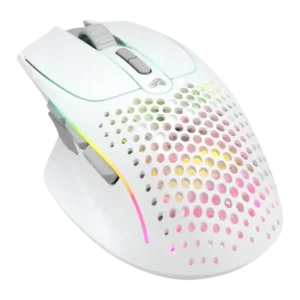
Compare Corsair Darkstar RGB vs Glorious Model I 2 Wireless

P1 Corsair Darkstar RGB
P2 Glorious Model I 2 Wireless

Comparison Takeaways

Corsair Darkstar RGB

Where It Has the Edge

  • click noise is 4.3 vs 2.5. Click noise is generally favorable, with reviewers describing the switches as quiet or not overly noisy while keeping...
  • tilt gesture controls is 4.0 vs 2.5. Tilt gestures are a standout but divisive feature: several reviewers love or rely on them, while others report...
  • polling rate is 4.2 vs 2.8. The 2,000Hz polling capability is praised as high-spec and useful for competitive play, though one reviewer felt the...
  • MOBA gaming suitability is 4.5 vs 3.3. MOBA suitability is also strong, with reviewers calling the Darkstar natural or versatile for MOBAs and related skill-heavy...

Glorious Model I 2 Wireless

Where It Has the Edge

  • cable flexibility is 4.3 vs 1.9. Cable flexibility was praised; reviewers found it light, flexible, and low-drag when used wired.
  • Bluetooth support is 4.8 vs 3.3. Bluetooth support was appreciated for extra device flexibility, though reviewers still favored 2.4 GHz for gaming.
  • scroll wheel quality is 3.7 vs 2.5. Scroll-wheel impressions were mixed, ranging from stiff/basic complaints to praise for its stepped, weighted feel.
  • value for money is 4.4 vs 3.3. Value was generally positive, with reviewers often calling the $100 price fair or strong for the weight and...
Average score
Product 1: Corsair Darkstar RGB
4.0
Product 2: Glorious Model I 2 Wireless
4.0
2.4GHz connectivity
Product 1: Corsair Darkstar RGB
4.6

2.4GHz Slipstream is a strength, with reviewers praising its solid, low-latency connection and high polling capability.

Product 2: Glorious Model I 2 Wireless
4.2

2.4 GHz connectivity was praised as stable, solid, and more reliable for gaming use.

Accuracy and tracking precision
Product 1: Corsair Darkstar RGB
4.6

Reviewers consistently describe tracking as accurate, precise, smooth, and responsive across surfaces and games, with one heavier-body caveat handled under weight.

Product 2: Glorious Model I 2 Wireless
4.6

Reviewers consistently described tracking as accurate and issue-free during gaming, including precise aiming and smooth tracking.

balance and weight distribution
Product 1: Corsair Darkstar RGB
4.6

Weight distribution is praised where discussed, with reviewers noting balanced feel and well-distributed mass.

Product 2: Glorious Model I 2 Wireless
4.0

Weight balance was mostly positive, though one reviewer noticed a slightly front-heavy feel.

battery life
Product 1: Corsair Darkstar RGB
2.2

Battery life is the most repeated complaint, especially with RGB enabled, where reviews call endurance disappointing or far from exceptional.

Product 2: Glorious Model I 2 Wireless
2.7

Battery life was the most divisive weakness: RGB-off results could be fine, but RGB-on drain was repeatedly criticized.

Bluetooth support
Product 1: Corsair Darkstar RGB
3.3

Bluetooth support is useful for travel, secondary devices, and pairing flexibility, but reviewers warn it is too high-latency for gaming.

Product 2: Glorious Model I 2 Wireless
4.8

Bluetooth support was appreciated for extra device flexibility, though reviewers still favored 2.4 GHz for gaming.

build quality
Product 1: Corsair Darkstar RGB
4.7

Build quality is a major strength, with reviewers calling the mouse high-quality, rock-solid, extremely well built, and free of creaking.

Product 2: Glorious Model I 2 Wireless
4.5

Build quality was mostly praised as solid, sturdy, and improved, with one review noting slight creaking.

button customization
Product 1: Corsair Darkstar RGB
4.4

Customization is one of the strongest themes, with reviewers praising deep button, DPI, RGB, gesture, and profile control despite software friction.

Product 2: Glorious Model I 2 Wireless
3.9

Button customization was broadly appreciated, though implementation varied by reviewer due to comfort, missing pieces, or side-button fit.

button responsiveness
Product 1: Corsair Darkstar RGB
4.5

Button responsiveness is mostly strong: clicks are described as instant, smooth, snappy, and responsive across several reviews.

Product 2: Glorious Model I 2 Wireless
4.5

Button responsiveness was praised, especially the crisp main buttons and easy actuation in games.

cable flexibility
Product 1: Corsair Darkstar RGB
1.9

Cable flexibility is a repeated weakness: several reviewers criticize the included cable as stiff or not paracord-style.

Product 2: Glorious Model I 2 Wireless
4.3

Cable flexibility was praised; reviewers found it light, flexible, and low-drag when used wired.

charging convenience
Product 1: Corsair Darkstar RGB
2.5

Charging convenience is mixed: USB-C access can be easy, but the stiff cable and missing dongle extender make wired charging less pleasant.

Product 2: Glorious Model I 2 Wireless
2.8

Charging convenience was mixed, with praise for usable charging speed and cable flexibility but complaints about the fiddly USB-C cable.

claw grip comfort
Product 1: Corsair Darkstar RGB
4.2

Claw grip comfort has limited but positive evidence, with one reviewer saying claw use felt pretty good.

Product 2: Glorious Model I 2 Wireless
4.5

Claw-grip comfort was positive, with multiple reviewers finding the shape comfortable for claw or hybrid grips.

click latency
Product 1: Corsair Darkstar RGB
4.5

Direct click-response comments are positive, with reviewers describing the primary inputs as instant and right to the point.

Product 2: Glorious Model I 2 Wireless
4.0

Click latency was not seen as a practical problem; the reviewer said the delay was not noticeable in use.

click noise
Product 1: Corsair Darkstar RGB
4.3

Click noise is generally favorable, with reviewers describing the switches as quiet or not overly noisy while keeping tactile feel.

Product 2: Glorious Model I 2 Wireless
2.5

Click noise was a downside for reviewers who found the clicks loud.

connection stability
Product 1: Corsair Darkstar RGB
4.5

Connection stability is generally positive in play, with no issues reported in one review and low-latency wireless modes praised in another.

Product 2: Glorious Model I 2 Wireless
4.5

Connection stability was strong across reviews, with no dropouts or lag issues reported in normal wireless use.

cross-platform compatibility
Product 1: Corsair Darkstar RGB
4.2

Cross-platform compatibility has limited but positive evidence, with one review calling the mouse versatile across Windows, Mac, and most OS setups.

Product 2: Glorious Model I 2 Wireless
5.0

Cross-platform compatibility was praised for Windows, macOS, Linux, and easy pairing across multiple devices.

debounce customization
Product 1: Corsair Darkstar RGB
No score yet
Product 2: Glorious Model I 2 Wireless
4.0

Debounce customization was positive because adjustable debounce supported drag-click use.

DPI range
Product 1: Corsair Darkstar RGB
4.5

The 26,000 DPI ceiling is treated as more than enough for most users, with praise for sensitivity and fine adjustment.

Product 2: Glorious Model I 2 Wireless
4.5

The DPI system was praised mainly for easy, visible sensitivity switching rather than raw maximum DPI alone.

drag click support
Product 1: Corsair Darkstar RGB
No score yet
Product 2: Glorious Model I 2 Wireless
4.0

Drag-click support was positive, supported by the reviewer successfully drag clicking on the mouse.

durability over time
Product 1: Corsair Darkstar RGB
4.0

Durability over time has limited evidence, but one review expects the promised switches and rock-solid build to last for years.

Product 2: Glorious Model I 2 Wireless
3.0

Durability over time had a caveat because one reviewer expected shiny wear marks on frequently touched textured plastic.

ecosystem integration
Product 1: Corsair Darkstar RGB
4.2

Ecosystem integration has limited but positive support, mainly around syncing multiple devices to one dongle.

Product 2: Glorious Model I 2 Wireless
No score yet
ergonomic design
Product 1: Corsair Darkstar RGB
4.3

Ergonomic design is generally praised for comfort, maneuverability, and right-handed control, though it is not universally the most ergonomic mouse.

Product 2: Glorious Model I 2 Wireless
4.4

Ergonomics were one of the strongest themes, especially the contoured shape, thumb rest, and long-use comfort.

fingertip grip comfort
Product 1: Corsair Darkstar RGB
3.1

Fingertip comfort is mixed: one reviewer could transition easily, while another found fingertip use uncomfortable and nearly unusable.

Product 2: Glorious Model I 2 Wireless
No score yet
FPS gaming suitability
Product 1: Corsair Darkstar RGB
4.1

FPS suitability is better than expected for an MMO mouse, with reviewers saying it handles shooters and flicks well, though not like ultralight FPS-first mice.

Product 2: Glorious Model I 2 Wireless
4.4

FPS suitability was mostly positive thanks to tracking, weight, and comfort, though one reviewer personally struggled with the thumb rest.

glide smoothness
Product 1: Corsair Darkstar RGB
4.4

Glide smoothness is mostly excellent thanks to large PTFE feet, though one reviewer found edge drag when leaning the mouse.

Product 2: Glorious Model I 2 Wireless
4.8

Glide smoothness was a consistent strength, with reviewers describing effortless, smooth movement across pads and surfaces.

grip texture
Product 1: Corsair Darkstar RGB
4.4

Grip texture is consistently liked, with rubberized or textured sides described as helpful, firm, grippy, and comfortable.

Product 2: Glorious Model I 2 Wireless
3.8

Grip texture was mostly positive for the matte/textured finish, but slick side buttons created a caveat.

handedness options
Product 1: Corsair Darkstar RGB
1.5

Handedness is a clear limitation: the mouse is framed as unsuitable for left-handed gamers.

Product 2: Glorious Model I 2 Wireless
2.0

Handedness was a limitation because the right-handed design leaves left-handed users out.

left and right click quality
Product 1: Corsair Darkstar RGB
4.6

Left and right click quality is a clear strength, with multiple reviews calling the main clicks wonderful, snappy, responsive, and tactile.

Product 2: Glorious Model I 2 Wireless
4.5

Left and right clicks were reviewed positively for their split-shell design, feel, and low travel.

lift-off distance
Product 1: Corsair Darkstar RGB
4.5

Lift-off behavior is praised where tested, especially the improved control and instant cut-off during repositioning.

Product 2: Glorious Model I 2 Wireless
No score yet
long-session comfort
Product 1: Corsair Darkstar RGB
4.8

Long-session comfort is strongly positive in the review that focused on endurance, calling it exceedingly comfortable over longer periods.

Product 2: Glorious Model I 2 Wireless
4.9

Long-session comfort was a major strength, with reviewers reporting no cramping, discomfort, or fatigue over extended use.

macro support
Product 1: Corsair Darkstar RGB
4.2

Macro support is viewed as useful for gaming and productivity, especially when mapped to creative tools, inventory management, or key presses.

Product 2: Glorious Model I 2 Wireless
4.0

Macro support was positively tied to the software's broader customization options.

materials quality
Product 1: Corsair Darkstar RGB
4.7

Materials quality is praised through comments about premium-feeling surfaces, high-quality construction, and loved materials.

Product 2: Glorious Model I 2 Wireless
4.0

Materials quality was reviewed positively, though the textured plastic may show shine over time.

MMO gaming suitability
Product 1: Corsair Darkstar RGB
4.2

MMO suitability is broadly positive because of the buttons, customization, and comfort, but the learning curve and side-button layout hold it back for some reviewers.

Product 2: Glorious Model I 2 Wireless
3.5

MMO suitability was mixed: layers and extra buttons helped, but reviewers said it was not a true MMO-specific mouse.

MOBA gaming suitability
Product 1: Corsair Darkstar RGB
4.5

MOBA suitability is also strong, with reviewers calling the Darkstar natural or versatile for MOBAs and related skill-heavy games.

Product 2: Glorious Model I 2 Wireless
3.3

MOBA suitability was mixed to modestly positive, with one reviewer disputing the billing and another noting fast, precise motion.

motion consistency
Product 1: Corsair Darkstar RGB
4.2

Motion consistency evidence is limited but positive, with testing noting little to no noticeable jitter in the reviewed settings.

Product 2: Glorious Model I 2 Wireless
4.5

Motion consistency was supported by smooth, accurate tracking during gameplay.

onboard memory
Product 1: Corsair Darkstar RGB
4.5

Onboard memory earns praise because configured profiles and lighting can run without keeping iCUE open.

Product 2: Glorious Model I 2 Wireless
4.5

Onboard memory was praised for helping the mouse move between devices.

palm grip comfort
Product 1: Corsair Darkstar RGB
3.8

Palm grip comfort is split by hand size: larger-hand palm users settled in well, while a smaller-hand palm user found the shape unwieldy.

Product 2: Glorious Model I 2 Wireless
4.3

Palm-grip comfort was positive for reviewers whose hands fit the ergonomic body and thumb rest.

polling rate
Product 1: Corsair Darkstar RGB
4.2

The 2,000Hz polling capability is praised as high-spec and useful for competitive play, though one reviewer felt the latency difference would often be hard to notice.

Product 2: Glorious Model I 2 Wireless
2.8

Polling rate drew mild criticism because reviewers saw 1000 Hz as acceptable but behind newer higher-polling competitors.

portability
Product 1: Corsair Darkstar RGB
4.1

Portability is supported by Bluetooth, multi-device flexibility, and versatile connection behavior, though it is not a major review theme.

Product 2: Glorious Model I 2 Wireless
4.2

Portability was split: reviewers liked it for travel, but one found it bulky and lacking dongle storage.

premium feel
Product 1: Corsair Darkstar RGB
4.5

Premium feel is a consistent strength, supported by praise for its premium look, feel, materials, and build.

Product 2: Glorious Model I 2 Wireless
3.5

Premium feel was mixed: the mouse felt solid, but one reviewer saw it as less feature-packed than pricier rivals.

profile switching
Product 1: Corsair Darkstar RGB
4.5

Profile switching is useful once configured, with reviewers highlighting game-specific modes and on-the-fly profile changes.

Product 2: Glorious Model I 2 Wireless
4.4

Profile switching was useful for genre changes, device movement, and easily swapping settings.

programmable buttons
Product 1: Corsair Darkstar RGB
4.4

The large programmable-button set is a major selling point, especially for assigning skills, abilities, potions, and other inputs.

Product 2: Glorious Model I 2 Wireless
4.4

Programmable buttons were a major strength, with reviewers valuing remapping, layers, shortcuts, and expanded control options.

RGB features
Product 1: Corsair Darkstar RGB
3.3

RGB opinions are mixed: some reviewers like the slick, versatile lighting, while others find key zones hidden, subtle, or battery-draining.

Product 2: Glorious Model I 2 Wireless
3.5

RGB was visually liked, but its battery drain made the feature a clear tradeoff.

scroll wheel quality
Product 1: Corsair Darkstar RGB
2.5

Scroll wheel feedback is mixed-to-negative because multiple reviewers found it stiff or hard to press despite tactile steps.

Product 2: Glorious Model I 2 Wireless
3.7

Scroll-wheel impressions were mixed, ranging from stiff/basic complaints to praise for its stepped, weighted feel.

sensor performance
Product 1: Corsair Darkstar RGB
4.7

The Marksman sensor is one of the strongest points: reviews call it impressive, accurate, spot-on, and competitive with top-tier gaming mouse sensors.

Product 2: Glorious Model I 2 Wireless
4.7

Sensor sentiment was strongly positive, with reviewers calling the BAMF sensor high-performing, spot-on, and free of tracking-speed problems.

shape comfort
Product 1: Corsair Darkstar RGB
4.2

Shape comfort is mostly positive, especially for medium-to-large hands, but one smaller-hand reviewer found it unwieldy.

Product 2: Glorious Model I 2 Wireless
4.5

Shape comfort was a repeated strength, with reviewers calling the mouse natural, comfortable, and improved over related models.

side button quality
Product 1: Corsair Darkstar RGB
2.7

Side button quality is the most divisive control issue: reviewers like the concept, but many complain that some buttons are hard to reach, unintuitive, or hit-or-miss.

Product 2: Glorious Model I 2 Wireless
3.0

Side-button feedback was mixed: reviewers liked the modularity and access, but some found placement crowded, slick, or awkward.

skate durability
Product 1: Corsair Darkstar RGB
No score yet
Product 2: Glorious Model I 2 Wireless
5.0

Skate durability was praised directly as high quality and durable.

software stability
Product 1: Corsair Darkstar RGB
1.8

Software stability is a concern, with reviews citing detection trouble, iCUE working only intermittently, and a random DPI-drop bug.

Product 2: Glorious Model I 2 Wireless
2.7

Software stability was mixed, with some recognition, battery-refresh, and sleep-behavior bugs reported.

software usability
Product 1: Corsair Darkstar RGB
2.9

Software usability is sharply split: PCMag and one YouTube review find it navigable, while several others call iCUE confusing, unintuitive, or a slog.

Product 2: Glorious Model I 2 Wireless
4.0

Software usability was mostly positive for simplicity and accessible settings, with a few reviewers calling it merely fine.

surface compatibility
Product 1: Corsair Darkstar RGB
4.7

Surface compatibility is strong, with reviewers reporting excellent tracking across surfaces and improved feel after calibration.

Product 2: Glorious Model I 2 Wireless
4.8

Surface compatibility was positive, with testing across varied surfaces and bare-table use.

switch durability
Product 1: Corsair Darkstar RGB
4.2

Switch durability evidence is limited to optical-switch impressions, but one review says the actuation should last longer.

Product 2: Glorious Model I 2 Wireless
No score yet
switch feel
Product 1: Corsair Darkstar RGB
4.6

Switch feel is widely liked, with reviewers describing the clicks as wonderful, crisp, quiet, snappy, smooth, and cushiony.

Product 2: Glorious Model I 2 Wireless
4.4

Switch feel was generally positive, with reviewers calling clicks tactile, crisp, satisfying, and nice-feeling.

tilt gesture controls
Product 1: Corsair Darkstar RGB
4.0

Tilt gestures are a standout but divisive feature: several reviewers love or rely on them, while others report sensitivity, calibration, or reliability issues.

Product 2: Glorious Model I 2 Wireless
2.5

Tilt controls were a limitation because reviewers missed left-right tilt or more advanced wheel behavior.

value for money
Product 1: Corsair Darkstar RGB
3.3

Value is mixed: reviewers admire the features and innovation, but many question or criticize the high price.

Product 2: Glorious Model I 2 Wireless
4.4

Value was generally positive, with reviewers often calling the $100 price fair or strong for the weight and features.

weight
Product 1: Corsair Darkstar RGB
4.1

The Darkstar is heavier than esports-first mice but generally praised for being lighter than rival MMO mice and agile enough for quick movement.

Product 2: Glorious Model I 2 Wireless
4.5

Reviewers strongly praised the low weight, often comparing it favorably with heavier ergonomic competitors.

wireless latency
Product 1: Corsair Darkstar RGB
4.6

Wireless latency is praised on 2.4GHz, with reviewers reporting low-latency play and no practical latency issues.

Product 2: Glorious Model I 2 Wireless
4.3

Wireless latency was generally praised as unnoticeable, though Bluetooth gaming drew one caution.

wireless performance
Product 1: Corsair Darkstar RGB
4.5

Wireless performance is broadly strong, with reviewers praising Slipstream responsiveness and wired-like behavior while noting some hardware omissions.

Product 2: Glorious Model I 2 Wireless
4.8

Wireless performance was strongly positive, with reviewers reporting no latency, response, or gameplay-performance problems.